On the ax2 device ?
Let me quote @strods for you:
Usually, if you need more, then you most likely need more powerful device.
And “power”, in a sense, is also ability to attach useful peripherials. In this sense, ax2 is not a powerful device (but e.g. ax3 is one).
Noticed very high CPU Usage on an RB750Gr3
Profile showed that the “management” process was using almost between 24% and 27% of CPU and another “unclassified” process was using another 16% CPU
NAME                USAGE
ethernet            0%
console             1%
ssh                 0%
firewall            0.1%
networking          5.6%
neighbor-discovery  0%
winbox              0%
logging             0.8%
management          24.3%
encrypting          0.1%
profiling           3.2%
unclassified        15.8%
total               50.9%
As this is a test device I reset it to defaults and with a simple default config same CPU usage occurs. No optional/wireless packages installed. As you can see below, the config could barely be simpler.
# 2024-03-24 13:01:03 by RouterOS 7.15beta8
# software id = XXXX-XXXX
#
# model = RB750Gr3
# serial number = XXXXXXXXXX
/interface bridge
add name=bridge1
/interface bridge port
add bridge=bridge1 interface=ether1
add bridge=bridge1 interface=ether2
add bridge=bridge1 interface=ether3
add bridge=bridge1 interface=ether4
add bridge=bridge1 interface=ether5
/ip neighbor discovery-settings
set discover-interface-list=!dynamic
/ip address
add address=172.20.0.254/16 interface=bridge1 network=172.20.0.0
/system note
set show-at-login=no
/system routerboard settings
set auto-upgrade=yes
I also have a test CHR running 7.15beta8 that does not display the same behaviour.
Management often equals winbox connection with multiple windows open and refreshing stats.
My initial thought as well.
No Winbox open. snippet above are from an SSH connection to the router.
RB5009UPr+S+
Sign extension problem from righ shift, the lower 32bit is zero.
:put (-1 >> -1)
-4294967296
As far as I know, this gives a result of -1.
Depends. JS allows it and is -1. But in Python, it’s an error. In C, it’s left to an implementation detail.
But of all things to complain about in RouterOS scripts… And even if “wrong”, you never know what might break changing stuff, someone could be relaying on the behavior.
Stuff like DLNA, SMB, back then, did not exist either. Please put those lesser used subsystems into the Extra packages archive. I also believe, that many users just don’t use stuff like dynamic routing, Radius, Hotspot, etc. either.
I am well aware that if those things are not moduler / isolated in the code, it might not be easy to abstract them. But you are a bunch of clever guys down there, so I am sure you’ll come up with something 
And I wanted to return my RB750Gr3 to RouterOS…
Seems I’ll wait a little longer.
Thank you!
PS: I doubt that they test the releases on these tiny devices.
do you still have use cases where the ARM devices work as full-fledged routers, so using any ROS feature, and not only as APs.
If second, why not offer a slimed main package for the “as AP only mode”?
When trying to update from v. 7.14.1
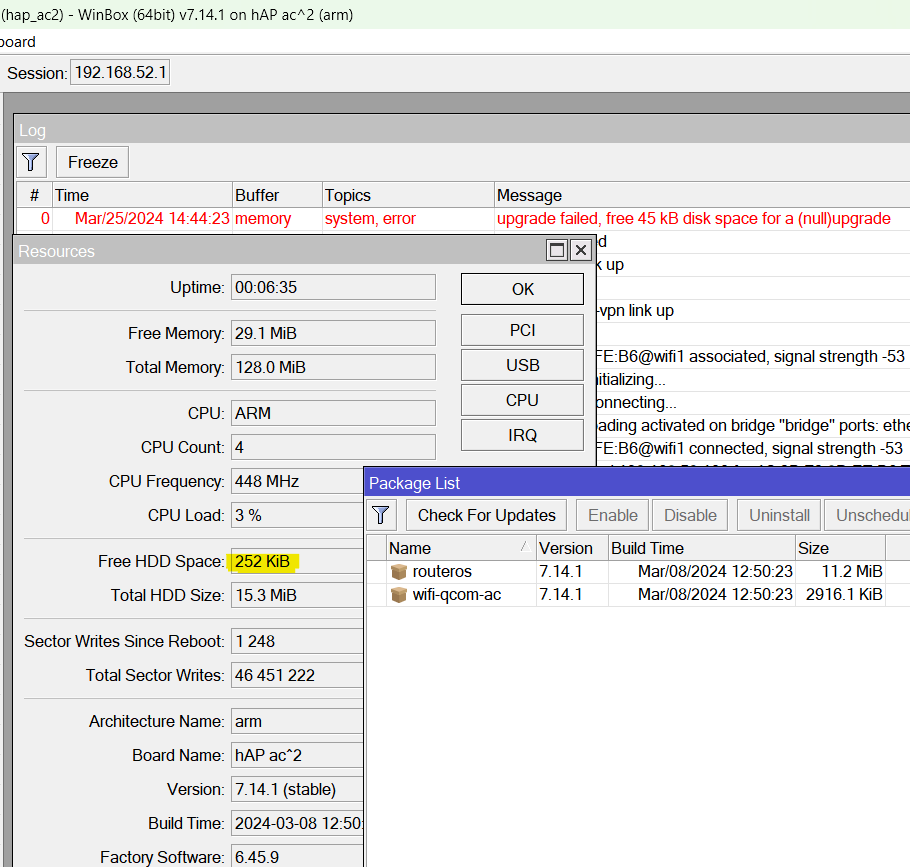
Be curious, do you have any other things in Files?
e.g. since photo shows 46 million sector writes, there could be none.
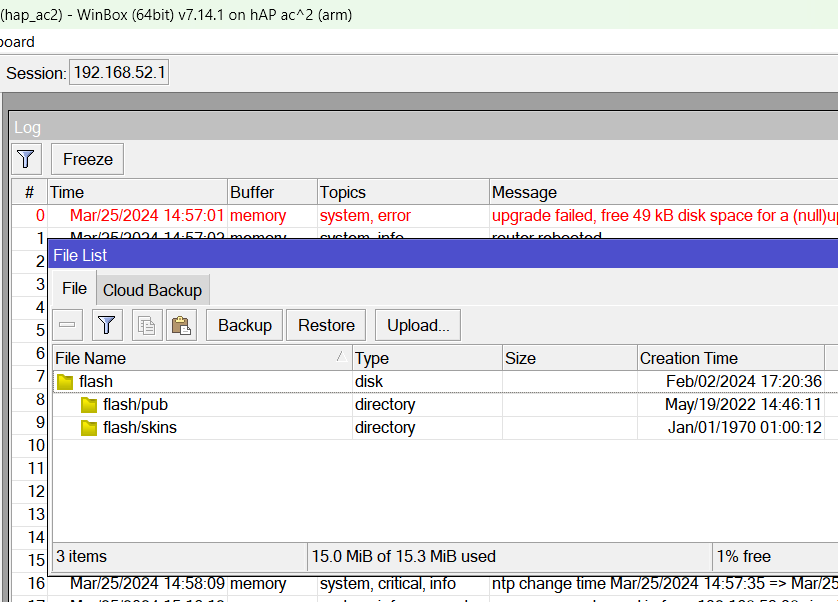
Maybe you have “graphing” running with “store on disk” enabled (and store every 5 minutes)?
And/or DHCP “store leases on disk” set to “immediately” and a lot of DHCP activity (short lease time and/or unreliable connections)?
It would be great to be able at least to see those, even better if we could move them to USB storage, and leave the flash for firmware and config.
Well, Mikrotik has said they’re working on a “solution”. And at least it failed gracefully. Using Netinstall let you test 7.15beta.
Whether it’s fragmentation, “leftover” files from past, leases, graphing… The “math” using the UI is not always predictive of failure & there are limited options to free at this point. Other than netinstall.
# 2024-03-25 16:42:20 by RouterOS 7.14.1
# software id = G48Y-1U35
#
# model = RBD52G-5HacD2HnD
# serial number = XXXXXX
/ip dhcp-server
add add-arp=yes address-pool=default-dhcp interface=bridge lease-time=8h name=LAN
/tool graphing interface
add interface=vlan20 store-on-disk=no
/tool graphing resource
add store-on-disk=no
16MB devices are obsolete, face the fact, time to upgrade…
yeah, they are so obsolete that even MT doesn’t know these are obsolete according to Etz.
boy that’s a crapload of money for a device with 16MB of ancient storage that was launched last year.
rip