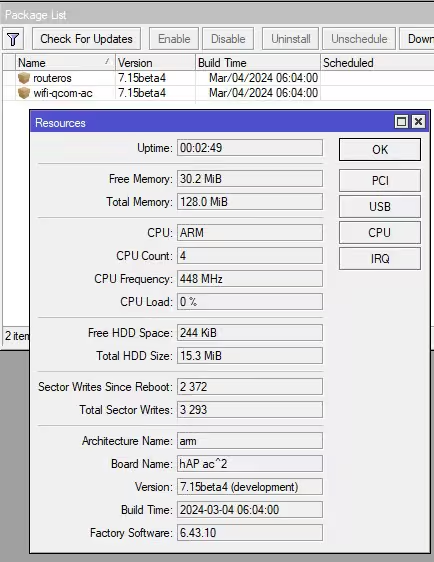
I was kind of surprised too that 7.14 reduced the free space further. Ongoing “bundle growing process” in 7.15 as it seems. I assumed that the raised concerns in 7.13 thread about disk-space on hap AC2 would cause some optimization or “re-thinking” of MT’s ROS product owner(s). Instead: “Dear developers! Prio1 Integrate DLNA service and adlist import”. It makes me think, development and feature priorization is maybe driven by some huge MT customer (telecomunication provider or something). This provider requests features and MT delivers.
DHCPv6 client default route corrupted addition after reboot :
The DHCPv6 client is not adding correctly the default route after reboot. (RB5009).
In my case the DHCPv6 client is set on a VLAN interface, located on a VLAN aware bridge.
Edit : this bug exhibit only if the DHCPv6 client is in address mode. In prefix mode there is no problem.
After rebooting, the DHCPv6 client successfully get an IP address, but IPv6 connectivity is dead on the VLAN interface. Asking for a renew does not solve the problem (but the address is correctly renewed).
After checking what is going on, i did discover that the default IPv6 route was not complete anymore after reboot, the default gateway address is missing :

I need to stop and restart the DHCPv6 client to get back IPv6 connectivity. After doing that, the route is complete again, with the gateway address :

Then in the meantime i have this startup script :
delay 2
/ipv6/dhcp-client/disable numbers=0
delay 3
/ipv6/dhcp-client/enable numbers=0
Another possibility (if the default gateway is always the same) is to uncheck “Add default route” in the DHCPv6 client, and use a default static route.
At least one other user has actually a very similar setup, but he does not have this problem. The only difference i can see is that he has the VLAN interface directly on the physical interface. In my case the DHCPv6 client is on a VLAN interface located on a VLAN aware bridge.
I did test the DNS Adlist, it seems to consume a lot of memory. Actually my cache is around 20 000 KiB. Is that normal ? A whitelist would be nice because some sites are detecting this and refuse to load.
I have been able to overcome lack of space by disabling all graphing (which can take megabytes of space!) and deleting backups/support.rif/everything from Files.
Maybe not nice to lose all traffic history, but it would be lost anyway after netinstal… now, it there was some way to download it before…
Please, back-port it to 7.14!
This is a serious bug and should be fixed in “stable” release, we cannot wait a couple months for 7.15 to became e “stable” and tested release…
In what language? What you said was very clear, and you made no mention of listening to all users.
In fact, it seemed to be, if anything, stating that home users, ME included, dont come to the forums, nor all the people I have helped that are home users, which is all quite laughable.
You lose credibility when you put your foot in your mouth, you lost yours for me and I am reminded every day with each new post I read that is a wasted initial effort and a painful dentistry extraction process to support. Luckily, our dedication is greater than your folly.
In any case, folks have to realize that this is a beta, not an RC, and that MT does not have the resources to test all the devices in all the firmware versions in all possible scenarios.
They either have no automated or limited automated test capability, so the work that you do here gratis, is extremely valuable.
So keep posting the issues!! As Normis stated, they will attempt to fix what they can.
( Note: Logging is the number one issue being reported by new users ( home owners and professionals) on the forum. )
My main blocker I use is about 1 million entries “HaGeZi’s Pro DNS Blocklist” well, my lists consist of various lists depending on what I allow where.
But until this point I’ve never had to worry about space as I was using a pi4 with a 64GB memory card. That list turns out to be around 35mb alone so I get your point. As an enthusiast etc.. I like options and I have the space it seems for it to work. Normally I use Unbound as a backend to pihole pointing at root which uses dnssec enabled queries. What I want is for a query to be sent securely from my router over https with add blocking working. how all that works out I’m unsure.
That problem has been present "forever" in RouterOS (at least as long as I use it).
There always have been panels with multiple columns with the same name. It seems that the developers do not care.
(I would think it is easy to programmatically scan for such mistakes and hand them to each responsible developer)
+1
I have no insights but I have the feel that it is quite an effort for MT to keep track of ROS changes in Winbox. There are always a ton of Winbox related changelog entries on each ROS release. And still Winbox is lacking behind CLI in some areas.
Case in point: I have well over 200-300 hAP AC/AX 2/3 routers deployed in my customers’ homes. I can guarantee that maybe 1 or two have visited this forum, ever, besides me. There are easily 199-299 that have not and will not ever need to.
I, on the other hand, visit it frequently, on their behalf.
My home customers aren’t going to care about 16MB of disk space; they just care that the WiFi works.
Just my two cents.
-
MT team is doing a great job adding features and developing on the RouterOS software. There is great potential here and I really hope they keep pushing the envelope. It works on multiple platforms and is extremely versatile, despite the growing pains MT is putting in some quality work into the software. This alone deserves massive respect and applause. That being said, a clearer roadmap + timeline (or tentative dates or even major version number) for fundamental routing features would be appreciated as well.
-
For products with limited space, there should be a slimmed down/lite LTS branch cut for those products and at some point they need to be EOL’d with regards to new feature development but they should continue to get security and bug fixes appropriate with the LTS branch. Going forward, sorry guys, its the truth, unfortunately putting a small amount of storage creates a constraint and it has been reached. MT doesn’t and shouldn’t spend their time making and maintaining a bunch of code just to keep adding features to those devices that have limited storage as a result of their mistake/oversight or lack of foresight during hardware development.
-
Add replacement products for the ones that are causing your devoted customers pain. A device refresh of a model that has 16MB storage, with more storage and maybe a slightly newer CPU replacement that is still within 10-15% price compared to the original would alleviate a lot of these complaints and make MT some cheddar.
The storage limit is an artificial problem introduced by a mistake or cost cutting reason during the hardware development. It’s 2024, TB is the new MB. Going forward for net new products (where it makes sense), add at least 1GB or more of storage to the devices and realistically 32GB+ to future proof them, sure it costs more but it isn’t going to be 50% more. For IoT/PtP/AP devices perhaps 256MB is enough, for any router device at least 1GB, and for flagship devices there is isn’t a reason it shouldn’t have 128GB storage at least (people are willing to pay for the appropriate hardware).
Yes, that tiny storage is becoming a problem. In the old RB411 I had 64 MB and now in hAP ac2/cAP ac only 16?
I like how the wAP LTE kit (2024) is also only 16MB 
Also: Chateau 5G R16 which retails at > 400EUR has only 16MB. 
I don’t want to discuss the retail price. But the fact: There are devices released in 2024 with 16MB flash. I don’t care if 16MB, 128MB or 1GB flash. As long as it fits and devices run stable. So this is fully on topic: keep an eye on the package sizes. They seem to be growing.
I repeat, even with wifi-qcom-ac I don’t get to 0 of free space as you say.
[quote=wfburton post_id=1060665 time=1709602195 user_id=215408]
[quote=massinia post_id=1060588 time=1709584529 user_id=202203]
Can anyone with hAP ac2 confirm that
</s>/ip/dns/adlist add url=https://raw.githubusercontent.com/StevenBlack/hosts/master/hosts ssl-verify=no<e>
download the list?
Name count always remains 0

[/quote]
It’s not feching the hosts file. Do it manually.
/tools/fetch url=<LINK_TEXT text=“https://raw.githubusercontent.com/Steve … ster/hosts”>https://raw.githubusercontent.com/StevenBlack/hosts/master/hosts</LINK_TEXT>
Seems it’s half baked…
then in the pull down box select hosts
Also, download the certificate chain and you can use ssl. But I haven’t verified it that works or not.
Cache Used 19094 KiB
</s>/ip/dns/adlist add url=https://raw.githubusercontent.com/StevenBlack/hosts/master/hosts ssl-verify=yes file=hosts<e>
github-io-chain.pem.txt
[/quote]
Thanks for your reply wfburton, I don’t know why “URL” doesn’t work for me, I have to download the file as you recommended.
How? It’s not an option to Branding Kit Maker on mt.lv… Nothing about how to build a “defconf” works is documented.
Sorta get $action==“revert” is based on prompt in winbox (thus RN to “hide”)… & now, perhaps setting something in the defconf can cause the prompt not to show?
Exactly how the default configuration uses caps-mode-script has been a mystery to me, before this change – e.g. from branding kit there is one default configuration loaded, but in CLI the caps-man and “main” default script appears separately under /system/default-configuration.
Export in docs show what appear to be invalid RSC… e.g the outer script:, caps-mode-script:, custom-script: in a indented YAML-like style in show in docs – is that actually valid for a defconf file from branding (cuz it ain’t valid at CLI)? I’ve assumed branding’s default configuration just replaced the “script” part… maybe not, dunno…
Some paragraph in docs (default configs or branding) for the defconf more generally be VERY helpful on both these “branding” RNs…
I have decided to solve the scripting issues on my side. So did a massive rework, and I think I am mostly fine for now. 
CHR 7.14/7.15b4 can’t find network interface in Vultr
http://forum.mikrotik.com/t/chr-7-14-7-15b4-cant-find-network-interface-in-vultr/173995/1
I don’t know that answer either but the list I have loaded which 32mb in size uses
 max-udp-packet-size: 4096
         query-server-timeout: 2s
          query-total-timeout: 10s
       max-concurrent-queries: 100
  max-concurrent-tcp-sessions: 20
                   cache-size: 131064KiB
                cache-max-ttl: 1w
      address-list-extra-time: 0s
                          vrf: main
                   cache-used: 117207KiB
I know some blockers can use compressed list etc.
To be clear I am just trying this out. it loads into memory thats all I can tell you so far. as to how it all performs is another question. I have the free memory so why not ? but as stated I would urge people to be carefull. as far as I can see if you don’t have enough memory your logs will be flooded.