Lots of people seem to think that address type “local” means an address on the local network(s). Apparently not you.
Also, some people think that traffic being forwarded also passes through the input chain. But that isn’t the case.
Still it seems better to match for multicast or broadcast when that is what you are after, instead of !local.
I cannot help you with VRF issues, I have always stayed away from it because for my purposes it has too many bugs and limitations.
I think you should use the VRF interface as the input interface.
https://help.mikrotik.com/docs/pages/viewpage.action?pageId=328206#VirtualRoutingandForwarding(VRF)-VRFinterfacesinfirewall
I tend to agree, however if packets with dst-address-type=local are matched by dst-address-type=!local rule, then dst-address-type=local rule matches no packets at all, and I can’t drop tcp/22 on VRFs, for example. Actually, I can use other rules to do that, but it’s out of the scope of the issue we’re discussing.
Good catch, already tried to a) add the VRF interface to the wan list, b) replace the wan list with the VRF interface. The problem persists.
Moved from 7.15rc2 to 7.15rc4 and after a few days, DNS completely stopped working.
- Tried flushing DNS(Mikrotik Cache) - did not help.
- Removed my local DNS(PiHole + unbound) and switched to 1.1.1.1 + 1.1.1.2 - did not help.
- Restarted a bunch of times and tried to set ISP IP as DNS - did not help.
- Added a third DNS server: 1.1.1.1 + 1.1.1.2 + 8.8.8.8 and suddenly it started working - first thing I did is revert back 7.14.
I have a feeling that 7.15rc3(maybe the DNS Adlists in general) might of introduced a regression with DNS but I have work to do and didn’t go into a deep dive…
It stopped working after a few days and reboot “a bunch of times” did not - at least temporarily - resolve the issue sounds more like an issue elsewhere.
Under support ticket SUP-153071 they sent me version 7.16 and the problem persists, after debugging I was able to replicate the problem, the access lists do not work properly. The devices are rejected.
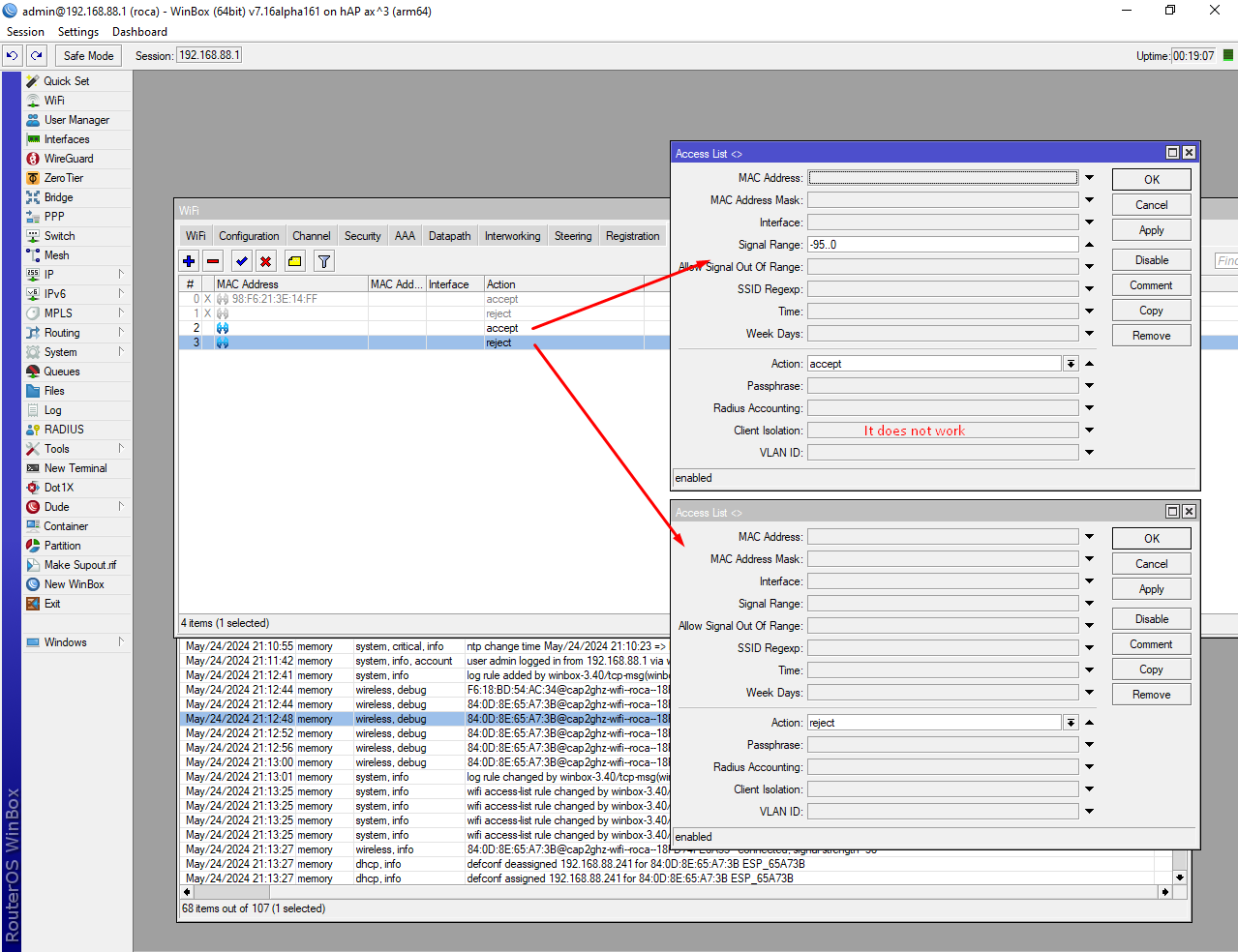
The contents shared with DLNA (IP>Media) are displayed on all devices (smartTV, smartphone, etc, etc) in random order and not in alphabetical order.
In some cases the order Z → A is followed instead of A → Z
For more details SUP-154088
When redistribute def-route via VRF will be added (on v6 that works perfectly fine).
I’ve been advised from the support teams that this is still not implemented on v7, but do we know what that will be?
What’s new in 7.15rc5 (2024-May-28 09:53):
*) lte - improved FG621-EA modem APN authentication;
*) route - improved system stability;
*) webfig - fixed issue where skin is not applied on first login after reboot (introduced in v7.15beta8);
*) wifi - improved interface initialization reliability on DFS channels;
1.1.1.x IP adresses sometimes get blocked by some ISP etc…
Are you sure PiHole + unbound are not using 1.1.1.1 as forwarders too?
Are you sure your ISP is not using 1.1.1.1 as forwarders too?
Maybe only the 8.8.8.8 (Google) is working now… Maybe try 1.0.0.1 (Cloudflare alternative DNS server IP address) and see if it is working.
Why revert back now when DNS is working?
Anyways from what you are saying it may not be RouterOS at all…
Thanks for solving this, which I am pretty confident was the root cause for my systems Wifi issues.
In WinBox WireGuard Peer under Client Settings we need a field for AllowedIPs
This is so that the Client QR can be configured to only route traffic for particular IPs to via the tunnel, instead of making it the default route (0.0.0.0/0).
Right now I have endpoints scan the code, but then have to manually change the AllowedIPs per device, which is an unnecessary job.
Thanks!
Hello MikroTik team,
Any chance to get the REST API user logout issue solved within this upcoming version? - topic is discussed http://forum.mikrotik.com/t/rest-api-active-users/175496/1 , unfortunatelly there was no reply with SUP ticket ID.
Thank you
*) route - improved system stability
MT Can u explain detail exactly
Thx
Could this help with intermittent lockups when using DFS channels?
Yes.
I hope 7.15 is going to fix most of DFS channel re-select issues reported here on the forum.
In simple words - we discovered that RouterOS internally did some unnecessary checks on specific situations under the hood, so we improved some part of code making routing processes more agile. You should notice the difference on large routing setups, not on a home router.
Very good, everything works fine after the update, looking forward to the official version!
+100 !!!
This is very important and should not be too hard to implement! Please!