There’s room for improvement in that menu. AllowedIPs was requested before, official answer 'till now was “edit it manually on the client”, well that’s not the point of having a qr / config generator in the first place if you still have to dig into the config to tweak missing pieces, is it?
If it was me, I’d also move the entire “client config” section (that’s only used for generating the client qr/config) to another tab on the selected peers menu.
+1 - it is nice feature but really confusing if you don’t know. If on another tab… it both be easy to have some add’l WG attributes like allowedip, mtu, or whatever & be way clear what these “Client Xxxxx:” things are used for. i.e. official WG clients only let you edit (or paste) a config file, so being able to just cut-and-paste all the right WG keys+config from RouterOS is pretty handy to setup a new peer.
I’m running into the “client was disconnected because could not assign vlan”.
Is this due to the fact I’m running hybrid (both wifi-qcom and wifi-qcom-ac? Didn’t have this with an wifi-qcom-ac only environment.
Yes, I’m using FT. Would setting ft-preserve-vlanid to yes make sense in this case?
Or is it related to the existing accesslist (rejecting clients below thresshold)?
I noticed that clients also get an IP address of the untagged assigned VLAN ID DHCP server and the correct VLAN ID DHCP server (both management and corporate).
I ran into the same issue at home this week when installing wAP AC using wifi-qcom-ac drivers in capsman environment.
For that device you need to set ft-preserve-vlanid to NO (open it in Winbox and leave it blank).
Thanks @holvoetn, will try this later today.
Update: Yes, this is indeed solving the issue I had.
The issue with the scheduler is now solved. The first script in the “startup” chain had a delay of 10 seconds … apparently this was not enough time cause when RoS reboots the interfaces do not initialize within that time delay so the dynu scrip generates an error condition that it cannot find the pppoe interface - and that kills scheduler from proceeding … I increased the delay to 15 seconds and this time all the scripts completed their tasks … picking 15 seconds was just a random number … when I have time I play with the time element by increments of 1 second and see if I can shorten the delay.
I actually consider it a bug that the startup script (just like the “run after reset” script that can be specified in a reset-configuration) is being run before the router finishes initialization.
In the past it has caused me much hair-pulling when I wanted to reinitialize a router, doing an export, some editing, and then reset-configuration with run-after-reset. Some interfaces (like wireless) not yet present and the script is failing.
There the workaround is “insert a delay” too, but that kind of kludges should not be necessary.
Yes I agree with your assessment — that it’s a bug …
What’s new in 7.16beta3 (2024-Jun-27 08:33):
*) 6to4 - fixed 6to4 tunnel LL address generation after system reboot;
*) 6to4 - limit keepalive timeout maximum value;
*) 6to4 - make “remote-address” parameter mandatory;
*) address - added “S” flag for addresses that belong to a slave interface;
*) arm64/x86 - added rtl8111/8168/8411 firmware;
*) bridge - added L2 MDB support for switch chips with HW offloaded IGMP snooping;
*) bridge - do not allow duplicate ports;
*) bth - improved system stability;
*) certificate - added support for cloud-dns challenge validation for sn.mynetname.net (CLI only);
*) certificate - automatically parse uppercase symbols to lowercase when registering domain on Let’s Encrypt;
*) chr - fixed incorrect disk size for ARM64;
*) console - added additional byte-array option to :convert command;
*) console - fixed an issue where certain MAC address can be interpreted as time value;
*) console - fixed typo in firewall error message;
*) console - improved stability when pasting a large input;
*) defconf - configure the default-route property for PPP clients only on devices with a built-in modem;
*) dhcp - added comment property for matchers, options and option sets;
*) dhcpv4-server - added matcher ability to match substring;
*) dhcpv4-server - added name for “User-Class” option (77), “Authentication” option (90), “SIP-Servers-DHCP-Option” option (120) and “Unassigned” option (163-174) in debug logs;
*) dhcpv6-client - release client on failed renew attempt (additional fixes);
*) discovery - added LLDP Port VLAN ID, Port And Protocol VLAN ID, VLAN Name TLVs support;
*) discovery - added LLDP-MED timeout;
*) discovery - set unknown bit for any unspecified link type in MAC/PHY TLV;
*) disk - added log message when disks get added or removed;
*) dns - added support for DoH with static FWD entries;
*) dns - added support for mDNS proxy (CLI only);
*) dns - refactored DNS service internal processes;
*) firewall - removed unnecessary TLS host matcher from NAT tables;
*) health - removed unnecessary health settings for RB921 and RB922 devices;
*) install - allow to save old configuration during cdrom install;
*) iot - added an option to log LoRa filtered packets (additional fixes);
*) iot - added LoRa option to filter out proprietary packets (additional fixes);
*) ipip6 - make IPv6 LL address random;
*) ipsec - improved performance by balancing multicore CPU usage;
*) ipv6 - added “d” deprecated flag for expired IPv6 SLAAC addresses;
*) ipv6 - allow to properly disable address when it is generated from pool;
*) ipv6 - allow to properly move IPv6 address from slave interface to a bridge interface;
*) ipv6 - do not allow adding address with invalid prefix when using pool;
*) ipv6 - do not allow to manually delete LL address;
*) ipv6 - fixed “no-dad” functionality;
*) ipv6 - fixed SLAAC address dynamic appearance;
*) ipv6 - properly initialize default ND “interface=all” entry;
*) ipv6 - warn user that reboot is required in order to properly apply accept-router-advertisements changes;
*) leds - fixed system LED to indicate correct RAT for Chateau (introduced in v7.16beta1);
*) lte - fixed modem dialer disable for Chateau 5G devices when cellular modem support mode set to serial (introduced in v7.16beta2);
*) lte - improved system stability for MBIM modem during AT query (introduced in v7.16beta1);
*) modem - fixed cases where USB bus could switch places (introduced in v7.16beta1);
*) modem - fixed modem firmware upgrade for Chateau 5G and Chateau 5G R16 (introduced in v7.15) (additional fixes);
*) netwatch - use time format according to ISO standard;
*) port - added IPv6 support for the “remote-access” feature;
*) ppp - automatically generate IPv6 firewall rules when filter-id is specified;
*) profiler - classify wifi processing as “wireless”;
*) rose-storage - fixed “/file sysnc status” parameter to be read-only;
*) rose-storage - moved “/rsync-daemon” to "/file rsync-daemon;
*) route - fixed incorrectly handled route distinguisher and route targets (introduced in v7.15);
*) sfp - fixed calculated link length based on EEPROM in certain cases;
*) ssh - improved system stability when SSH tries to bind to non-existing interface;
*) ssh - fixed SSH cryptographic accelerator selection (introduced in v7.14);
*) supout - rename “store” section to “disk”;
*) switch - fixed an issue where half-duplex links could occupy Tx resources for 98DX8xxx, 98DX4xxx, 98DX325x switch chips;
*) switch - fixed an issue with Ethernet port group hang for CRS354 devices;
*) system - added “clock” logging topic for time change related messages;
*) system - do not start IPsec and certificate processes when not necessary;
*) system - fixed an issue where routing configuration was missing after performing a reset, adding a new configuration and then upgrading (introduced in v7.15);
*) system - improved reporting of total memory size;
*) tunnel - allow specifying IPv6 LL address as “remote-address” for EoIPv6, GRE6 and IPIP6 tunnels;
*) user - added inactivity timeout for non-GUI sessions;
*) wifi - added “slave-name-format” (CLI only);
*) wifi - adjusted virtual interface naming when provisioning local radios;
*) wifi - do not allow frequency-scan on virtual interfaces;
*) wifi - fixed packet receive when having multiple station interfaces;
*) wifi - fixed signal strength reporting during association (introduced in v7.15) (additional fixes);
*) wifi - improve regulatory compliance for Chateau ax devices;
*) wifi-qcom - add spectral-scan and spectral-history tools (CLI only) (additional fixes);
*) wifi-qcom-ac - count dropped packets to “tx-drop” instead of “tx-error”;
*) winbox - fixed false invalid flag under “System/Ports/Remote Access” menu;
*) winbox - moved Switch menu tabs to individual menus (additional fixes);
*) winbox - separated different Watchdog settings into logical tabs;
*) winbox/webfig - fixed skins (introduced in v7.15);
*) wireless - allow unsetting signal-range and ssid-regext properties for capsman access-list (additional fixes);
*) x86 - added missing PCI ids for bnx2x driver;
 *) dns - added support for mDNS proxy (CLI only);
 *) ipv6 - fixed "no-dad" functionality;
finally we can test anycast now and mDNS proxy this is awesome any docs?
*) dns - added support for mDNS proxy (CLI only);
OMG it is what I think is? mDNS repeater trough VLANs?
yes, real mDNS repeater. Very simple config, just add interfaces and enable.
Am I right that this is Hardware Multicast support ?
This update enhances the existing hardware multicast support. Now, you can create static multicast group entries using MAC addresses, for example:
/interface bridge mdb
add bridge=bridge1 group=01:00:5E:01:01:02 ports=ether2
add bridge=bridge1 group=33:33:00:00:00:02 ports=ether2,ether3
Although it may not be very useful right now, it could become helpful in the future when you need to use dynamic multicast groups with MAC addresses instead of IPs from IGMP.
I found /ip dns mdns-repeat-ifaces but overlooked “enable”. Can you please give a hint? Thanks.
Hi there,
I’m using DNS FWD entries and usually could ping to a FQDN for those FWD entries from the terminal. This is not working anymore in 7.16. Please fix it, it is really useful.
ping portal.test.internal
invalid value for argument address:
invalid value of mac-address, mac address required
invalid value for argument ipv6-address
while resolving ip-address: name does not exist
Thank you!
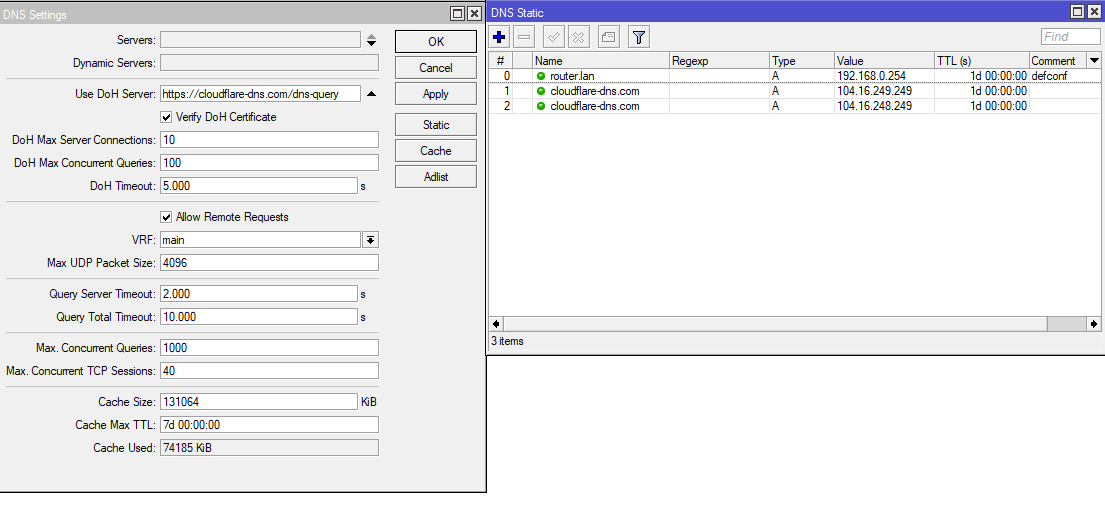
My DoH stopped working when I updated to 7.16_beta3 from beta2
I didn’t reboot my router since adding the DoH function last week so it might be that. To correct the problem I had to add 1.1.1.1 to Servers
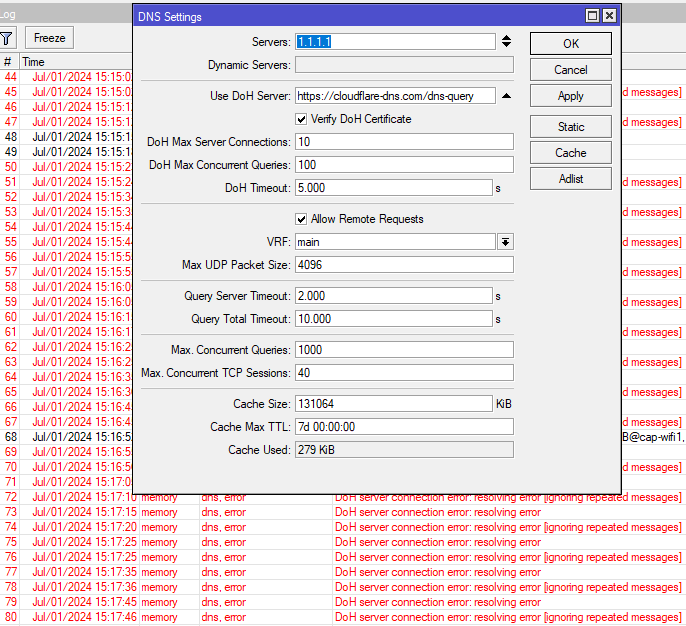
My previous setting was just adding the following to static, thoughts please.
Static
cloudflare-dns.com
104.16.249.249
cloudflare-dns.com
104.16.248.249
Rolling back the dns is shit
Ok, rolled back with my old settings, all works fine!
Mikrotik ??