Well, that whole “it will reboot to change the setting” makes the whole thing even worse than it already is.
Not only is it required to physically go to each router, and to connect to the CLI and issue the command and press the button, but also it will cause an interruption in the network at that time.
It is usually even more difficult to get physical access in a maintenance service window than it already is in the first place.
Even when a reboot is required to activate the new settings, it could be noted and the reboot could be done later.
(just as when you upgrade routerboot, for example)
And we cannot even prepare the new device-settings ahead of time, because 7.16 does not allow to set the new properties yet.
The fact that it is a “cold reboot” is also bad, e.g. we have “add ARP for dhcp leases” and “arp mode reply-only” on all the networks, and a cold reboot leaves some clients in a confused state because new leases have not yet been written to storage and after boot will have no ARP entry. At least do a warm reboot!
I want to prepare a site of which I don’t have physical access to in the next months.
What is the best command to be ready and have all features enabled?
Please, what will happen to the running containers after the update to 7.17?
Nothing should happen, on my ax3 everything is working. Do you have an issue ?
nothing it works fine nothing to do with containers unless you have different partitions for them but most run on usb??
in your log do you get HapAx3_5Ghz detect LAN if you have that active??
seem to show up every 3 hrs or so only the HapAx3_5Ghz detect LAN no other interface does it
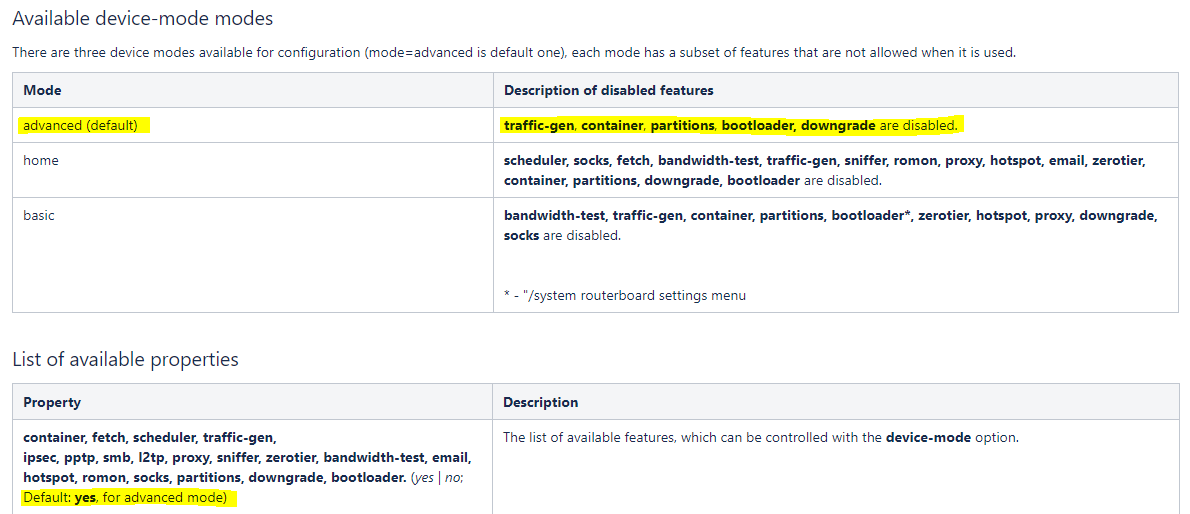
But it’s still not clear what I need to do to make sure I can still use all features (including traffic-gen, container, partitions, bootloader and downgrade) on our 2000+ devices in the field without having to physically visit each one of them and do a powercycle.
Also, the documentation is still confusing. It first mentions (under ‘Available device-mode modes’) that traffic-gen, container, partitions, bootloader, downgrade are disabled for ‘advanced mode’. But then under ‘List of available properties’ it says “Default: yes, for advanced mode” describing properties that also include traffic-gen, container, partitions, bootloader and downgrade?
No, we do not plan to implement annual licensing or any other licensing changes.
Device mode, as clarified in the manual, is meant to protect home users who have their routers taken over by attackers and are using them for botnet purposes.
EVEN THOUGH we have no known security issues in RouterOS AND we have added default passwords out of the box, improved security will ensure the devices stay secure for a long time. Home user does not need traffic generator.
It’s not ok on my RB5009.
None of my containers start (iperf, openspeedtest, pi-hole) and yesterday I noticed a couple of drops during Teams calls (never saw that happening before).
Will troubleshoot later this evening.
Home and Advanced mode are like presets, that allow certain list of features. Groups of features, that are listed next to them in the manual.
BUT there is no mode that allows ALL features, if you have Advanced and also need some additional features, you have to enable them one by one. I suggest reading the entire documentation page, it clarifies this further in the text.
Containers ALWAYS had device-mode requirement, since day one. Maybe you forgot you set it. So nothing changes if you had a running container.
Thank’s to all for the confirmation regarding containers…
I have posted further updates to the manual, so all your Device mode questions should be answered in there .
If your containers stopped working after upgrade to 7.17, it might not be related to device mode at all.
This still looke like a mess…
There are several EOL products which do not “confirm” mode changes with a reset button press. These routers can confirm mode change only with a power cycle.
Which devices? Will there be a list?
Second question which I still find hard time to get answer to - will all device-mode related changes from changelog get initiated to all devices which have features (to be disabled as per changelog) already in use i.e. if non-default settings are already applied to device-mode settings? If yes then it is an obvious departure from “not-to-mess-with-applied-configuration” philosophy.
What settings should be next to be expected to be steamrolled over?
P. S. We now have 3 Device-mode presets and no clear defiition of which devices default to which one.
This “one-liner” is not enough → Advanced (previously called enterprise) mode is assigned to CCR and 1100 series devices, home mode is assigned to home routers and basic mode to any other type of device
[quote=holvoetn post_id=1100939 time=1727869432 user_id=185526]
Were do I need to look then ?
[/quote]
Any hints in log?
I never said it was related to device mode.
However it is related to ROS 7.17beta… and that’s what this thread is about, no ?
I will troubleshoot this evening.
Sorry about that, my mistake, this whole thread has turned into “questions about device mode”
[quote=infabo post_id=1100947 time=1727870098 user_id=177714]
[quote=holvoetn post_id=1100939 time=1727869432 user_id=185526]
Were do I need to look then ?
[/quote]
Any hints in log?
[/quote]
Missing exec. Only thing which shows in log after start and then immediately stop.
At first sight (quickly logged in via wireguard during lunch break) disk is mounted correctly (it did cause problems in the past with some USB3 drives on Rb5009 but it seems it gets recognized ok now each time after reboot), folders are still there from what I can see. Mounts are present as expected.
On itself not a real issue since those containers are pretty easy to setup again from scratch but I am simply wondering why it broke all of a sudden.
*) dns - added option to create named DNS servers that can be used as forward-to servers
Does this mean forwarder-to can try to forward to multiple servers?
Does it mean if first server doesnt respond (because its down), it will retry next forwarder before giving answer back to client?
Like this guy is talking about: http://forum.mikrotik.com/t/dns-forwarding-multiple-dns-servers/163556/4
Or does this change simply mean that the named forwarder you define will automatically resolve behind the scenes, so that you dont have add one or multiple static A records for the forwarders?