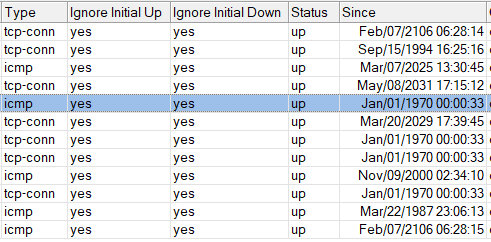
After updating from 7.16.1 to 7.18.1 /export show-sensitive terse started showing new bogus interface
/interface ovpn-server server add mac-address=[…] name=ovpn-server1
While it’s disabled by default, I would prefer default config and especially updates not to create bogus interfaces.
P.S. Somewhere before 7.16.1 similar thing happened with addition of
/zerotier set zt1 comment=“ZeroTier Central controller - https://my.zerotier.com/” disabled=yes disabled=yes name=zt1 port=9993
After updating from 7.16.1 to 7.18.1 it got removed again.
I think something similar happened with ovpn-server1.
(I track default config after each update to track my own modifications to it.)
This happened because in 7.17 supports for multiple OVPN server instances were introduced. In previous version there were only one possible instance, so all settings applied to /interface ovpn-server server. After upgrading to 7.17 RouterOS has to migrate the setting of that old single default instance, and it creates the ovpn-server1 entry and copy over the old settings. If in the old setting OVPN server was not enabled, then the new entry is created in the disabled state (to reflect that old Enabled checkbox value).
I’m wondering if some one is also experiencing limitation in adding adlist more than 32 entries? Even if I deleted all entries I will not able to add any more until I rebooted the router. I experience this since v7.17 and until now at v7.18.1 still experiencing the same problem.
Mikrotik has gotten back to me. It appears that if you rig the QCA8337 or the Atheros 8327 for hardware bridging with VLANs, you need to enable independent-learning for VLAN 1 (my default/untagged VLAN) for the hardware RSTP functions to work correctly.
For WAN, I use the SFP-PON module.
It was issued by the provider.
Model: RAISECOM
Name HT801-GSFP
Revision T.10
Other settings:
RX TX control - off
Auto Negotiation - enable
After updating to 7.18.1, a problem appeared.
After a hot reboot, the link on the SFP port is not raised.
If the provider reboot the module remotely, everything is ok.
If I warm reboot the Hex S - the link on the SFP port does not rise.
I noticed the problem on version 7.18.1
Prior to that, I was scheduled to update from the 6th line to 7.17.2.
Yesterday I updated from 7.17.2 to 7.18.1 and already thought that it was a brick, but no.
The size of the root package, in which a lot of usually unnecessary things are now packed, is different.
On HAP AC2 (arm) I change the flash memory to 32 MB.
Now, on 7.18.1 it used 16.6 mb of 32 mb…
For the Hex S, such a trick did not work - it does not support more than 16 mb flash drive, but it has an SD Card.
But now 17% (used 13.1 of 16 Mb) is free on one of these devices (mmips).
On Cap Ac (ARM) access points, 6% of the space is free (root and Wireless packages).
Back in RouterOS 6.x all_packages-xxx-6.x.x.zip used to actually contain all packages, both extra and the ones contained in the bundle, so you could choose to install from it only what is needed for your particular use case and not to install ppp, hotspot, mpls, ipv6 for example and save roughly 1MB which is pretty significant on a 16MB devices and avoids any lack of storage space issues… and upgrades wold only upgrade what is already installed.
Alas not anymore, what is bundled in routeros-7.x.x-xxx.npk is not available in all_packages-xxx-7.x.x.zip, is not visible in package manager and you cannot uninstall it even if you don’t need it. Maybe MT could revert to 6.x packaging…
Well, let me tell you why no one’s answering.
First of all, there is a separate topic about Amnezia VPN.
Secondly, Amnezia is open-source code. If you are so lame that you can’t look through the code, that’s your problem. And you haven’t even learned how to use Google. Otherwise you would understand how it works - it changes some standart settings of Wireguard, for example, instead of a constant header length it uses a variable one for protocol obfuscation.
Thirdly, how can that scary FSB hack you if Amnezia comes as a separate installation package that is NOT installed by default on the router? Is Harry Potter going to wave his magic wand?
And lastly - some people are a few continents away from “FSB”, however hillbilly with pitchforks is near and in the White House.
As for you personally - no respect for you. In the good old days you would have to provide proofs or the moderators would do their job, but for now hillbillys like you can post any crap, rumors and propaganda without risk of being banned. Shame on you!
I’m using the stable version 7.18.1 on my hAP ac², where I started using a USB flash drive to save files to avoid taking up space in the RB’s internal memory, which is only 16 MB.
This led to the following issue: the flash drive I initially used was a SanDisk 3.2Gen1 128GB, which became defective. I had to replace it with the same model but with a smaller capacity, a SanDisk 3.2Gen1 32GB.
I discovered a possible bug: when I insert the new 32GB flash drive, the RB still recognizes the previous 128GB flash drive, even though it is not mounted or inserted in the RB. It detects it as usb1, and the inserted 32GB flash drive as usb1-part1.
If I try to eject and remove usb1, it also removes usb1-part1, and vice versa. It seems like the system is recognizing both drives as one.
I have already tried a factory reset, reboot, and downgrade, but the issue persists.