There was a firmware change in 7.16 that of course may affect you only later when you do not update firmware every upgrade.
I had a CCR1009 go into a bootloop when I changed from 2 to 1 partitions (the first one being active) with 7.18beta4 to beta6 upgrade, and when trying to netinstall it things got only worse.
Serial terminal with Ctrl-E was required to recover it, but what if that was a device without serial port?
And of course the bootloop after changing partitions is a bug in itself.
Adding a queue with 7.18 on a CCR2004-1G-12S+2XS crashes the OS and boot loops the device. 
I would avoid using this version, It is very unstable.
/queue type
add kind=pcq name=PCQ-Internet pcq-classifier=src-address
/queue simple
add dst=internet-sfp12 max-limit=950M/950M name=Internet-FairShare queue=
PCQ-Internet/PCQ-Internet target=“” total-queue=PCQ-Internet
WebFIG : Please remove the default username in the login field ! And add dark mode too, like WB4
There are no buffer on logging, All logs that are generated at boot are not sent since there are no network up and running. Logs will only be tried sent once, and if that does not work, they are not sent (UDP/TCP).
if you set the /interface/pppoe-server/server set max-sessions=1 and for eg the pppoe-over-vlan-range=1-1000, only one pppo-client can connect at time, because “limit of maximum connections exceeded”.
This is wrong, becase it have to take in account how many the sessions “for each inner vlan”, and not the whole number of sessions on the outer vlan.
It work properly in the past if you set max-sessions=1 and have the pppo-server in a bridge and have 100 users.
The issue with OVPN service running on MMIPS devices with “hardware encryption” has been reproduced and fixed already. The fix will be available in the upcoming RouterOS releases.
*) ovpn - disable hardware accelerator for GCM on Alpine CPUs (introduced in v7.17);
What’s the reason for disabling GCM? What issue was it causing?
Yes, and it is not something that can be solved easily.
E.g. in our network the branch routers log to a syslog server in the main office, connected via tunnels and routed with BGP.
Due to the BGP bugs introduced in 7.16 it takes a minute for the routing to establish, so everything happening in the first minute is lost. That could be a lot.
Probably when someone is interested in the logs after boot, they should send a trigger message at boot (have a scheduled job at startup that checks if the connection to logserver is already up, or does a simple delay) and on the logserver have some action that recognizes this message and fires a program that contacts the router using API and retrieves the log from memory.
Just checked for myself… The very first message I have on the log server for every device is:
system,info MikroTik: router rebooted by ssh:eworm@10.171.215.2/shutdown
I am pretty sure this is before wireguard connection is up, and also before OSPF established any routes. So there must be what ever kind of buffering, no?
Log servers are mostly passive. To me the best course of action would be to create a memory buffer (a small one, say 1MiB) and send log messages to it. In fact, we already have: it’s the “log to memory option”.
THEN the contents of this buffers that were marked to remote logging are sent - and only removed either wen successfully sent OR the buffer runs out of space.
Problem 1:
This won’t work for logs servers using UDP for communication.
Problem 2:
Increases complexity on a system that should just work.
Possible workaround 1:
Set a job to be run ONLY after boot. It tries to send everything on memory that is marked with the “remote” option. This would take care of the UDP problem, would not need changes to the server and should “just work”.
Problem 1 for this workaround:
Now we have several lines of log waiting for network. How do we check connectivity? A simple “fire and forget” UDP log server will not have this. We could ping it - but how do we make sure it’s really working? How do we know the ping isn’t going trough one secondary route, and the UDP would be blocked by the firewall on this one?
Possible workaround 2:
I had another idea, but just forgot. Early morning and all that. Ah, well.
I saw exactly the same on hap ac, 600 kb left after that. Even uninstalled packages came back after resetting the router and the reason Is I got locked by no rules. First rule in the FW filter list to filter incoming dhcp-offers disappeared somewhere. It was fine until I simplified some Address Lists (combined them) using WInBox.
They forgot to test again, I suppose.
UPD: Now router rejects offers from netinstall to flash long-term back. Nice piece of software.
PLEASE PLEASE PLEASE study the matter before you claim that packages get installed.
Starting from 7.18, this list has both the packages that are installed, and those that are optional to install.
Besides marking for uninstall, was the device rebooted to complete uninstall @nipfel?
And did you create supout to inform support?
This is not really constructive.
Can’t imagine people overseeing such a thing, can you?
Well, I have often commented that the changelog is inadequate and should be replaced with something that has more info, links to documentation, etc.
But when looking at the packages screen, I really do not see how someone could think that packages are installed that are not:
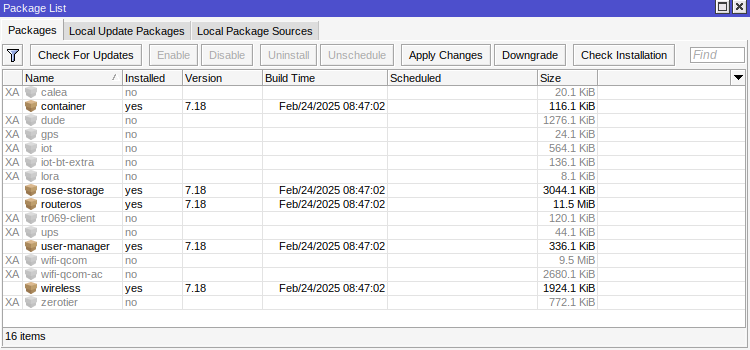
OVPN related issues are fixed, if you still have problems with this version, send us supout.
https://box.mikrotik.com/d/c2fc960065ed49b78214/
@oskarsk
WARNING: Are links for RouterOS 7.20_ab22!!!
I do not know if is done on purpose, skipping 7.18.x / 7.19
OK! That’s it!
v7.18 “stable” published and with this:
- YouTube video officially listed 16 hours ago.
- https://www.youtube.com/watch?v=g1wpIIfYpZA
- Rose Data Server Confluence page was published 1 hour ago.
- https://help.mikrotik.com/docs/spaces/UM/pages/298975330/ROSE+Data+Server
-
The device supports RouterOS software with version v7.18 or above.
The pressures from product teams and marketing teams have already been met.

Now who knows, maybe they can put "renice -19" on everything related to routing and switching, and a "renice 19" on everything that is superfluous.

Let's pray.Yes, that would be great!
But I fear that once the Rose Data Server really hits the street, we will see lots of requests for (in itself) reasonable requests around data server functionality.
(some of them in software not written by MikroTik but becoming their responsibility when used as part of such a product. e.g. I am using BTRFS myself on my home system, and I can tell it is a REAL PAIN when you are running RAID-1 and one of the disks goes offline. It is NOT like in a typical RAID-1 controller where you can just pull the disk and plug the same or another one back in)
.
Great news, thanks for the quick fix on this one. Can we expect a v7.18.1 fixing this, or it will be published on v7.19 only, for example?