Linux is a multitasking operating system and has scheduling algorithms that make sure that all tasks get some CPU time, unless major foul-ups have been made setting realtime priority.
Even when one “regular” process (which I assume the containers are) is using 100% CPU, other similar processes still get CPU time.
It is like a process asking 100% CPU automatically gets a slightly lower priority than all others, so that it does not get 100% but rather “all remaining time”.
That has always been the case in Linux (and Unix). On a typical Linux system there is more to fear from programs that use 100% of the disk bandwidth (either through file I/O or through swapping) than from programs using 100% CPU.
The reason is not in a broken .tar file, but in free space on the main disk. I have CHR, I install containers on an additional disk, but they deploy something on the main one. I saw that there was 0% free space on it. Removing all containers did not help, /files/print is empty, but there is no free space, reboot does not help, after installation and reboot, the containers have status = extracting.
Solution: I took the x86 .iso file, installed it on the 1Gb disk and all containers started working.
Another bug:
Using “root-dir” expands a huge number of files. When “/files” starts, the CPU load becomes 100% and either WinBox crashes or the VM is completely overloaded.
Maybe I’m doing something wrong.
After creating package with docker on windows, using links from wiki (not current) for arm architecture and putting it on hAP ac3 it always tells that it’s build for amd64 not arm.
But unpacking pihole.tar and revieving files reveals that is buld for arm, amd64 is mentioned only in one *json file.
So if it’s built for arm, i’ve changed that line in *json file and tried starting container. It creates some files and stops without any error.
Previously with first-build arm (in RoS it shows still amd64) when I tried to start container it showed eroor “bad file descriptor” but only once - removing, recreating containers using same file do not give any errors.
It’s even possible that running:
arm
    docker pull pihole/pihole:latest@sha256:381a39fc1a131e5fa1bb7e1ea6241147758c61206ffa851446a3737c61cf4162
    docker save pihole/pihole:latest > pihole.tar
can build image for amd64 instead of arm? Size of package in my example is 340MB.
Maybe somebody who tried using docker will provide built image? I’m running out of ideas what’s wrong…
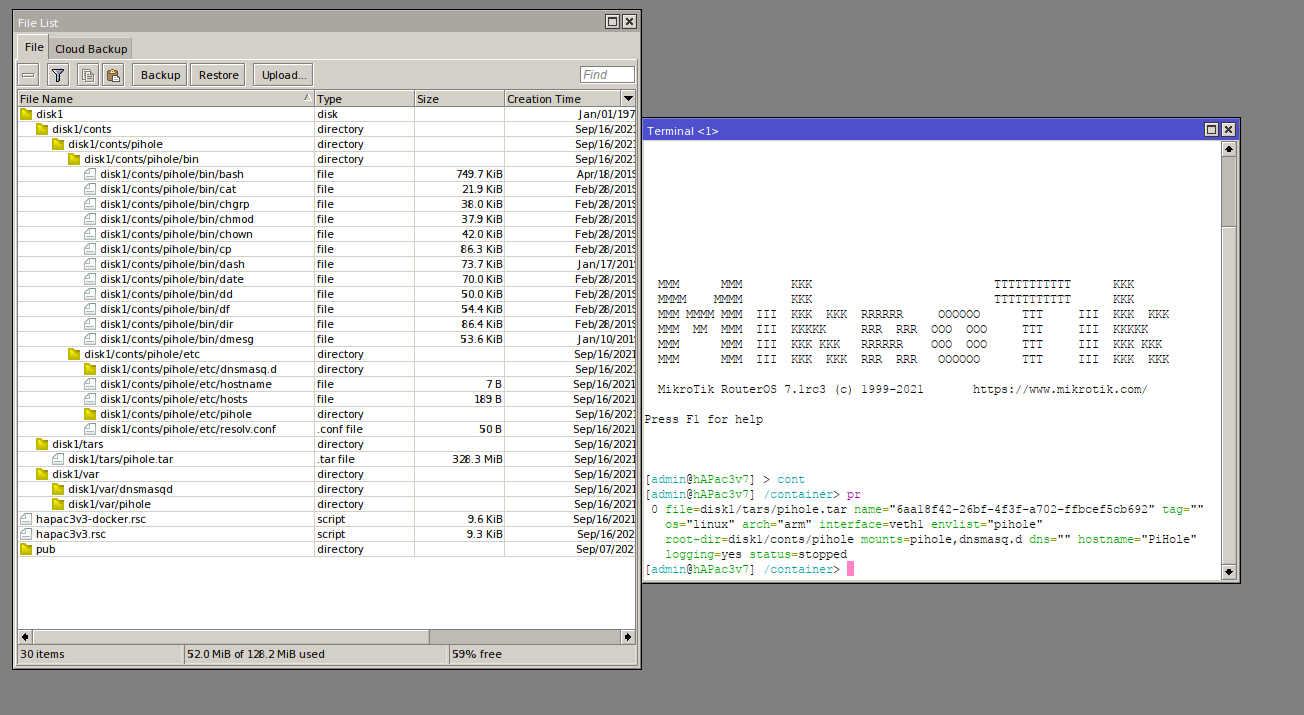
Try using docker pull --platform arm pihole/pihole instead of hash code.
Spoiler: Fixed in rc4
It doesn’t help, it still shows amd64, I will try on another PC with fresh docker install
Check with docker images and remove all before pulling a cross platform one. That helped me getting it the other way, e.g. from arm to arm64.
I’m getting out of ideas - it still builds version for amd64, even on PC with fresh docker installed.
The type=amd64 for PiHole containers is gonna be for every package they publish on every arch and can be ignored. Unfortunately that is a quirk and/or a bug on their end.
As for why pihole container would not run - please create a supout.rif file and send it to support@mikrotik.com (mentioning this forum discussion) so we can look into it.
its arm or arm64 board btw?
try pull 2021.09-armhf-buster tag,
or just this, https://dockerimagesave.akiel.dev/download/pihole_pihole_2021.09-armhf-buster.tar.zip (extract from .zip).
Thanks for that build.
After contacting Mikrotik Support, we have tracked the isssue( thanks Krisjanis!)
The issue was filesystem on external USB storage - it was FAT32, I’ve missed that when formatting disk to use as container storage.
After change of filesystem to ext3 container files have been unpacked properly and container finally works.
So always check filesystem on external storages 
Bug:
the command “/interface/veth/set address =” does not actually change the address
[admin@RouterOS] > /interface/veth/add name=veth1 address=10.10.0.2/16 gateway=10.10.0.1
[admin@RouterOS] > /interface/bridge/add name=docker
[admin@RouterOS] > /ip/address/add address=10.10.0.1/16 interface=docker
[admin@RouterOS] > /interface/bridge/port add bridge=docker interface=veth1
[admin@RouterOS] > /interface/veth/print
Flags: X - disabled; R - running
 0  R name="veth1" address=10.10.0.2/16 gateway=10.10.0.1

[admin@RouterOS] > ping 10.10.0.2
  SEQ HOST                                     SIZE TTL TIME       STATUS
    0 10.10.0.2                                  56  64 93us
    1 10.10.0.2                                  56  64 43us
    2 10.10.0.2                                  56  64 44us
    sent=3 received=3 packet-loss=0% min-rtt=43us avg-rtt=60us max-rtt=93us

[admin@RouterOS] > /interface/veth/set numbers=0 address=10.10.0.3
[admin@RouterOS] > /interface/veth/print
Flags: X - disabled; R - running
 0  R name="veth1" address=10.10.0.3 gateway=10.10.0.1

[admin@RouterOS] > ping 10.10.0.3
  SEQ HOST                                     SIZE TTL TIME       STATUS
    0 10.10.0.3                                                    timeout
    1 10.10.0.3                                                    timeout
    2 10.10.0.3                                                    timeout
    sent=3 received=0 packet-loss=100%

[admin@RouterOS] > ping 10.10.0.2
  SEQ HOST                                     SIZE TTL TIME       STATUS
    0 10.10.0.2                                  56  64 33us
    1 10.10.0.2                                  56  64 44us
    2 10.10.0.2                                  56  64 45us
    sent=3 received=3 packet-loss=0% min-rtt=33us avg-rtt=40us max-rtt=45us
after reboot
[admin@RouterOS] > /interface/veth/print
Flags: X - disabled; R - running
 0    name="veth1" address=10.10.0.3 gateway=10.10.0.1
[admin@RouterOS] > ping 10.10.0.2
  SEQ HOST                                     SIZE TTL TIME       STATUS
    0 10.10.0.2                                                    timeout
    1 10.10.0.2                                                    timeout
    sent=2 received=0 packet-loss=100%

[admin@RouterOS] > ping 10.10.0.3
  SEQ HOST                                     SIZE TTL TIME       STATUS
    0 10.10.0.3                                                    timeout
    1 10.10.0.3                                                    timeout
    sent=2 received=0 packet-loss=100%
it is possible to change the address only by deleting and adding an interface
huh, maybe we need to use a docker alternative that uses the same container protocols/ generates images in same format. I’m not a docker expert so don’t know much about how to proceed. On that note, how did routeros dev team tested container functionality on mips? Maybe they can provide some test images…
It is not about MikroTik itself, but about mipsbe support by a linux distros, if you find one that supports mipsbe, you can use it with no problems.
Looks like there is only 20 mips supported images in the Docker hub https://hub.docker.com/search?type=image&architecture=mips
Also you can compile mipsbe rootfs by yourself.
I have not yet studied what special requirements there are for making a docker image, but in the past I have compiled programs for MIPS without problem by installing a cross-development environment on my PC. It consists of a cross-compiling gcc, linker, libraries etc. all in a user directory I created for that.
Would that not work in this case?
docker only supports mips64. So what I understood so far, even if you made a mips rootfs, you can’t make a docker image/container with it, as the architecture is unsupported. From debian wiki
Through the Debian 10 (“buster”) release, Debian currently provides 3 ports, ‘mips’, ‘mipsel’, and ‘mips64el’
Also openwrt seems to support mips too. So linux is certainly available for mips, but the problem is to make a docker container out of it.
So I tried to run docker hello world example in RB750Gr3. After some research and looking at openwrt wiki and inspecting the binaries of routeros package, It concluded that its using mips little endian.
In ubuntu I compiled it using
mipsel-linux-gnu-gcc -mtune=24kc -static ../../hello.c -o hello
I tried with and without -mtune=24kc. I also tried mips-linux-gnu-gcc which is big endian.
My Dockerfile is just
FROM scratch
COPY hello /
CMD ["/hello"]
Then I build it using,
docker build --platform linux/mipsel -t sarim/hello-mips:0.6 .
I also tried linux/mips when using mips-linux-gnu-gcc.
Then
docker save sarim/hello-mips:0.6 -o hello-mips.tar
In routeros I added “container” to system/logging.
[admin@GittuTik] /container> add file=hello-mips.tar interface=veth1 logging=yes root-dir=disk4
[admin@GittuTik] /container> print
 0 file=hello-mips.tar name="98f82a3b-c4b6-49d0-b17d-bbd1aa409f27" tag="sarim/hello-mips:0.6" os="linux" arch="mipsel"
   interface=veth1 root-dir=disk4 mounts="" dns="" workdir="/" logging=yes status=stopped
[admin@GittuTik] /container> start 0

[admin@GittuTik] /container> print
 0 file=hello-mips.tar name="98f82a3b-c4b6-49d0-b17d-bbd1aa409f27" tag="sarim/hello-mips:0.6" os="linux" arch="mipsel"
   interface=veth1 root-dir=disk4 mounts="" dns="" workdir="/" logging=yes status=stopped
[admin@GittuTik] /container>
I tried with and without root-dir=disk4 .With many variations the result is the same. after start 0 nothing happens. Nothing shows up in log. No error.
After several hours of digging I think its an bug with RB750Gr3 and routeros. I mean no matter what I do no error message shows up in log. Anyone got any idea what is going on? Should I contact support?
mipsbe is supported in docker. Try the multiarch containers https://hub.docker.com/r/multiarch/debian-debootstrap/tags?page=1&ordering=last_updated&name=mips-buster
There were some fixes in rc4 for mips arch containers. Previously they were not working.
docker pull multiarch/debian-debootstrap:mips-buster
docker save multiarch/debian-debootstrap > mips-buster.tar
RouterOS config:
/interface bridge
add name=docker
/interface veth
add address=172.17.0.2/16 gateway=172.17.0.1 name=veth1
/container
add cmd="uname -ar" file=mips-buster.tar hostname=debian interface=veth1 logging=yes
/interface bridge port
add bridge=docker interface=veth1
/ip address
add address=172.17.0.1/16 interface=docker network=172.17.0.0
Run the container and see the below in the logs:

What is your hardware? My router, RB750Gr3 is not mipsBE. In Routeros page its listed as Mmips. Nevertheless I tried the image you references, nothing happens. It extracts but then start does nothing. No log no error nothing.
mipsbe / RB450G
For a RB750Gr3 you could try the little endian containers and see if they work: https://hub.docker.com/r/multiarch/debian-debootstrap/tags?page=1&ordering=last_updated&name=mipsel-buster