You are in trouble. Installing separate packages instead of the full package causes this problem and we are still waiting for MikroTik to fix this.
Reports are that it works when you remove the wireless package first, then reboot, and do the upgrade.
You need to make a backup and restore that after the upgrade.
But of course you cannot do that when these LHG are “remote” and you access them via the wireless link.
Maybe the fix_space.npk can help ? Or it could brick a v7 install. I don’t know xD - http://forum.mikrotik.com/t/problem-with-mount-point/94/1
NO! Don’t use that. it was for a completely different problem. The problem of upgrading installations with separate packages on 16MB flash devices is already wellknown and is not fixed by that.
Is anyone else seeing their OSPF interface templates setting the interface to “unknown” when the router is rebooted?
The bottom screenshot is before and top is after a reboot.
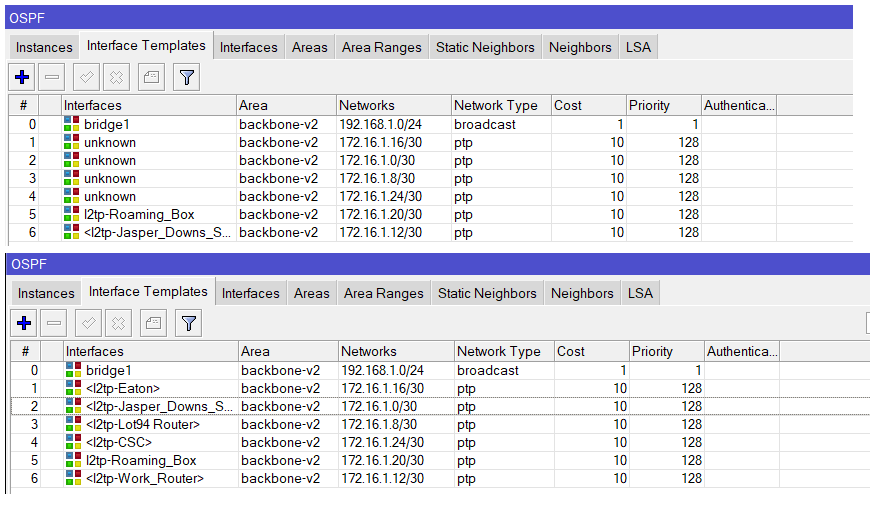
If I export the config it’s got some real funky interface names in there.
/routing ospf interface-template
add area=backbone-v2 disabled=no interfaces=bridge1 networks=192.168.1.0/24 priority=1
add area=backbone-v2 cost=10 disabled=no interfaces=*F0000A networks=172.16.1.16/30 type=ptp
add area=backbone-v2 cost=10 disabled=no interfaces=*F00012 networks=172.16.1.0/30 type=ptp
add area=backbone-v2 cost=10 disabled=no interfaces=*F0000B networks=172.16.1.8/30 type=ptp
add area=backbone-v2 cost=10 disabled=no interfaces=*F00010 networks=172.16.1.24/30 type=ptp
add area=backbone-v2 cost=10 disabled=no interfaces=l2tp-Roaming_Box networks=172.16.1.20/30 type=ptp
add area=backbone-v2 cost=10 disabled=no interfaces=<l2tp-Jasper_Downs_Shearing_Shed> networks=172.16.1.12/30 type=ptp
That probably happens for any “dynamic interface”. These are interfaces that are created when someone calls in with L2TP and deleted when they disconnect.
So after a reboot they certainly are gone. You should not refer to them in static configuration.
I am not familiar with OSPF configuration but maybe you can do something with an “interface list”. You can configure the L2TP server to make dynamic interfaces member of an interface list when they are created.
I just tried the list as suggested and it does work.
So thanks for that. I suppose its another “feature” to watch out for in ROS7
This not should be thread about L2TP but in Interface > Add > L2TP Binding *enter username from sicret tab".
Even l2tp link is down then that L2TP Binding exist. This is not perfect when you use from remote Radius/LDAP.
btw. very often OSPF can be not use if you have 2 main DC, branches not must see themself. Just add static route to remote range of branches by opposite DC with metric >=2 . Each branch have own ppp>secrets with a route field who will do route to it with metric1 directly to that DC. Branch must have two routes via two tunels and one EMCP and this is all. Simple and very often this is safer then use OSPF, special with ros7.
Good day. After the update, I lost records from the black list and the log was reset. Whitelist entries remain. How normal is this and how can you avoid it?
[quote=TimmZahn post_id=936390 time=1654017908 user_id=200086]
The device’s CPU frequency has not been manually set, nor changed from the defaults.
[/quote]
No, but default changed meanwhile to "auto" and software upgrade doesn't change running values (and that's for good reasons).
I think the 7.2 branch should be renamed from “stable” to “vista” 
Eeek!
please add support for quad ethernet cards. version 6.x works without problems. version 7 does not change its status to running (x86)

Since upgrading from RoS v6.48.1 to v7 I have trouble with both IP-IP and EoIP tunnels (until then, they were working with the same configuration without any issue). Now I’m getting “eoip-tunnel-1 transmit loop detected, downing interface for 60 seconds” error all the time.
On both sides, tunnels are added to bridges to provide L2 connectivity between devices (separate vlans) and the tunnel usually fails after sending some amount of data through, so I assume this is not connected with any regular mechanism that actually checks for loops.
I tried to disable all loop detection mechanisms on both sides (on the tunnel interfaces and on the bridges) but the message keeps coming and the interface is being disabled. Makes me wonder, which RoS mechanism actually does this.
You have both IPIP and EoIP tunnels?
Then it will be very important to fully understand the matter and to configure things really carefully.
no, I have just EoIP now, but I tried both protocols (separately) and both failed with the same error.
That points in the direction “not fully understanding the matter”…
I have Mikrotik CHR version. In all latest stable version I have 50% usage CPU. Profiler tool show “management process” is uses 50% CPU. When I use only testing version this problem does not occur. I use CHR in home with VLAN, EoIP and OVPN TCP for remote access. Why is this problem only on the stable version?
The testing version is supposed to contain fixes for bugs that have not yet been fixed in the stable version.
So when you observe that, it is good. It would be bad when it was the other way around (testing version using CPU and stable version not).
hi
look true whole post and not seen 1 note how to upgrade my classic wAP 60G AP to 7.2.3 from 6.49.6 factory at 6.41.2
so can somebody that knows the secret let me or as that invested (have 5 old classic wAP 60G AP units)
in development of this wAP 60G AP product line know or what to do next
i have rev3 wAP 60G AP at fac os 6.44.6 that upgrade to 7.2.3 fine no memory size error
thank you
d
upgrade to latest version of ROS 6 - 6.49.6 in winbox you should seen the option of channel upgrade… upgrade to version 7,