v7.2 is released!

Hi.
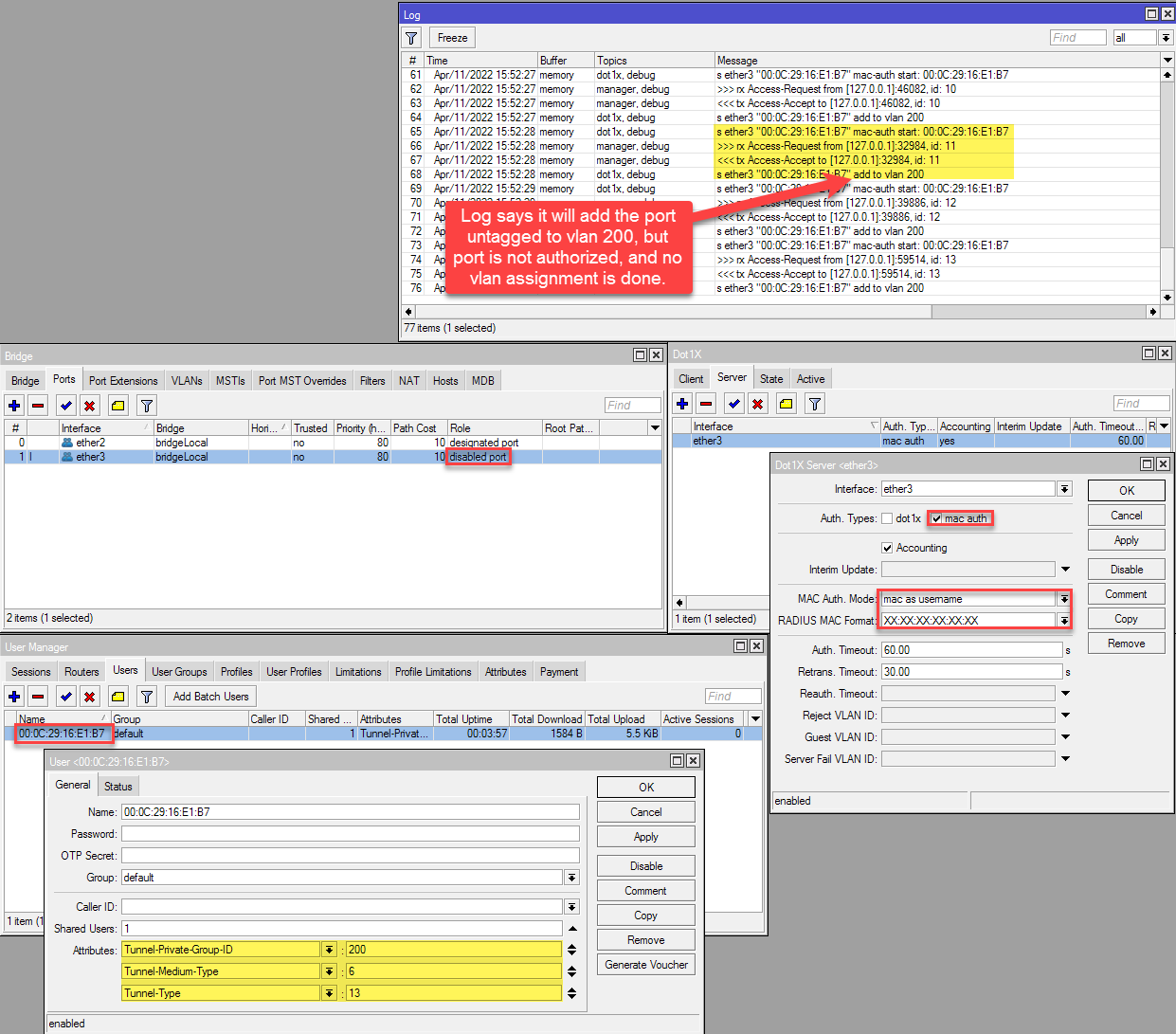
in the current release there is a problem with dot1x (mac/dot1x) authentication and dynamic vlan assignment with usermanager as radius server. The same settings were successfully tested with RouterOS release 7.1.5(CHR_x86), but in the current release 7.2 (CHR_x86) the setup fails.
RouterOS sends multiple radius requests, always gets Access-Accept from usermanager, but it fails to unblock the port and assignment to the vlan as untagged port.
screenshot.png
Demo Config used to reproduce the problem

# apr/11/2022 16:06:40 by RouterOS 7.2
# software id = 
#
/interface bridge
add ingress-filtering=no name=bridgeLocal protocol-mode=none vlan-filtering=yes
/interface vlan
add interface=bridgeLocal name=vlan200 vlan-id=200
/interface bridge port
add bridge=bridgeLocal frame-types=admit-only-untagged-and-priority-tagged interface=ether3
/ip pool
add name=pool_vlan200 ranges=10.200.0.10-10.200.0.254
/ip dhcp-server
add address-pool=pool_vlan200 interface=vlan200 lease-time=1h name=dhcp_vlan200
/user-manager user
add attributes=Tunnel-Private-Group-ID:200,Tunnel-Medium-Type:6,Tunnel-Type:13 name=00:0C:29:16:E1:B7
/interface bridge vlan
add bridge=bridgeLocal tagged=bridgeLocal vlan-ids=200
/interface dot1x server
add auth-types=mac-auth interface=ether3
/ip address
add address=10.200.0.1/24 interface=vlan200 network=10.200.0.0
/ip dhcp-server network
add address=10.200.0.0/24 dns-server=10.200.0.1 gateway=10.200.0.1 netmask=24
/ip dns
set allow-remote-requests=yes
/radius
add address=127.0.0.1 service=hotspot,ipsec,dot1x src-address=127.0.0.1
/radius incoming
set accept=yes
/system logging
add topics=manager
add topics=dot1x
/user-manager
set enabled=yes
/user-manager router
add address=127.0.0.1 name=local

Best Regards

he.net tunnels are working ok in 7.2. Make sure your endpoint address matches your current public address (tunnelbroker.net), it is not updated automatically. Always use the cli to add routes. Winbox route menu is still buggy af, don’t know about webfig.

Doing anything with routes in Webfig has been broken in 7.x for a long time (which is really frustrating since I browse into RouterOS from my Macs or iPhone when Winbox (Mac) or a terminal (iPhone) are often not convenient or available). Until I started deploying 7-only devices, I had no need for Winbox.

As mentioned, CLI is best place to view them for now; I believe they work OK in Winbox.

[quote=stlang post_id=925859 time=1649692965 user_id=199983]
Winbox is not an option for me as it’s Mac and Linux only here.
[/quote]
winbox.exe is a portable executable that easily runs under wine on both Linux and Mac.

Just download it and type “wine winbox.exe”.

or wine64 winbox64.exe :slight_smile:

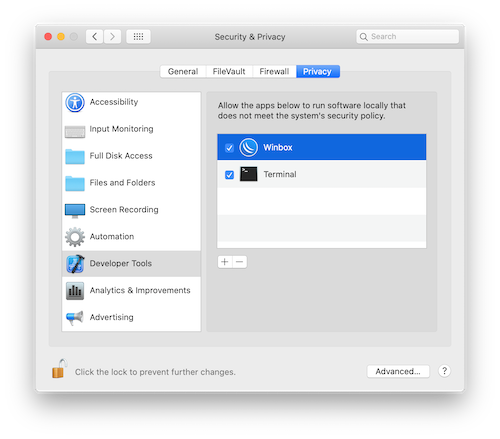
How to install Winbox on MacOS

  1. Follow the Mikrotik install instructions: Run Winbox on macOS. You can install Wine64 using brew: “$ brew --cask install wine-stable”

  2. Create a start icon using the “Script Editor” with the Apple-script code below and save it as type Application in /Applications/Winbox.

on run
	do shell script "/usr/local/bin/wine64 /Applications/Winbox.app/Contents/MacOS/winbox64.exe"
end run
  1. Download and copy the 64 bit version of Winbox (winbox64.exe) to /Applications/Winbox.app/Contents/MacOS

4 Start “System Preferences → Security & Privacy → Privacy → Developer Tools” and add /Applications/Winbox
Screenshot 2022-04-11 at 19.59.55.png

This CRS354-48G-4S+2Q+ feels a little cold (-274 degrees Celsius).
Only a copper pigtail cable is present in one SFP+ port, which has no temperature to report.
It is a Mellanox MCP2104-X01AB cable.

/system/health> print
Columns: NAME, VALUE, TYPE
#  NAME                VALUE  TYPE
0  temperature         -274   C   
1  cpu-temperature     61     C   
2  sfp-temperature     -274   C   
3  fan1-speed          5550   RPM 
4  fan2-speed          5445   RPM 
5  fan3-speed          5610   RPM 
6  board-temperature1  44     C   
7  board-temperature2  27     C   
8  psu1-state          ok         
9  psu2-state          ok

EDIT: I am not sure if this problem is Router OS 7.2 specific, but I just noticed it the first time after upgrading.

7.2 on CCR2004-1G-12S+2XS

PIM-SM still does not work.

I will be submitting an FBI tip.

I found this! When command is typed there is pcap file on disc that is saved. Downloaded on computer and read with a pcap reader (wireshark in my case)

Just to update, Simple Queues with IPv6 and fq-codel are working fine for the past 24 hours. This is most welcome news.

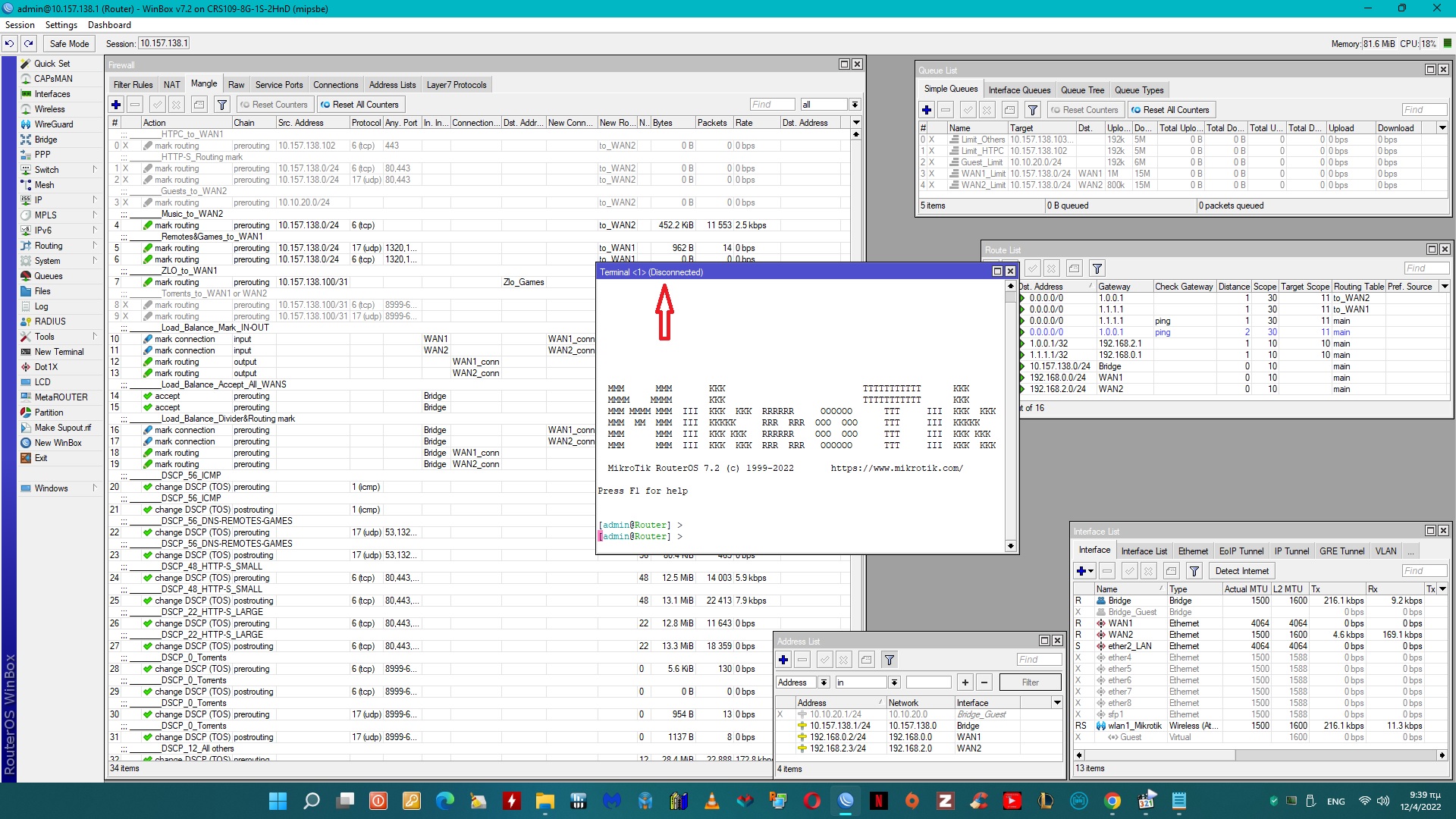
On paste i get this now…

if u cant paste, writing from begin is time painful
Terminal.jpg

@Note
Can you share your mangle
Or at least ,Qos DSCP
I have 2WAN in loadbalance

I lost Winbox connectivity after I upgraded my CCR2216. I am using Winbox for MAC 3.30. I could see the router in my neighbors list, and could connect to it. When I tried to login with the default login username and password, the Winbox session simply disappeared. I upgrade a router before I even create a username and password.
Winbox 3.35 should be fine.

Applying an export filter to a VRF results in no routes being distributed.

/routing filter rule
	chain=DISTRIBUTE rule="accept"
	
/routing bgp vpn
	export-filter=DISTRIBUTE

BIG problem!!
maybe before a stable release first to churn out, which is tested well, thankful that I stopped with the updates of the other devices

Have had 3 random reboots after updating my RB2011UiAS-2HnD from 7.1.5 to 7.2.
I’ve never had this problem before, so I went back to 7.1.5 for now.

You can get it from here…

http://forum.mikrotik.com/t/advanced-routing-failover-without-scripting/136599/1

Problem fixed with secret disabled.

New version v7.2.1 has been released:

http://forum.mikrotik.com/t/v7-2-1-stable-is-released/157240/1