I’m curious because I am also building out a CHR dedicated device. When you say better, compared to throttling at 3Gbps/300Kpps, what results are you seeing now? You mentioned 7Gbps throughput but I’m more curious on the pps. Also was the 7.19.4 build throttling on 3Gbps total throughput or one-direction? And are you reaching limits due to your bandwidth test server so you cant really see the maximum or some other bottleneck?
I’m seeing 7Gbps and 650Kpps on the 7.20.6 CHR with Chelsio NIC passed through vs 3Gbps and 300Kpps on 7.19.4 bridged to the motherboard’s onboard Intel 550’s (LACP bonded).
There could be three reasons for that:
- Passthrough of a PCI device is generally more performant than bridging the VM to the host
- Support pointed out that 7.20.x has Virtio enhancements (and a couple more drivers)
- Intel 550’s pale in comparison to Chelsio T500’s
I attribute it to all of the above.
I was looking at the bond’s total throughput (all the routers have an LACP bond to an MLAG stack), so it’s aggregating up and down PPS.
Upload does fare better because I’m testing over a production path and there is a consistent 1.5-2Gbps of customer traffic during testing, skewed heavily inbound of course. And my server has other test traffic on it.
I’m using Ubiqutii’s 5G USB adapter on my MacBook Pro M1. I’m assuming it’s not going to get much more than 4.5Gbps in any one direction.
@sirbryan Thank you for the extra details, very much appreciated! I’ll make a post once I have everything built and tested.
I heard from others that upgrade destroyed their BGP configuration but on my devices it worked OK.
A common situation at users here is a v6 device that was setup with an extra “instance” with an AS number, router ID and route table (the “default” instance was left untouched, at AS 65530 and main table, but is not used), then is was converted to v7 where the “instance” was converted to a “template” (MikroTik claim that “template” was not the successor of “instance”, but this is the observed conversion) and now in v7.20 versions the “instance” was re-introduced and the “template”s data was partly migrated into “instance”s.
It seems that this conversion sometimes fails. Probably no issue when there were no v6 instances and/or the whole setup was created in v7?
All of this was 100% done in V7. Sure, my original 2004’s were v6, then upgraded, but those were since replaced by 2116’s (and this one that was upgraded was a 2116 and always v7).
Ok so the v6 may not be a factor in this. But did you have different templates that were converted to instances?
I don’t know. Wasn’t paying that close attention to it. I’ll watch the next couple of routers that I upgrade to see what works and what doesn’t.
Some more testing and research has given me better answers for my results above.
- The disparity between host CPU utilization and VM CPU utilization that I noticed when PCI devices are passed through is a result of the halt polling system used by KVM/QEMU (only affects guests with passthrough).
- For my Ampere ARM64 box, the best setting is 50000ns. With this value, both the host and guest’s representation of CPU utilization matches. I haven’t tried on my Intel servers yet.
- Set it at runtime:
echo 50000 > /sys/module/kvm/parameters/halt_poll_ns - Set it at boot: add
kvm.halt_poll_ns=50000to kernel command line (GRUB settings)
I also came across this forum post I had saved regarding NICs and CHR or native builds ( Hardware for x86 (Replacing 2216) - MikroTik hardware general - MikroTik community forum ) and realized what was going on.
- The Intel NICs (onboard 550’s and some X710’s I just tested) are a poor choice for RouterOS because they are IRQ-throttled. The interrupts load up one CPU core, so my 2-3Gbps/300Kpps test results above were due to saturation of the lone core. This doesn’t matter whether they’re passed through or bridged by Proxmox to the guest. (However, they do perform well with DPDK apps, like LIbreQoS.)
- The Chelsio cards spread the work across the cores more evenly, so the CHR with the Chelsio passed-through performs very well. The problem is, despite the changelog, 7.20.x (still) doesn’t see the individual ports if you pass only their function through. To get it to work at all, you have to pass at least one physical port’s function (0-3), along with the “whole card” function (4), and then all ports show up in the VM. (I’ve tested this with T540 4x10 and T580 2x40 cards.) If you want your CHR to have the whole card, then it’s not a problem.
- The poster recommends Mellanox and Chelsio cards. I have some Mellanox 25G and 40G cards, but I haven’t put them through the paces yet.
I need to try just bridging the individual Chelsio ports to the VM’s and see how that performs. It will probably be just as good as if I had passed the cards through.
Hello everyone,
I am currently running a router on RouterOS v7.19.6 (stable channel) and attempting to upgrade to the latest stable version, v7.20.6.
1. Router Upgrade Problem (RouterOS)
-
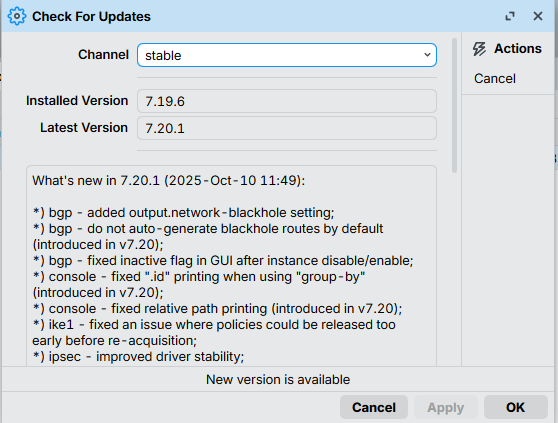
The "Check For Updates" window shows that v7.20.1 is available (see attached image).
-
However, the 'Apply' button is grayed out/disabled, preventing me from starting the initial upgrade to v7.20.1, which I assume is a prerequisite for reaching v7.20.6.
-
What am I doing wrong? Is there a required intermediate step or setting I might be missing for the upgrade to proceed?
2. Switch Upgrade Problem (CRS Devices)
I am also having similar issues with my CRS switches:
-
I have a CRS310 and a CRS304.
-
When I check for updates on these devices, no upgrade is even shown as available, despite newer versions existing.
Any guidance on how to successfully initiate the upgrades on both my router and my CRS switches would be greatly appreciated.
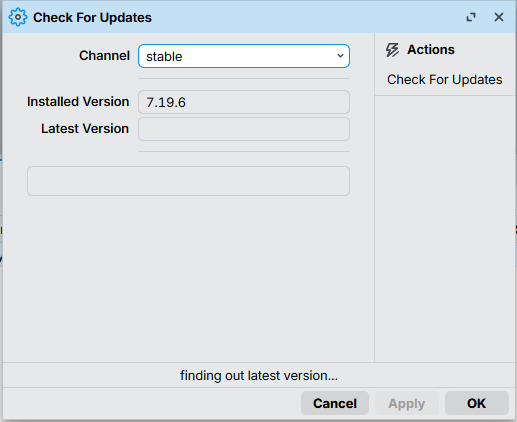
Thank you for your help!
It is not. Coincidentally, I was upgrading an out-of-the-box device from 7.19.5 to 7.20.6 yesterday and it doesn’t need any intermediate version. The only case where you need an intermediate version is when you upgrade from 7.11.x and older. So your issue must be something else, like DNS settings or internet access restrictions.
So please create a dedicated topic about your issue - this one is strictly reserved for issues related to 7.20.6 itself, which is not the case here - if your issue is version-related at all, it is related to 7.19.6. We can proceed in that new topic.
Thank you for your answer.
I found out that I had to switch the channel to LTS or Testing, which forced an update of the available versions. The latest version, 7.20.6, was then found.
Thanks again and I apologize for creating a post in the wrong place!
To follow up with my own testing
RouterOS with a virtio NIC passed in to the CHR instead of the physical Chelsio suffers from the same problem as it does when using an Intel card: the guest’s first core is pegged with IRQ’s.
So now on to testing with 7.21rc1:
*) arm64 - allow enabling receive packet steering on /system/resource/irq/rps menu in order to overcome unbalanced CPU load;
You need to specify the type of the router, and what kind of internet connection it (and the switch) has.
It is a known issue that it does not work properly when the internet connection has an MTU lower than 1500 and there is no TCP MSS clamping configured.
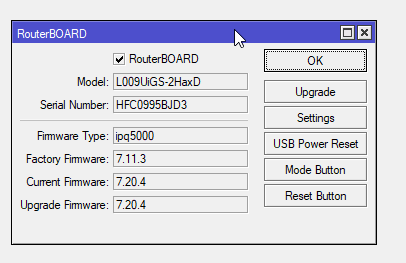
I downloaded both the config and backup for my Mikrotik L009UiGS-2HaxD on 7.20.4
I pressed upgrade and after that reboot, I’m now stuck with a routerboard with all ethernet port lights on but nothing is hapening.
And idea how I can recover this situation?
The config is here below:
# 2025-12-14 14:57:12 by RouterOS 7.20.4

# software id = 2T9Q-GYWT

#

# model = L009UiGS-2HaxD

# serial number = removed

/interface bridge
add admin-mac=78:9A:18:B5:AE:32 auto-mac=no comment=defconf name=bridge
/interface wifi
set \[ find default-name=wifi1 \] channel.band=2ghz-ax .skip-dfs-channels=
10min-cac .width=20/40mhz configuration.country=Netherlands .mode=ap
.ssid=MikroTik disabled=no security.authentication-types=
wpa2-psk,wpa3-psk .ft=yes .ft-over-ds=yes
/interface wireguard
add comment=back-to-home-vpn listen-port=23839 mtu=1420 name=back-to-home-vpn
/interface vlan
add comment=eigenconf interface=ether1 name=vlan1.300 vlan-id=300
/interface list
add comment=defconf name=WAN
add comment=defconf name=LAN
/ip pool
add name=default-dhcp ranges=192.168.88.10-192.168.88.254
/ip dhcp-server
add address-pool=default-dhcp interface=bridge name=defconf
/port
set 0 name=serial0
/disk settings
set auto-media-interface=bridge auto-media-sharing=yes auto-smb-sharing=yes
/interface bridge port
add bridge=bridge comment=defconf interface=ether2
add bridge=bridge comment=defconf interface=ether3
add bridge=bridge comment=defconf interface=ether4
add bridge=bridge comment=defconf interface=ether5
add bridge=bridge comment=defconf interface=ether6
add bridge=bridge comment=defconf interface=ether7
add bridge=bridge comment=defconf interface=ether8
add bridge=bridge comment=defconf interface=sfp1
add bridge=bridge comment=defconf interface=wifi1
/ip neighbor discovery-settings
set discover-interface-list=LAN
/interface list member
add comment=defconf interface=bridge list=LAN
add comment=defconf interface=ether1 list=WAN
/ip address
add address=192.168.88.1/24 comment=defconf interface=bridge network=
192.168.88.0
/ip cloud
set back-to-home-vpn=enabled ddns-enabled=yes ddns-update-interval=10m
/ip cloud back-to-home-user
add allow-lan=yes comment=DeBaander8-L009 name="Frank's A34" private-key=
"RemovedPrivateKey=" public-key=
"RemovedPublicKey="
/ip dhcp-client
add comment=defconf default-route-tables=main interface=vlan1.300
/ip dhcp-server network
add address=192.168.88.0/24 comment=defconf dns-server=192.168.88.1 gateway=
192.168.88.1
/ip dns
set allow-remote-requests=yes servers=8.8.8.8,8.8.4.4
/ip dns static
add address=192.168.88.1 comment=defconf name=router.lan type=A
/ip firewall filter
add action=accept chain=input comment=
"defconf: accept established,related,untracked" connection-state=
established,related,untracked
add action=drop chain=input comment="defconf: drop invalid" connection-state=
invalid
add action=accept chain=input comment="defconf: accept ICMP" protocol=icmp
add action=accept chain=input comment=
"defconf: accept to local loopback (for CAPsMAN)" dst-address=127.0.0.1
add action=drop chain=input comment="defconf: drop all not coming from LAN"
in-interface-list=!LAN
add action=accept chain=forward comment="defconf: accept in ipsec policy"
ipsec-policy=in,ipsec
add action=accept chain=forward comment="defconf: accept out ipsec policy"
ipsec-policy=out,ipsec
add action=fasttrack-connection chain=forward comment="defconf: fasttrack"
connection-state=established,related hw-offload=yes
add action=accept chain=forward comment=
"defconf: accept established,related, untracked" connection-state=
established,related,untracked
add action=drop chain=forward comment="defconf: drop invalid"
connection-state=invalid
add action=drop chain=forward comment=
"defconf: drop all from WAN not DSTNATed" connection-nat-state=!dstnat
connection-state=new in-interface-list=WAN
add action=accept chain=input connection-state=established,related
add action=accept chain=input in-interface=vlan1.300 protocol=icmp
add action=accept chain=input connection-state=established,related
add action=drop chain=input in-interface=vlan1.300
/ip firewall nat
add action=masquerade chain=srcnat comment="defconf: masquerade"
ipsec-policy=out,none out-interface-list=WAN
add action=masquerade chain=srcnat out-interface=vlan1.300
/ipv6 firewall address-list
add address=::/128 comment="defconf: unspecified address" list=bad_ipv6
add address=::1/128 comment="defconf: lo" list=bad_ipv6
add address=fec0::/10 comment="defconf: site-local" list=bad_ipv6
add address=::ffff:0.0.0.0/96 comment="defconf: ipv4-mapped" list=bad_ipv6
add address=::/96 comment="defconf: ipv4 compat" list=bad_ipv6
add address=100::/64 comment="defconf: discard only " list=bad_ipv6
add address=2001:db8::/32 comment="defconf: documentation" list=bad_ipv6
add address=2001:10::/28 comment="defconf: ORCHID" list=bad_ipv6
add address=3ffe::/16 comment="defconf: 6bone" list=bad_ipv6
/ipv6 firewall filter
add action=accept chain=input comment=
"defconf: accept established,related,untracked" connection-state=
established,related,untracked
add action=drop chain=input comment="defconf: drop invalid" connection-state=
invalid
add action=accept chain=input comment="defconf: accept ICMPv6" protocol=
icmpv6
add action=accept chain=input comment="defconf: accept UDP traceroute"
dst-port=33434-33534 protocol=udp
add action=accept chain=input comment=
"defconf: accept DHCPv6-Client prefix delegation." dst-port=546 protocol=
udp src-address=fe80::/10
add action=accept chain=input comment="defconf: accept IKE" dst-port=500,4500
protocol=udp
add action=accept chain=input comment="defconf: accept ipsec AH" protocol=
ipsec-ah
add action=accept chain=input comment="defconf: accept ipsec ESP" protocol=
ipsec-esp
add action=accept chain=input comment=
"defconf: accept all that matches ipsec policy" ipsec-policy=in,ipsec
add action=drop chain=input comment=
"defconf: drop everything else not coming from LAN" in-interface-list=
!LAN
add action=fasttrack-connection chain=forward comment="defconf: fasttrack6"
connection-state=established,related
add action=accept chain=forward comment=
"defconf: accept established,related,untracked" connection-state=
established,related,untracked
add action=drop chain=forward comment="defconf: drop invalid"
connection-state=invalid
add action=drop chain=forward comment=
"defconf: drop packets with bad src ipv6" src-address-list=bad_ipv6
add action=drop chain=forward comment=
"defconf: drop packets with bad dst ipv6" dst-address-list=bad_ipv6
add action=drop chain=forward comment="defconf: rfc4890 drop hop-limit=1"
hop-limit=equal:1 protocol=icmpv6
add action=accept chain=forward comment="defconf: accept ICMPv6" protocol=
icmpv6
add action=accept chain=forward comment="defconf: accept HIP" protocol=139
add action=accept chain=forward comment="defconf: accept IKE" dst-port=
500,4500 protocol=udp
add action=accept chain=forward comment="defconf: accept ipsec AH" protocol=
ipsec-ah
add action=accept chain=forward comment="defconf: accept ipsec ESP" protocol=
ipsec-esp
add action=accept chain=forward comment=
"defconf: accept all that matches ipsec policy" ipsec-policy=in,ipsec
add action=drop chain=forward comment=
"defconf: drop everything else not coming from LAN" in-interface-list=
!LAN
/system clock
set time-zone-name=Europe/Amsterdam
/system routerboard settings
set enter-setup-on=delete-key
/tool mac-server
set allowed-interface-list=LAN
/tool mac-server mac-winbox
set allowed-interface-list=LAN
First read about what “upgrade” means for Firmware and RouterOS. They are different things.
@erlinden sorry for late answer. Hm. i do not tried it “again” … and i am currently short on time (Christmas deadline  ) . I am back next year .. lets see what is at this point of time the “current” version .. i will retry
after 7.20.4 update we reduce number of “push route” to 24 (from ~110) and all worked fine, but in 7.20.6 this config already not working (MT Client freeze ), now we try to reduce up to 4 and some device connected and some freezing...
OpenVPN with 24 (or 110) pushed routes??? Maybe you need to re-think your network a little bit…
Universal configuration for all clients, regardless of hardware.
On older hardware: up to 100 routes.
On newer hardware: 1,100 routes.
On Mikrotik devices: 9,000 routes. 
It works on Windows/MacOS/Android/iPhone. As far as I know, such devices don't have the ability to natively enable BGP/OSPF to load the route list.
It seems possible on Linux, but I haven't had any such request yet.