IIRC it was working on rc3 (the version I was using before rc4).
Had some other versions in my archive.
Same problem with Winbox 3.31 and Ros 7.2rc4. Towards ROS 7.1.3 works just fine.
AND … could be me but Webfig doesn’t seem to work on 7.2rc4 either ? Works just fine towards a 7.1.3 device.
For me the webfig works OK
I took the JUMP and hit the concrete on the bottom with my head!!
WTF Mikrotik!! Erase the routing tables (/routing/table), leaving me with setting about 50 different routing-marks all who are all over the place!!!
I started the recovery but ran out off breath doing them all and will think hard over it before trying to go from 7.1.1 to 7.2RC again. I went back to 7.1.1 and then restored the config and all worked again like a well oiled machine. oooooooooooooooooooooooof!
Is there not a better way change routing tables without let us running in to walls??
I also lost the single custom routing table I had after upgrading from rc3 to rc4  At least in my case it was easy to fix, but it took me a while to understand what was wrong after the upgrade.
I upgraded a CCR2004-16G-2S+ from 7.2rc3 to 7.2rc4.
After I experienced an issue with one vlan not passing traffic anymore, I restarted the router. This was the second reboot after the upgrade, the first one happened right after the ros update to update routerboot.
The router didn’t come back online, so I checked with woobm and my phone what is going on.
Well, the config looked like it was hit by a nuclear warhead.
- all bridges completely gone
- some interfaces got reset to their default values including both sfp-plus and one ethernet interface
- 4 wireguard interfaces, 1 6in4 tunnel interface, 1 eoip tunnel, 1/7 vlan completely gone
- lost some wireguard peers, some had invalid values in their configuration, like only AAAAAAs for the public key
- firewall filter rules (IPv4+6) mostly gone, 4 out of ~60 survived, but all INPUT rules were deleted, WAN interface was still working(!)
- capsman config 90% gone
- lost CA and LE certificates, capsman CA and caps certs survived
Mikrotik please stop working on anything else and fix this bs. Is this all stored in a MS access database on a filesystem that doesn’t support cow?
It seems like there is no integrity checking taking place at all.
As for backups (before updating the router):
exports are mostly useless because they don’t include certificates, um db, ssh keys, etc. which could easily be done by converting them into base64 and also storing them in the rsc/text file.
binary backups are (currently) also useless, because they store the entire database, and at the time of taking that backup nobody knows if it’s already corrupted, and every time you have to restore that file, you’ll end up having the same problem.
I took a supout and an export from this mess and I’ll file a ticket tomorrow, but really, this needs to stop!
Many thanks to everyone above who has suffered because of jumping on this hand grenade so that I (and others) didn’t need to do so! I’ll take one for the team next time!
I went from 7.1.3 to 7.2rc4 on a CCR2004-1G-12S+2XS to test an L2TP/IPSEC fix and it too felt like a bomb went off.
Fortunately it was the home lab router; unfortunately it was talking to the production network…
While it appears most things were still working, OSPF adjacencies were all over the place, and eventually I caught it telling the rest of the network that it was the best path for everything…
Back-rev’d it to 7.1.3 and, after reinstalling ZeroTier and fixing some MTU issues on the bridge and VLAN interfaces, it settled down.
After upgrade from 7.2rc3 to 7.2rc4 all of routing tables are gone and related mangle rules are broken (RouterBOARD 750G r3)
Edit: Also internet detection is broken!
Could you elaborate into this? Specifically, where can this information be seen now?
no changes in ovpn udp? let’s get to the rc58 at this rate…
BGP VRF on MPLS Layer 3 implementation still not works.
Everything works fine in 6.49.2
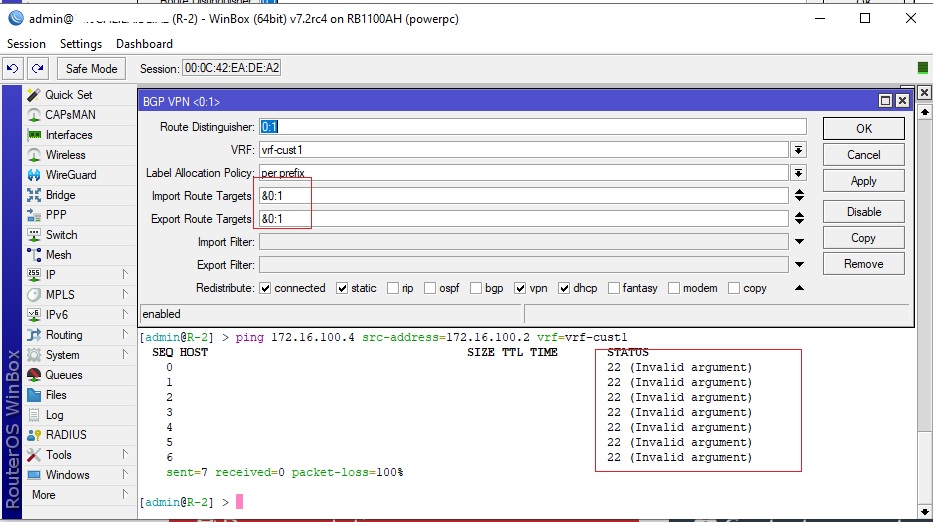
how many longer should we wait?
V7 is not beta anymore.
thx
export-list.rsc (3.49 KB)
Better some more…
Priority should be to fix features that already were working in v6 but are broken in v7.
When I look through the changelogs of testing release tree I must admit, that RC releases were released at a way higher pace several years ago. 6.41,6.42,6.43 and so on. New RC releases at least once a week or so. Some even within days. And the changelog within a week was like huge.
This info should be in the “priority” field present in each packet. That would be transferred to the priority in a VLAN tag, or it can be used (albeit with a detour via packet marks) in a queue tree.
I noticed this in rc3, now it’s reproducible in rc4. I have a Routing Filter rule that disappears after reboot:
 > routing/filter/rule/export
# feb/24/2022 14:45:29 by RouterOS 7.2rc4
# software id =
#
/routing filter rule
add chain=ospf-out disabled=no rule=reject
add chain=ospf-out disabled=no rule="if ( gw-interface ether1 || gw-interface wg-RedShield ) { reject; } accept;"
add chain=ospf-out disabled=no rule=reject
REBOOT…
 > routing/filter/rule/export
# feb/24/2022 14:48:16 by RouterOS 7.2rc4
# software id =
#
/routing filter rule
add chain=ospf-out disabled=no rule=reject
add chain=ospf-out disabled=no rule=reject
Did you already do a clean netinstall and import of the old exported config before?
I plan to do that with rc4 now that it is clear that a rc3->rc4 update does not work anyway in a router that uses multiple routing tables.
I hope it is caused by some database corruption that is fixed when a clean start is made… some other reports seem to suggest that.
I can’t do that, it’s CHR instance in Oracle Cloud Free Plan, and I can’t create custom disk images anymore 
Ok… don’t know if you can do a full configuration reset e.g. because you have a nearby VM that can serve as RoMON relay (if that is possible in that service), but I already did that before and it did not fully remedy the problem anyway.