testing v7.2rc4 as PPPoE server we get an issue describe in ticket [SUP-75504]:
on some cases (fast reauthentication from another parallel pppoe server) the router is not able to assign remote ip address. It is reported 0.0.0.0 in Active connection tab, but there is a remote ip address into the dynamic ppp interface and it is equal to last ip the client had in the parallel pppoe server where it was previously authenticated.
[admin@MikroTik] > /ip/firewall/service-port/disable dccp
failure: module dccp is built-in and cannot be individually disabled
[admin@MikroTik] > /ip/firewall/service-port/disable sctp
failure: module sctp is built-in and cannot be individually disabled
[admin@MikroTik] > /ip/firewall/service-port/disable udplite
failure: module udplite is built-in and cannot be individually disabled
Finally, RB5009 switch chip is simply not able to handle dst-address related ARP traffic, while CRS317 has more advanced switch features, and so properly handles it.
Thank you for the explanation MikroTik support !
Any word on what this initialization issue / change is? I’ve got some evidence that the CCR2004-16g-2s+ (running 7.1.1) is providing an open “dumb” switch for a short while during reboots. I haven’t dug into this too far because I’ve got other things to deal with, but it’d be useful to know if it’s a known issue with a fix in the pipeline.
*) ppp - improved stability when handling large amount of connections simultaneously;
I am still having problems with PPP sessions - CCR that is running as PPP Server (OVPN) suddenly starts to duplicate sessions without eliminating old ones … I found out that also configuration changes that are made when router is already making this problems are lost after reboot - like it does not permanently stores them…
I have 160+ OVPN Client connections (from MikroTik routers).
Upgraded pair of RB750G routers from 7.2rc3 to 7.2rc4. Upgrade vent well but now I have this error message. feb/26/2022 09:27:40 system,error,critical,radius error while running customized default configuration script: std failure: timeout (13)
Radius is not configured on any of those two routers. They are used for test only. VRRP and OpenVPN is configured on both of them.
BTW OpenVPN and VRRP don’t play well together or I should say that they don’t perform what I have expected.
When I simulate port failure on switch behind routers, connection is transferred but OpenVPN process is stuck to the port on main router and it newer goes down.
I know that I can script and do transfer that way but that isn’t elegant way.
And what is critical in one second change? And console crashed to.
feb/26/2022 09:25:13 system,info,critical Firmware upgraded successfully, please reboot for changes to take effect!
feb/26/2022 09:27:40 system,error,critical,radius error while running customized default configuration script: std failure: timeout (13)
feb/26/2022 09:28:36 system,critical,info ntp change time Feb/26/2022 09:27:53 => Feb/26/2022 09:28:36
feb/26/2022 09:44:38 system,critical,info ntp change time Feb/26/2022 09:44:38 => Feb/26/2022 09:44:39
[admin@Test-Backup] >
Console has crashed; please log in again.
I see no claim that this has been fixed… in general, one can say that when there is no mention in the changes, it is still broken.
(and it would only be worthwhile to report things that were fixed without mention in the changes)
@MT any estimation when Simple Queue + IPV6 will going to get fixed? our use case in production is simple enough no dynamic routing just plain NAT + PBR + Queue + IPV6 why is so hard for you guys to fix most of the IPV6 issue here?
In all fairness for most setup v7 is ok in our use case and we are ready to switch from v6 to v7, if only this main important function is working properly
What do queue fixes have to do with a 5ghz mipsbe wireless issue? And, no, I was running 7.2rc3 before this, so I can guarantee that these 5ghz mipsbe wireless issues were present in that version too.
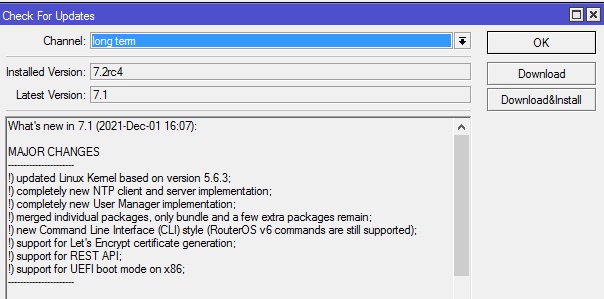
Both 7.2 rc3 and r4 does shows wrong in long term release
long term: 7.1
stable 7.1.3
testing 7.2 rc4
development: error: file not found.
Strange that 7.1.3 is stable and 7.1 is long term
.