v7.8 [stable] is released!

Hello.


SUP-108056
Clean netinstalled 7.8 from chr-7.8.vdi not print /ip/ipsec/installed-sa/print, only after reboot.
supout.rif from r1 and r2 in attachment SUP-108056

Command r1:


/certificate/add name="r1-ca" common-name="r1-ca" subject-alt-name="email:r1-ca" key-size=prime256v1 key-usage=key-cert-sign,crl-sign
:do {/certificate/sign [find name=r1-ca] name=r1-ca} on-error={:delay 2}
/certificate/add name="r1" common-name="192.168.2.14" subject-alt-name="IP:192.168.2.14" key-size=prime256v1 key-usage=digital-signature,content-commitment,key-encipherment,key-agreement,tls-server
:do {/certificate/sign [find name=r1] ca=r1-ca name=r1} on-error={:delay 2}
/certificate/add name="r1-r2" common-name="r1-r2" subject-alt-name="email:r1-r2" key-size=prime256v1 key-usage=digital-signature,key-encipherment,data-encipherment,key-agreement,tls-client
:do {/certificate/sign [find name=r1-r2] ca=r1-ca name=r1-r2} on-error={:delay 2}
:delay 2
/certificate/export-certificate r1-ca file-name=r1-ca
/certificate/export-certificate r1 file-name=r1
/certificate/export-certificate r1-r2 file-name=r1-r2 type=pkcs12 export-passphrase=passphrase
/ip/pool/add name=r1-r2 ranges=192.168.1.2
/ip/ipsec/mode-config/add address-pool=r1-r2 address-prefix-length=32 name=r1-r2 split-include=0.0.0.0/0 system-dns=no
/ip/ipsec/policy/group/add name=group1
/ip/ipsec/profile/add dh-group=ecp256 enc-algorithm=aes-256 hash-algorithm=sha256 name=profile1 prf-algorithm=sha256 proposal-check=strict
/ip/ipsec/peer/add exchange-mode=ike2 local-address=192.168.2.14 name=peer1 passive=yes profile=profile1
/ip/ipsec/proposal/add auth-algorithms=sha256 enc-algorithms=aes-256-cbc,aes-256-gcm lifetime=8h name=proposal1 pfs-group=ecp256
/ip/ipsec/identity/add auth-method=digital-signature certificate=r1 generate-policy=port-strict match-by=certificate mode-config=r1-r2 peer=peer1 policy-template-group=group1 remote-certificate=r1-r2
/ip/ipsec/policy/add dst-address=192.168.1.0/24 group=group1 proposal=proposal1 src-address=0.0.0.0/0 template=yes

Command r2:


/certificate/import file-name="r1-ca.crt" name="r1-ca" passphrase=""
/certificate/import file-name="r1.crt" name="r1" passphrase=""
/certificate/import file-name="r1-r2.p12" name="r1-r2" passphrase="passphrase"
/ip/ipsec/mode-config/add name=cfg1 responder=no
/ip/ipsec/policy/group/add name=group1
/ip/ipsec/profile/add dh-group=ecp256 enc-algorithm=aes-256 hash-algorithm=sha256 name=profile1 prf-algorithm=sha256 proposal-check=strict
/ip/ipsec/peer/add address=192.168.2.14/32 exchange-mode=ike2 name=peer1 profile=profile1
/ip/ipsec/proposal/add auth-algorithms="" enc-algorithms=aes-256-gcm lifetime=8h name=proposal1 pfs-group=ecp256
/ip/ipsec/identity/add auth-method=digital-signature certificate=r1-r2 generate-policy=port-strict match-by=certificate mode-config=cfg1 my-id=dn peer=peer1 policy-template-group=group1 remote-certificate=r1
/ip/ipsec/policy/add dst-address=0.0.0.0/0 group=group1 proposal=proposal1 src-address=0.0.0.0/0 template=yes

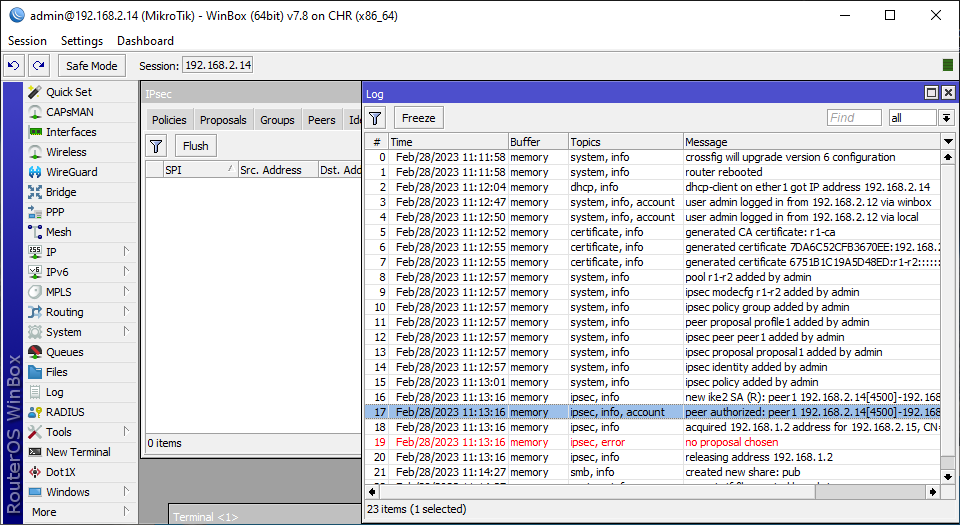
r1:
r1.png
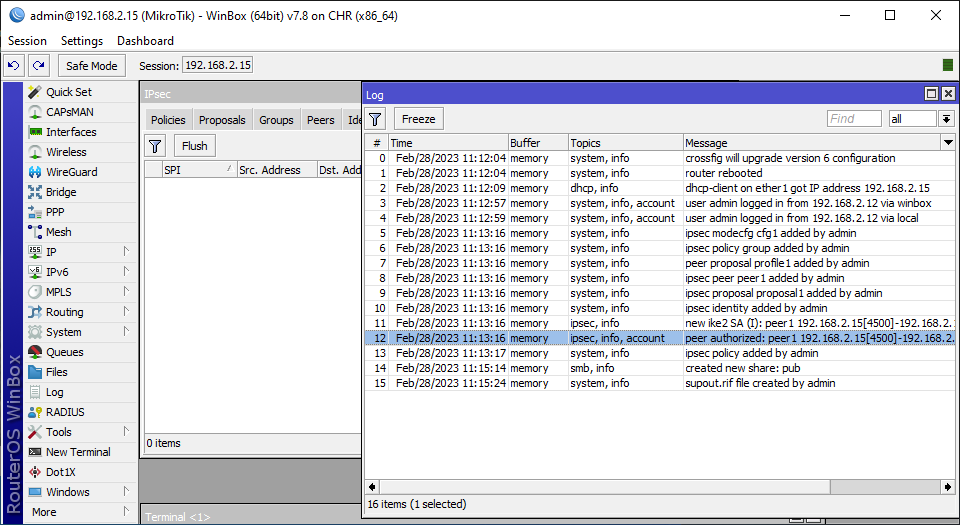
r2:
r2.png
Bug not always reproduced, many need netinstall few times.
supout.rif from r1 and r2 in attachment SUP-108056


Please, fix it.

Can you please advice how to rename the disk?
I habe usb1 or nvme1 and if I change the name, the error “can not change device type (6)” appears.

Thanks
dksoft

Thank you very much. Just an update. Using CRS317, ip address configured on a vlan (vlan belongs to a bridge with L3 HW enabled), currently after turning off IGMP Snooping for the bridge, ospfv3 works fine. The problem is whether IGMP Snooping is blocking some packets of ipv6

Hello,
Just FYI
On hap ac3 on 7.7 with a single usb flash drive mounted on /usb and adguard container running from usb drive, after the upgrade to 7.8 I’ve got

  • usb drive is now mounted on /usb1-part1
  • trying to change back to /usb results in an incorrect partition size error…
  • existing docker containers fails to start becaus of root path is now not existing (and cannot be changed, apparently)
  • pulling an image from dockerhub results in error 401 (known issue from other posts)
  • recreated the container after updating the mount points and uploading the container tar file, but it does not start and no logs whatsoever except for the image import success notice…

I’ve deleted the container and used a raspberry pi to run it :frowning:

What you need to change is the “slot” parameter.

When upgrade fails, it’s usually something in logs about the cause of it. So after you try to upgrade and it fails, immediately after reboot check logs to see the reason.

while upgrading my HEX (RB750Gr3) with DUDE I was surprised that the partition of the SDcard containing the DUDE data was renamed !

fixed this with
/dude set data-directory=sd1-part1

all other systems running fine after upgrade

Have you turned on IGMP Snooping?

Thanks we will check this


thanks, this is Winbox bug, should work from CLI -
disk set usb1 slot=lala

I’ve this problem since v7.7 → https://forum.mikrotik.com/viewtopic.php?t=192427&start=300#p982228.
No follow up or update from Mikrotik staff. I guess either i don’t know what i’m doing or they don’t … :slight_smile:
Anyway, I just reboot the box a few times more until it is happy to have the usb name matches with what i put in the Adguard container configuration. Not perfect but this is the way it is now …


The change that others are complaining about now, was made exactly to prevent the problem that you had!
Instead of “scanning the devices at boot and assigning them numbered names” like disk1 usb1 etc, now disks get fixed “slot” names that you can assign yourself.

Thank you for your information. I will give v7.8 a try then.

SFP no longer runs (= no link) in v7.8. The hardware still shows up. Everything comes back after downgrading to v7.7

The problem persists also on a clean installation after a full reset. Works in v7.7 but not in v7.8.

Any ideas what to try?

SFP: CTS SFP-31W2A(SM-10)-DR
Board: hEX S (MMIPS)

Hello,

I encounter the same with another gpon sfp module (FS GPON-ONU-34-20BI), the module is not detected anymore (Module present in GUI is unchecked), reverting back to v7.7 solve the issue.

I would like to add 3 other issues:

  • CPU usage is definitivly higher on v7.8: going from more or less 22% at 350 mhz on v7.7 to 30% at 1400 mhz on v7.8 (in basic router operation with ipv4 and ipv6, no containers, no ospf, no vpn, but capsman) for arround 500 Mbs download speed.
  • IPV6, firewall connection tab is reporting no connections (in web-gui, working fine in winbox) but this existing since at least v7.3.
  • On RB5009 activating bridge filter rules still disable ipv4 fasttrack… (sadly for now switch filter rules are not supported for new-vlan-priority)

I hope this will help.

Updated my hAP AC2 from 7.7 to 7.8, still having the problem that FastTracking stops working after few hours until you reboot the router (with a performance drop Speedtest over PPPoE from 930Mbps to 350Mbps).
I have updated the support case I’ve opened for the issue on 7.7.
Everything else seems ok, I’ve only noticed that the USB drive on which I schedule backus has been renamed from disk2 to usb1-part1.
SFP seems to be a systematic problem with v7.8. At least on some boards

http://forum.mikrotik.com/t/v7-8-stable-is-released/164757/1

iPhone 12 with iOS 16.3.1 cannot connect to WiFi if wpa3-psk is enabled.

I did a bit more testing, and I can say this issue depends on the sfp module.
For me on rb 5009 running v7.8:

  • FS GPON-ONU-34-20BI is not detected and therefore not working
  • Mikrotik S-RJ01 is working perfectly

Of course rolling back to v7.7 makes both modules running properly.

Can you please explain in more detail what issues are you facing with the Chateau LTE12? Do you already have a support ticket open?

@Pl07R3K try setting: /interface/wifiwave2/security/set yourWiFiprofile sae-pwe=hunting-and-pecking