Vlan configuration issue

Hello Guys,
I have tried and change the whole configuration to make it work during the week end. The good news is that now everything works (android app and visibiity of the whole network).
What I did is remove vlan100 and use only the bridge for LAN and the guest network on vlan 10.
PLease see the new config below. The only problem that I still do not understand is that, I need to make Ether 2 and ether 5 (the trunk ports connected to smart switches or smart AP) in admit all mode, and not admit only tagged as per Anav’s advice. If i use only tagged vlan option on these trunk ports I loose connectivity to the smart device.
Thank you to point out to me if I do anything wrong.

/interface bridge
add admin-mac=xxx auto-mac=no comment=defconf name=bridge \
    vlan-filtering=yes
/interface vlan
add interface=bridge name=GUEST_VLAN vlan-id=10
add interface=ether1 mtu=1492 name=vlan-IAM vlan-id=881
/interface pppoe-client
add add-default-route=yes disabled=no interface=vlan-IAM name=PPPoE-IAM user=\
/interface list
add comment=defconf name=WAN
add comment=defconf name=LAN
add name=VLAN
add name=BASE
/interface lte apn
/interface wireless security-profiles
set [ find default=yes ] supplicant-identity=MikroTik
/ip pool
add name=default-dhcp ranges=192.168.0.100-192.168.0.254
add name=GUEST_POOL ranges=192.168.10.100-192.168.10.254
/ip dhcp-server
add address-pool=default-dhcp disabled=no interface=bridge name=defconf
add address-pool=GUEST_POOL disabled=no interface=GUEST_VLAN name=GUEST_DHCP
/queue simple
add max-limit=2M/4M name=Queue_GUESTVLAN target=GUEST_VLAN
/system logging action
add email-to=h@gmail.com name=email target=email
/interface bridge port
add bridge=bridge comment=defconf interface=ether2
add bridge=bridge comment=defconf frame-types=\
    admit-only-untagged-and-priority-tagged interface=ether3
add bridge=bridge comment=defconf interface=ether4
add bridge=bridge comment=defconf ingress-filtering=yes interface=ether5
add bridge=bridge comment=defconf interface=sfp1
/ip neighbor discovery-settings
set discover-interface-list=!dynamic
/interface bridge vlan
add bridge=bridge tagged=ether2,ether5,bridge vlan-ids=10
/interface list member
add comment=defconf interface=bridge list=LAN
add comment=defconf interface=ether1 list=WAN
add interface=PPPoE-IAM list=WAN
add interface=GUEST_VLAN list=VLAN
add interface=lte1 list=WAN
/ip address
add address=192.168.0.1/24 comment=defconf interface=bridge network=\
    192.168.0.0
add address=192.168.10.1/24 interface=GUEST_VLAN network=192.168.10.0
/ip cloud
set ddns-enabled=yes
/ip cloud advanced
set use-local-address=yes
/ip dhcp-client
add comment=defconf disabled=no interface=ether1

/ip dhcp-server network
add address=192.168.0.0/24 comment=defconf dns-server=192.168.0.1 gateway=\
    192.168.0.1
add address=192.168.10.0/24 dns-server=192.168.0.1 gateway=192.168.10.1
/ip dns
set allow-remote-requests=yes servers=8.8.8.8,8.8.4.4
/ip dns static
add address=192.168.88.1 comment=defconf name=router.lan
/ip firewall address-list
add address=e1f10eca5397.sn.mynetname.net list=MyWANIP
/ip firewall filter
add action=accept chain=input comment="Allow VLAN" in-interface-list=VLAN
add action=accept chain=input comment="Allow LAN" in-interface-list=LAN
add action=accept chain=input comment=\
    "defconf: accept established,related,untracked" connection-state=\
    established,related,untracked
add action=drop chain=input comment="defconf: drop invalid" connection-state=\
    invalid
add action=accept chain=input comment="defconf: accept ICMP" protocol=icmp
add action=accept chain=input comment=\
    "defconf: accept to local loopback (for CAPsMAN)" dst-address=127.0.0.1
add action=drop chain=input comment="defconf: drop all not coming from LAN" \
    in-interface-list=!LAN
add action=accept chain=forward in-interface-list=LAN out-interface-list=VLAN
add action=accept chain=forward comment="Allow Estab & Related" \
    connection-state=established,related
add action=accept chain=forward comment="LAN Internet Access" \
    connection-state=new in-interface-list=LAN out-interface-list=WAN
add action=accept chain=forward comment="VLAN Internet Access Only" \
    connection-state=new in-interface-list=VLAN out-interface-list=WAN
add action=accept chain=forward comment="Allow forwarded ports" \
    connection-nat-state=dstnat
add action=drop chain=forward comment=Drop
add action=accept chain=forward comment="defconf: accept in ipsec policy" \
    ipsec-policy=in,ipsec
add action=accept chain=forward comment="defconf: accept out ipsec policy" \
    ipsec-policy=out,ipsec
add action=fasttrack-connection chain=forward comment="defconf: fasttrack" \
    connection-state=established,related
add action=accept chain=forward comment=\
    "defconf: accept established,related, untracked" connection-state=\
    established,related,untracked
add action=drop chain=forward comment="defconf: drop invalid" \
    connection-state=invalid
add action=drop chain=forward comment=\
    "defconf: drop all from WAN not DSTNATed" connection-nat-state=!dstnat \
    connection-state=new in-interface-list=WAN
/ip firewall nat
add action=masquerade chain=srcnat comment="hairpin nat" dst-address=\
    192.168.0.0/24 src-address=192.168.0.0/24
add action=masquerade chain=srcnat comment="defconf: masquerade" \
    ipsec-policy=out,none out-interface-list=WAN
add action=dst-nat chain=dstnat dst-address-list=MyWANIP dst-address-type=\
    local dst-port=80,5000,443,5001,5006,6690,16881,32400 protocol=tcp \
    to-addresses=192.168.0.10
add action=dst-nat chain=dstnat dst-address-list=MyWANIP dst-address-type=\
    local dst-port=9025-9040 protocol=tcp to-addresses=192.168.0.10
add action=dst-nat chain=dstnat dst-address-list=MyWANIP dst-address-type=\
    local dst-port=1194 protocol=udp to-addresses=192.168.0.10
/ip route
add check-gateway=ping distance=1 gateway=PPPoE-IAM
/ip service
set telnet disabled=yes
set ftp disabled=yes
set www disabled=yes
set ssh port=2500
set www-ssl certificate=https-cert disabled=no
/system clock
set time-zone-name=Africa/Casablanca
/system logging
add action=email prefix="ccc" topics=interface,info
/system scheduler
add comment="Reconnexion IAM" interval=1d name="Reconnexion Internet" \
    on-event=pppoe-reconnect policy=\
    ftp,reboot,read,write,policy,test,password,sniff,sensitive,romon \
    start-date=nov/29/2021 start-time=05:30:00
/system script
add comment=Reconnexion-Internet dont-require-permissions=no name=\
    pppoe-reconnect owner=admin policy=\
    ftp,reboot,read,write,policy,test,password,sniff,sensitive,romon source="/\
    log info message=\"pppoe-reconnect-script start\"\r\
    \n/interface pppoe-client disable PPPoE-IAM\r\
    \n:delay 3s\r\
    \n/ip firewall connection remove [find]\r\
    \n/interface pppoe-client enable PPPoE-IAM\r\
    \n/log info message=\"pppoe-reconnect-script done\""
/tool e-mail
set address=74.125.141.108 from=hhhhh@gmail.com port=587 \
    start-tls=yes user=domaineschefchaouni@gmail.com
/tool mac-server
set allowed-interface-list=LAN
/tool mac-server mac-winbox
set allowed-interface-list=LAN
Because they are hybrid with the “main” network untagged and guest network tagged. Whilst some purists want everything to be tagged there is nothing inherently wrong using hybrid rather than tagged if it makes sense for your use case. The TP-Link APs appear to not make it obvious that in multi-SSID mode VLAN 1 is always untagged and any other VLAN IDs are tagged.

I use TPLINK APS (smart ones) without issue. I do not send them any untagged vlans, only tagged vlans as they are smart APs.

Many vendors use something which is often referred to as “native VLAN” … and quite a few fix VLAN ID 1 to that use. And those who fix the VLAN ID, don’t talk about it loudly … which is one of reasons to stay away from VLAN ID 1 whenever explicitly setting VLAN ID. So essentially VLAN ID 1 is often sinonymous for untagged …

Speaking of the devil, default configuration on ROS uses VLAN ID 1 as native VLAN as well … and it’s hidden as well, one has to try a bit harder to see it in configuration.

Most consumer smart switches use vlan1 as native idea, that is not a reason for screwed up MT hybrid configuration.
Either a smart device can handle incoming tagged vlans or it cant.

Most consumer smart switches use vlan1 as native idea, that is not a reason for screwed up MT hybrid configuration.
Either a smart device can handle incoming tagged vlans or it cant.

The only reasons I have see for a hyrid port is two fold.

  1. Some VOIP phones that come with two ethernet connections, one from the switch or router and the second to a PC.
    a. the VOIP can read tagged vlans and consumes this vlan.
    b. the untagged vlan gets passed through to the PC.

  2. Ubquiti shitty products that come default expecting the managment VLAN to be untagged and the rest of the traffic as vlans, instead of all of them tagged from source (smart switch or router).

I don’t have any TP-Link access points, but your comment about how UniFi access points, when in factory default state, use “standard ethernet frames” to allow configuration makes me wonder how the initial configuration of TP-Link “smart” Access Points is done. “standard ethernet frames” is exacty what untagged frames are.

So how do TP-Link access points allow configuration, if they don’t support untagged access? I am not trying to get into an heated argument, I am just trying to understand.

I understand the advantages of using tagged only trunk ports between switches, as it can prevent accidentally mixing vlans via mismatched “native” vlans, But I can understand why UniFi does use untagged frames for the initial configuration. And yes, they can be configured to use a tagged vlan for management, but I think they “expect” that vlan 1 will always be untagged, so if you want a tagged vlan, you must choose a vlan other than 1. But doesn’t Omada behave very similar to UniFi? From what I have heard, it’s nearly a “clone” of UniFi, so I wouldn’t be surprised it it does allow connections from untagged networks.

Thank you but is there a way to tag also the pvid 1 of the bridge in order to have the trunks set correctly as per Anav’s advice with accepting only tagged traffic?
And another question: If the answer is no and I were to add a second vlan, and I wanted to make the ether 2 and 5 pure trunk ports by seleting the only tagged traffic option in the port configuration, what address would get the smart device connected to the port (AP or switch), would it keep a 192.168.0.x address if i keep pvid=1 (which does not happen when I remove the admit all option) , will it get a 192.168.10.x address if i use pvif=10 in the port? It seems like there is no more connectivity at all when I alow only tagged traffic.

Thanks

On TP LINK APS, switches just like on MT, the native untagged vlan IS ALWAYS 1 and is maintained throughout unless a port is designated as an access port or hybrid port or WLAN port…
Once you assign pvid to a port on a switch, it replaces the one, which is what happens on an access port or hybrid port.
For the TP LINK access points, one assigns the vlans to the WLANs and it automatically tags and untags the WLAN port.

The trunk ports with tagged vlans retain their transparent native vlan1, all the data vlans going over this port need to be tagged.
For the access port, the port going over this port needs to be untagged.

I use many vendors switches and and APs and they work this way.
RoS is consistent with this as well, The bridge retains the native vlan1… ’

Charifch, WE NEVER TAG VLAN1, we dont touch it… not on RoS not switch not on AP.
What we do is only replace vlan1 WHEN we assign a pvid to a port.
If you need help with a specific vendor switch or AP, except ubiquiti shit,… let me know.

That is why when you look at switch port details, you will always see vlan1 staying untagged on trunk ports and not used at all for access or hybrid ports.
Its never seen tagged.

I am in agreement with your words Anav, but my question is:
I have my bridge with PVID=1.
I have a GUest VLAN with PVIID=10.
I have the tplink AP connected to ether 5 (with pvid=1) getting its adress from the MT router.
I I configure the ether 5 in admit tagged traffic only , I loose connectivity to the tplink and it does not get any address.
If i configure it with admit all, it gets the bridge subnet as expected.
=> I understand from what you are saying is that this is normal behaviour because vlan 1 is untagged by default.
If I were to add another vlan, would I need to tag it in the ether 5 port too, and still leave the “admit all” option? So we never use the admit only tagged traffic option ?

I give the TPLINK the IP address ON the trusted subnet. I attach the TP LINK to the trunk port carrying lets say 2 vlans (home which is also trusted, and guest). I dont set vlan1 on the TPLINK, but I will quickly look to see if there were any other funny settings.
The tplink assigns access ports to the WLANS when you assign the vlan to the WLAN.

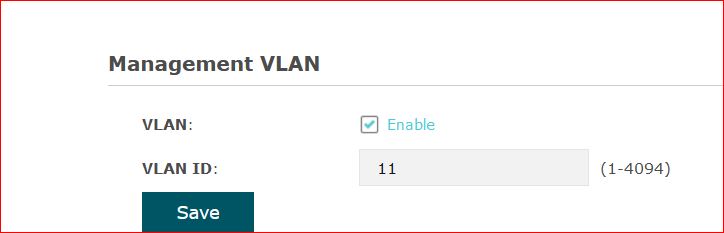
Okay I do set the management vlan on the TPLINK to the trusted subnet, on this example to vlan11

tplinkMVlan.JPG

Hi Anav,
I have applied exactely your instructions but it looks like the TPlink AP WA901-ND is unable to get the IP address from the MT when I tag vlan 100 and vlan10 on ether5. It does get the IP address which it is supposed to get when I set the ether 5 to admit all traffic but not when I choose only tagged traffic. Any idea why? For netgear switch plugged on ether2 in trunk mode, it gets its programmed address (192.168.0.2 static), but the AP which is supposed to get (192.168.0.3) never gets it.
Here is the config:

/interface lte
set [ find ] mac-address=CCCCCCCCCCCCCC name=lte1
/interface bridge
add admin-mac=CCCCCCCCCCCCCCCC auto-mac=no comment=defconf name=bridge \
    protocol-mode=none vlan-filtering=yes
/interface wireless
set [ find default-name=wlan1 ] band=2ghz-b/g/n bridge-mode=disabled \
    channel-width=20/40mhz-XX country=xxxxxxxx disabled=no distance=indoors \
    frequency=auto installation=indoor mode=ap-bridge ssid=CCCCCC \
    vlan-id=100 wireless-protocol=802.11 wps-mode=disabled
set [ find default-name=wlan2 ] band=5ghz-a/n/ac channel-width=\
    20/40/80mhz-XXXX country=CCCCCCCCCCC disabled=no distance=indoors frequency=\
    auto installation=indoor mode=ap-bridge ssid=CCCC \
    wireless-protocol=802.11 wps-mode=disabled
/interface vlan
add interface=bridge name=BASE_VLAN vlan-id=100
add interface=bridge name=GUEST_VLAN vlan-id=10
/interface list
add comment=defconf name=WAN
add comment=defconf name=LAN
add name=VLAN
add name=BASE
/interface lte apn
set [ find default=yes ] apn=CCCCCCCC
/interface wireless security-profiles
set [ find default=yes ] authentication-types=wpa2-psk mode=dynamic-keys \
    supplicant-identity=MikroTik
add authentication-types=wpa2-psk mode=dynamic-keys name=guest \
    supplicant-identity=MikroTik
/interface wireless
add disabled=no mac-address=ccccccccccccccc master-interface=wlan1 name=\
    wlan3 security-profile=guest ssid=GUEST
/ip hotspot profile
set [ find default=yes ] html-directory=flash/hotspot
/ip pool
add name=default-dhcp ranges=192.168.88.100-192.168.88.254
add name=BASE_POOL ranges=192.168.0.100-192.168.0.254
add name=GUEST_POOL ranges=192.168.10.100-192.168.10.254
/ip dhcp-server
add address-pool=default-dhcp disabled=no interface=bridge name=defconf
add address-pool=GUEST_POOL disabled=no interface=GUEST_VLAN name=GUEST_DHCP
add address-pool=BASE_POOL disabled=no interface=BASE_VLAN name=BASE_DHCP
/queue simple
add max-limit=2M/4M name=Queue_GUESTVLAN target=GUEST_VLAN
/system logging action
add email-to=CCCCCCCCCCC name=email target=email
/interface bridge port
add bridge=bridge comment=defconf frame-types=admit-only-vlan-tagged \
    ingress-filtering=yes interface=ether2 pvid=100
add bridge=bridge comment=defconf frame-types=\
    admit-only-untagged-and-priority-tagged ingress-filtering=yes interface=\
    ether3 pvid=100
add bridge=bridge comment=defconf interface=ether4 pvid=100
add bridge=bridge comment=defconf frame-types=admit-only-vlan-tagged \
    ingress-filtering=yes interface=ether5 pvid=100
add bridge=bridge comment=defconf interface=sfp1
add bridge=bridge comment=defconf interface=wlan1 pvid=100
add bridge=bridge comment=defconf interface=wlan2 pvid=100
add bridge=bridge interface=wlan3 pvid=10
/interface bridge vlan
add bridge=bridge tagged=ether2,bridge,ether5 untagged=wlan3 vlan-ids=10
add bridge=bridge tagged=ether2,bridge,ether5 untagged=wlan1,ether3,wlan2 \
    vlan-ids=100
/interface list member
add comment=defconf interface=bridge list=LAN
add comment=defconf interface=ether1 list=WAN
add interface=lte1 list=WAN
add interface=BASE_VLAN list=VLAN
add interface=GUEST_VLAN list=VLAN
/ip address
add address=192.168.88.1/24 comment=defconf interface=bridge network=\
    192.168.88.0
add address=192.168.10.1/24 interface=GUEST_VLAN network=192.168.10.0
add address=192.168.0.1/24 interface=BASE_VLAN network=192.168.0.0
/ip cloud
set ddns-enabled=yes
/ip cloud advanced
set use-local-address=yes
/ip dhcp-client
add comment=defconf dhcp-options=hostname,clientid disabled=no interface=\
    ether1
/ip dhcp-server lease
add address=192.168.0.2 comment="Netgear Switch RDC Tadla" mac-address=\
    C8:9E:43:9C:43:B3 server=BASE_DHCP
add address=192.168.0.3 client-id=1:d8:d:17:b7:73:2 comment="PA RDC Tadla" \
    mac-address=D8:0D:17:B7:73:02 server=BASE_DHCP
/ip dhcp-server network
add address=192.168.0.0/24 dns-server=192.168.0.1 gateway=192.168.0.1
add address=192.168.10.0/24 dns-server=192.168.0.1 gateway=192.168.10.1
add address=192.168.88.0/24 comment=defconf dns-server=8.8.8.8 domain=8.8.4.4 \
    gateway=192.168.88.1
/ip dns
set allow-remote-requests=yes servers=8.8.8.8,8.8.4.4
/ip dns static
add address=192.168.88.1 comment=defconf name=router.lan
/ip firewall address-list
add address=cccccccccccccc list=MyWANIP
/ip firewall filter
add action=accept chain=input comment=\
    "defconf: accept established,related,untracked" connection-state=\
    established,related,untracked disabled=yes
add action=drop chain=input comment="defconf: drop invalid" connection-state=\
    invalid disabled=yes
add action=accept chain=input comment="defconf: accept ICMP" disabled=yes \
    protocol=icmp
add action=accept chain=input comment=\
    "defconf: accept to local loopback (for CAPsMAN)" disabled=yes \
    dst-address=127.0.0.1
add action=drop chain=input comment="defconf: drop all not coming from LAN" \
    disabled=yes in-interface-list=!LAN
add action=accept chain=forward comment="defconf: accept in ipsec policy" \
    disabled=yes ipsec-policy=in,ipsec
add action=accept chain=forward comment="defconf: accept out ipsec policy" \
    disabled=yes ipsec-policy=out,ipsec
add action=fasttrack-connection chain=forward comment="defconf: fasttrack" \
    connection-state=established,related disabled=yes
add action=accept chain=forward comment=\
    "defconf: accept established,related, untracked" connection-state=\
    established,related,untracked disabled=yes
add action=drop chain=forward comment="defconf: drop invalid" \
    connection-state=invalid disabled=yes
add action=drop chain=forward comment=\
    "defconf: drop all from WAN not DSTNATed" connection-nat-state=!dstnat \
    connection-state=new disabled=yes in-interface-list=WAN
add action=accept chain=input comment="Allow VLAN" in-interface-list=VLAN
add action=accept chain=input comment="Allow LAN" in-interface-list=LAN
add action=accept chain=input comment=\
    "defconf: accept established,related,untracked" connection-state=\
    established,related,untracked
add action=drop chain=input comment="defconf: drop invalid" connection-state=\
    invalid
add action=accept chain=input comment="defconf: accept ICMP" protocol=icmp
add action=accept chain=input comment=\
    "defconf: accept to local loopback (for CAPsMAN)" dst-address=127.0.0.1
add action=drop chain=input comment="defconf: drop all not coming from LAN" \
    in-interface-list=!LAN
add action=accept chain=forward in-interface=BASE_VLAN out-interface=\
    GUEST_VLAN
add action=accept chain=forward comment="Allow Estab & Related" \
    connection-state=established,related
add action=accept chain=forward comment="LAN Internet Access" \
    connection-state=new in-interface-list=LAN out-interface-list=WAN
add action=accept chain=forward comment="VLAN Internet Access Only" \
    connection-state=new in-interface-list=VLAN out-interface-list=WAN
add action=accept chain=forward comment="Allow forwarded ports" \
    connection-nat-state=dstnat
add action=drop chain=forward comment=Drop
add action=accept chain=forward comment="defconf: accept in ipsec policy" \
    ipsec-policy=in,ipsec
add action=accept chain=forward comment="defconf: accept out ipsec policy" \
    ipsec-policy=out,ipsec
add action=fasttrack-connection chain=forward comment="defconf: fasttrack" \
    connection-state=established,related
add action=accept chain=forward comment=\
    "defconf: accept established,related, untracked" connection-state=\
    established,related,untracked
add action=drop chain=forward comment="defconf: drop invalid" \
    connection-state=invalid
add action=drop chain=forward comment=\
    "defconf: drop all from WAN not DSTNATed" connection-nat-state=!dstnat \
    connection-state=new in-interface-list=WAN
/ip firewall nat
add action=masquerade chain=srcnat comment="hairpin nat" dst-address=\
    192.168.0.0/24 src-address=192.168.0.0/24
add action=masquerade chain=srcnat comment="defconf: masquerade" \
    ipsec-policy=out,none out-interface-list=WAN
add action=dst-nat chain=dstnat dst-address-list=MyWANIP dst-address-type=\
    local dst-port=80,5000,443,5001,5006,6690,16881,32400 protocol=tcp \
    to-addresses=192.168.0.8
add action=dst-nat chain=dstnat dst-address-list=MyWANIP dst-address-type=\
    local dst-port=9025-9040 protocol=tcp to-addresses=192.168.0.8
add action=dst-nat chain=dstnat dst-address-list=MyWANIP dst-address-type=\
    local dst-port=1194 protocol=udp to-addresses=192.168.0.8
/system clock
set time-zone-name=xxxxxxxxxxxxxx
/tool mac-server
set allowed-interface-list=LAN
/tool mac-server mac-winbox
set allowed-interface-list=LAN

Not sure what you are doing but this is a really old 300N access point.
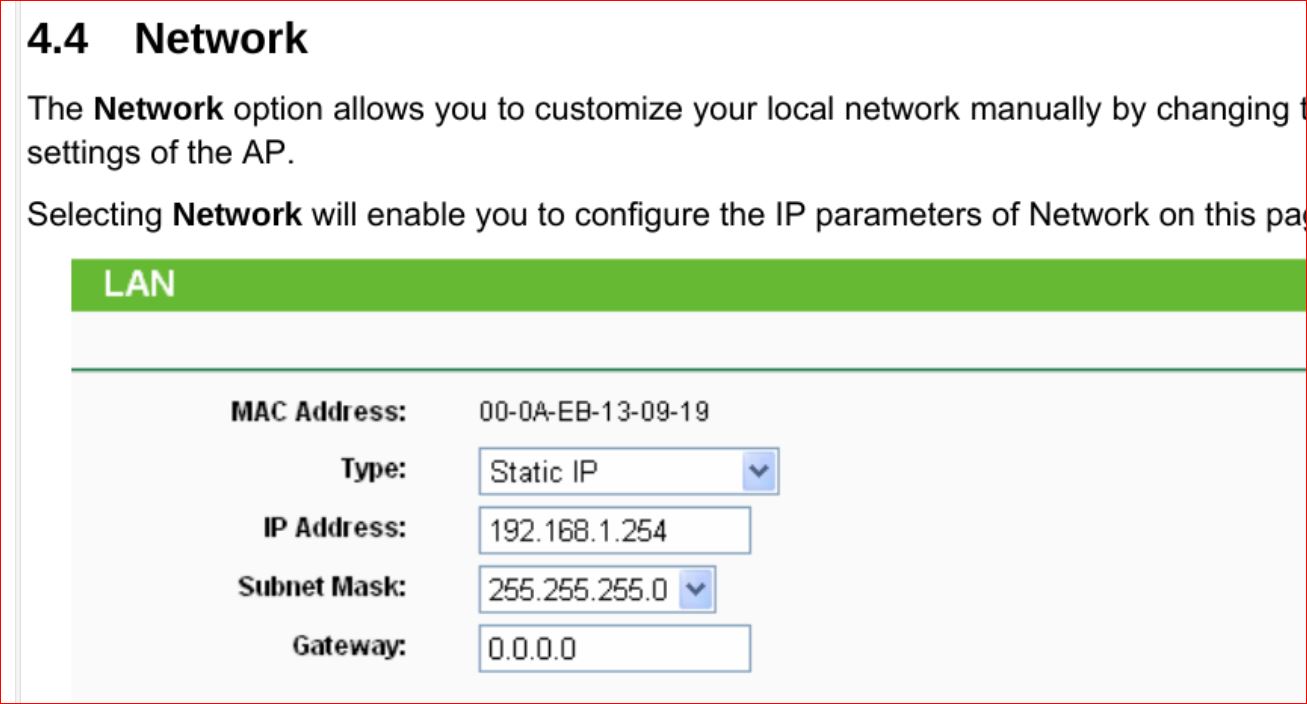
Whichever is your trusted LAN aka vlan100, find an unused IP address on the router check dhcp leases.
Then add the mac address of the AP tot he router and manually enter in the IP address with the mac address in DHCP leases for the vlan subnet.

Then go to the AP and switch its lan settings to the IP address above… should work.

tpl.JPG

I dont think you understand what your doing take this line…

/interface bridge port
add bridge=bridge comment=defconf frame-types=admit-only-vlan-tagged
ingress-filtering=yes interface=ether2 pvid=100

On one hand you are saying this is a Trunk port by only allowing vlan tagged traffic.
In other words it is talking to another smart device and passing traffic both in and out of the port with vlan tags.

Then you state oh this port is an Access port with pvid of 100.
Meaning, that any traffic originating from the dumb device attached to the port should have its traffic tagged with 100 upon entry to the port and untagged upon exit of the port going back to the dumb device.

You cant have both here…

SAME issue with etherport 5!!!

You reallly need to read this article over again…
http://forum.mikrotik.com/t/using-routeros-to-vlan-your-network/126489/1

++++++++++++++++++++++++++++++++++++++++

Ok so I shall then keep PVID=1 for Ether 2 and 5?
When I do so, the Switch on Ether 2 gets an IP address from the GUEST_VLAN (192.168.10.X) and I have no understanding why, even when assigingn a static IP address on the base vlan to the switch
And is it possible that this approach works with the netgear switch only and not with this old AP? Because, it looks like the AP definitely does not want to take any address when connected to ether 5 or ether 2 (tried permutating them)

What do you mean keep vlan=1 for ports, we dont even think about vlan1 for ports,
Its the default vlan for the bridge and is left alone.


Once you have setup your AP as suggested do the people on the vlans 10 and 100 get internet traffic.
In other words do not ask the AP to get any address, give it its adddress manually on vlan100 as explained.

If push comes to shove I can do a skype session to have a look at your desktop etc…

The only other thing I can think of that may be interfering is the fact that you have the bridge giving out DCHP on all ports as well.
The next step would be to change that to a VLAN so its only goes on ports you want it to go out on.

Well to be honest I lost and made you loose so much time …sorry.
If you feel you can do a skype session just let me know I would be very grateful. My email if you want to reach direct: charifch@yahoo.fr
I will look into your last 2 posts though just to make sure I cannot handle it alone

Thanks

You are both going around in circles, in no particular order:

The TL-WA901ND does not have an option to explicitly set a management VLAN ID which the EAPxxx models do, so it is likely that managment access is always untagged. It is not clear if using an SSID with associated an VLAN ID 1 leads to tagged or untagged packets, however https://www.tp-link.com/us/support/faq/418/ implies that TP-Link have conflated ‘VLAN ID 1’ with ‘untagged’.

Untagged VLANs have no ID on the wire, they are regular ethernet packets with no VLAN header between the ethernet addresses and payload data. Having a PVID usually means ‘insert a VLAN header with the specified ID to packets with no VLAN header on ingress’ and ‘remove the VLAN header containing the specified ID from the packet’ on egress. The VLAN ID at each end can be completely different as each end has no knowledge of what ID the other is using.

There is a “feature” in many devices in that they will often accept tagged packets with the same VLAN ID which is applied to untagged packets on ingress. For example if a device has a port with a PVID of 42 it will not only add a VLAN header with the ID 42 to untagged packets on ingress, it will also accept already tagged packets where the ID is 42. However on egress any VLAN headers with the ID 42 are removed from the packets, so it is possible for packets in one direction to be tagged and in the other direction untagged which works for devices which can handle both cases but breaks those which expect untagged only. This can lead to some devices communicating, and others not, despite them all appearing to be part of the same network.

Mikrotiks will exhibit this performance with ingress-filtering=no or ingress-filtering=yes frame-types=admit-all. The OpenWRT UI fibs for devices with Atheros fast (100Mbit) switch chips as they are incapable of hybrid operation, a port with a PVID set actually leaves packets with that ID tagged on egress but will accept both untagged and tagged with that ID on ingress.

A Mikrotik bridge-to-CPU port is no different from any ports added under /interface bridge port, it has pvid=, ingress-filtering= and frame-types= the only difference being the are specified as part of the bridge itself under /bridge. So by default when creating a bridge the bridge-to-CPU port is untagged with VLAN ID 1, untagged packets from-CPU-to-bridge have a VLAN header with ID 1 inserted, and any packets from-bridge-to-CPU have VLAN headers with ID 1 removed. If you want to make the bridge-to-CPU port truly tagged-only it must have ingress-filtering=yes frame-types=admit-only-vlan-tagged which causes pvid= to be ignored.

In that case, we set both vlans tagged to ether5 and if you recall the oP has the bridge giving out dhcp on all ports as well.
Thus we give the AP a static fixed address on the MT for 192.168.88 network and put that into the LAN settings for the AP.
That should do it…