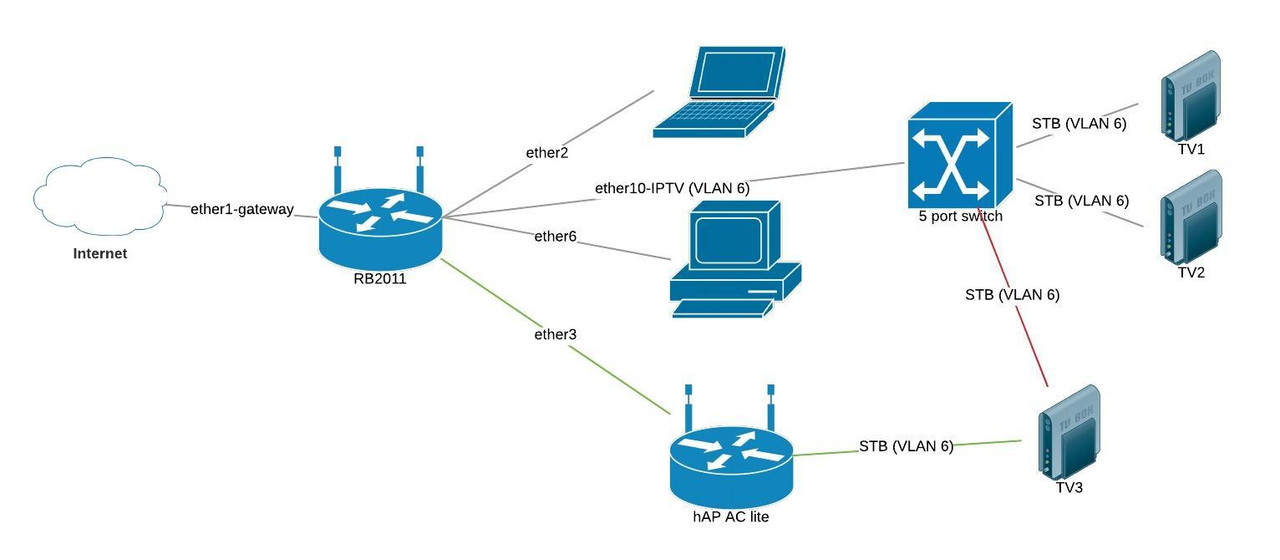
VLAN pass-through over router to AP

export-rb2011-trimmed.rsc (7.07 KB)
Hello Mikrotik guru’s,

I have RB2011 successfully dealing with home tasks. In addition it routes the local Telia IPTV VLAN (id=6) to isolated port (ether10-IPTV). All the VLAN stuff has been made by the simple way:

/interface vlan
add interface=ether1-gateway name=vlan-iptv vlan-id=6

/interface bridge
add name=bridge-iptv

/interface bridge port
add bridge=bridge-iptv interface=vlan-iptv
add bridge=bridge-iptv hw=no interface=ether10-IPTV

I decided to add another TV set on a distant place and improve the Wifi coverage so I have bought hAP ac lite for these tasks. I configured CAPsMAN on them successfully, but I have problems to configure VLAN 6 submission to some dedicated ethernet port of hAP. My target is to implement “green lines” ant to drop “red” one:

I have tried to configure the similar “VLAN - ethernet port” snippet on hAP with no luck. Maybe the VLAN 6 packets is not properly passed thorough the routing chain (ether1-gateway ↔ bridge-local) on RB2011? How to achieve VLAN 6 pass-thorough to port ether3 of RB2011 and also to keep the fire-walled untagged LAN on them for the Internet service?

I have attached the RB2011 config without wireless, IPSEC and another not important things.

Thank you for all possible ideas and solutions!

So to recap, you have standard internet coming over the WAN connection from your ISP.
On the same line they also have IPTV on vlan6?

So the hapAC unit take ether1 coming from the router as a trunk port
Setup a bridge and do the following.

interface bridge
add admin-mac=xx.xx.xx.xx.xx auto-mac=no comment=defconf name=
bridgeiptv vlan-filtering=yes
/interface ethernet
set [ find default-name=ether1 ] speed=100Mbps
/interface vlan
add interface=bridgeiptv name=IPTV-WIFI van-id=6
/interface wireless security-profiles (as required)
/interface wireless
set [ find default-name=wlan1 ] band=bandofyourchoice country=yourcountry disabled=no
distance=indoors frequency=xxxx mode=ap-bridge name=HAPAC_WLAN
security-profile=devices_only ssid=IPTVSSID vlan-id=6 vlan-mode=use-tag
wireless-protocol=802.11 wps-mode=disabled
/interface bridge port
add bridge=bridgeiptv comment=defconf interface=ether1
add bridge=bridgeHallway comment=defconf interface=HAPAC_WLAN
/interface bridge vlan
add bridge=bridgeHallway tagged=HAPAC_WLAN,ether1 vlan-ids=6


On the RB router
ether3 is the trunk port to the HAPAC so ensure its defined in bridge port settings:
add bridge=bridge-iptv comment=defconf interface=ether3 ingress filtering=yes

Then ensure the vlan is identified in interface bridge vlan settings:
/interface bridge vlan
add bridge=bridge-iptv tagged=bridge-iptiv,ether3,ether10 vlan-ids=6

Thank you, anav, your response is highly appreciated.

So to recap, you have standard internet coming over the WAN connection from your ISP.
On the same line they also have IPTV on vlan6?

Yes, you are right, on the same optical wire goes Internet and IPTV on VLAN6.

It’s one problem regarding this:

On the RB router
ether3 is the trunk port to the HAPAC so ensure its defined in bridge port settings:
add bridge=bridge-iptv comment=defconf interface=ether3 ingress filtering=yes

I have got failure: device already added as bridge port
The port ether3 is already included in bridge-local with the reason to get routed and filtered internet. If I exclude them from bridge-local so how this port will get another packets than VLAN6 tagged?

/interface bridge port
add bridge=bridge-local interface=ether2-Rimelis-desktop
add bridge=bridge-local interface=wlan1
add bridge=bridge-iptv interface=vlan-iptv
add bridge=bridge-local interface=ether6
add bridge=bridge-local interface=wlan2
add bridge=bridge-local interface=ether3
add bridge=bridge-local interface=ether4
add bridge=bridge-local interface=ether5
add bridge=bridge-local interface=ether7
add bridge=bridge-local interface=ether8
add bridge=bridge-local interface=ether9
add bridge=bridge-iptv hw=no interface=ether10-IPTV

Thank you!

Okay so you have two bridges…
I will have to think about this

The number of bridges is not the case should stop us. It is more convenient to have only one bridge on whole router so let’s have it - I can reconfigure everything because it’s home router. Just say what to do, please. :wink:

You can remove the below line:
/interface bridge vlan
add bridge=bridge-iptv tagged=ether1-gateway untagged=ether10-IPTV vlan-ids=6

Then remove ether3 from bridge-local and add it to bridge-iptv.

That should be all you need to do

Please Post you config again after your done

Hello,

Dear CZFan, thank you for your post, I am confused a little bit: do you mean that I have to use your snippet:

/interface bridge vlan
add bridge=bridge-iptv tagged=ether1-gateway untagged=ether10-IPTV vlan-ids=6

instead of anav’s snippet:

Then ensure the vlan is identified in interface bridge vlan settings:
/interface bridge vlan
add bridge=bridge-iptv tagged=bridge-iptiv,ether3,ether10 vlan-ids=6

?

I am going to play with these settings at late afternoon (EET).