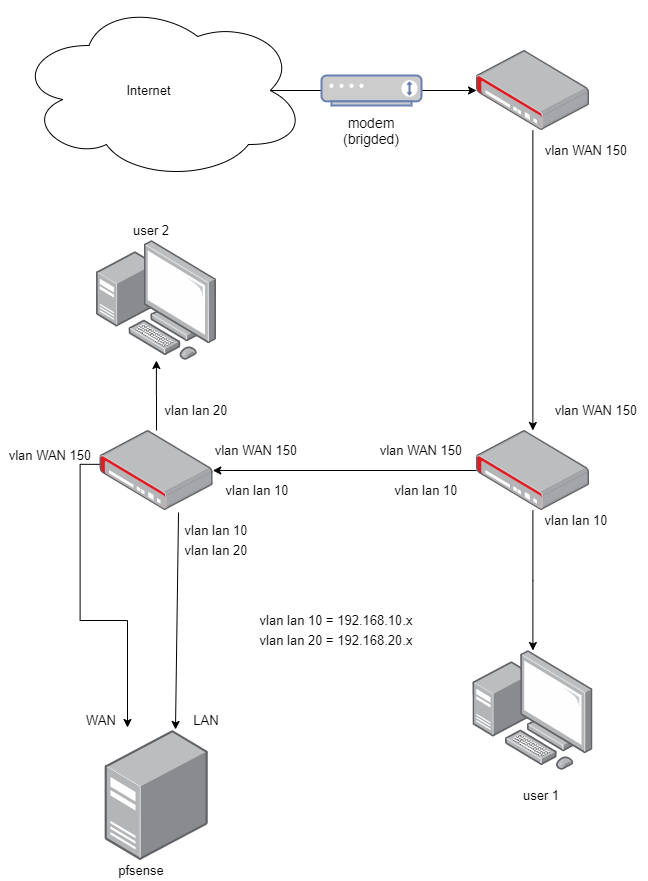
That is correct, they are used as switches right now. (simple brigde and vlan setup, nothing else)
Edit: I can add the config from the last router (closest to pfsense box). I have removed vlan id 20 from the router, just to make it easier for my self to get the basic stuff working correctly first. And I have removed RSTP from all brigdes.
I used one bridge and added all the VLAN’s to it. On the bridge VLAN you can add all VLAN’s and mark all ether ports either tagged (in case of a trunk port with multiple VLAN’s) or untagged (for a sngle VLAN or access port).
Do I need both interface vlans AND brigde vlan configured?
With interface vlans I get traffic, but packet loss. With brigde vlans I get some connectivity but having problems getting my network up and running.
If anyone know of examples on configuring a MT router basicly as a switch with VLANs that would be very appreciated.
That’s easy to check. Speedtest to internet shows ~50% speed and ping shows packet loss:
PING 8.8.8.8 (8.8.8.: 56 data bytes
64 bytes from 8.8.8.8: icmp_seq=0 ttl=116 time=13.750 ms
64 bytes from 8.8.8.8: icmp_seq=1 ttl=116 time=16.930 ms
64 bytes from 8.8.8.8: icmp_seq=2 ttl=116 time=13.187 ms
— 8.8.8.8 ping statistics —
10 packets transmitted, 3 packets received, 70.0% packet loss
round-trip min/avg/max/stddev = 13.187/14.622/16.930/1.648 ms
When that is said. The packet loss does not happen before pfsense but after. The ping results above are from WAN interface on pfsense.
Got All VLANs up and running, no packet loss, full speed across the network and all SSID’s working as they should - all good and fine
But I need to add a ‘managment’ network as I am now not able to communicate with the routers via winbox - guess that’s because all packages from “user 1 pc” are tagged with VLAN headers and the routers are on another network/vlan 1.
 : 56 data bytes