VLANs on RB750GR3 - I'm stuck...

So recommending… where LAN = all internal subnets.
FROM
add chain=input action=drop
TO
add chain=input action=reject interface-list=LAN reject-with=icmp-admin-prohibited
add chain=input action=drop

And
FROM
add chain=forward action=drop
TO
add chain=input action=reject interface-list=LAN reject-with=icmp-admin-prohibited
add chain=input action=drop

So let me get this straight the topology is ISP modem --------> Router1 -------> Switch --------->MT DEVICE/Router

Where Router 1, only handles IP DHCP client aspect of routing then carries traffic to switch and then to MT Device on a private subnet IP.

Switch (lets say 24 port)

  • Gets internet on ether1 (access port) (vlan10)
  • Rest of ports are detailed in its vlan settings
  • Passes internet all VLAN traffic (for L3/DHCP/internet) to MT device on stick on port 24

MT on a stick (acting as a router).
ether 1 is a Trunk Port connecting to port 24 on the switch.
IP DHCP Client is vlan10 interface is ether1 (static IP address private)
All other vlans are assigned, IP address with interface ether 1, IP pool, Dhcp-server, dhcp-server network
Determine necessary firewall rules.

interface list
LAN ----- all vlans save10
WAN ------vlan10
CLOSE?

Close. I do not have a “router 1”, so it’s actually much simpler:

Internet → Cable mode (in bridge mode) → MT (WAN on eth1)
MT, eth2 (has all VLANs as per config: 10, 20, 30, 40, 50, all with their own DHCP server, all looking to 192.168.10.11 for DNS) → switch trunk port

@sob, that’s what i had in mind, drop the traffic coming from the Internet and reject the internal traffic…

Here is a waterproof VLAN tutorial:
https://administrator.de/contentid/367186

Really? I drowned trying to read it. :slight_smile:

As MK stated, this is a clear case of Bridgephobia ;-PP

a. identify all vlans and give them a parent interface of ether2
b. all vlans get IP pool, IP address, dhcp-server, dhcp-server network
c. Apply firewall rules
d. done.

other dribs and drabs.
ensure each vlan is added to the LAN interface.
Not sure why you are complicating life by using vlan10 for ether1 (access to bridged modem/router).
Assuming you are getting a private IP??

/ip firewall filter
add action=accept chain=input comment="defconf: accept established,related,untracked" connection-state=established,related,untracked
add action=drop chain=input comment="defconf: drop invalid" connection-state=invalid
add action=accept chain=input comment="defconf: accept ICMP" protocol=icmp
add action=accept chain=input in-interface-list=Authorized src-address-list=Admin dst-port=xxxx protocol=tcp {winbox}
add action=accept chain=input comment="Allow LAN DNS queries-UDP" \ {and NTP services if required etc}
dst-port=53 in-interface-list=LAN protocol=udp
add action=accept chain=input comment="Allow LAN DNS queries - TCP" \
dst-port=53 in-interface-list=LAN protocol=tcp
add action=reject chain=input in-interface-list=LAN reject-with=icmp-admin-prohibited {useful for tracking LAN issues}
add action=drop chain=input comment="drop all else"
{forward chain}
add action=accept chain=forward comment="defconf: accept in ipsec policy" ipsec-policy=in,ipsec
add action=accept chain=forward comment="defconf: accept out ipsec policy" ipsec-policy=out,ipsec
add action=fasttrack-connection chain=forward comment="defconf: fasttrack" connection-state=established,related
add action=accept chain=forward comment="defconf: accept established,related, untracked" connection-state=established,related,untracked
add action=drop chain=forward comment="defconf: drop invalid" connection-state=invalid
add action=accept chain=forward comment="allow internet traffic" in-interface-list=LAN out-interface-list=WAN
add action=accept chain=forward comment="allow dst-nat from both WAN and LAN (including port forwarding)" connection-nat-state=dstnat
add action=reject chain=forward in-interface-list=LAN reject-with=icmp-admin-prohibited {useful for tracking LAN issues}
add action=drop chain=forward comment="drop all else"
/ip firewall nat
add action=masquerade chain=srcnat comment="defconf: masquerade" ipsec-policy=out,none out-interface-list=WAN

if any communication is to be allowed between vlans, make the necessary rules.

For example if the admin on vlanXX needs access to all the vlans.
add chain=forward action=accept in-interface=vlanXX out-interface-list=LAN src-address=IPofAdminPC (or src-address-list if the admin has several devices)

For example if there is a shared device such as a printer on vlan YY
add chain=forward action=accept in-interface-list=LAN out-interface=VLANYY dst-address=IP of printer (protocol= if required).

Hi,
I would say, that’s a lengthy tutorial, which is not bad for bridge VLAN filtering, but a device like the RB750GR3 does not have a switch chip with HW Offloading, so that would work, but all bridging is done using the CPU.
To use the built in switch chip for trunking, bridging on must not configure a bridge with vlan filtering enabled.
I have found the following videos very helpful on VLANs on MT:
Configure VLAN on built-in switch chip in MikroTik (this explains exactly, what you want to have):
https://www.youtube.com/watch?v=rvQ6o4RfnoU&list=PLZDygwrqq7bW7yi15YEPHInbQmsHZulUz&index=20
This guy compares all the possible VLAN config types in these videos:
https://www.youtube.com/watch?v=4BOYqtV4MCY&list=PLJ7SGFemsLl1QUNkgAbGj9ldlWRrr8zMj&index=1
https://www.youtube.com/watch?v=TAGW_XCqCfs&list=PLJ7SGFemsLl1QUNkgAbGj9ldlWRrr8zMj&index=2

I am not affiliated with any of the guys creating those videos, but I wish I had those available before I have set up my MTs.


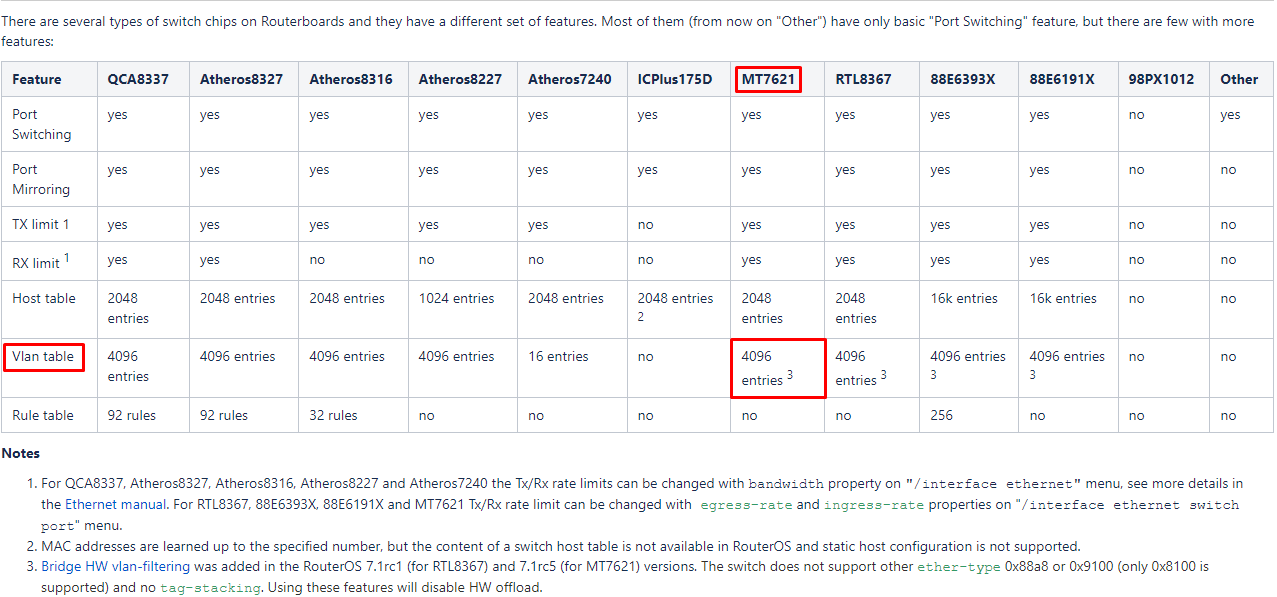
Switch chip used in RB750Gr3 can not be configured for VLAN stuff under ROS v6. Under ROS v7 it received the bridge hw offliading so again it has to be configured with bridge vlan-filtering.

Hi mkx,
thanks, I hate to write, but I think you are wrong.

-According to here: https://help.mikrotik.com/docs/display/ROS/Switch+Chip+Features
HEX has MT7621 and has a VLAN table.
It also says:

Bridge HW vlan-filtering was added in the RouterOS 7.1rc1 (for RTL8367) and 7.1rc5 (for MT7621) versions. The switch does not support other ether-type 0x88a8 or 0x9100 (only 0x8100 is supported) and no tag-stacking. Using these features will disable HW offload.

-That means, Bridge HW vlan filtering was added from 7.1rc1. Of course you can still configure it’s switch chip in any recent 6.xx. You can also use bridge vlan filtering in 6.xx, just without HW acceleration.

-I have no HEX, but a HEX S, which has the same switch chip. I have a vlan config on it based on switch chip (admittedly not very extensive as it’s sole purpose is running Capsman). But this proves, that you can use the switch chip for tagging/trunks :

[admin@vie-r5hexs] /interface ethernet switch> print
Flags: I - invalid 
 #   NAME                      TYPE             MIRROR-SOURCE                     MIRROR-TARGET                     SWITCH-ALL-PORTS
 0   switch1                   MediaTek-MT7621  none                              none                             
[admin@vie-r5hexs] /interface ethernet switch> export hide-sensitive 
# mar/13/2022 12:04:58 by RouterOS 6.49.4
# software id = BLURRED
#
# model = RB760iGS
# serial number = CAFEAFFE
/interface ethernet switch vlan
add independent-learning=no ports=e1uplink,switch1-cpu switch=switch1 vlan-id=9

BR
Woland

Could be that switch chip setup indeed started to work in some late v6 release. The old documentation about switch chip features however states no VLAN support on MT7621. I’ll have to trust you when saying that in 6.49.4 VLANs are properly dealt with by switch chip. Because the config snippet you’re showing is far from complete for AR8327 or QCA8327 (i.e. you can write anything you want under /interface ethernet switch vlan but nothing is enforced without setting things under /interface ethernet switch port, property vlan-mode=secure).

Sadly documentation on MT site mostly lacks information about which ROS version changed some feature set.

Hi mkx,
yes I have a second setup with a HEX S , where some more sophisticated VLAN config is also functioning. Also some HEX PoEs of mine are working fine with some more complicated VLAN setups.
I can only speak about my experience in the time interval between last summer and today. I think I have set up my HEX S with 6.46.x first and it was working since. I also remember to have read something about Mediatek and VLAN support, but I can´t find that anymore.

I definitely agree with you about the confusing MT manuals. Also I am no beginner with VLANs, I have used many different solutions from many vendors, but no vendor I know of, has managed to make VLANs so confusing as MTs implementation.

I still do enjoy playing with MT. :slight_smile:

W

Hello again.

Finally - had time again to revisit my firewall. This is what I have now. The good news - the major stuff is working. I haven't spent time yet on getting my Wireguard VPN working, but that's not a big issue at the moment. What I AM happy about is that I figured out how to implement firewall rules to separate the VLAN traffic where I need to.

Here is my config, exported with hide-sensitive and further cleaned up by using xx in IP addresses and names:

mar/20/2022 13:56:55 by RouterOS 7.1

software id = 72VR-1FM3

model = RB750Gr3

serial number = D5030E3E8970

/interface ethernet
set [ find default-name=ether1 ] name=ether1-WAN
set [ find default-name=ether5 ] comment="Management port" name=ether5-access

/interface wireguard
add listen-port=13231 mtu=1420 name=wireguard1

/interface vlan
add interface=ether2 name=GuestWifi vlan-id=30
add interface=ether2 name=LAN vlan-id=10
add interface=ether2 name=Phone vlan-id=40
add interface=ether2 name=Tina-TWORK vlan-id=50
add interface=ether2 name=Wifi vlan-id=20

/interface list
add comment="All VLANs list" name=VLANs
add comment=WAN name=WAN
add name=VLAN30
add name=VLAN10

/interface lte apn
set [ find default=yes ] ip-type=ipv4

/interface wireless security-profiles
set [ find default=yes ] supplicant-identity=MikroTik

/ip ipsec peer
add address=184.xx.xx.xx/32 local-address=184.xx.xx.xx name=WORK

/ip ipsec profile
set [ find default=yes ] dh-group=modp1024 dpd-interval=10s enc-algorithm=3des hash-algorithm=md5 lifetime=8h name=WORK nat-traversal=no

/ip ipsec proposal
set [ find default=yes ] disabled=yes
add enc-algorithms=3des lifetime=8h name=WORK

/ip pool
add comment=VLAN-10 name=LAN ranges=192.168.10.40-192.168.10.60
add comment=Management name=Ether5-access ranges=192.168.100.10-192.168.100.20
add comment=VLAN-20 name=Wifi ranges=192.168.20.2-192.168.20.254
add comment=VLAN-30 name=GuestWifi ranges=192.168.30.2-192.168.30.254
add comment=VLAN-40 name=Phone ranges=192.168.40.2-192.168.40.254
add comment=VLAN-50 name=Tina-TWORK ranges=192.168.50.2-192.168.50.254

/ip dhcp-server
add address-pool=LAN interface=LAN name=LAN
add address-pool=Ether5-access interface=ether5-access name=dhcp1
add address-pool=Wifi interface=Wifi name=Wifi
add address-pool=GuestWifi interface=GuestWifi name=GuestWifi
add address-pool=Phone interface=Phone name=Phone
add address-pool=Tina-TWORK interface=Tina-TWORK name=dhcp2

/port
set 0 name=serial0

/routing bgp template
set default as=65530 disabled=no name=default output.network=bgp-networks

/routing ospf instance
add name=default-v2

/routing ospf area
add disabled=yes instance=default-v2 name=backbone-v2

/ipv6 settings
set disable-ipv6=yes max-neighbor-entries=8192

/interface list member
add interface=LAN list=VLANs
add interface=Wifi list=VLANs
add interface=GuestWifi list=VLANs
add interface=Phone list=VLANs
add interface=Tina-TWORK list=VLANs
add interface=ether1-WAN list=WAN
add interface=GuestWifi list=VLAN30
add interface=LAN list=VLAN10

/interface wireguard peers
add allowed-address=192.168.60.2/24,192.168.60.3/24 interface=wireguard1 public-key="fvSavRzRKl7cZvMKwfkpI/GfAVG2FXsMarP+NCHKpgI="

/ip address
add address=172.16.16.1/24 disabled=yes interface=ether5-access network=172.16.16.0
add address=192.168.10.1/24 comment=VLAN10 interface=LAN network=192.168.10.0
add address=192.168.20.1/24 comment=VLAN20 interface=Wifi network=192.168.20.0
add address=192.168.30.1/24 comment=VLAN30 interface=GuestWifi network=192.168.30.0
add address=192.168.40.1/24 comment=VLAN40 interface=Phone network=192.168.40.0
add address=192.168.50.1/24 comment=VLAN50 interface=Tina-TWORK network=192.168.50.0
add address=192.168.60.1/24 interface=wireguard1 network=192.168.60.0
add address=184.68.82.26/29 interface=ether1-WAN network=184.xx.xx.xx
add address=192.168.100.1/24 interface=ether5-access network=192.168.100.0

/ip dhcp-server lease
add address=192.168.10.4 client-id=1:18:c0:4d:26:b8:1d comment="Marcel's PC" mac-address=18:C0:4D:26:B8:1D server=LAN
add address=192.168.10.2 client-id=ff:5e:4f:ac:2d:0:1:0:1:29:60:9d:fc:e0:d5:5e:4f:ac:2d comment="File server" mac-address=E0:D5:5E:4F:AC:2D server=LAN

/ip dhcp-server network
add address=192.168.10.0/24 dns-server=192.168.10.11 gateway=192.168.10.1
add address=192.168.20.0/24 dns-server=192.168.10.11 gateway=192.168.20.1
add address=192.168.30.0/24 dns-server=192.168.10.11 gateway=192.168.30.1
add address=192.168.40.0/24 dns-server=192.168.10.11 gateway=192.168.40.1
add address=192.168.50.0/24 dns-server=192.168.10.11 gateway=192.168.50.1
add address=192.168.100.0/24 dns-server=8.8.8.8 gateway=192.168.100.1

/ip dns
set servers=192.168.10.11

/ip firewall address-list
add address=0.0.0.0/8 comment="defconf: RFC6890" list=no_forward_ipv4
add address=169.254.0.0/16 comment="defconf: RFC6890" list=no_forward_ipv4
add address=224.0.0.0/4 comment="defconf: multicast" list=no_forward_ipv4
add address=255.255.255.255 comment="defconf: RFC6890" list=no_forward_ipv4
add address=127.0.0.0/8 comment="defconf: RFC6890" list=bad_ipv4
add address=192.0.0.0/24 comment="defconf: RFC6890" list=bad_ipv4
add address=192.0.2.0/24 comment="defconf: RFC6890 documentation" list=bad_ipv4
add address=198.51.100.0/24 comment="defconf: RFC6890 documentation" list=bad_ipv4
add address=203.0.113.0/24 comment="defconf: RFC6890 documentation" list=bad_ipv4
add address=240.0.0.0/4 comment="defconf: RFC6890 reserved" list=bad_ipv4
add address=0.0.0.0/8 comment="defconf: RFC6890" list=not_global_ipv4
add address=10.0.0.0/8 comment="defconf: RFC6890" list=not_global_ipv4
add address=100.64.0.0/10 comment="defconf: RFC6890" list=not_global_ipv4
add address=169.254.0.0/16 comment="defconf: RFC6890" list=not_global_ipv4
add address=172.16.0.0/12 comment="defconf: RFC6890" list=not_global_ipv4
add address=192.0.0.0/29 comment="defconf: RFC6890" list=not_global_ipv4
add address=192.168.0.0/16 comment="defconf: RFC6890" list=not_global_ipv4
add address=198.18.0.0/15 comment="defconf: RFC6890 benchmark" list=not_global_ipv4
add address=255.255.255.255 comment="defconf: RFC6890" list=not_global_ipv4
add address=224.0.0.0/4 comment="defconf: multicast" list=bad_src_ipv4
add address=255.255.255.255 comment="defconf: RFC6890" list=bad_src_ipv4
add address=0.0.0.0/8 comment="defconf: RFC6890" list=bad_dst_ipv4
add address=224.0.0.0/4 comment="defconf: RFC6890" list=bad_dst_ipv4
add address=192.168.10.1-192.198.10.254 comment="Inverse VLAN-30 group" list="Inverse VLAN-30"
add address=192.168.20.2-192.198.20.254 list="Inverse VLAN-30"
add address=192.168.40.2-192.198.40.254 list="Inverse VLAN-30"
add address=192.168.50.2-192.198.50.254 list="Inverse VLAN-30"
add address=192.168.10.2-192.198.10.254 comment="Inverse VLAN-40 group" list="Inverse VLAN-40"
add address=192.168.20.2-192.198.20.254 list="Inverse VLAN-40"
add address=192.168.30.2-192.198.30.254 list="Inverse VLAN-40"
add address=192.168.50.2-192.198.50.254 list="Inverse VLAN-40"
add address=192.168.10.2-192.198.10.254 comment="Inverse VLAN-20 group" list="Inverse VLAN-20"
add address=192.168.30.2-192.198.30.254 list="Inverse VLAN-20"
add address=192.168.40.2-192.198.40.254 list="Inverse VLAN-20"
add address=192.168.50.2-192.198.50.254 list="Inverse VLAN-20"
add address=192.168.10.2-192.198.10.254 comment="Inverse VLAN-50 group" list="Inverse VLAN-50"
add address=192.168.20.2-192.198.20.254 list="Inverse VLAN-50"
add address=192.168.30.2-192.198.30.254 list="Inverse VLAN-50"
add address=192.168.40.2-192.198.40.254 list="Inverse VLAN-50"
add address=192.168.10.0/24 list="All VLANs"
add address=192.168.20.0/24 list="All VLANs"
add address=192.168.30.0/24 list="All VLANs"
add address=192.168.40.0/24 list="All VLANs"
add address=192.168.50.0/24 list="All VLANs"

/ip firewall filter
add action=accept chain=input comment="Wireguard UDP" connection-state="" dst-port=13231 protocol=udp
add action=accept chain=input comment="defconf: accept established,related,untracked" connection-state=established,related,untracked
add action=drop chain=input comment="defconf: drop invalid" connection-state=invalid
add action=accept chain=input comment="defconf: accept ICMP" protocol=icmp
add action=drop chain=input comment="defconf: drop all not coming from VLANs" in-interface-list=!VLANs
add action=accept chain=forward comment="defconf: accept in ipsec policy" ipsec-policy=in,ipsec
add action=accept chain=forward comment="defconf: accept out ipsec policy" psec-policy=out,ipsec
add action=accept chain=forward comment="defconf: accept established,related, untracked" connection-state=established,related,untracked
add action=accept chain=forward comment="All VLANs to DNS" connection-nat-state="" connection-state="" dst-address=192.168.10.11 src-address-list="All VLANs"
add action=accept chain=forward comment="Allow VLAN-10 to other VLANs" connection-nat-state="" connection-state="" disabled=yes dst-address=192.168.30.0/24 log=yes src-address=192.168.10.0/24
add action=drop chain=forward comment="Block VLAN-20 to other VLANs" connection-nat-state="" connection-state="" dst-address-list="Inverse VLAN-20" src-address=192.168.20.0/24
add action=drop chain=forward comment="Block VLAN-30 to other VLANs" connection-nat-state="" connection-state="" dst-address-list="Inverse VLAN-30" src-address=192.168.30.0/24
add action=drop chain=forward comment="Block VLAN-40 to other VLANs" connection-nat-state="" connection-state="" dst-address-list="Inverse VLAN-40" src-address=192.168.40.0/24
add action=drop chain=forward comment="Block VLAN-50 to other VLANs" connection-nat-state="" connection-state="" dst-address-list="Inverse VLAN-50" src-address=192.168.50.0/24
add action=fasttrack-connection chain=forward comment="defconf: fasttrack" connection-state=established,related hw-offload=yes
add action=drop chain=forward comment="defconf: drop invalid" connection-state=invalid
add action=drop chain=forward comment="defconf: drop all from WAN not DSTNATed" connection-nat-state=!dstnat connection-state=new in-interface-list=WAN

/ip firewall nat
add action=accept chain=srcnat comment="IP phone NAT rule" dst-address=10.1.2.0/24 src-address=192.168.40.0/24
add action=masquerade chain=srcnat comment="LAN to Internet MASQuerading"
add action=dst-nat chain=dstnat comment=Pihole dst-address=!192.168.10.11 dst-port=53 in-interface=!ether1-WAN protocol=udp src-address=!192.168.10.11 to-addresses=192.168.10.11
add action=dst-nat chain=dstnat comment=Pihole dst-address=!192.168.10.11 dst-port=53 in-interface=!ether1-WAN protocol=tcp src-address=!192.168.10.11 to-addresses=192.168.10.11
add action=masquerade chain=srcnat comment=Pihole dst-address=192.168.10.11 dst-port=53 protocol=udp src-address=192.168.10.0/24
add action=masquerade chain=srcnat comment=Pihole dst-address=192.168.10.11 dst-port=53 protocol=tcp src-address=192.168.10.0/24

/ip firewall raw
add action=notrack chain=prerouting dst-address=10.1.2.0/24 src-address=192.168.40.0/24
add action=notrack chain=prerouting dst-address=192.168.40.0/24 src-address=10.1.2.0/24

/ip firewall service-port
set ftp disabled=yes
set tftp disabled=yes
set irc disabled=yes
set h323 disabled=yes
set sip disabled=yes
set pptp disabled=yes
set udplite disabled=yes
set dccp disabled=yes
set sctp disabled=yes

/ip ipsec identity
add peer=WORK

/ip ipsec policy
add dst-address=10.1.2.0/24 peer=WORK proposal=WORK src-address=192.168.40.0/24 tunnel=yes
set 1 disabled=yes

/ip route
add disabled=no distance=1 dst-address=0.0.0.0/0 gateway=184.xx.xx.xx pref-src="" routing-table=main scope=30 suppress-hw-offload=no target-scope=10

/ip service
set telnet disabled=yes
set ftp disabled=yes
set www disabled=yes
set ssh disabled=yes
set api disabled=yes
set api-ssl disabled=yes

/system clock
set time-zone-name=America/Winnipeg

/tool sniffer
set file-name=Wireshark filter-interface=Tina-TWORK memory-limit=1000KiB


Hopefully this is much closer to a safer firewall than before. As always, suggestions are appreciated.

I am new owner of a hEX S, so I never saw this until this month.

Bridge Hardware Offloading has the following in footnote 3.
HW vlan-filtering was added in the RouterOS 7.1rc1 (for RTL8367) and 7.1rc5 (for MT7621) versions. The switch does not support other ether-type 0x88a8 or 0x9100 (only 0x8100 is supported) and no tag-stacking. Using these features will disable HW offload.

At this time, the MT7621 and RTL8367 can do some things the Atheros/Qualcomm chips can’t (Bridge vlan offloading) but they can’t do Bridge dhcp snooping. For me, the vlan offloading is a much more useful feature.

And the v7.2 testing versions have added more bug/feature fixes for bridge hardware offloading. I just updated to the bleeding edge v7.2rc5 about 4 hours ago on my hEX S. More info about v7.2 fixes here Testing release tree Some bridge highlights follow:

What’s new in 7.2rc5 (2022-Mar-23 12:04):
*) bridge - fixed firewall “ingress-priority” matcher and “new-priority=from-ingress” action settings from VLAN tagged frames;
What’s new in 7.2rc4 (2022-Feb-22 13:37):
*) bridge - fixed FastPath when using “frame-types=admit-only-untagged-and-priority-tagged” setting;
*) bridge - fixed IP address on untagged bridge interface when vlan-filtering is enabled (introduced in v7.2rc2);
*) bridge - fixed PPPoE packet forwarding when using “use-ip-firewall-for-pppoe” setting;
*) bridge - fixed destination NAT when using “use-ip-firewall” setting;
*) bridge - fixed filter and NAT “set-priority” on ARM64 devices;
*) bridge - fixed filter rules when using interface lists;
*) bridge - fixed priority tagged frame forwarding when using “frame-types=admit-only-untagged-and-priority-tagged” setting;
What’s new in 7.2rc3 (2022-Jan-28 16:33):
) bridge - fixed filter and NAT “set-priority” action;
What’s new in 7.2rc2 (2022-Jan-28 11:00):
*) bridge - added fast-path and inter-VLAN routing FastTrack support when vlan-filtering is enabled;

I am a big proponent of configuring the bridge if you are using vlans, and since v7.1rc5 the bridge on the MT7621A devices (RB750Gr3 and RB760iGS) will do this without a significant performance penalty.

Before hardware offloading for the bridge was available, trying to use the hEX as a replacement for the ER-X was a non-starter for me, because I use vlans heavily. Now the hEX has some switching features that ER-X doesn’t, but I haven’t tried them all yet (I haven’t tried using the mirror feature or port isolation features on the hEX). The ER-X evidently allows setting up a mirror port using the undocumented /bin/switch utility, but there is no way to configure this in /config/config.boot, so the only way to get reboot persistence would be a script. And I am not aware of any way to do port isolation on the ER-X (at switch-port level). There are a lot more knobs to turn in RouterOS than on the ER-X, so for some things RouterOS is more flexible, but more complex than EdgeOS.

@HandyDutchGuy If you never plan to use ether3 or ether4, then it really makes no difference, but if the bridge is configured, it makes it very easy to “attach” an unused ethernet port to any vlan you want. It essentially turns the hEX bridge ports into a mini-vlan-aware switch.

So for example, if you wanted to test what the guest Wifi had access to, you could add ether3 as an access port for vlan 30, and if you plugged a Raspberry Pi into the port it would be on the guest network. It can also be a big advantage when something isn’t working on the managed switch connected to ether2.

It probably isn’t worth changing (unless it is currently in a lab situation), but using the bridge has few downsides once you get past the hurdle of wrapping your head around how the bridge works.

The links in this post were helpful to me, when I was trying to learn the new “language” of RouterOS bridges, coming from knowledge about how vlans work on EdgeOS and the vlan-aware switch0 on the ER-X.

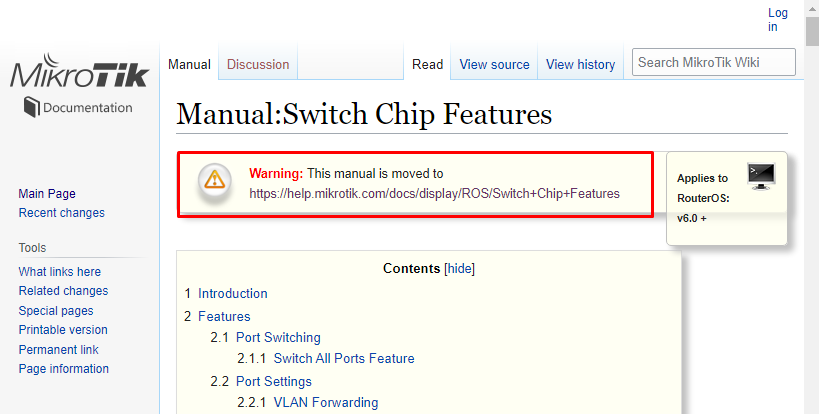
The manual is clear that MT7621 has no VLAN Table support…https://wiki.mikrotik.com/wiki/Manual:Switch_Chip_Features
Bridge HW offload on VLANs was added on ROS v7.1rc5 https://help.mikrotik.com/docs/display/ROS/Switch+Chip+Features
Also the changelog https://mikrotik.com/download/changelogs has no reference at all on MT7621 adding support of Switch based VLANs on ROS v6.

Summary: If you want to use vlans on the RB750Gr3 or RB760iGS using the device independent “bridge with vlan-filtering” method, you will need to use something > v7.1rc5, but preferably v7.2rc5 or higher, as more and more features are being fixed in bridge support in v7.

It is also clear that the wiki.mikrotik.com version is obsolete.
wiki_mikrotik_com_manual_warning.png
The new help page which was in the second link, does have the MT7621 with vlan table. so I am surprised you posted that link if you think the MT7621 doesn’t work with vlans in hardware. It just requires at least v7.1rc5 to program the features on the switch chip.
help.mikrotik.com_mt7621_vlan_table.png
The MT7621A chip has always supported vlan tables, but RouterOS didn’t use them until v7.1rc5 The Ubiquiti ER-X uses the same chip, and it has had a hardware assisted vlan-aware switch0 device at least since 2016 in EdgeOS v1.8.5. The point is, it is not a limitation of the MT7621A SOC, it is a limitation of the software not using the SOC’s integrated MT7530 compatible switch ASIC features.

Here’s a 2016 Ben Pin youtube video where he demostrates how the vlan-aware switch can be used on the ER-X.

@Buckeye i am surprised too since i clearly mention that support on Bridge VLAN filtering in hardware is added on Ros v7… So i totally do not understand your point…
Also, if the switch chip itself has a VLAN table, but ROS does not use it ( on V6 for example ), this does not change the fact, that it still has no VLAN table…

Besides the fact of referencing old documentation.
This is the current documentation to reference.
https://help.mikrotik.com/docs/display/ROS/Switch+Chip+Features

https://help.mikrotik.com/docs/display/ROS/Bridging+and+Switching

We’ve been sidetracked by @woland who claimed his hEX S can be configured for VLANs on switch chip in ROS v6. I’m still not convinced that his setup actually works correctly - or rather that it works any better than a dumb switch..

But anyway, we all agree that OP, using v7, is correct to use bridge vlan filtering, which should be offloaded to hardware on hEX. So we can stop with this discussion and let’s see if OP has solved his issues or not.

Hi all, “OP” here again…

I posted my current config a few posts above this one, and tbh, when I read ^:

“… OP, using v7, is correct to use bridge vlan filtering,..”

I must admit that I am not aware if I am indeed using bridge vlan filtering, or not. I ‘think’ not, since I have not configured a bridge.

The whole reason for my using only one ethernet port, is that with the setup I have, I only need ONE network cable to go to just ONE managed switch.
All the VLANs travel across that wire and have access to a DNS server on VLAN10 and I have figured out how to block traffic between VLANs where I need to do so.

In a large environment it is probably not very efficient for various reasons, but for a fairly low demand network design, it seems to work.

Remember, I opted for my model MT for a reason. If I would implement a MT in a higher demand type of network, I would likely (have to) select a more powerul router also.

I am far for being an expert in MT and will still gladly accept tips on improving my config. I will read up again on vlan bridge filtering to see if I would be better of using it; at this point, I’m clueless.

As a side note - I am very appreciative of the community and individual efforts to help out and assist with questions such as mine.

My bad, indeed you’re using single interface. So neither switch chip nor bridge matter in this case. Things would change if you would start using hEX in role of switch.

Just a note (not that your current setup is inadequate or wrong): instead of using IP subnet addresses in firewall rules you could use (vlan) interfaces. I don’t think it would make any observable difference though.