Please see diagram - I am wanting to reach devices on the remote network that have a different gateway to the VPN router. I am not able to access the remote networks usual default gateway to add routes. Any suggestions as to how I could accomplish this?
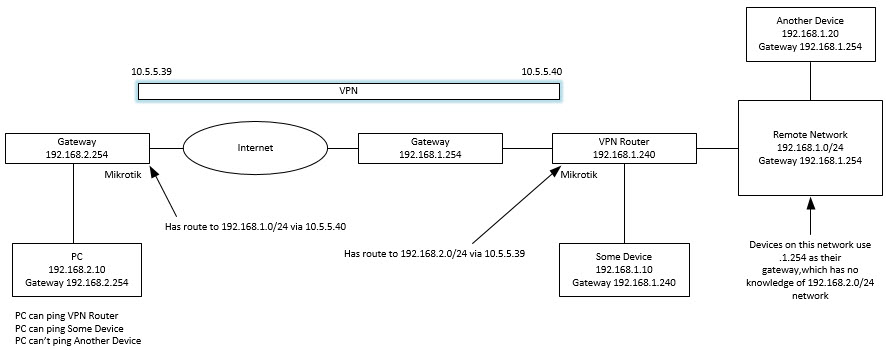
You can use srcnat on VPN router, to hide everything coming from 192.168.2.0/24 to 192.168.1.0/24 behind common 192.168.1.240. Because 192.168.1.240 is local address for any other 192.168.1.x, they will know where to send responses. And VPN router will know that they belong to connections from remote networks and will route them back correctly. While this helps, it’s also the one disadvantage, devices in 192.168.1.0/24 won’t be able to see real source addresses, so they won’t be able to tell 192.168.2.10 from 192.168.2.20 and it can be a problem when you’d want some IP based access rules. But you can’t have everything.
Can you place the VPN router between the existing default gateway device on the remote network and all the other devices (i.e. that traffic from all the devices would have to physically pass through the VPN router to the default gateway device)?
More than that, the devices in 192.168.1.0/24 would be also be unable to initiate connections to 192.168.2.0/24 unless the OP would create dstnat rules.
Right, but in original post, I see request only for one direction. 
Thanks, everything would be nice, but not for this purpose
So I added the following and I can access Another Device now:
add action=src-nat chain=srcnat src-address=192.168.2.0/24 to-addresses=192.168.1.240
Unfortunately no - we often can’t access/change default gateway devices, if we could it would be easy 