For recent version of Windows, to enable BBR2, run these with UAC elevation:
netsh int tcp set supplemental Template=Internet CongestionProvider=bbr2
netsh int tcp set supplemental Template=InternetCustom CongestionProvider=bbr2
netsh int ipv4 set global LoopbackLargeMTU=disabled
The 3rd command is needed to avoid problem with some programs and services that connect to loopback, among them are Steam and the Hyper-V Console.
Verify the active congestion control provider with:
netsh int tcp show supplemental
In my setup with RB5009 + GPON SFP stick, this improves the upload throughput significantly when latency is high (though still not as good as Linux with BBR enabled).
To undo, run the commands above with cubic instead of bbr2, and enabled instead of disabled.
Regarding possible WireGuard HW acceleration, newer ARMv8.6-A specs bring the "FEAT_CHACHA20" option for hardware acceleration of ChaCha20, but you need a Linux kernel v6.2 or newer and of course chip support.
I spent some more time configuring IPSec and Wireguard and did some simple bandwidth checks with the builtin tool.
Wireguard indeed is a very fast solution on MikroTik routers! My setup is the following:
CCR2216 <---> RB5009 (Internet) <--- PPPoE + IPSec with GRE tunnel/Wireguard ---> RB5009
All physical connections were 10Gbit links.
Wireguard reaches about 850MBit/sec in this setup. IPSec reaches only about 450MBit/sec. I expected the performance impact of the GRE tunnel in the case of my IPSec setup to be more noticeable but you would need to do specific measurements to even notice it. I also expected IPSec to be at least 50% faster, especially as it is listed with up to 1400MBit/sec on the MikroTik site.
IPSec seems to scale better on the CCR2216 because load is about 50% lower than with IPSec.
I didn't manage to push Wireguard over a total of 950 MBit in my setup, even with multiple routers. But that might be related to bottlenecks caused by PPPoE. I did not investigate this any further.
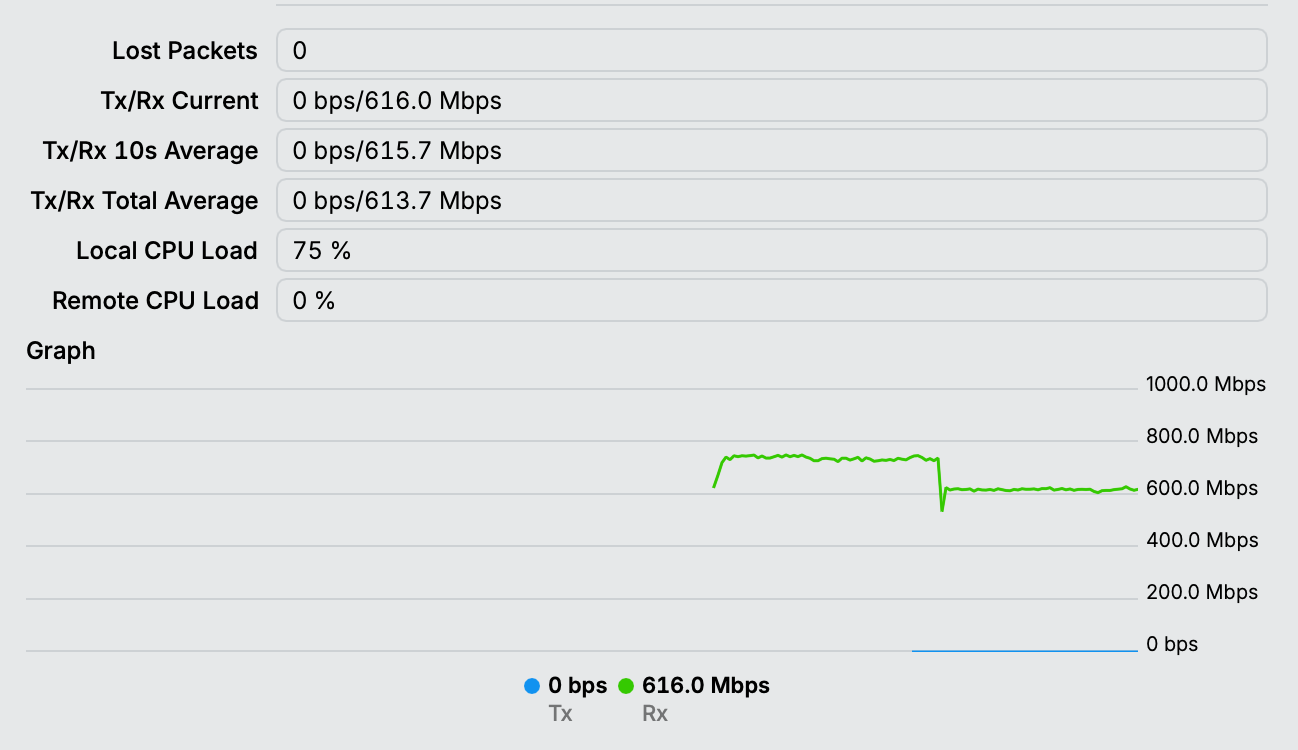
I looked into this some more and this what I got: it's about 720MBit/sec with UDP and about 600MBit/sec over TCP.
Throughput is a little higher if traffic is not routed over a GRE/EoIP tunnel but that is expected due to the lower MSS. PPPoE is also only a small difference but has noticeable CPU penalty on the RB5009.
The left part is UDP traffic, the right part is TCP traffic.
As this was never meant to be a benchmarking exercise, I did not look further into impact of firewall rules, generating traffic with iperf3 instead of the bandwidth tool. I did not max out the CPU, thus I believe that the limiting factor should not be traffic generation.
As a golden rule of thumb for reliable throughput test results: always use external load-generating tools (on both sides!). Make sure the remote device has equal or greater capacity than the device under test. An RB5009 should be able to push well over 1 Gbps with minimal CPU impact.