wAP ax?

hap ax lite is not the only device using the same SoC (IPQ-5010) with builtin 2.4ghz wireless. There are several ones. see https://mikrotik.com/products/matrix. Grep for “IPQ-5010”.
And from these devices - all sharing the same SoC - you chose hap ax lite with the by far “lowest” values in the wireless specification table. All other devices show way higher transmit values in the specification table. And I think when to “extrapolate”, then don’t compare a wAP ax (which is mostly designed for outdoor) with some “hap ax lite” low-cost indoor device (as it may be “trimmed down” on purpose).

And generally: that Mikrotik did not publish “wireless specifications” table despite wap ax is being sold already right now makes me wonder. Device goes through all the hardware certification processes upfrront and upon launch there is a) “copy paste”-errors on antenna gain values on product page b) missing specifications.

It will probably not deviate from FCC certification info or they might have to redo the whole thing. That can be a costly joke …

Well, then we have to take this granted: https://fccid.io/TV7WAPGR52AX/Test-Report/Antenna-specification-7634095

Infos on wap ax product page change on a daily basis. Today it says “7dbi” for both 2.4ghz and 5ghz again. That matches with fccid.io antenna measurements pdf. So these are most probably the true antenna gain values.

So now it makes sense: tx-power is within limits of regulatory domain (Austria). 13dbm for 2.4ghz and 23dbm for 5ghz. I could try another regulatory domain with higher EIRP limits - but I dont want to mess arround with country settings. Unless someone names me one “super-loose” country I could test the maximum values.

Brazil is a “super-loose” country when it comes zo 2.4GHz band (30dBm Tx power). Pretty high Tx powers on 5GHz as well.

BTW, what does /interface/wifi/radio/print detail show set to min-antenna-gain? Acvording to your observations it should be set to 7 for both radios.

I chose hAP ax lite because it poped up in my mind the first. Yes, it may be a poor choice … but it does illustrate that Tx power can vary between devices built around same SoC. And until we get the numbers for wAP ax, we have to brace ourselves for the worst :wink:


 2   min-antenna-gain=7 hw-type="QCA5018" 

 3   min-antenna-gain=7 hw-type="QCN6122"

Yup, 7dBi for both bands. So by setting country=Brazil, then Tx power should go up to 23dBm (if chipset is not limited lower than that).

Why do clients then see weaker signal? Are higher gain antennas better for AP RX direction? Besides beeing more directional.

Country=Australia can increase the radio coverage on 2.4GHz!

Country limitation is about EIRP … which is in most WiFi cases reduced to: Tx power + antenna gain. So the higher antenna gain, the lower Tx power … but for clients the effect is the same, either wax there’s same RSSI some distance away from antenna.

However: antenna can not produce RF energy, antenna can only focus RF energy in certain direction which automatically means less energy in other directions. By definition there is no trully omni-directional antenna with gain higher than 0dBi. So with wAP ax having antenna gain of +7dBi it means that outside main lobe (charts say that main lobe is around ±45° around center of front direction) signal strength will be considerably lower (charts say that in back direction RSSI will be around 17dBm lower than in main direction). And who knows what’s along vertical axis …

Antenna gain works both for Tx and Rx, so antenna will “amplify” signal, coming from direction of main lobe. At the same time it’ll “degrade” signals from other directions … which can actally be good if these signals are interference and that means better SINR (which means higher throughputs). Even if interference is coming from same general direction and would antenna “amplify” interference as well, using antenna with decent gain is still good … there’s always some uncorrelated interfrence, such as thermal noise, which ultimately defines noise floor (sometimes also referred to as “background noise”).

[admin@MikroTik] > system/resource/print 
                   uptime: 1d23h45m10s
                  version: 7.16.1 (stable)
               build-time: 2024-10-10 14:03:32
         factory-software: 7.15.1
              free-memory: 36.8MiB
             total-memory: 256.0MiB
                      cpu: ARM
                cpu-count: 2
            cpu-frequency: 800MHz
                 cpu-load: 2%
           free-hdd-space: 96.9MiB
          total-hdd-space: 128.0MiB
  write-sect-since-reboot: 1108
         write-sect-total: 1846
               bad-blocks: 0%
        architecture-name: arm
               board-name: wAP ax
                 platform: MikroTik

I know, free-memory tells you nothing. It is running in caps-mode with not a single extra configuration than it received from capsman server.

# 2024-11-04 23:23:13 by RouterOS 7.16.1
# software id = redacted
#
# model = wAPG-5HaxD2HaxD
# serial number = redacted
/interface bridge
add admin-mac=redacted auto-mac=no comment=defconf name=bridgeLocal
/interface wifi datapath
add bridge=bridgeLocal comment=defconf disabled=no name=capdp
/interface wifi
# managed by CAPsMAN
# mode: AP, SSID: redacted, channel: 2442/ax/Ce
set [ find default-name=wifi1 ] configuration.manager=capsman datapath=capdp disabled=no
# managed by redacted
# mode: AP, SSID: jupiter, channel: 5500/ax/Ceeeeeee
set [ find default-name=wifi2 ] configuration.manager=capsman datapath=capdp disabled=no
/interface bridge port
add bridge=bridgeLocal comment=defconf interface=ether1
add bridge=bridgeLocal comment=defconf interface=ether2
/interface wifi cap
set discovery-interfaces=bridgeLocal enabled=yes slaves-datapath=capdp
/ip dhcp-client
add comment=defconf interface=bridgeLocal
/system clock
set time-zone-name=Europe/Vienna
/system note
set show-at-login=no

Got my wAP AX yesterday. 2.4ghz range i really disappointing, far worse than the wAP AC. No way it has 7dBi antennas.

Seems like wap ax is truly designed for outdoor usage mainly.

I don’t think it was designed primarily for outdoor use, because what they changed again in the documentation is that the antenna orientation is 180 degrees. Previously it was 360 degrees in the documentation. I would assume that it is better to work with such an antenna if it is mounted on a wall or ceiling, so it is preferable for indoor use.
So attention, for anyone who hasn’t noticed, antennas don’t scatter the signal 360 degrees, they scatter it 180 degrees!
Chaos is the documentation for this device!!!
This will cause mistrust of this device in the future!

Clearly a poor cut-and-paste job on the specs page. And IDK why it’s hard to for the web specs to match the PDF - the PDF often has additional details (like you 180º “beam width”)

But it’s not so simple as 360º vs 180º, it’s power in which directions be more useful. It be better if Mikrotik over-corrected the docs situation here by adding polar patterns.

Well, access points on external walls seem to me a rather common need.

Anyway the coverage Is surely not 180 degrees, more like 120 or less.

On the other thread here:
http://forum.mikrotik.com/t/wap-coverage-picture-included/179859/1
the shape of emissions is described with links to the FCC documentation.

Sorry about the specs, yes, there were some mistakes, we will / have corrected them. In the PDF we always try to include more information, so I suggest always opening those files too.

I have to say… I really like how these guys include the antenna test result patterns.
Screenshot_20241108-071104.png

I also adore how detailed Cambium includes technical specs. Normis once said there are no “antenna radiation patterns” available - IIRC too expensive - so they just have none. That may be true for “legacy” devices but for the wap ax they exist over at fccid.io. So it would be easy to put these “patterns” in the brochure/datasheet as well. Wireless specification table still missing as well. So there is room for improvement.

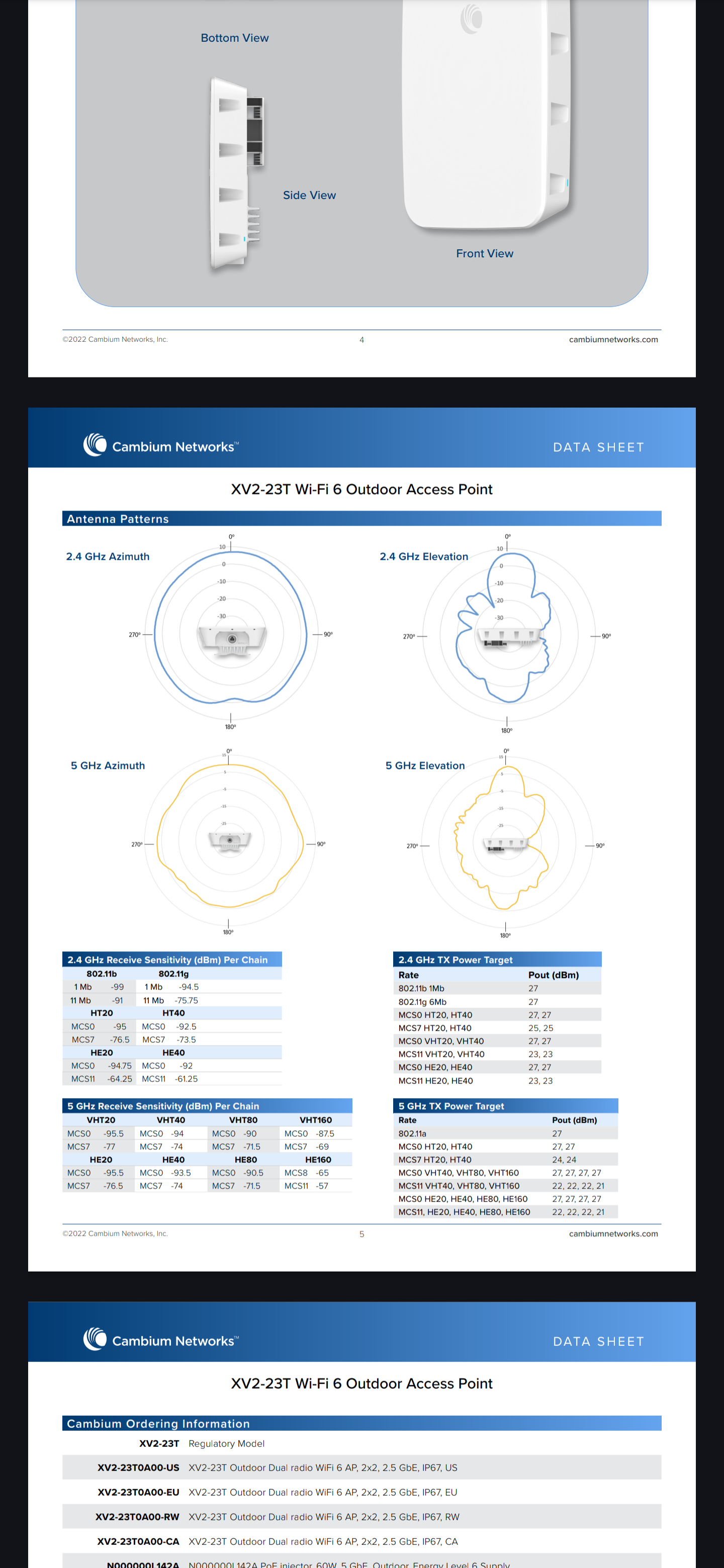
Related to wap ax …

anyone noticed the order of wifi1/2 has been changed … AGAIN ??
Wifi1 = 2Ghz
Wifi2 = 5Ghz

extract from defconf:

 /interface wifi {                                                                                                                                              
                    :local ifcId [/interface wifi find where default-name=wifi1]                                                                                                     
                        set $ifcId configuration.mode=ap channel.band=2ghz-ax disabled=no                                                                                            
                        set $ifcId channel.width=20/40mhz;                                                                                                                           
                        set $ifcId channel.skip-dfs-channels=10min-cac;                                                                                                              
                       set $ifcId security.authentication-types=wpa2-psk,wpa3-psk security.passphrase=$defconfWifiPassword security.ft=yes security.ft-over-ds=yes                   
                        :local wlanMac  [/interface get [/interface find where default-name=wifi1] mac-address];                                                                     
                        :set ssid "MikroTik-$[:pick $wlanMac 9 11]$[:pick $wlanMac 12 14]$[:pick $wlanMac 15 17]"                                                                    
                        set $ifcId configuration.ssid=$ssid