Web Proxy for small network

Hello pal,

i’ve set it up and it seems to be working. but over all, I seem to have gained jx a marginal difference.

But am still monitoring and researching on some petty issues but if I get stuck, I will ask for your help.

But one more thing, how do i prevent a specific site from being cached.

I want to prevent facebook.com from been cached and don’t know the rule to apply.
Your help will be appreciated.

thanks

hello Boss,

what i’ve noticed is that caching only works when am caching in RAM but fails to work when i select the “Cache on disk” option.

What could be my problem?
I had to drives both SATA and under System–>Stores → Disks. they both show as SATA1 and SATA2 with their respective sizes intact yet whether i choose to cache on SATA1 or SATA2, it won’t work unless I deselect Cache on disk then it start s caching on RAM.

help needed here please,
max

@max

You can block file download by Mikrotik Proxy. Example
/ip proxy access add path=.avi action=deny
/ip proxy access add path=
.flv action=deny
/ip proxy access add path=*.mkv action=deny

You can block any web site via domain name. Example:
/ip proxy access add action=deny disabled=no dst-host=facebook.com
/ip proxy access add action=deny disabled=no dst-host=www.facebook.com

you may stop using facebook. but don’t stop caching any web site. bcoz it’s a basic web-proxy.
not for more customization.


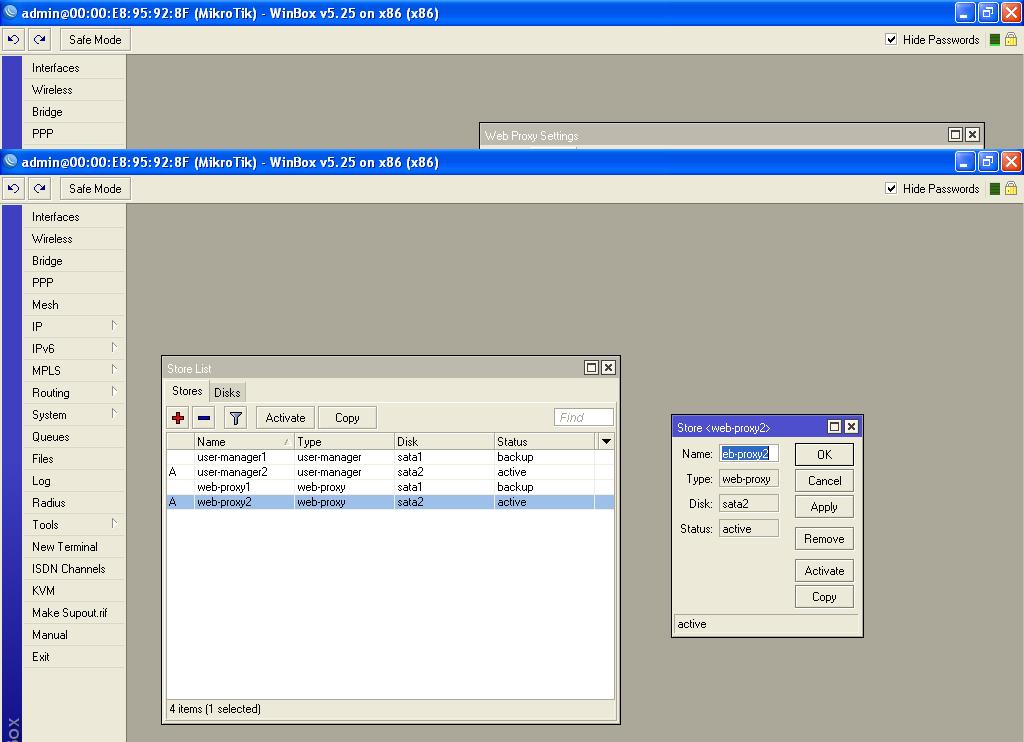
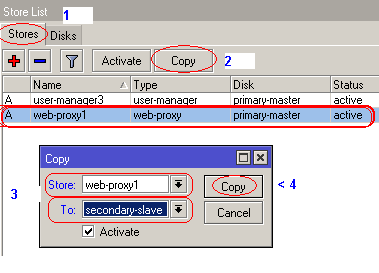
You must 1st select your storage drive properly or activate your storage drive then select “cache on disk”
copy-webproxy-secondary.png

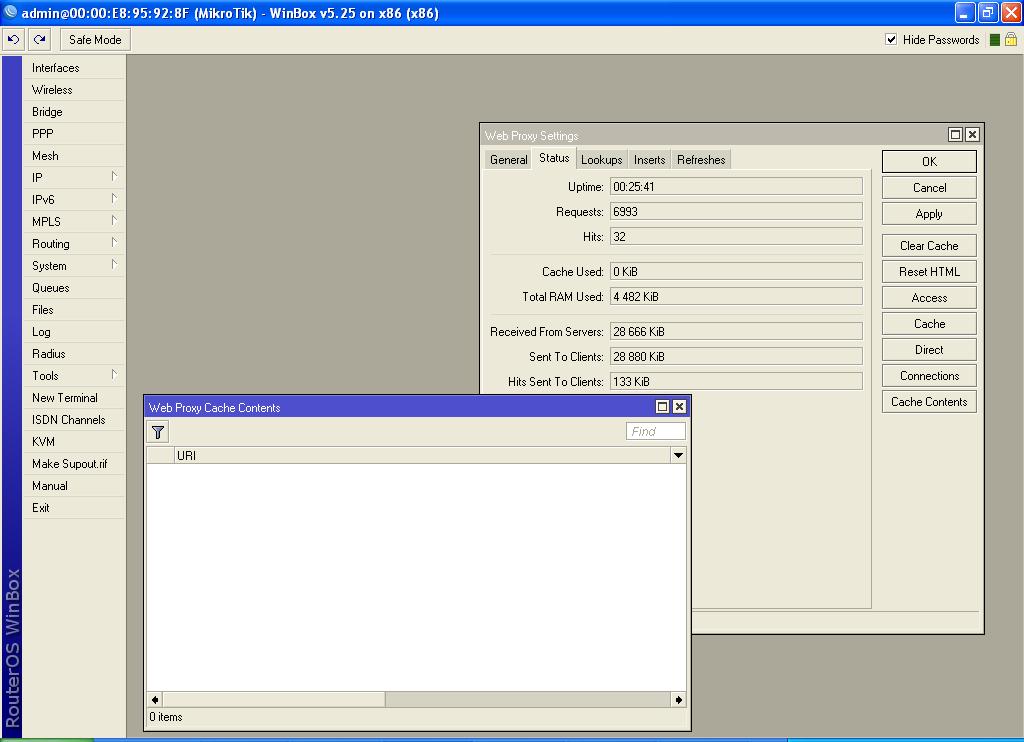
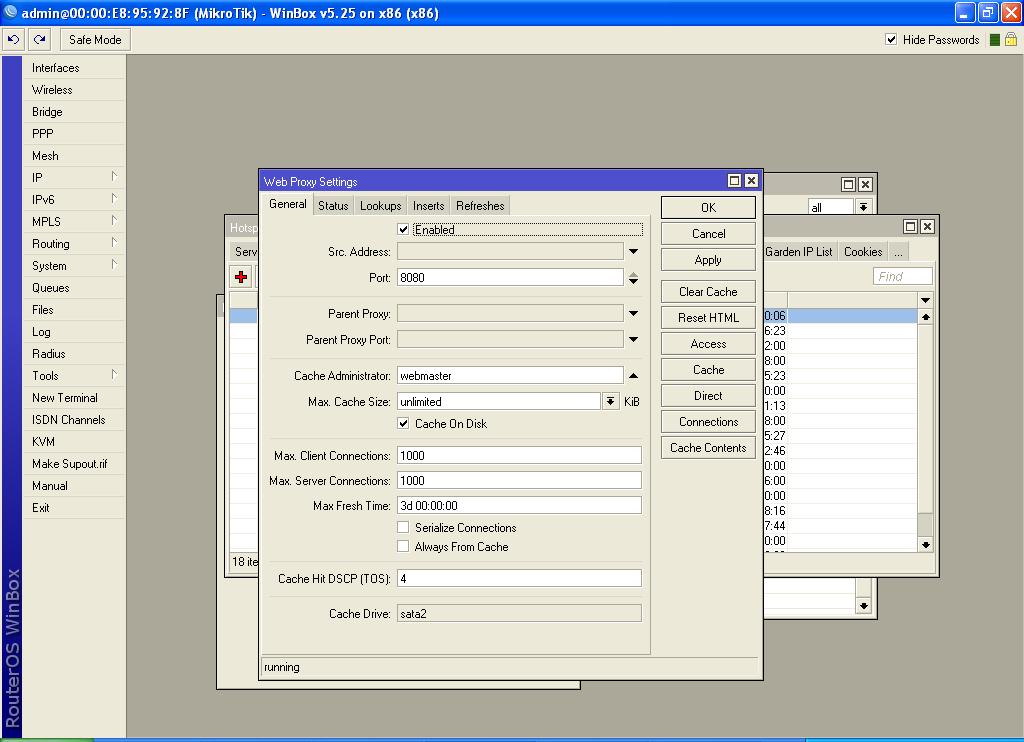
These images below show Web Proxy Enabled, Web Proxy copied to and activated on SATA2 yet the status show that nothing is being cached.

those few activities on Hits and “Hits sent to client” was those related to deselecting “Cache on disk”


looking forward to your assistance

thanks
proxy status.JPG
proxy system stores.JPG
proxy enabled.JPG

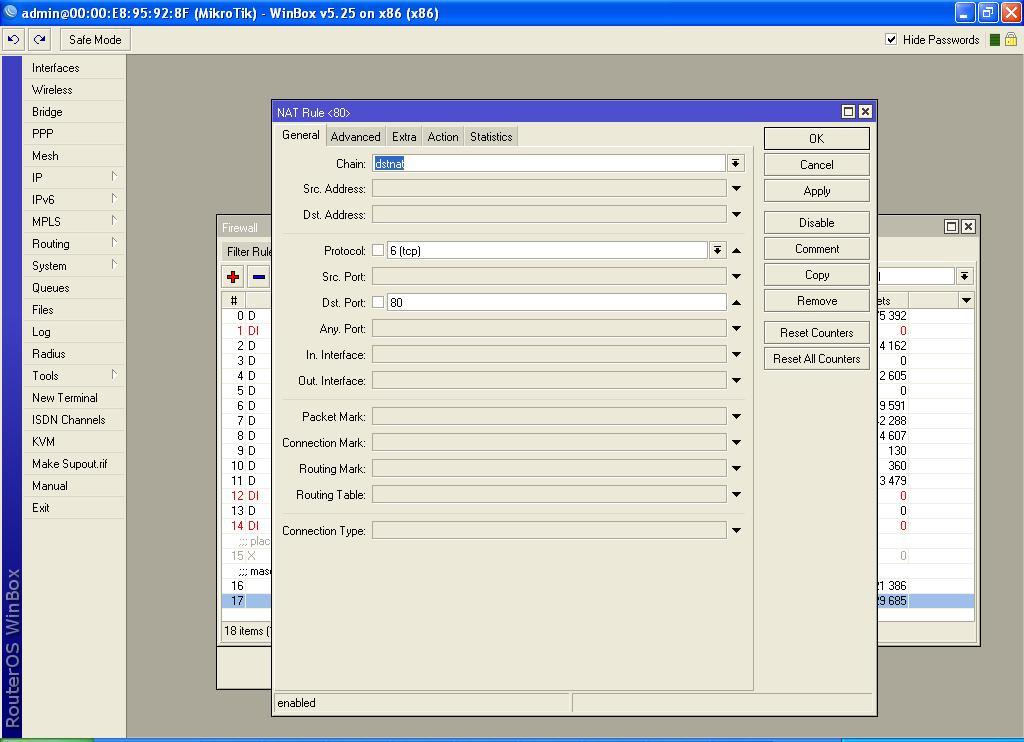
Have you got your Dst Nat rule set correctly for http traffic?

thanks for your input Karina,

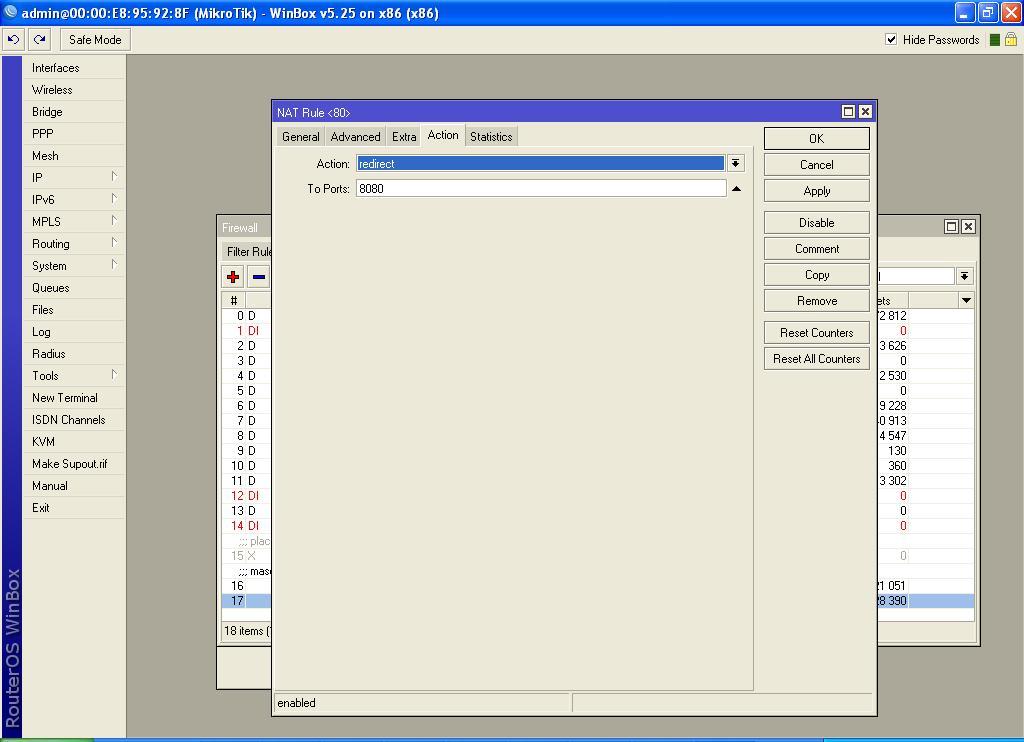
I’ve taken screen shot of my dst Nat rule for you to review if I’m missing something.

Every help will be appreciated. I’m kinda getting desperate now since intense online search seems to yield no result.

thanks again,
nat rule2.JPG
nat rule1.JPG

@max

what’s your method for internet user ?
pppoe or ip base ???
have you any load balancing ?
pls export your configuration …

best regards

Only thing i would add is the src address range of the subnet you want to proxy, I dont think this would cause your issue though

hotspot and firewall configuration below

/ip hotspot export

[admin@MikroTik] /ip hotspot> export
# may/16/2013 12:49:57 by RouterOS 5.25
# software id = S171-XH7K
#
/ip hotspot profile
set [ find default=yes ] dns-name="" hotspot-address=0.0.0.0 html-directory=\
    hotspot http-proxy=0.0.0.0:0 login-by=http-chap name=default nas-port-type=\
    wireless-802.11 radius-accounting=yes radius-default-domain="" \
    radius-interim-update=received radius-location-id="" radius-location-name=\
    "" radius-mac-format=XX:XX:XX:XX:XX:XX rate-limit="" smtp-server=0.0.0.0 \
    split-user-domain=no use-radius=yes
add dns-name=hispeed.com hotspot-address=192.168.88.1 html-directory=hotspot \
    http-proxy=0.0.0.0:0 login-by=http-chap name=hsprof1 nas-port-type=\
    wireless-802.11 radius-accounting=yes radius-default-domain="" \
    radius-interim-update=received radius-location-id="" radius-location-name=\
    "" radius-mac-format=XX:XX:XX:XX:XX:XX rate-limit="" smtp-server=0.0.0.0 \
    split-user-domain=no use-radius=yes
/ip hotspot
add address-pool=hs-pool-2 addresses-per-mac=2 disabled=no idle-timeout=5m \
    interface=ether2 keepalive-timeout=none name=hotspot1 profile=hsprof1
/ip hotspot user profile
set [ find default=yes ] idle-timeout=none keepalive-timeout=2m name=default \
    rate-limit=512000/512000 shared-users=1 status-autorefresh=1m \
    transparent-proxy=no
/ip hotspot ip-binding
add address=192.168.88.2 disabled=no mac-address=58:C3:8B:7B:CF:0C server=\
    hotspot1 to-address=192.168.88.2 type=bypassed
add address=192.168.88.12 disabled=no mac-address=00:11:25:A2:D6:0B server=\
    hotspot1 to-address=192.168.88.12 type=bypassed
add address=192.168.88.254 disabled=no mac-address=00:23:15:C8:0C:2C server=\
    hotspot1 to-address=192.168.88.254 type=bypassed
/ip hotspot service-port
set ftp disabled=no ports=21
/ip hotspot user

/ip firewall export

#
/ip firewall connection tracking
set enabled=yes generic-timeout=10m icmp-timeout=10s tcp-close-timeout=10s \
    tcp-close-wait-timeout=10s tcp-established-timeout=1d tcp-fin-wait-timeou
    10s tcp-last-ack-timeout=10s tcp-syn-received-timeout=5s \
    tcp-syn-sent-timeout=5s tcp-syncookie=no tcp-time-wait-timeout=10s \
    udp-stream-timeout=3m udp-timeout=10s
/ip firewall filter
add action=passthrough chain=unused-hs-chain comment="place hotspot rules her
    disabled=yes
/ip firewall nat
add action=passthrough chain=unused-hs-chain comment="place hotspot rules her
    disabled=yes to-addresses=0.0.0.0
add action=masquerade chain=srcnat comment="masquerade hotspot network" \
    disabled=no src-address=192.168.88.0/24
add action=redirect chain=dstnat disabled=no dst-port=80 protocol=tcp to-port
    8080
/ip firewall service-port
set ftp disabled=no ports=21
set tftp disabled=no ports=69
set irc disabled=no ports=6667
set h323 disabled=no
set sip disabled=no ports=5060,5061 sip-direct-media=yes
set pptp disabled=no

thanks,
max

@max

i don’t know what’s your actual hotspot configuration. Here is a Example:

/ip address
add address=192.168.0.1/24 comment=Out to users disabled=no interface=LAN network=192.168.0.0
add address=192.168.1.6/24 comment=INTERNET disabled=no interface=WAN network=192.168.1.0

/ip pool
add name=hs-pool-1 ranges=192.168.0.10-192.168.0.255

/ip dns
set allow-remote-requests=yes cache-max-ttl=1w cache-size=10000KiB max-udp-packet-size=512 servers=8.8.8.8,8.8.4.4

/ip dhcp-server
add address-pool=hs-pool-1 authoritative=after-2sec-delay bootp-support=static disabled=no interface=LAN lease-time=1h name=dhcp1

/ip dhcp-server config set store-leases-disk=5m

/ip dhcp-server network add address=192.168.0.0/24 comment=“hotspot network” gateway=192.168.0.1

/ip hotspot profile
set default dns-name=“” hotspot-address=0.0.0.0 html-directory=hotspot http-cookie-lifetime=3d http-proxy=0.0.0.0:0 login-by=http-chap name=default rate-limit=“” smtp-server=0.0.0.0 split-user-domain=no use-radius=no

add dns-name=login.dotnet.com hotspot-address=192.168.0.1 html-directory=hotspot http-cookie-lifetime=1d http-proxy=0.0.0.0:0 login-by=http-chap name=hsprof1 rate-limit=“” smtp-server=0.0.0.0 split-user-domain=no use-radius=no

/ip hotspot
add address-pool=hs-pool-1 addresses-per-mac=1 disabled=no idle-timeout=15m interface=LAN keepalive-timeout=none name=hotspot1 profile=hsprof1

/ip hotspot user profile
set default idle-timeout=15m keepalive-timeout=2m name=default shared-users=1 status-autorefresh=1m transparent-proxy=no

add address-pool=hs-pool-1 advertise=no idle-timeout=none keepalive-timeout=2m name=“512k Limit” open-status-page=always rate-limit=512k/512k shared-users=1 status-autorefresh=1m transparent-proxy=yes

add address-pool=hs-pool-1 advertise=no idle-timeout=none keepalive-timeout=2m name=“256k Limit” open-status-page=always rate-limit=256k/256k shared-users=1 status-autorefresh=1m transparent-proxy=yes

/ip hotspot service-port set ftp disabled=yes ports=21

/ip hotspot walled-garden ip add action=accept disabled=no dst-address=192.168.0.1

/ip hotspot set numbers=hotspot1 address-pool=none

/ip firewall nat add action=masquerade chain=srcnat disabled=no

/ip hotspot user
add disabled=no name=admin password=123 profile=default
add disabled=no name=dotnet password=1234 profile=“512k Limit” server=hotspot1
add disabled=no name=dotnet-256k password=1234 profile=“256k Limit” server=hotspot1

/ip route
add disabled=no distance=1 dst-address=0.0.0.0/0 gateway=192.168.1.1 scope=30 target-scope=10


***The Hotspot itself is already a proxy, so you’re looping to yourself. To bypass the automatic proxy for authenticated users, insert the following NAT rule:
Code:
/ip nat firewall
add chain=pre-hotspot dst-address=!local hotspot=auth action=accept

That has other side effects. If it does not work well for you you can try rewriting your proxy rules to work in the ‘output’ rather than the ‘forward’ chain, but that will also have side effects.

Overall the cleanest solution would be to use a third party proxy.

Yes you can, but you need to force guests to use the proxy after they sign in. This can be done with a simple NAT rule or you can check to enable “use transparent proxy” in the user profile. The transparent proxy only works for HTTP, not HTTPS.
http://wiki.mikrotik.com/wiki/Manual:IP/Proxy

With the NAT rule it looks something like this and needs to come before the hotspot rules in the firewall, you can also put it on the pre-hotspot chain:
Code:
/ip firewall nat
add chain=dst-nat action=redirect to-port=8080 dst-port=80 protocol=tcp hotspot=auth src-address=192.168.1.0/24

If you want to do this for only certain profiles then you need to use it at the profile level, or use a dynamic address list that a guest is going to be added to upon signing in, another option in the user profiles, or done with a Radius attribute.

*** Acutally Hotspot with web-proxy is a complicated, i think it’s need to better separate box from Hotspot. Then Mikrotik web proxy will give you good result. You must be delete your old web-proxy setting for storage, and make a new web-proxy setting.


best regards
all this while i had sent a message to mikrotik support now they say i should upgrade to V6 but when i go to System → Packages and check for updates it doesn’t update it tells me my system is up to date.

I’ve downloaded the v6 both the update package aldd “All package” can you please tell me how i can update manually via winbox to v6 please? i don’t want to do anything that willl ruin my license

thanks

How did you try to upgrade? I was running 5.25, I went to system - packages, hit the “check for updates” button, hit the upgrade button and within a min or 2 I was back up with V6, everything working fine except the web proxy had disabled itself. probebly one of the smoothest upgrades I have ever done :slight_smile:

This is probably a really stupid question but does your router you are trying to upgrade have access to the internet? I am thinking there is something very basic wrong here, hence the reason its been overlooked as is so often the case

@max

open your winbox then drag & drop all package of 6.0 in you winbox file menu.
then go to system >> upgrade >> upgrade package source >> click + sign >>
router ip address >> admin >> password (router password) >> Apply.
then you will reboot the system. i hope your system will upgrade automatically.


best regards

unluckily for me, this didn’t work :frowning:

@max

it’s a basic upgrade or upload system for Mikrotik Router.
you may follow the link for reference:
http://wiki.mikrotik.com/wiki/Manual:Upgrading_RouterOS


best regards

The best way to upgrade manually is just to add all the .npk packages you downloaded from all packages, click on file, then drag them to that place of thru webfig, click on file, then browse to add or upload all the packages, then login thru winbox, and ru this command, /system reboot, then y for yes, the stuff must upgrade. NB: make sure u are upgrading with the correct device or architecture (pc is different from rb-7xx, 9xx etc).

I will like to know the best way to achieve this setup of hotspot and web proxy on the same system or just using rb951