Why are my static DNS records forwarding upstream?

This would return a valid address (from pure IPv6 point of view) to the device, which then might try to use it. If the goal is to just throw away AAAA lookups, then the discard prefix should be a better choice. I don’t have an IPv6 network to test this but my guess IPv6-aware devices would not try to do anything with this prefix.

I agree with what @pe1chl said, I don’t understand why MikroTik insists on developing their own DNS resolver. I would think it would be much easier for them just to use a solution already developed and maintained by someone else. It’s a win-win. Lack of a decent DNS resolver was pretty much the only downside I felt when moved away from EdgeRouter some years ago. EdgeRouter used dnsmasq (as many other embedded systems do, e.g. OpenWRT), which easily allows customization like what OP is looking for.

You’re probably right. I was trying to think of some “trick” that might block the upstream, but your right that effect downstream LAN… My suggestion was more IF you had some trick, you could likely script “sync”'ing the A to some AAAA thing.

Which lead us to larger problem that RouterOS DNS server is pretty specialized and limited…

The problem is ship sailed there once V7 shipped, they still have to maintain config compatibility will all DNS tricks they do support… And likely be great disagreement if replacement should be closer to BIND9 or dnsmasq or adguard/pihole/blocky/etc. :wink:

Now you can just run your preferred DNS as container, not ideal, but flexible.

The trick I suggested above should stop all AAAA lookups for the local domain going upstream, not sure if this is what OP is after.

/ip dns static add address=100:: match-subdomain=yes name=mgmt.domain.tld type=AAAA


That’s understandable but is there a better time to introduce a big change like that other than along with the new major version? It didn’t prevent them from a number of other breaking changes (DNS probably being the least one). To be honest, until some recent improvements, the early v7 resolver was bare bones, not much to break… I’m all for maintaining backwards compatibility but not to the point where it holds back the progress.

Container would be acceptable if it was possible to run on all devices. Larger or more sophisticated networks are less likely to need DNS on a router in the first place. It’s precisely SOHO, often with a single device, where such a need arises.

The open source project “unbound” provides everything the current MikroTik DNS resolver has, plus what it needs to get added in the near future.
Probably the main reason not to use it would be the binary size, which could be problematic on the darned 16MB Flash devices…
Still it would be nice when it was available as an “overlay” package (one that replaces some internal RouterOS functionality with more advanced functions, similar to rose-storage and qcom wireless).

Hi… I seem to have similar problem. Here’s the dig output (192.168.0.1 is the wired address of Mikrotik):

; <<>> DiG 9.10.6 <<>> goliath.lan @192.168.0.1
;; global options: +cmd
;; Got answer:
;; ->>HEADER<<- opcode: QUERY, status: NXDOMAIN, id: 63818
;; flags: qr rd ra ad; QUERY: 1, ANSWER: 0, AUTHORITY: 1, ADDITIONAL: 1

;; OPT PSEUDOSECTION:
; EDNS: version: 0, flags:; udp: 512
; OPT=15: 00 1d 52 65 73 75 6c 74 20 73 79 6e 74 68 65 73 69 7a 65 64 20 62 79 20 72 6f 6f 74 2d 6e 78 2d 74 72 75 73 74 ("..Result synthesized by root-nx-trust")
;; QUESTION SECTION:
;goliath.lan.			IN	A

;; AUTHORITY SECTION:
.			1754	IN	SOA	a.root-servers.net. nstld.verisign-grs.com. 2025063000 1800 900 604800 86400

;; Query time: 33 msec
;; SERVER: 192.168.0.1#53(192.168.0.1)
;; WHEN: Mon Jun 30 09:47:10 UTC 2025
;; MSG SIZE  rcvd: 156

Here the /ip/dns/static/print

Columns: NAME, TYPE, ADDRESS, TTL
 # NAME           TYPE  ADDRESS        TTL
 0 fiona.lan      A     192.168.0.1    1d 
[...]
 9 goliath.lan    A     192.168.0.24   1d 
[...]

Here ip/dns/print:

                      servers: 91.233.136.1  
                               1.1.1.1       
                               8.8.8.8       
                               88.199.145.218
              dynamic-servers:               
               use-doh-server:               
              verify-doh-cert: no            
   doh-max-server-connections: 5             
   doh-max-concurrent-queries: 50            
                  doh-timeout: 5s            
        allow-remote-requests: yes           
          max-udp-packet-size: 4096          
         query-server-timeout: 2s            
          query-total-timeout: 10s           
       max-concurrent-queries: 100           
  max-concurrent-tcp-sessions: 20            
                   cache-size: 2048KiB       
                cache-max-ttl: 1w            
      address-list-extra-time: 0s            
                          vrf: main          
           mdns-repeat-ifaces: lan-bridge    
                               sfp3-wlan     
                   cache-used: 178KiB        

RouiterOS is 7.18.2, IPV6 is not used, caches flushed, both client and server side…

What else should I be looking for?

Have you tried to sniff DNS packets?

@silverdr, do you allow DNS requests from your LAN via firewall? What happens if you use dig goliath.lan. (dot at the end?).

I can’t reproduce the issue (I’m on 7.19).

Yes. I believe I wouldn’t be getting NXDOMAIN if requests were blocked.

The same. No change. But… «problem solved below»

Not until you mentioned… and yes, that was a very good advice! After setting the sniffer to:

[silverdr@Fiona] /tool/sniffer> print 
                     only-headers: no            
                     memory-limit: 100KiB        
                    memory-scroll: yes           
                        file-name:               
                       file-limit: 1000KiB       
                streaming-enabled: no            
                 streaming-server: 0.0.0.0:37008 
                    filter-stream: no            
                 filter-interface:               
               filter-mac-address:               
           filter-src-mac-address:               
           filter-dst-mac-address:               
              filter-mac-protocol:               
                filter-ip-address: 192.168.0.1/32
            filter-src-ip-address: 192.168.0.5/32
            filter-dst-ip-address:               
              filter-ipv6-address:               
          filter-src-ipv6-address:               
          filter-dst-ipv6-address:               
               filter-ip-protocol:               
                      filter-port: dns           
                  filter-src-port:               
                  filter-dst-port:               
                      filter-vlan:               
                       filter-cpu:               
                      filter-size:               
                 filter-direction: any           
  filter-operator-between-entries: or            
                       quick-rows: 20            
                 quick-show-frame: no            
                          running: no            

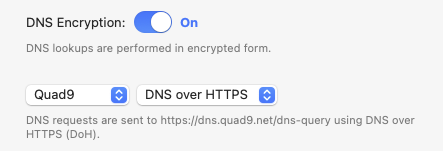
I was able to catch only my dig requests. Although it’s binary, obviously, I was able to notice “dns.quad9.net” in the hex/ascii dump of the packet! Something I have configured neither on the server, nor on the client (sic!). After scratching my head a bit, I recalled that the only thing I have on this machine, that in fact injects itself into the networking stack is “LittleSnitch”. I opened its settings and found this:


which explains the whole issue. I added “exceptions” for my local domains (“lan” and “wlan”) and problem gone. Thank you very much for pointing me in the right direction!

I just came across this exact issue. Unfortunately I don’t think it’s fixed. I am running 7.20.8. Here is an explanation of the issue and a proposed solution:

The Problem

I have a domain a1.example.com that has a public CNAME record pointing to an external service. Internally, I have a static A record on my MikroTik pointing to a local IP address for split-horizon DNS.

Expected behavior: Internal clients query the MikroTik, receive the local A record (192.168.1.100), and connect to the internal server. The public CNAME should never be involved.

Actual behavior: The MikroTik returns the local A record, but also queries upstream for other record types (AAAA, HTTPS type 65, etc.). The upstream server follows the public CNAME chain, and that CNAME response gets cached. The cached CNAME then overrides the static A record, causing clients to resolve to the external address instead of the local one.

This is documented behavior per MikroTik's own documentation:

"If there is only an A record in the list, but the router receives an AAAA request, then it will reply with an A record from the static list and will query the upstream server for the AAAA record."

Proposed Solution

Add a simple boolean option to DNS static entries, something like:

/ip/dns/static add name=a1.example.com address=192.168.1.100 type=A no-forward=yes

When no-forward=yes is set, the router should:

  • Return the static entry for matching record types (A in this case)

  • NOT query upstream for any other record types for that name

  • Return an empty/negative response for record types that don't have a static entry, rather than forwarding upstream

Summary

RouterOS DNS static entries need a per-entry option (e.g., no-forward=yes) to prevent the resolver from querying upstream servers for record types not covered by static entries. Without this, split-horizon DNS is broken because upstream CNAME records override local A records.

I don't suppose there's been any real movement on this?
I just upgraded from RouterOS v6 to v7 and I've been heavily relying on using a split-horizon setup to override public DNS entries that I own with static DNS entries.

Unfortunately, I usually use a CNAME to map on the public side, and I've been using an A record internally. Which under RouterOS v7 results returning both an A and a CNAME (violation of DNS RFCs) - and causing different behavior depending on the particular local resolver - but ultimately - headaches.

I can override this with an appropriate static CNAME - but only if it was relying on my reverse internally & externally proxy. In situations where it was pointing at a CNAME externally (the reverse proxy) and direct to the internal server internally (via the IP DNS static entry) - this introduces additional headaches.

I don't really see an easy fix for this, other than downgrading to v6 or implementing some sort of specific local DNS resolvers to handle these split horizon records. Frankly, neither option is particularly appealing to me.

The proposed 'no-forward=yes' seems appealing, and maybe I'm a little late to the v7 party - but I'm honestly a little surprised that this has been an issue for what seems a long time now, yet there is no resolution yet?

I think this is so because DNS works this way. Assuming you have a static A record in ROS, if you query for the A you will get the A, if you query for the A and an AAAA you will get the A from ROS and the AAAA from upstream (because ROS doesnt have it).

It would be strange to me, if I add for example an A record and would have an option to not forward other records depending on this A record.

I see no solution for this, you could insert for all typs of DNS-records a dummy entry in ROS. I think 99.9% of all users simply dont care about this. And, if you think further, with DoT/DoH it is simply not possilby because clients encrypt their DNS queries and tranmit over port 443.

It would be strange to me, if I add for example an A record and would have an option to not forward other records depending on this A record.

When you implement split-horizon you claim full authority over domain within local view. You can do whatever you want. Except RouterOS does not give you enough knobs.

If your local clients reach directly to other resolvers or pin answers then it's local administrative misconfiguration you ought to address and is unrelated to DNS Server capabilities.

IMO Mikrotik should keep RouterOS's dns server simple, there are plenty containerized solutions that are can be deployed with ease.