Changelog 7.15:
*) wifi-qcom - updated driver;
Changelog 7.15:
*) wifi-qcom - updated driver;
I can concur, had no issues on 7.14.3 but upgraded yesterday and am now seeing disconnects. Any word on any improvements 7.16 might bring?
The same here, cAPGi-5HaxD2HaxD ROS 7.18.2:
50:16:F4:D1:D3:DF@wifi2-2GHz connected, signal strength -56
50:16:F4:D1:D3:DF@wifi2-2GHz disconnected, connection lost, signal strength -55
50:16:F4:D1:D3:DF@wifi1-5GHz connected, signal strength -59
…and so on
It is not only in the logfile. My TV ask me everyday for checking the connection, my laptop looses the network and Teams disconnects from time to time.
I observed the same or similar behavior in my network (RB5009 + 2 wAP ax, 7.18.2, CAPsMAN). Clients would disconnect every few minutes and reconnect to the same AP in the other band. My workaround was to configure a fixed channel in both bands. Clients now only disconnect when roaming between APs. They then initially connect at 2.4 GHz, switch to 5 GHz a few seconds later and maintain a stable connection from thereon.
Same here. I had the problem with old hAP and now I have same problem with ax3.
I have the problem with ALL devices at home. Android, iPhone, Macbook m1, Windows 10 laptop, windows 11 PC with intel etc. Randomly drops.
It was worse but when I changed country to China, I got some relief because radar detection was switched off that way. I wouldn’t notice it even but VPN disconnects and bringing it up again on all devices takes litle bit more time than just wifi hick up. Line of sight between 3 to 7 meters.
I would actually throw it away and get some 30eur Trendnet by now if I wouldn’t have vpn servers running on it for my travels.
No upgrade has helped, no firmware updates etc, even hardware change. This crap has been going on at least 2 years now. I was just too lazy to complain about it and couldn’t find any topics about it so thought that I’m only one in a world with this problem.
I have no such troubles with Fortigate, Ubiquity nor even with cheap Trendnet!
And I don’t use randomizers at home network as suggested before.
I have been using Mikrotik products since 2004 but it seems that golden days are over. Sorry for no technical and emotional post but I wanted just to add it to show that you are not alone with the same troubles.
Changing country bts helped against this every half hour disconnecting but random disconnects 2 to 7 times per day has stayed.
We have the same problems with our cAPGi-5HaxD2HaxD. I tried some modification and it’s a little better when you separate 2,4GHz and 5Ghz SSID to different names, not the same. But still not satisfied. Today I will try downgrade to 7.14.3 but now we are on 7.19.1 and it’s really a little from that version. So i hope there will not be more bugs different from just wifi.
I guess downgrading to 7.14.3 is the only option.
I had tried all fixes but…
Got my parents a hAP AX3, netinstalled it to version 7.19.2 and absolutely no disconnects at all (and they have like the absolute weirdest and oldest devices “alive”).
May I kindly request anyone responding to this topic at least provides info like RouterOS and firmware version and the outpu of /interface wifi?
Same problem here, on hap ax² running routerOS7.22. The hap ax² standalone works fine. But as soon as another ap (cap ac) is connected via ethernet, the hap ax² drops and reconnects:
2026-04-03 19:24:26 wireless,info 74:3A:F4:C5:A2:F1@homenet-2.4(homenet) disconnected, not responding, signal strength -68
 2026-04-03 19:24:26 wireless,debug 74:3A:F4:C5:A2:F1@homenet-2.4(homenet) disassociated, not responding, signal strength -68
 2026-04-03 19:27:37 wireless,debug 74:3A:F4:C5:A2:F1@homenet-5(homenet) associated, signal strength -70
 2026-04-03 19:27:37 wireless,info 74:3A:F4:C5:A2:F1@homenet-5(homenet) connected, signal strength -69
 2026-04-03 19:28:13 wireless,info 74:3A:F4:C5:A2:F1@homenet-5(homenet) disconnected, connection lost, signal strength -70
 2026-04-03 19:28:13 wireless,debug 74:3A:F4:C5:A2:F1@homenet-5(homenet) disassociated, connection lost, signal strength -70
 2026-04-03 19:31:33 wireless,debug 74:3A:F4:C5:A2:F1@homenet-2.4(homenet) associated, signal strength -68
 2026-04-03 19:31:33 wireless,info 74:3A:F4:C5:A2:F1@homenet-2.4(homenet) connected, signal strength -68
 2026-04-03 19:32:18 wireless,info 74:3A:F4:C5:A2:F1@homenet-2.4(homenet) disconnected, connection lost, signal strength -69
 2026-04-03 19:32:18 wireless,debug 74:3A:F4:C5:A2:F1@homenet-2.4(homenet) disassociated, connection lost, signal strength -69
 2026-04-03 19:32:19 wireless,debug 74:3A:F4:C5:A2:F1@homenet-2.4(homenet) associated, signal strength -71
 2026-04-03 19:32:19 wireless,info 74:3A:F4:C5:A2:F1@homenet-2.4(homenet) connected, signal strength -71
 2026-04-03 19:32:45 wireless,info 74:3A:F4:C5:A2:F1@homenet-2.4(homenet) disconnected, connection lost, signal strength -66
 2026-04-03 19:32:45 wireless,debug 74:3A:F4:C5:A2:F1@homenet-2.4(homenet) disassociated, connection lost, signal strength -66
 2026-04-03 19:32:48 wireless,debug 74:3A:F4:C5:A2:F1@homenet-2.4(homenet) associated, signal strength -68
 2026-04-03 19:32:48 wireless,info 74:3A:F4:C5:A2:F1@homenet-2.4(homenet) connected, signal strength -68
 2026-04-03 19:33:21 wireless,info 74:3A:F4:C5:A2:F1@homenet-2.4(homenet) disconnected, connection lost, signal strength -68
 2026-04-03 19:33:21 wireless,debug 74:3A:F4:C5:A2:F1@homenet-2.4(homenet) disassociated, connection lost, signal strength -68
Both APs were running a 2.4GHz and a 5GHz network using the same SSID. The 5GHz channels were 20MHz wide and about 500 MHz apart.
The only “solution” was to keep one AP at 5GHz and the other at 2.4 GHz only. There are other 5GHz networks around, urban neighbourhood. These are the current settings of the hap ax²:
2026-04-03 20:52:12 by RouterOS 7.22.1
software id = XXXX-YYYY
model = C52iG-5HaxD2HaxD
serial number =

/interface bridge
add admin-mac=F4:1E:57:D2:7D:F5 auto-mac=no comment=defconf name=bridge protocol-mode=none
/interface ethernet
set [ find default-name=ether1 ] name=en1
set [ find default-name=ether2 ] name=en2
set [ find default-name=ether3 ] name=en3
set [ find default-name=ether4 ] name=en4
set [ find default-name=ether5 ] name=en5
/interface ethernet switch
set 0 cpu-flow-control=yes
/interface list
add comment=defconf name=WAN
add comment=defconf name=LAN
/ip pool
add name=default-dhcp ranges=192.168.1.20-192.168.1.254
/ip dhcp-server
add address-lists="" address-pool=default-dhcp interface=bridge lease-time=1d name=server1 use-framed-as-classless=no
/disk settings
set auto-media-interface=bridge auto-media-sharing=yes auto-smb-sharing=yes
/interface wifi
set [ find default-name=wifi2 ] channel.band=2ghz-ax .frequency=2412 .secondary-frequency=disabled .skip-dfs-channels=disabled .width=
20mhz configuration.country=Switzerland .mode=ap .ssid=homenet .tx-power=15 name=homenet-2.4 security.authentication-types=
wpa2-psk .ft=no .ft-mobility-domain=0x1CE0 .ft-over-ds=yes steering=*1 steering.neighbor-group=dynamic-homenet-a90dd20b
set [ find default-name=wifi1 ] channel.band=5ghz-ax .frequency=5180 .skip-dfs-channels=10min-cac .width=20mhz configuration.country=
Switzerland .mode=ap .ssid=homenet .tx-power=10 disabled=no interworking.realms-raw="" name=homenet-5
security.authentication-types=wpa2-psk .ft=no .ft-mobility-domain=0x1CE0 .ft-over-ds=yes steering=*1 steering.neighbor-group=
dynamic-homenet-a90dd20b
/interface bridge port
add bridge=bridge comment=defconf interface=en2
add bridge=bridge comment=defconf interface=en3
add bridge=bridge comment=defconf interface=en4
add bridge=bridge comment=defconf interface=en5
add bridge=bridge comment=defconf interface=homenet-5
add bridge=bridge comment=defconf interface=homenet-2.4
add bridge=bridge interface=en1
/interface bridge settings
set allow-fast-path=no
/interface list member
add comment=defconf interface=bridge list=LAN
/ip address
add address=192.168.1.2/24 interface=bridge network=192.168.1.0
/ip dhcp-server network
add address=192.168.1.0/24 comment=defconf dns-server=91.102.199.199,91.102.199.198 gateway=192.168.1.1 netmask=24
/ip dns
set allow-remote-requests=yes servers=91.102.199.199,91.102.199.198,8.8.8.8
/ip dns static
add address=192.168.1.2 comment=defconf name=router.lan type=A
/ip firewall filter
add action=accept chain=forward comment="defconf: accept in ipsec policy" disabled=yes ipsec-policy=in,ipsec
add action=accept chain=forward comment="defconf: accept out ipsec policy" disabled=yes ipsec-policy=out,ipsec
add action=fasttrack-connection chain=forward comment="defconf: fasttrack" connection-state=established,related disabled=yes
add action=accept chain=forward comment="defconf: accept established,related, untracked" connection-state=established,related,untracked
disabled=yes
add action=drop chain=forward comment="defconf: drop invalid" connection-state=invalid disabled=yes
add action=drop chain=forward comment="defconf: drop all from WAN not DSTNATed" connection-nat-state=!dstnat connection-state=new
disabled=yes in-interface-list=WAN
/ip firewall nat
add action=masquerade chain=srcnat comment="defconf: masquerade" disabled=yes ipsec-policy=out,none out-interface-list=WAN
/ip route
add disabled=no distance=1 dst-address=0.0.0.0/0 gateway=192.168.1.1 routing-table=main scope=30 target-scope=10
/ip service
set ftp disabled=yes
set www-ssl disabled=no
/ipv6 firewall address-list
add address=::/128 comment="defconf: unspecified address" list=bad_ipv6
add address=::1/128 comment="defconf: lo" list=bad_ipv6
add address=fec0::/10 comment="defconf: site-local" list=bad_ipv6
add address=::ffff:0.0.0.0/96 comment="defconf: ipv4-mapped" list=bad_ipv6
add address=::/96 comment="defconf: ipv4 compat" list=bad_ipv6
add address=100::/64 comment="defconf: discard only " list=bad_ipv6
add address=2001:db8::/32 comment="defconf: documentation" list=bad_ipv6
add address=2001:10::/28 comment="defconf: ORCHID" list=bad_ipv6
add address=3ffe::/16 comment="defconf: 6bone" list=bad_ipv6
/ipv6 firewall filter
add action=accept chain=input comment="defconf: accept established,related,untracked" connection-state=established,related,untracked
add action=drop chain=input comment="defconf: drop invalid" connection-state=invalid
add action=accept chain=input comment="defconf: accept ICMPv6" protocol=icmpv6
add action=accept chain=input comment="defconf: accept UDP traceroute" dst-port=33434-33534 protocol=udp
add action=accept chain=input comment="defconf: accept DHCPv6-Client prefix delegation." dst-port=546 protocol=udp src-address=
fe80::/10
add action=accept chain=input comment="defconf: accept IKE" dst-port=500,4500 protocol=udp
add action=accept chain=input comment="defconf: accept ipsec AH" protocol=ipsec-ah
add action=accept chain=input comment="defconf: accept ipsec ESP" protocol=ipsec-esp
add action=accept chain=input comment="defconf: accept all that matches ipsec policy" ipsec-policy=in,ipsec
add action=drop chain=input comment="defconf: drop everything else not coming from LAN" in-interface-list=!LAN
add action=fasttrack-connection chain=forward comment="defconf: fasttrack6" connection-state=established,related
add action=accept chain=forward comment="defconf: accept established,related,untracked" connection-state=established,related,untracked
add action=drop chain=forward comment="defconf: drop invalid" connection-state=invalid
add action=drop chain=forward comment="defconf: drop packets with bad src ipv6" src-address-list=bad_ipv6
add action=drop chain=forward comment="defconf: drop packets with bad dst ipv6" dst-address-list=bad_ipv6
add action=drop chain=forward comment="defconf: rfc4890 drop hop-limit=1" hop-limit=equal:1 protocol=icmpv6
add action=accept chain=forward comment="defconf: accept ICMPv6" protocol=icmpv6
add action=accept chain=forward comment="defconf: accept HIP" protocol=139
add action=accept chain=forward comment="defconf: accept IKE" dst-port=500,4500 protocol=udp
add action=accept chain=forward comment="defconf: accept ipsec AH" protocol=ipsec-ah
add action=accept chain=forward comment="defconf: accept ipsec ESP" protocol=ipsec-esp
add action=accept chain=forward comment="defconf: accept all that matches ipsec policy" ipsec-policy=in,ipsec
add action=drop chain=forward comment="defconf: drop everything else not coming from LAN" in-interface-list=!LAN
/ipv6 nd
set [ find default=yes ] advertise-dns=yes
/system clock
set time-zone-name=Europe/Zurich
/system logging
add topics=wireless,debug
and the settings of the cap ac:
# 2026-02-26 20:05:19 by RouterOS 7.20.6
# software id = XXXX-YYYY
#
# model = RBcAPGi-5acD2nD
# serial number =
/interface bridge
add name=bridge1 protocol-mode=none
/interface wireless
set [ find default-name=wlan1 ] band=2ghz-onlyn comment=homenet-2.4 country=\
    switzerland disabled=no frequency=2462 installation=indoor mode=ap-bridge \
    name=homenet-2.4 ssid=homenet
set [ find default-name=wlan2 ] band=5ghz-onlyac comment=homenet-5 country=\
    switzerland frequency=5700 installation=indoor mode=ap-bridge name=\
    homenet-5 ssid=homenet
/interface wireless manual-tx-power-table
set homenet-2.4 comment=homenet-2.4
set homenet-5 comment=homenet-5
/interface wireless nstreme
set homenet-2.4 comment=homenet-2.4
set homenet-5 comment=homenet-5 enable-polling=no
/interface list
add name=WAN
add name=LAN
/interface lte apn
set [ find default=yes ] ip-type=ipv4 use-network-apn=no
/interface wireless security-profiles
set [ find default=yes ] authentication-types=wpa2-psk mode=dynamic-keys \
    supplicant-identity=MikroTik
/interface bridge filter
add action=drop chain=input dst-port=68 in-interface=ether1 ip-protocol=udp \
    mac-protocol=ip
/interface bridge port
add bridge=bridge1 ingress-filtering=no interface=ether1 internal-path-cost=\
    10 path-cost=10
add bridge=bridge1 ingress-filtering=no interface=ether2 internal-path-cost=\
    10 path-cost=10
add bridge=bridge1 ingress-filtering=no interface=homenet-5 \
    internal-path-cost=10 path-cost=10
add bridge=bridge1 ingress-filtering=no interface=homenet-2.4 \
    internal-path-cost=10 path-cost=10
/ip firewall connection tracking
set udp-timeout=10s
/ip settings
set max-neighbor-entries=8192
/ipv6 settings
set disable-ipv6=yes max-neighbor-entries=8192
/interface list member
add interface=bridge1 list=LAN
/interface ovpn-server server
add auth=sha1,md5 mac-address=FE:EA:4F:32:CB:FA name=ovpn-server1
/interface wireless cap
set bridge=bridge1 interfaces=homenet-5,homenet-2.4
/ip address
add address=192.168.1.3/24 interface=bridge1 network=192.168.1.0
/ip hotspot profile
set [ find default=yes ] html-directory=hotspot
/ip ipsec profile
set [ find default=yes ] dpd-interval=2m dpd-maximum-failures=5
/routing bfd configuration
add disabled=no interfaces=all min-rx=200ms min-tx=200ms multiplier=5
/system clock
set time-zone-name=Europe/Zurich
Thanks for any suggestions!
You might want to run wifi-qcom-ac on the cAP ac.
Also consider running equal RouterOS versions (and make sure firmware is updated as well).
Check config for asterikses.
Consider using DRY principle (creating all parts like /interface/wifi/configuration, /interface/wifi/security, /interface/wifi/channel, /interface/wifi/steering, etc).
Thanks! For the past month I stayed with the hAP ax² running alone, the cAP was turned off. I didn't have the time to track the issue down. However, now the same reconnect problem happens without the cAP. The connection to an Android mobile phone and to a Win11 desktop drops, then the client tries to connect in WiFi6 -> WiFi5 -> WiFi4 -> and so on without success.
The only known cure is turning the router off and on again. I was on RouterOS 7.22.2, now upgraded to 7.22.3. I didn't implement your suggestions so far, erlinden, I shall do that soon...
Could this be some kind of runtime problem in RouterOS? Or a DHCP lease problem, i.e. after the lease expires (1 day currently)?
Hi all,
I have the same problem with a Viessmann Gas boiler.
Discussed here: Administrator Forum (German)
Connection is stable using no VLAN.
Why… I don‘t know.
Any help is welcome.
Kind rdgards
After spending a lot of time trying to debug why 2.4GHz network was so unstable on my CAP ax devices, I finally stumbled upon this thread.
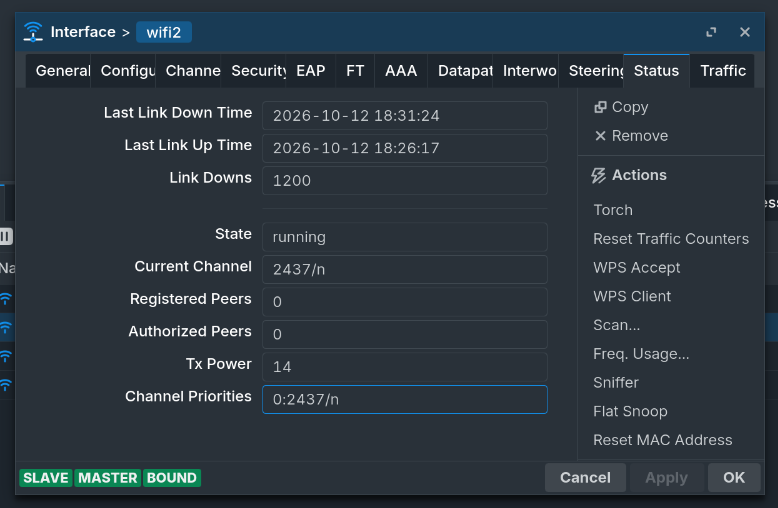
I didn't notice this issue since most of my devices are on 5GHz, but after replacing a few perfectly fine IoT devices I narrowed the issue to Mikrotik, and then I saw this Link Downs counter.
Nothing helps except downgrading to 7.14.3, which is horribly vulnerable.
There is no need to describe how unhappy I am with these devices.
Do you use VLAN for your 2.4ghz iot-wlan?
As written in the other forum, I got a stable connection using no VLAN.
So it is a weird combination of configuration.
I have only 1 device (2,4ghz) which shows this behaviour. All others are running fine.
As a matter of fact: I do. IoT wifi is set to own VLAN via Datapath setting.
Unfortunately there is no space for a device per WIFI SSID, and the fact that Mikrotik don't seem to care about this rather big issue is worrying.
At least please share config, to exclude human error.
Makes sense. Here it is hide-sensitive applied. It is connected to RB5009 on the other side.
# 2026-10-13 13:42:23 by RouterOS 7.24.5
# software id = LVX9-4P1N
#
# model = cAPGi-5HaxD2HaxD
# serial number = XXXXXXXX
/interface bridge
add admin-mac=F4:1E:57:35:FB:D2 auto-mac=no name=br0 vlan-filtering=yes
/interface ethernet switch
set switch1 cpu-flow-control=yes
/interface wifi datapath
add bridge=br0 disabled=no name=atest-dp vlan-id=10
add bridge=br0 disabled=no name=atest-guest-dp vlan-id=20
add bridge=br0 disabled=no name=atestiot-dp vlan-id=30
/interface wifi security
add authentication-types=wpa2-psk,wpa3-psk disabled=no name=Atest-sec
add authentication-types=wpa2-psk,wpa3-psk disabled=no name=Atest-Guest-sec
add authentication-types=wpa-psk,wpa2-psk disabled=no name=AtestIot-sec
/interface wifi configuration
add channel.band=2ghz-ax .frequency=2437 .width=20mhz country=Germany \
    datapath=atest-dp disabled=no mode=ap name=Atest-cfg2.4 security=\
    Atest-sec ssid=Atest
add channel.band=2ghz-ax .frequency=2437 .width=20mhz country=Germany \
    datapath=atest-guest-dp disabled=no mode=ap name=Atest-Guest-cfg \
    security=Atest-Guest-sec ssid=Atest-Guest
add channel.band=2ghz-ax .frequency=2437 .width=20mhz country=Germany \
    datapath=atestiot-dp disabled=no mode=ap name=AtestIot-cfg security=\
    AtestIot-sec ssid=AtestIot
/interface wifi
set [ find default-name=wifi2 ] configuration=Atest-cfg2.4 \
    configuration.mode=ap disabled=no
add configuration=Atest-Guest-cfg configuration.mode=ap disabled=no \
    mac-address=F6:1E:57:35:FB:D5 master-interface=wifi2 name=wifi3
add configuration=AtestIot-cfg configuration.mode=ap disabled=no mac-address=\
    F6:1E:57:35:FB:D6 master-interface=wifi2 name=wifi4
/interface wifi steering
add disabled=no name=steering-main rrm=yes wnm=yes
/interface wifi configuration
add channel.band=5ghz-ax country=Germany datapath=atest-dp disabled=no mode=\
    ap name=Atest-cfg5 security=Atest-sec ssid=Atest steering=steering-main
/interface wifi
set [ find default-name=wifi1 ] configuration=Atest-cfg5 configuration.mode=\
    ap disabled=no
/snmp community
set [ find default=yes ] name=kotur
/interface bridge port
add bridge=br0 interface=ether1
add bridge=br0 interface=ether2
add bridge=br0 interface=wifi1
add bridge=br0 interface=wifi2
/ip neighbor discovery-settings
set discover-interface-list=!dynamic
/interface bridge vlan
add bridge=br0 tagged=ether1,wifi1,wifi2 vlan-ids=10
add bridge=br0 tagged=ether1,wifi3 vlan-ids=20
add bridge=br0 tagged=ether1,wifi4 vlan-ids=30
/interface ovpn-server server
add mac-address=FE:A1:A9:9B:1F:30 name=ovpn-server1
/ip dhcp-client
add interface=br0 name=br0
/ip ipsec profile
set [ find default=yes ] dpd-interval=2m dpd-maximum-failures=5
/ipv6 nd
# automatic dns option advertising is not started, re-apply dns config
set [ find default=yes ] advertise-dns=yes
/snmp
set contact=ap-ground enabled=yes location=Home
/system clock
set time-zone-name=Europe/Berlin
/system identity
set name=AP-GROUND
/system ntp client
set enabled=yes
/system ntp client servers
add address=0.pool.ntp.org
add address=1.pool.ntp.org
add address=2.pool.ntp.org
add address=3.pool.ntp.org
I switched to to AX and bumped it to latest stable trying to find a config that might work, but it drops link no matter what.
cap-ax-2026-10-13.rsc (3.1 KB)
Wifi interfaces should not be tagged. Also, there is no need to add them as bridge port (as this is handled by the datapath).
Lastly...wpa-psk? Any devices that require this non security? If possible use at least wpa2-psk.
Even the bride/vlan is mostly dynamically create. Usually you only need to add the trunk port. don't add wifi interfaces manually to bridge port. too much manual misconfiguration.
I don't think I did, I followed this (old) case: VLANs on Wireless - RouterOS - MikroTik Documentation
Still, none of that should make wifi interfaces losing link.