WireGuard routing

Good afternoon! Can you tell me where the problem is?
Network diagram: Router R2 is with a routable IP and domain name, followed by a NAS (which acts as a central hub for IP cameras) and an IP camera.
R1, R3 with private IP, followed by IP cameras.
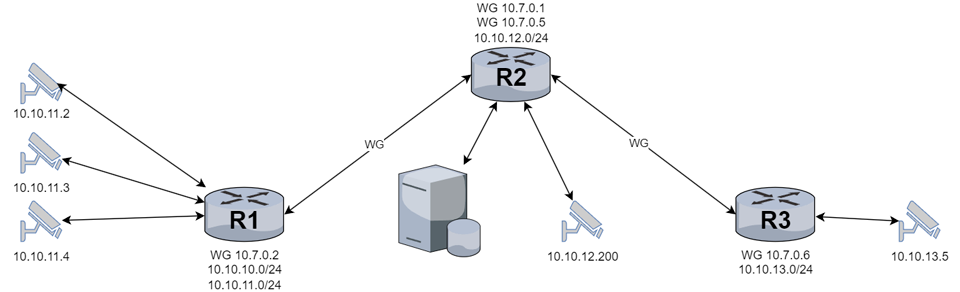
Currently, R2 users have access to the network on 10.10.10.0/24, 10.10.11.0/24 and 10.10.13.0/24.
The goal is to be behind any router to have access to other routers and equipment behind them.

Config Router R2 10.10.12.0/24:

/interface wireguard add comment="WG-own-VPN RB5009" listen-port=51819 mtu=1420 name=WG1-RB5009
/interface wireguard add comment="WG-own-VPN hAP aX2" listen-port=51818 mtu=1420 name=WG2-AX2
/interface list member add interface=WG1-RB5009 list=LAN
/interface list member add interface=WG2-AX2 list=LAN
/ip address add address=10.7.0.1/30 interface=WG1-RB5009 network=10.7.0.0
/ip address add address=10.7.0.5/30 interface=WG2-AX2 network=10.7.0.4
/interface wireguard peers add allowed-address=10.7.0.2/32,10.10.10.0/24,10.10.11.0/24 comment=RB5009 interface=WG1-RB5009 persistent-keepalive=1m public-key="xxxx"
/interface wireguard peers add allowed-address=10.7.0.6/32,10.10.13.0/24 comment="hAP aX2" interface=WG2-AX2 persistent-keepalive=1m public-key="xxxx"
/ip firewall filter add action=accept chain=input comment="WireGuard VPN" connection-state=established,related,new dst-port=51818-51820 in-interface-list=WANs protocol=udp
/routing bgp connection add as=65000 connect=yes disabled=no listen=yes local.address=10.7.0.1 .role=ibgp-rr name=TO-RB5009 nexthop-choice=force-self output.network=LAN_IP .redistribute=bgp remote.address=10.7.0.2/32 .as=65000 router-id=10.10.12.1 routing-table=main
/routing bgp connection add as=65000 connect=yes disabled=no listen=yes local.address=10.7.0.5 .role=ibgp-rr name=TO-AX2 nexthop-choice=force-self output.network=LAN_IP .redistribute=bgp remote.address=10.7.0.6/32 .as=65000 router-id=10.10.12.1 routing-table=main

Config Router R1 10.10.10(11).0/24:

/interface wireguard add comment=WG-Own-VPN listen-port=51819 mtu=1420 name=WG1-AX3
/interface wireguard peers add allowed-address=10.7.0.0/24,10.10.12.0/24,10.10.13.0/24 comment="Own-VPN hAP aX3" endpoint-address=xxxx.xx endpoint-port=51819 interface=WG1-AX3 persistent-keepalive=1m public-key="xxxx"
/interface list member add interface=WG1-AX3 list=LAN
/ip address add address=10.7.0.2/30 interface=WG1-AX3 network=10.7.0.0
/ip firewall filter add action=accept chain=input comment="WireGuard VPN" connection-state=established,related,new dst-port=51819-51820 in-interface-list=WANs protocol=udp
/routing bgp connection add as=65000 connect=yes disabled=no listen=yes local.address=10.7.0.2 .role=ibgp-rr-client name=TO-AX3 output.network=LAN_IP .redistribute=static remote.address=10.7.0.1/32 .as=65000 router-id=10.10.10.1 routing-table=main

Config Router R3 10.10.13.0/24:

/interface wireguard add comment=WG-Own-VPN listen-port=51818 mtu=1420 name=WG2-AX3
/interface wireguard peers add allowed-address=10.7.0.0/24,10.10.10.0/24,10.10.11.0/24,10.10.12.0/24 comment="to WG-Own-VPN" endpoint-address=xxxx.xx endpoint-port=51818 interface=WG2-AX3 persistent-keepalive=1m public-key="zzzz"
/interface list member add interface=WG2-AX3 list=LAN
/ip address add address=10.7.0.6/30 interface=WG2-AX3 network=10.7.0.4
/ip firewall filter add action=accept chain=input connection-state=established,related,new dst-port=51818,51820 in-interface-list=WAN protocol=udp
/routing bgp connection add as=65000 connect=yes disabled=no listen=yes local.address=10.7.0.6 .role=ibgp-rr-client name=TO-AX3 output.network=LAN_IP remote.address=10.7.0.5/32 .as=65000 router-id=10.10.13.1 routing-table=main

After everything was connected, I configured routing via BGP and dynamic routes appeared on all routers.
R1

/ip/route/ print  
Flags: D - DYNAMIC; A - ACTIVE; c - CONNECT, s - STATIC, b - BGP, v - VPN
Columns: DST-ADDRESS, GATEWAY, DISTANCE
#     DST-ADDRESS     GATEWAY     DISTANCE
  DAv 0.0.0.0/0       ISP1-PPPoE         2
  DAc 10.7.0.0/30     WG1-AX3            0
  DAc 10.10.10.0/24   Bridge.10          0
  DAc 10.10.11.0/24   VBridge.11         0
  DAb 10.10.12.0/24   10.7.0.1         200
  DAb 10.10.13.0/24   10.7.0.6         200
  DAc 10.110.54.1/32  ISP1-PPPoE         0
;;; Acceess to SFP module
0  As 192.168.1.0/24  SFP                1
  DAc 192.168.1.0/32  SFP                0

R2

/ip/route> print
Flags: D - DYNAMIC; A - ACTIVE; c - CONNECT, s - STATIC, b - BGP, d - DHCP
Columns: DST-ADDRESS, GATEWAY, DISTANCE
#     DST-ADDRESS       GATEWAY         DISTANCE
  DAc 10.7.0.0/30       WG1-RB5009             0
  DAc 10.7.0.4/30       WG2-AX2                0
  DAb 10.10.10.0/24     10.7.0.2             200
  DAb 10.10.11.0/24     10.7.0.2             200
  DAc 10.10.12.0/24     Bridge                 0
  DAb 10.10.13.0/24     10.7.0.6             200
  DAc 81.163.176.0/22   WAN                    0
  DAb 192.168.1.0/24    10.7.0.2             200

R3

/ip/route> print
Flags: D - DYNAMIC; X - DISABLED, I - INACTIVE, A - ACTIVE; c - CONNECT, s - STATIC, b - BGP, d - DHCP
Columns: DST-ADDRESS, GATEWAY, DISTANCE
#     DST-ADDRESS      GATEWAY         DISTANCE
  DAd 0.0.0.0/0        192.168.64.254         1
  DAc 10.7.0.4/30      WG2-AX3                0
  DAb 10.10.10.0/24    10.7.0.2             200
  DAb 10.10.11.0/24    10.7.0.2             200
  DAb 10.10.12.0/24    10.7.0.5             200
  DAc 10.10.13.0/24    Bridge                 0
  DAb 192.168.1.0/24   10.7.0.2             200
  DAc 192.168.64.0/24  WAN                    0

But when tracing from R1 to R3, it does not pass through R2.

/tool> traceroute 10.10.13.1
Columns: ADDRESS, LOSS, SENT, LAST, AVG, BEST, WORST, STD-DEV
 #  ADDRESS          LOSS  SENT  LAST     AVG  BEST  WORST  STD-DEV
 1  10.110.54.1      0%       1  1.5ms    1.5  1.5   1.5          0
 2  172.10.0.202     0%       1  2.3ms    2.3  2.3   2.3          0
 3  5.181.211.13     0%       1  1.2ms    1.2  1.2   1.2          0
 4  100.105.103.157  0%       1  2.2ms    2.2  2.2   2.2          0
 5  194.187.204.9    0%       1  3.2ms    3.2  3.2   3.2          0
 6                   100%     1  timeout

As well as in the opposite direction from R3 to R1.

/tool> traceroute 10.10.10.1
Columns: ADDRESS, LOSS, SENT, LAST, AVG, BEST, WORST, STD-DEV
 #  ADDRESS         LOSS  SENT  LAST     AVG   BEST  WORST  STD-DEV
 1  192.168.64.254  0%       2  0.4ms    0.5   0.4   0.5    0.1    
 2  85.117.68.16    0%       2  2.4ms    2.5   2.4   2.6    0.1    
 3  85.117.68.17    0%       2  2.2ms    2.1   2     2.2    0.1    
 4  85.117.68.101   0%       2  3ms      2.9   2.7   3      0.2    
 5  10.220.191.125  0%       2  2.6ms    2.6   2.6   2.6    0      
 6  212.188.16.238  0%       2  2.2ms    2.3   2.2   2.3    0.1    
 7  212.188.56.41   0%       2  12.3ms   12.3  12.3  12.3   0      
 8  212.188.29.145  0%       2  22.7ms   22.7  22.6  22.7   0.1    
 9  212.188.56.37   0%       2  34.3ms   34.3  34.3  34.3   0      
10  212.188.29.85   0%       2  50.3ms   50.3  50.2  50.3   0.1    
11  195.34.50.161   0%       2  62.2ms   62.1  62    62.2   0.1    
12                  100%     2  timeout

All doable but not quite clear yet.

  1. What is the role of R2 with respect to wireguard ( server for handshake for both R1 and R3 ).
  2. R2 is the only one of the three with a public IP address or the ability of an upstream ISP router to forward a port?
  3. Why are there two wireguard interfaces identified on R2 but on the same subnet ???
  4. Need complete config minus router serial number, any public WANIP information, keys etc…)
    +++++++++++++++++++++++++++++++++++++++++++++++++++++++++++++++++++++++

Good afternoon!

  1. R2 is the central hub, all tunnel data comes to the NAS that is connected to R2.
  2. R2 is the only router with a public IP and there is a domain name for this IP, so all connections go to it.
  3. Used subnets 10.7.0.0/30, 10.7.0.4/30, 10.7.0.16/28 for WireGuard, in order not to breed new subnets, and everything was limited to one entry 10.7.0.0/24 in the address list.
/interface bridge add arp=proxy-arp auto-mac=no mtu=1500 name=Bridge port-cost-mode=short
/interface bridge add name=Dockers port-cost-mode=short
/interface ethernet set [ find default-name=ether1 ] comment="to NAS" l2mtu=9100 mtu=9000 name=LAN1
/interface ethernet set [ find default-name=ether2 ] name=LAN2
/interface ethernet set [ find default-name=ether3 ] name=LAN3
/interface ethernet set [ find default-name=ether5 ] name=WAN1
/interface ethernet set [ find default-name=ether4 ] name=WAN2
/interface wireguard add comment="to VPS" listen-port=51820 mtu=1420 name=WG-VPS
/interface wireguard add comment="WG-own-VPN RB5009" listen-port=51819 mtu=1420 name=WG1-RB5009
/interface wireguard add comment="WG-own-VPN hAP aX2" listen-port=51818 mtu=1420 name=WG2-AX2
/interface wireguard add comment="WG-own-VPN Mobile" listen-port=51817 mtu=1420 name=WG3-MOB
/interface veth add address=10.6.0.2/24 gateway=10.6.0.1 gateway6="" name=VETH1-adguard
/interface pppoe-client add add-default-route=yes comment="to Rostelecom" default-route-distance=2 disabled=no interface=WAN2 name=PPPoE-RT user=xxx
/interface list add name=LANs
/interface list add name=WANs
/interface list add name=Own-VPN
/ip pool add name=shatura ranges=10.10.12.180-10.10.12.199
/ip dhcp-server add add-arp=yes address-pool=shatura bootp-lease-time=lease-time bootp-support=dynamic interface=Bridge lease-time=15m name=DHCP_Server
/routing table add disabled=no fib name=wg_mark
/container add envlist=adguard_envs interface=VETH1-adguard mounts=adguard_workdir,adguard_confdir root-dir=usb1-part1/Containers/adguard start-on-boot=yes workdir=/opt/adguardhome/work
/container config set ram-high=200.0MiB registry-url=https://registry-1.docker.io tmpdir=usb1-part1/TMP username=xxxxx
/container envs add key=TZ name=adguard_envs value=Europe/Moscow
/ip smb set enabled=yes interfaces=Bridge
/interface bridge port add bridge=Bridge interface=LAN1 internal-path-cost=10 path-cost=10
/interface bridge port add bridge=Bridge interface=LAN2 internal-path-cost=10 path-cost=10
/interface bridge port add bridge=Bridge interface=LAN3 internal-path-cost=10 path-cost=10
/interface bridge port add bridge=Dockers interface=VETH1-adguard
/interface bridge port add bridge=Dockers interface=VETH2-xray
/interface bridge port add bridge=Dockers interface=VETH3-tun
/interface list member add interface=Bridge list=LANs
/interface list member add interface=WAN1 list=WANs
/interface list member add interface=WG-VPS list=WANs
/interface list member add interface=WG1-RB5009 list=Own-VPN
/interface list member add interface=WG2-AX2 list=Own-VPN
/interface list member add interface=WG3-MOB list=Own-VPN
/interface list member add interface=WAN2 list=WANs
/interface list member add interface=PPPoE-RT list=WANs
/interface wireguard peers add allowed-address=0.0.0.0/0 comment="to VPS TimeCloud" endpoint-address=xxxx.xx endpoint-port=51820 interface=WG-VPS preshared-key="xxx" public-key="xxx"
/interface wireguard peers add allowed-address=10.7.0.2/32,10.10.10.0/24,10.10.11.0/24 comment=RB5009 interface=WG1-RB5009 persistent-keepalive=1m public-key="xxx"
/interface wireguard peers add allowed-address=10.7.0.6/32,10.10.13.0/24 comment="hAP aX2" interface=WG2-AX2 persistent-keepalive=1m public-key="xxx"
/interface wireguard peers add allowed-address=10.7.0.18/32 comment="Lenovo Legion 7" interface=WG3-MOB public-key="xxx"
/interface wireguard peers add allowed-address=10.7.0.19/32 comment="S24 Ultra" interface=WG3-MOB public-key="xxx"
/interface wireguard peers add allowed-address=10.7.0.22/32 comment="Air Macbook" interface=WG3-MOB public-key="xxx"
/interface wireguard peers add allowed-address=10.7.0.23/32 comment="S23 Plus" interface=WG3-MOB public-key="xxx"
/interface wireguard peers add allowed-address=10.7.0.20/32 comment="Tab S8" interface=WG3-MOB public-key="xxx"
/interface wireguard peers add allowed-address=10.7.0.21/32 comment="Note 20" interface=WG3-MOB public-key="xxx"
/ip address add address=10.10.12.1/24 interface=Bridge network=10.10.12.0
/ip address add address=10.6.0.1/24 interface=Dockers network=10.6.0.0
/ip address add address=10.7.0.1/30 interface=WG1-RB5009 network=10.7.0.0
/ip address add address=10.7.0.5/30 interface=WG2-AX2 network=10.7.0.4
/ip address add address=10.7.0.17/28 interface=WG3-MOB network=10.7.0.16
/ip address add address=10.8.0.3/24 interface=WG-VPS network=10.8.0.0
/ip address add address=192.168.0.10/24 interface=WAN2 network=192.168.0.0
/ip dhcp-client add add-default-route=special-classless default-route-distance=5 interface=WAN1 use-peer-dns=no
/ip dhcp-client add add-default-route=special-classless default-route-distance=5 interface=WAN2 use-peer-dns=no
/ip dhcp-server network add address=10.10.12.0/24 dns-server=10.6.0.2 gateway=10.10.12.1 netmask=24
/ip dns set allow-remote-requests=yes cache-max-ttl=1w3d doh-timeout=6s query-server-timeout=2s500ms query-total-timeout=12s servers=1.1.1.1,1.0.0.1,8.8.8.8,8.8.4.4 use-doh-server=https://cloudflare-dns.com/dns-query verify-doh-cert=yes
/ip dns static add address=1.1.1.1 name=cloudflare-dns.com
/ip dns static add address=1.1.1.1 name=https://1.1.1.1/dns-query
/ip dns static add address=1.0.0.1 name=cloudflare-dns.com
/ip dns static add address=1.0.0.1 name=https://1.0.0.1/dns-query
/ip firewall address-list add address=10.7.0.0/24 list=Admin-list
/ip firewall address-list add address=10.8.0.0-10.8.0.25 list=Admin-list
/ip firewall address-list add address=10.10.12.0/24 list=Admin-list
/ip firewall address-list add address=10.10.10.0/24 list=Admin-list
/ip firewall address-list add address=10.10.11.0/24 list=Admin-list
/ip firewall address-list add address=10.6.0.0/24 disabled=yes list=LAN_IP
/ip firewall address-list add address=10.10.12.0/24 list=LAN_IP
/ip firewall filter add action=accept chain=forward connection-state=established,related,untracked
/ip firewall filter add action=accept chain=input connection-state=established,related,untracked
/ip firewall filter add action=accept chain=input connection-state=established,related,new dst-port=51817-51820 in-interface-list=WANs protocol=udp
/ip firewall filter add action=accept chain=input dst-port=22 in-interface-list=WANs protocol=tcp src-address-list=Admin-list
/ip firewall filter add action=accept chain=input connection-state=established,related,new protocol=icmp src-address-list=Admin-list
/ip firewall filter add action=drop chain=forward connection-state=invalid in-interface-list=WANs
/ip firewall filter add action=drop chain=input connection-state=invalid in-interface-list=WANs
/ip firewall filter add action=drop chain=input in-interface-list=WANs
/ip firewall mangle add action=mark-routing chain=prerouting dst-address-list=rkn_wg new-routing-mark=wg_mark passthrough=yes
/ip firewall mangle add action=change-mss chain=forward new-mss=clamp-to-pmtu out-interface=WG-VPS passthrough=yes protocol=tcp tcp-flags=syn
/ip firewall nat add action=dst-nat chain=dstnat comment="NAT 1.01 - TCP 53 Redirect DNS requests to AdguardHome" dst-port=53 in-interface=Bridge protocol=tcp to-addresses=10.6.0.2
/ip firewall nat add action=dst-nat chain=dstnat comment="NAT 1.02 - UDP 53 Redirect DNS requests to AdguardHome" dst-port=53 in-interface=Bridge protocol=udp to-addresses=10.6.0.2
/ip firewall nat add action=masquerade chain=srcnat comment="WWW through VPN WireGuard" dst-address-list=rkn_wg out-interface=WG-VPS
/ip firewall nat add action=masquerade chain=srcnat out-interface-list=WANs src-address=10.6.0.0/24
/ip firewall nat add action=masquerade chain=srcnat out-interface-list=WANs
/ip route add comment="Acceess to WWW through WG1-VPS" disabled=no distance=1 dst-address=0.0.0.0/0 gateway=WG-VPS pref-src="" routing-table=wg_mark scope=30 suppress-hw-offload=yes target-scope=10
/routing bgp connection add as=65000 connect=yes disabled=no listen=yes local.address=10.7.0.1 .role=ibgp-rr name=TO-RB5009 nexthop-choice=force-self output.network=LAN_IP .redistribute=bgp remote.address=10.7.0.2/32 .as=65000 router-id=10.10.12.1 routing-table=main
/routing bgp connection add as=65000 connect=yes disabled=no listen=yes local.address=10.7.0.5 .role=ibgp-rr name=TO-AX2 nexthop-choice=force-self output.network=LAN_IP .redistribute=bgp remote.address=10.7.0.6/32 .as=65000 router-id=10.10.12.1 routing-table=main

Your use of subnets for wireguard is problematic, when I get time will modify it…
Now I see some new information previously not noted, you have a second wireguard network to VPS??

So to be clear R2 is the VPS, RB5009 is R1 and AX3 is R3 ??
Configs of each device are required not just one…
As you can tell, nothing is clear to the reader yet.

Good day!
Not really,
the VPS is a separate server to which a tunnel goes to bypass the locks in the country. In this case, I don’t consider it at all, because everything is fine with it :slight_smile:, everything works as it should.
In the case under consideration, R1 is RB5009, R2 is x3, R3 is x2

R1 Conf:

/interface bridge add admin-mac=xx:xx:xx:xx:xx:xx arp=proxy-arp auto-mac=no mtu=1500 name=Bridge.10 port-cost-mode=short vlan-filtering=yes
/interface bridge add name=Dockers
/interface ethernet set [ find default-name=ether1 ] arp=proxy-arp name=LAN1
/interface ethernet set [ find default-name=ether2 ] arp=proxy-arp name=LAN2
/interface ethernet set [ find default-name=ether3 ] arp=proxy-arp name=LAN3
/interface ethernet set [ find default-name=ether4 ] arp=proxy-arp name=LAN4
/interface ethernet set [ find default-name=ether5 ] arp=proxy-arp name=LAN5
/interface ethernet set [ find default-name=ether6 ] arp=proxy-arp name=LAN6
/interface ethernet set [ find default-name=ether7 ] arp=proxy-arp name=LAN7
/interface ethernet set [ find default-name=sfp-sfpplus1 ] name=SFP
/interface ethernet set [ find default-name=ether8 ] comment=IPS2-MobileRouter name=WAN_4G poe-out=off
/interface wireguard add comment=WG-Own-VPN listen-port=51819 mtu=1420 name=WG1-AX3
/interface wireguard add comment="to VPS TimeCloud" listen-port=51820 mtu=1420 name=WG1-VPS
/interface veth add address=10.6.1.2/24 gateway=10.6.1.1 gateway6="" name=VETH1-adguard
/interface vlan add arp=proxy-arp interface=Bridge.10 name=VBridge.11 vlan-id=2
/interface pppoe-client add add-default-route=yes comment="to SKScom" default-route-distance=2 disabled=no interface=SFP name=ISP1-PPPoE use-peer-dns=yes user=xxx
/interface list add name=WANs
/interface list add name=LANs
/interface list add name=OWN-VPN
/ip pool add name=LAN.10 ranges=10.10.10.180-10.10.10.199
/ip pool add name=LAN.20 ranges=10.10.11.180-10.10.11.199
/ip dhcp-server add add-arp=yes address-pool=LAN.10 bootp-lease-time=lease-time bootp-support=dynamic interface=Bridge.10 lease-time=15m name=DHCP.10
/ip dhcp-server add add-arp=yes address-pool=LAN.20 bootp-lease-time=lease-time bootp-support=dynamic interface=VBridge.11 lease-time=15m name=DHCP.11
/routing table add disabled=no fib name=wg_mark
/container add envlist=adguard_envs interface=VETH1-adguard mounts=adguard_confdir,adguard_workdir root-dir=Containers/adguard start-on-boot=yes workdir=/opt/adguardhome/work
/container config set ram-high=200.0MiB registry-url=https://registry-1.docker.io tmpdir=TMP username=dehb86
/container envs add key=TZ name=adguard_envs value=Europe/Moscow
/interface bridge port add bridge=Bridge.10 interface=LAN1 internal-path-cost=10 path-cost=10
/interface bridge port add bridge=Bridge.10 interface=LAN2 internal-path-cost=10 path-cost=10
/interface bridge port add bridge=Bridge.10 interface=LAN3 internal-path-cost=10 path-cost=10
/interface bridge port add bridge=Bridge.10 interface=LAN4 internal-path-cost=10 path-cost=10
/interface bridge port add bridge=Bridge.10 interface=LAN5 internal-path-cost=10 path-cost=10
/interface bridge port add bridge=Bridge.10 interface=LAN6 internal-path-cost=10 path-cost=10 pvid=2
/interface bridge port add bridge=Bridge.10 interface=LAN7 internal-path-cost=10 path-cost=10 pvid=2
/interface bridge port add bridge=Dockers interface=VETH1-adguard
/interface bridge vlan add bridge=Bridge.10 tagged=Bridge.10 untagged=LAN6,LAN7 vlan-ids=2
/interface list member add interface=WG1-VPS list=WANs
/interface list member add interface=Bridge.10 list=LANs
/interface list member add interface=ISP1-PPPoE list=WANs
/interface list member add interface=VBridge.11 list=LANs
/interface list member add interface=WG1-AX3 list=OWN-VPN
/interface list member add interface=WAN_4G list=WANs
/interface wireguard peers add allowed-address=0.0.0.0/0 comment="to VPS TimeCloud" endpoint-address=xxxx endpoint-port=51820 interface=WG1-VPS preshared-key="xxxx" public-key="xxxx"
/interface wireguard peers add allowed-address=10.7.0.0/24,10.10.12.0/24,10.10.13.0/24 comment="Own-VPN hAP aX3" endpoint-address=xxxx.xx endpoint-port=51819 interface=WG1-AX3 persistent-keepalive=1m public-key="xxxx"
/ip address add address=10.10.10.1/24 interface=Bridge.10 network=10.10.10.0
/ip address add address=10.8.0.2/24 interface=WG1-VPS network=10.8.0.0
/ip address add address=10.7.0.2/30 interface=WG1-AX3 network=10.7.0.0
/ip address add address=10.10.11.1/24 interface=VBridge.11 network=10.10.11.0
/ip address add address=192.168.1.2 interface=SFP network=192.168.1.0
/ip address add address=10.6.1.1/24 interface=Dockers network=10.6.1.0
/ip dhcp-client add add-default-route=special-classless default-route-distance=2 interface=SFP use-peer-dns=no
/ip dns set allow-remote-requests=yes cache-max-ttl=2d query-server-timeout=2s500ms query-total-timeout=12s servers=1.1.1.1,1.0.0.1,8.8.8.8,8.8.4.4 use-doh-server=https://cloudflare-dns.com/dns-query verify-doh-cert=yes
/ip dns static add address=1.1.1.1 name=cloudflare-dns.com
/ip dns static add address=1.0.0.1 name=cloudflare-dns.com
/ip dns static add address=1.1.1.1 name=https://1.1.1.1/dns-query
/ip dns static add address=1.0.0.1 name=https://1.0.0.1/dns-query
/ip firewall filter add action=accept chain=forward connection-state=established,related,untracked
/ip firewall filter add action=accept chain=input connection-state=established,related,untracked
/ip firewall filter add action=accept chain=input connection-state=established,related,new dst-port=51819-51820 in-interface-list=WANs protocol=udp
/ip firewall filter add action=drop chain=forward connection-state=invalid in-interface-list=WANs
/ip firewall filter add action=drop chain=input connection-state=invalid in-interface-list=WANs
/ip firewall filter add action=accept chain=input in-interface-list=WANs protocol=icmp src-address-list=Admin-list
/ip firewall filter add action=accept chain=input dst-port=22 in-interface-list=WANs protocol=tcp src-address-list=Admin-list
/ip firewall filter add action=drop chain=input in-interface-list=WANs
/ip firewall mangle add action=mark-routing chain=prerouting dst-address-list=rkn_wg new-routing-mark=wg_mark passthrough=yes
/ip firewall mangle add action=change-mss chain=forward new-mss=clamp-to-pmtu out-interface=WG1-VPS protocol=tcp tcp-flags=syn
/ip firewall nat add action=dst-nat chain=dstnat comment="NAT 1.01 - TCP 53 Redirect DNS requests to AdguardHome" dst-port=53 in-interface-list=LANs protocol=tcp to-addresses=10.6.1.2
/ip firewall nat add action=dst-nat chain=dstnat comment="NAT 1.02 - UDP 53 Redirect DNS requests to AdguardHome" dst-port=53 in-interface-list=LANs protocol=udp to-addresses=10.6.1.2
/ip firewall nat add action=masquerade chain=srcnat comment="Access to SFP-module" dst-address=192.168.1.0/24 out-interface=SFP
/ip firewall nat add action=masquerade chain=srcnat comment="Containers through NAT" out-interface=ISP1-PPPoE src-address=10.6.1.0/24
/ip firewall nat add action=masquerade chain=srcnat comment="WWW through VPN WireGuard" dst-address-list=rkn_wg out-interface=WG1-VPS
/ip firewall nat add action=masquerade chain=srcnat out-interface=ISP1-PPPoE
/ip route add comment="Acceess to WWW through WG1-VPS" disabled=no distance=1 dst-address=0.0.0.0/0 gateway=WG1-VPS pref-src="" routing-table=wg_mark scope=30 suppress-hw-offload=no target-scope=10
/ip route add comment="Acceess to SFP module" disabled=no distance=1 dst-address=192.168.1.0/24 gateway=SFP pref-src="" routing-table=main scope=30 suppress-hw-offload=no target-scope=10
/routing bgp connection add as=65000 connect=yes disabled=no listen=yes local.address=10.7.0.2 .role=ibgp-rr-client name=TO-AX3 output.network=LAN_IP .redistribute=static remote.address=10.7.0.1/32 .as=65000 router-id=10.10.10.1 routing-table=main

R3 Conf:

/interface bridge add admin-mac=xx:xx:xx:xx:xx:xx arp=proxy-arp auto-mac=no mtu=1500 name=Bridge
/interface bridge add name=Dockers
/interface ethernet set [ find default-name=ether2 ] name=LAN1
/interface ethernet set [ find default-name=ether3 ] name=LAN2
/interface ethernet set [ find default-name=ether4 ] name=LAN3
/interface ethernet set [ find default-name=ether5 ] name=LAN4
/interface ethernet set [ find default-name=ether1 ] comment="to WAN" name=WAN poe-out=off rx-flow-control=auto tx-flow-control=auto
/interface wireguard add comment="to VPS TimeCloud" listen-port=51820 mtu=1420 name=WG1-VPS
/interface wireguard add comment=WG-Own-VPN listen-port=51818 mtu=1420 name=WG2-AX3
/interface veth add address=10.6.2.2/29 gateway=10.6.2.1 gateway6="" name=VETH1-adguard
/interface list add name=LANs
/interface list add name=WANs
/interface list add name=OWN-VPN
/ip pool add name=work ranges=10.10.13.2-10.10.13.31
/ip dhcp-server add add-arp=yes address-pool=work bootp-lease-time=lease-time bootp-support=dynamic interface=Bridge lease-time=15m name=DHCP_Server
/routing table add disabled=no fib name=wg_mark
/container config set ram-high=200.0MiB registry-url=https://ghcr.io tmpdir=tmpfs/TMP
/container envs add key=TZ name=adguard_envs value=Europe/Moscow
/interface bridge port add bridge=Bridge interface=LAN1 internal-path-cost=10 path-cost=10
/interface bridge port add bridge=Bridge interface=LAN3 internal-path-cost=10 path-cost=10
/interface bridge port add bridge=Bridge interface=LAN4 internal-path-cost=10 path-cost=10
/interface bridge port add bridge=Bridge interface=LAN2 internal-path-cost=10 path-cost=10
/interface bridge port add bridge=Dockers interface=VETH1-adguard
/interface list member add interface=Bridge list=LANs
/interface list member add interface=WAN list=WANs
/interface list member add interface=WG1-VPS list=WANs
/interface list member add interface=WG2-AX3 list=OWN-VPN
/interface wireguard peers add allowed-address=0.0.0.0/0 comment="to VPS TimeCloud" endpoint-address=xxxx endpoint-port=51820 interface=WG1-VPS preshared-key="xxxx" public-key="xxxx"
/interface wireguard peers add allowed-address=10.7.0.0/24,10.10.10.0/24,10.10.11.0/24,10.10.12.0/24 comment="to WG-Own-VPN" endpoint-address=xxxx.xx endpoint-port=51818 interface=WG2-AX3 persistent-keepalive=1m public-key="xxxx"
/ip address add address=10.10.13.1/24 interface=Bridge network=10.10.13.0
/ip address add address=10.7.0.6/30 interface=WG2-AX3 network=10.7.0.4
/ip address add address=10.8.0.13/24 interface=WG1-VPS network=10.8.0.0
/ip address add address=10.6.2.1/24 interface=Dockers network=10.6.2.0
/ip dhcp-client add add-default-route=special-classless interface=WAN use-peer-dns=no
/ip dhcp-server network add address=10.10.13.0/24 dns-server=10.10.13.1 gateway=10.10.13.1 netmask=24
/ip dns set allow-remote-requests=yes cache-max-ttl=1w3d doh-timeout=6s query-server-timeout=2s500ms query-total-timeout=12s servers=1.1.1.1,8.8.4.4,1.0.0.1,8.8.8.8
/ip dns static add address=1.1.1.1 name=cloudflare-dns.com
/ip dns static add address=1.1.1.1 name=https://1.1.1.1/dns-query
/ip dns static add address=1.0.0.1 name=cloudflare-dns.com
/ip dns static add address=1.0.0.1 name=https://1.0.0.1/dns-query
/ip firewall filter add action=accept chain=forward connection-state=established,related,untracked
/ip firewall filter add action=accept chain=input connection-state=established,related,untracked
/ip firewall filter add action=accept chain=input connection-state=established,related,new dst-port=51818,51820 in-interface-list=WANs protocol=udp
/ip firewall filter add action=drop chain=forward connection-state=invalid in-interface-list=WANs
/ip firewall filter add action=drop chain=input connection-state=invalid in-interface-list=WANs
/ip firewall filter add action=accept chain=input connection-state=established,related,new protocol=icmp src-address-list=Admin-list
/ip firewall filter add action=drop chain=input in-interface-list=WANs
/ip firewall mangle add action=mark-routing chain=prerouting dst-address-list=rkn_wg new-routing-mark=wg_mark passthrough=yes
/ip firewall mangle add action=change-mss chain=forward new-mss=clamp-to-pmtu out-interface=WG1-VPS passthrough=yes protocol=tcp tcp-flags=syn
/ip firewall nat add action=dst-nat chain=dstnat comment="NAT 1.01 - TCP 53 Redirect DNS requests to AdguardHome" disabled=yes dst-port=53 in-interface=Bridge protocol=tcp to-addresses=10.6.2.2
/ip firewall nat add action=dst-nat chain=dstnat comment="NAT 1.02 - UDP 53 Redirect DNS requests to AdguardHome" disabled=yes dst-port=53 in-interface=Bridge protocol=udp to-addresses=10.6.2.2
/ip firewall nat add action=masquerade chain=srcnat comment="WWW through VPN WireGuard" dst-address-list=rkn_wg out-interface=WG1-VPS
/ip firewall nat add action=masquerade chain=srcnat out-interface=WAN src-address=10.6.2.0/24
/ip firewall nat add action=masquerade chain=srcnat comment="LAN through NAT" out-interface=WAN
/ip route add comment="Acceess to WWW through WG1-VPS" disabled=no distance=1 dst-address=0.0.0.0/0 gateway=WG1-VPS pref-src="" routing-table=wg_mark scope=30 suppress-hw-offload=yes target-scope=10
/routing bgp connection add as=65000 connect=yes disabled=no listen=yes local.address=10.7.0.6 .role=ibgp-rr-client name=TO-AX3 output.network=LAN_IP remote.address=10.7.0.5/32 .as=65000 router-id=10.10.13.1 routing-table=main

Ahh okay.
SO main wireguard is to connect routers and subnets and admin access
VPS wireguard is to allow certain user access to independent internet.
Might work fine but context allows one to make sense of the config .

R2–>AX3 -Server Peer for Wireguard network
R1 -->RB5009 -Client Peer for Wireguard network
R3 -->AX2 -Client Peer for Wireguard nework

R1 - 5009

(1) /interface wireguard add comment=WG-Own-VPN listen-port=51819 mtu=1420 name=WG1-AX3

(2) What I would not do is mix apples and oranges. If I use vlans then on the bridge use all vlans.
/interface vlan add arp=proxy-arp interface=Bridge.10 name=VBridge.11 vlan-id=2
/interface vlan add arp=proxy-arp interface=Bridge.10 name=VBridge.10 vlan-id=10

/ip dhcp-server add add-arp=yes address-pool=LAN.10 bootp-lease-time=lease-time bootp-support=dynamic interface=VBridge.10 lease-time=15m name=DHCP.10
/ip dhcp-server add add-arp=yes address-pool=LAN.20 bootp-lease-time=lease-time bootp-support=dynamic interface=VBridge.11 lease-time=15m name=DHCP.11

/interface bridge port add bridge=Bridge.10 interface=LAN1 internal-path-cost=10 path-cost=10 pvid=10
/interface bridge port add bridge=Bridge.10 interface=LAN2 internal-path-cost=10 path-cost=10 pvid=10
/interface bridge port add bridge=Bridge.10 interface=LAN3 internal-path-cost=10 path-cost=10 pvid=10
/interface bridge port add bridge=Bridge.10 interface=LAN4 internal-path-cost=10 path-cost=10 pvid=10
/interface bridge port add bridge=Bridge.10 interface=LAN5 internal-path-cost=10 path-cost=10 pvid=10
/interface bridge port add bridge=Bridge.10 interface=LAN6 internal-path-cost=10 path-cost=10 pvid=2
/interface bridge port add bridge=Bridge.10 interface=LAN7 internal-path-cost=10 path-cost=10 pvid=2

/interface bridge vlan
add bridge=Bridge.10 tagged=Bridge.10 untagged=LAN6,LAN7 vlan-ids=2
add bridge=Bridge.10 tagged=Bridge.10 untagged=LAN1,LAN2,LAN3,LAN4,LAN5 vlan-ids=10

/interface list add name=WANs
/interface list add name=LANs
/interface list add name=localsubnet

/interface list member add interface=ISP1-PPPoE list=WANs
/interface list member add interface=WAN_4G list=WANs
/interface list member add interface=WG1-VPS list=WANs
/interface list member add interface=VBridge.10 list=LANs
/interface list member add interface=VBridge.11 list=LANs
/interface list member add interface=Dockers list=LANs
/interface list member add interface=WG1-AX3 list=LANs

/interface list member add interface=Vbridge.10 list=localsubnet
/interface list member add interface=Vbridge.11 list=localsubnet

/ip address add address=10.10.10.1/24 interface=VBridge.10 network=10.10.10.0
/ip address add address=10.8.0.2/24 interface=WG1-VPS network=10.8.0.0
/ip address add address=10.7.0.2/30 interface=WG1-AX3 network=10.7.0.0
/ip address add address=10.10.11.1/24 interface=VBridge.11 network=10.10.11.0
/ip address add address=192.168.1.2 interface=SFP network=192.168.1.0
/ip address add address=10.6.1.1/24 interface=Dockers network=10.6.1.
0

  1. Interface list members adjusted above.

  2. Problems with your WAN1, its pppoe so there should be no IP address entry?? There should NO ip dhcp client entries??
    /ip address add address=192.168.1.2 interface=SFP network=192.168.1.0
    /ip dhcp-client add add-default-route=special-classless default-route-distance=2 interface=SFP use-peer-dns=no

  3. Firewall rules: Dont mix up order, makes it harder to read and troubleshoot issues…
    Why do you try SSH to the router, you have Wireguard??? Removed because you have no corresponding SSh noted in config aka services… to correlate.
    Further, this router does not have a public IP so not port forwarding etc…
    Why are there so few rules? Do you have an upstream own router, or ISP router facing the internet???
    Missing fasstrack rule…
    Input chain rules have nothing to do with port forwarding!!! (use dstnat rules) but why you stated there is no public IP nor able to port forward from upstream router ???
    Assuming there is no port forwarding on this device as you stated ONLY R1, ax3 has a public IP!!

/ip firewall address-list
add address=10.6.1.2 list=Excluded comment=“Adguard Server”
add address=10.10.10.X list=Authorized comment=“Local admin device1”
add address=10.10.11.Y list=Authorized comment=“Local admin device2”
add address=10.7.0.(18-23) list=Authorized comment=“6 Remote admin devices” { shortcut cause im lazy }
add address=10.10.12.C list=Authorized comment=“Remote admin on R2 subnet”
add address=10.10.13.D list=Authorized comment=“Remote admin on R3 subnet”

/ip firewall filter
{ default rules to keep }
add action=accept chain=input connection-state=established,related,untracked
add action=drop chain=input comment=“defconf: drop invalid” connection-state=invalid
add action=accept chain=input comment=“defconf: accept ICMP” protocol=icmp

{ admin rules }
add action=accept chain=input comment=“admin access only” in-interface-list=LANs src-address-list=Authorized
add action=accept chain=input comment=“user services” in-interface-list=LANs dst-port=53 protocol=udp
add action=accept chain=input comment=“user services” in-interface-list=LANs dst-port=53 protocol=tcp
add action=drop chain=input comment="drop all else
" { put this rule in last }
++++++++++++++++++++++++++++++++++++++++++++++++++++++++++++
{ default rules to keep }
add action=fasttrack-connection accept chain=forward connection-state=established,related
add action=accept chain=forward connection-state=established,related,untracked
add action=drop chain=forward comment=“defconf: drop invalid” connection-state=invalid

{ admin rules }
add action=accept chain=forward comment=“internet traffic” in-interface-list=LANs out-interface-list=WANs
add action=accept chain=forward comment=“allow to adguard -dns” in-interface-list=LANs dst-address=10.6.1.2
add action=accept chain=forward comment=“admin access to subnets and dockers” src-address-list=Authorized out-interface-list=LANs
add action=accept chain=forward comment=“remote wg subnet access” in-interface=WG1-AX3 out-interface-list=localsubnet
add action=accept chain=forward comment=“local subnet wg outbound” in-interface-list=localsubnet out-interface=WG1-AX3
add action=drop chain=forward comment=“drop all else”

/ip firewall nat
add action=masquerade chain=srcnat out-interface-list=WANs
add action=dst-nat chain=dstnat comment=“direct DNS to Adguard” dst-port=53 in-interface-list=LANs protocol=tcp to-addresses=10.6.1.2 src-address-list=!excluded
add action=dst-nat chain=dstnat comment=“direct DNS to Adguard” dst-port=53 in-interface-list=LANs protocol=udp to-addresses=10.6.1.2 src-address-list=!excluded

/ip firewall mangle add action=change-mss chain=forward new-mss=clamp-to-pmtu out-interface=WG1-VPS protocol=tcp tcp-flags=syn
/ip route add dst-address=10.10.12.0/24 gateway=WG1-AX3 routing-table=main
/ip route add dst-address=10.10.13.0/24 gateway=WG1-AX3 routing-table=main

++++++++++++++++++++++++++++++++++++++++++++++++++++++++++++++++++++++++++++++++++
Not able to understand your other routes.

The obvious unanswered question is how do you propose to select people going out VPS for internet.
Is it one only, two, how many? Can you put them on their own VLAN, or own WIFI LAN/SSID? as the easy methods.
Please explain the requirement here so we can complete the config on this device as a start…

Once we remove the unknowns and get R1 to where it should be we can move to R3 and then finally R2.

About WireGuard to VPS - Router in home network, only those to whom I will give access have access to it.

I will be able to work on other issues only the day after tomorrow, I went on a trip.

Enjoy,
There are two methods one can choose.
There is no automated method to enable and disable at will. You will have to manually decide when and if there is VPS or Local WAN access.

  1. Use of Table, IP route, and Routing rules.
  2. Use of table, IP route and Mangling (via address list)

/ip table and /ip route are the same for both and a required firewall rule.
However we already have a suitable firewall rule. We allow LANs to WANs and since all users are covered by LANs and the VPS is included as WANs, we are good to go!

_/routing table add disabled=no fib name=use-wgVPS
/ip route add dst-address=0.0.0.0/0 gateway=WG1-VPS routing-table=use-wgVPS
/ip firewall filter add chain=forward action=accept comment=“special users to VPS WG” src-address-list=toVPS out-interface=WG1-VPS
\

  1. Use of routing rules and one rule per user.

    /ip routing rules
    add min-prefix=0 action=lookup-only-in-table table=main comment=“permit all local traffic first”
    add src-address=adminSelectedIP1 action=lookup table=use-wgVPS
    add src-address=adminSelectedIP2 action=lookup table=use-wgVPS
    etc._

Since we used action=lookup for the source addresses, this means all you need to do is disable wg-VPS1 and all such users will have normal access to local WAN due to the fact,
that the router will search for an active route on the main table.

  1. Use of mangle rules and firewall address list.

/ip firewall address-list
add address=10.10.10.0/24 list=localSubnet
add address=10.10.11.0/24 list=localSubnet

/ip firewall address-list
add address=adminSelectedIP1 list=toVPS
add address=adminSelectedIP2 list=toVPS
etc…

Now we mangle.
add action=accept chain=prerouting src-address-list=toVPS dst-address=localSubnet comment=“ensure local traffic is permitted”
add action=mark-routing chain=prerouting src-address-list=toVPS new-routing-mark=use-VPS passthrough=no

Not sure on the effect of fastrack but to be safe…
add action=accept chain=forward src-address-list=viaVPN connection-state=established,related
add action=accept chain=forward dst-address-list=viaVPN connection-state=established,related
add action=fasttrack-connection chain=forward connection-state=established,related

Again, all you have to do is disable wg-VPS1 and the router will see that the route is not active and will find WAN1 as an available route for internet traffic.
++++++++++++++++++++++++++++++++++++++++++++++++++++++++++++++++++++++++++++++++++++++++++++++++++++++++++++++++++++++++++

Now what you should have noted in both approaches we get ‘special users’ access to the local WAN by simply disabling WG1-VPS.
However, that ALSO MEANS, that if WG1-VPS goes down by itself, for whatever reason, you may not know, and those special users will then go out local WAN and perhaps unintended ??

Therefore, the better “CONTROLLED” scenario is the following.

  1. Routing Rules with ACTION CHANGE.
    add src-address=adminSelectedIP1 action=lookup-only-in-table table=use-wgVPS

This means, if you either disable WG1-VSP or it goes down at the other end for some reason, the ‘special users’ will NOT have access to local WAN.
You would have to manually disable the associated routing rules and then they would have access to local WAN.

Perhaps I expressed myself incorrectly when setting the tasks, it doesn’t matter to me what and how will happen with the WireGuard tunnel to VPS, perhaps there won’t be this tunnel at all later, because I will access blocked Internet resources through a proxy.
I need to have a LAN connection on the routers, now I have the ability from R2 to access R1 and R3.
But if I’m on a local network R1 or R3, I only have access to R2, then I can’t connect to another router.

Okay will ignore VPS for now… sorry for the sidetrack but I like to make the whole thing work :slight_smile:
The First post focussing on the router is all valid for the purpose of inter LAN traffic and admin able to access each router when local and remote.

R3 CONFIG

/interface wireguard peers add allowed-address=10.7.0.0/24,10.10.10.0/24,10.10.11.0/24,10.10.12.0/24 comment=“to WG-Own-VPN” endpoint-address=xxxx.xx endpoint-port=51819 interface=WG2-AX3 persistent-keepalive=1m public-key=“xxxx”

/interface list add name=LANs
/interface list add name=WANs

/interface list member add interface=Bridge list=LANs
/interface list member add interface=WAN list=WANs
/interface list member add interface=WG2-AX3 list=LANs

/ip address add address=10.10.13.1/24 interface=Bridge network=10.10.13.0
/ip address add address=10.7.0.6/30 interface=WG2-AX3 network=10.7.0**.0**

NO input chain rules required for wireguard, its not the server for handshake!!’
Order important as in previous R1 work.
Same address-list for all routers, note only the comments differ ( local or remote).

_/ip firewall address-list
add address=10.6.2.2 list=Excluded **** comment=“Adguard Server”
add address=10.10.10.X list=Authorized comment=“Remote admin dev1 on R1”
add address=10.10.11.Y list=Authorized comment=“Remote admin dev2 on R1”
add address=10.7.0.(18-23) list=Authorized comment=“6 Remote admin devices”
add address=10.10.12.C list=Authorized comment=“Remote admin on R2 subnet”
add address=10.10.13.D list=Authorized comment=“Local admi_n”

/ip firewall filter
{ default rules to keep }
add action=accept chain=input connection-state=established,related,untracked
add action=drop chain=input comment=“defconf: drop invalid” connection-state=invalid
add action=accept chain=input comment=“defconf: accept ICMP” protocol=icmp

{ admin rules }
add action=accept chain=input comment=“admin access only” in-interface-list=LANs src-address-list=Authorized
add action=accept chain=input comment=“user services” in-interface-list=LANs dst-port=53 protocol=udp
add action=accept chain=input comment=“user services” in-interface-list=LANs dst-port=53 protocol=tcp
add action=drop chain=input comment=“drop all else”
{ put this rule in last }
++++++++++++++++++++++++++++++++++++++++++++++++++++++++++++
{ default rules to keep }
add action=fasttrack-connection accept chain=forward connection-state=established,related
add action=accept chain=forward connection-state=established,related,untracked
add action=drop chain=forward comment=“defconf: drop invalid” connection-state=invalid

{ admin rules }
add action=accept chain=forward comment=“internet traffic” in-interface-list=LANs out-interface-list=WANs
add action=accept chain=forward comment=“allow to adguard -dns” in-interface-list=LANs dst-address=10.6.1.2
add action=accept chain=forward comment=“admin access to subnets and dockers” src-address-list=Authorized out-interface-list=LANs
add action=accept chain=forward comment=“remote wg subnet access” in-interface=WG2-AX3 dst-address=10.10.13.0/24
add action=accept chain=forward comment=“local subnet wg outbound” src-address=10.10.13.0/24 out-interface=WG2-AX3
add action=drop chain=forward comment=“drop all else”

/ip firewall nat
add action=masquerade chain=srcnat out-interface-list=WANs
add action=dst-nat chain=dstnat comment=“direct DNS to Adguard” dst-port=53 in-interface-list=LANs protocol=tcp to-addresses=10.6.2.2 src-address-list=!excluded
add action=dst-nat chain=dstnat comment=“direct DNS to Adguard” dst-port=53 in-interface-list=LANs protocol=udp to-addresses=10.6.2.2 src-address-list=!excluded

/ip route add dst-address=10.10.10.0/24 gateway=WG2-AX3 routing-table=main
/ip route add dst-address=10.10.11.0/24 gateway=WG2-AX3 routing-table=main
/ip route add dst-address=10.10.12.0/24 gateway=WG2-AX3 routing-table=main

R2 CONFIG
Main focus is simplifying Wireguard Setup, only one interface required for own vpn

/interface wireguard add comment=“WG-own-VPN RB5009” listen-port=51819 mtu=1420 name=WG-Server

/interface list add name=LANs
/interface list add name=WANs

/interface list member add interface=Bridge list=LANs
/interface list member add interface=WG-Server list=LANs

Keep alive not required for own VPN but you need to add it for VPS!!
/interface wireguard peers add allowed-address=0.0.0.0/0 endpoint-address=xxxx.xx endpoint-port=51820 interface=WG-VPS preshared-key=“xxx” public-key=“xxx” persistent-keepalive=45s
/interface wireguard peers add allowed-address=10.7.0.2/32,10.10.10.0/24,10.10.11.0/24 comment=RB5009 interface=WG-Server public-key=“xxx”
/interface wireguard peers add allowed-address=10.7.0.6/32,10.10.13.0/24 comment=“hAP aX2” interface=WG-Server public-key=“xxx”
/interface wireguard peers add allowed-address=10.7.0.18/32 comment=“Lenovo Legion 7” interface=WG-Server public-key=“xxx”
/interface wireguard peers add allowed-address=10.7.0.19/32 comment=“S24 Ultra” interface=WG-Server public-key=“xxx”
/interface wireguard peers add allowed-address=10.7.0.22/32 comment=“Air Macbook” interface=WG-Server public-key=“xxx”
/interface wireguard peers add allowed-address=10.7.0.23/32 comment=“S23 Plus” interface=WG-Server public-key=“xxx”
/interface wireguard peers add allowed-address=10.7.0.20/32 comment=“Tab S8” interface=WG-Server public-key=“xxx”
/interface wireguard peers add allowed-address=10.7.0.21/32 comment=“Note 20” interface=WG-Server public-key=“xxx”

/ip address add address=10.10.12.1/24 interface=Bridge network=10.10.12.0
/ip address add address=10.6.0.1/24 interface=Dockers network=10.6.0.0
/ip address add address=10.7.0.1/24 interface=WG-Server network=10.7.0.0

NOW, if you wanted to keep your MOBILE road warriors a bit separate you can use a different subnet schema but same interface, for EX.
/ip address add address=10.7.0.1/24 interface=WG-Server network=10.7.0.0 comment=“R1 and R3”
/ip address add address=10.9.0.1/24 interface=WG-Server network=10.7.0.0[/i] comment=“Mobile users”[/i]

In this regard you would have to change the IP address structure setup for the mobile devices.
Essentially you are using the same wireguard interface but assigning a different subnet schema for mobile users.
I am not convinced it adds anything you need and as of right now we are going for simple and working!!!

/ip firewall address-list
add address=10.6.0.2 list=Excluded comment=“Adguard Server”
add address=10.10.10.X list=Authorized comment=“Remote admin dev1 on R1”
add address=10.10.11.Y list=Authorized comment=“Remote admin dev2 on R1”
add address=10.7.0.(18-23) list=Authorized comment=“6 Remote mobile devices”
add address=10.10.12.C list=Authorized comment=“Local admin on R2”
add address=10.10.13.D list=Authorized comment=“Remote admin at R3”

/ip firewall filter
{ default rules to keep }
add action=accept chain=input connection-state=established,related,untracked
add action=drop chain=input comment=“defconf: drop invalid” connection-state=invalid
add action=accept chain=input comment=“defconf: accept ICMP” protocol=icmp
{ admin rules }

add action=accept chain=input comment=“wireguard handshake” dst-port=51819-51820 protocol=udp { keep this rule simple }
add action=accept chain=input comment=“admin access only” in-interface-list=LANs src-address-list=Authorized
add action=accept chain=input comment=“user services” in-interface-list=LANs dst-port=53 protocol=udp
add action=accept chain=input comment=“user services” in-interface-list=LANs dst-port=53 protocol=tcp
add action=drop chain=input comment=“drop all else”
{ put this rule in last }
++++++++++++++++++++++++++++++++++++++++++++++++++++++++++++
{ default rules to keep }
add action=fasttrack-connection accept chain=forward connection-state=established,related
add action=accept chain=forward connection-state=established,related,untracked
add action=drop chain=forward comment=“defconf: drop invalid” connection-state=invalid

{ admin rules }
add action=accept chain=forward comment=“internet traffic” in-interface-list=LANs out-interface-list=WANs
add action=accept chain=forward comment=“allow to adguard -dns” in-interface-list=LANs dst-address=10.6.0.2
add action=accept chain=forward comment=“wireguard relay” in-interface=WG-Server out-interface=WG-Server
add action=accept chain=forward comment=“admin access to subnets and dockers” src-address-list=Authorized out-interface-list=LANs
add action=accept chain=forward comment=“remote wg subnet access” in-interface=WG-Server dst-address=10.10.12.0/24
add action=accept chain=forward comment=“local subnet wg outbound” src-address=10.10.12.0/24 out-interface=WG-Server
add action=drop chain=forward comment=“drop all else”

/ip firewall nat
add action=masquerade chain=srcnat out-interface-list=WANs
add action=dst-nat chain=dstnat comment=“direct DNS to Adguard” dst-port=53 in-interface-list=LANs protocol=tcp to-addresses=10.6.0.2 src-address-list=!excluded
add action=dst-nat chain=dstnat comment=“direct DNS to Adguard” dst-port=53 in-interface-list=LANs protocol=udp to-addresses=10.6.0.2 src-address-list=!excluded

/ip route add dst-address=10.10.10.0/24 gateway=WG-Server routing-table=main
/ip route add dst-address=10.10.11.0/24 gateway=WG-Server routing-table=main
/ip route add dst-address=10.10.13.0/24 gateway=WG-Server routing-table=main

anav, good day!
Finally I got to editing the config on the routers.
On R1 and R2, I changed the config, the connection between them remained, but R3 is not yet available (IPS has problems on the trunk, most likely there will be no connection for another week).
There were a few questions about the configuration, I did not manually prescribe routes yet, because I wanted everything to load automatically when connecting routers - and I was able to achieve this only by watching The Network Berg youtube video and repeating his actions.
At the moment, on R1, these are the settings:

/interface bridge
add admin-mac=xx:xx:xx:xx:xx:xx arp=proxy-arp auto-mac=no mtu=1500 name=Bridge port-cost-mode=short vlan-filtering=yes
add name=Dockers
/interface ethernet
set [ find default-name=ether1 ] arp=proxy-arp name=LAN1
set [ find default-name=ether2 ] arp=proxy-arp name=LAN2
set [ find default-name=ether3 ] arp=proxy-arp name=LAN3
set [ find default-name=ether4 ] arp=proxy-arp name=LAN4
set [ find default-name=ether5 ] arp=proxy-arp name=LAN5
set [ find default-name=ether6 ] arp=proxy-arp name=LAN6
set [ find default-name=ether7 ] arp=proxy-arp name=LAN7
set [ find default-name=sfp-sfpplus1 ] name=SFP
set [ find default-name=ether8 ] comment=IPS2-MobileRouter name=WAN_4G poe-out=off
/interface veth
add address=10.6.1.2/24 gateway=10.6.1.1 gateway6="" name=VETH1-adguard
add address=10.6.1.3/24 gateway=10.6.1.1 gateway6="" name=VETH2-xray
add address=10.6.1.4/24 gateway=10.6.1.1 gateway6="" name=VETH3-tun
/interface vlan
add arp=proxy-arp interface=Bridge name=VBridge.10 vlan-id=10
add arp=proxy-arp interface=Bridge name=VBridge.11 vlan-id=11
/interface pppoe-client
add add-default-route=yes comment="to SKScom" default-route-distance=2 disabled=no interface=SFP name=ISP1-PPPoE use-peer-dns=yes user=xxx
/interface list
add name=WANs
add name=LANs
add name=Localsubnet
/ip dhcp-server
add add-arp=yes address-pool=LAN.10 bootp-lease-time=lease-time bootp-support=dynamic interface=VBridge.10 lease-time=15m name=DHCP.10
add add-arp=yes address-pool=LAN.11 bootp-lease-time=lease-time bootp-support=dynamic interface=VBridge.11 lease-time=15m name=DHCP.11
/interface bridge port
add bridge=Bridge interface=LAN1 internal-path-cost=10 path-cost=10 pvid=10
add bridge=Bridge interface=LAN2 internal-path-cost=10 path-cost=10 pvid=10
add bridge=Bridge interface=LAN3 internal-path-cost=10 path-cost=10 pvid=10
add bridge=Bridge interface=LAN4 internal-path-cost=10 path-cost=10 pvid=10
add bridge=Bridge interface=LAN5 internal-path-cost=10 path-cost=10 pvid=10
add bridge=Bridge interface=LAN6 internal-path-cost=10 path-cost=10 pvid=11
add bridge=Bridge interface=LAN7 internal-path-cost=10 path-cost=10 pvid=11
add bridge=Dockers interface=VETH1-adguard
add bridge=Dockers interface=VETH2-xray
add bridge=Dockers interface=VETH3-tun
/interface bridge vlan
add bridge=Bridge tagged=Bridge untagged=LAN1,LAN2,LAN3,LAN4,LAN5 vlan-ids=10
add bridge=Bridge tagged=Bridge untagged=LAN6,LAN7 vlan-ids=11
/interface list member
add interface=WG1-VPS list=WANs
add interface=ISP1-PPPoE list=WANs
add interface=VBridge.11 list=LANs
add interface=WG1-AX3 list=LANs
add interface=WAN_4G list=WANs
add interface=VBridge.10 list=LANs
add interface=Dockers list=LANs
add interface=VBridge.10 list=Localsubnet
add interface=VBridge.11 list=Localsubnet
/interface wireguard
add comment=WG-Own-VPN listen-port=51819 mtu=1420 name=WG1-AX3
add comment="to VPS TimeCloud" listen-port=51820 mtu=1420 name=WG1-VPS
/interface wireguard peers
add allowed-address=0.0.0.0/0 comment="to VPS TimeCloud" endpoint-address=x.x.x.x endpoint-port=51820 interface=WG1-VPS preshared-key="xxx" public-key="xxx"
add allowed-address=10.7.0.0/24,10.10.12.0/24,10.10.13.0/24 comment="Own-VPN hAP aX3" endpoint-address=xxxx.xx endpoint-port=51819 interface=WG1-AX3 persistent-keepalive=1m public-key="xxx"
/ip address
add address=10.10.10.1/24 interface=VBridge.10 network=10.10.10.0
add address=10.10.11.1/24 interface=VBridge.11 network=10.10.11.0
add address=10.6.1.1/24 interface=Dockers network=10.6.1.0
add address=10.7.0.2/24 interface=WG1-AX3 network=10.7.0.0
add address=10.8.0.2/24 interface=WG1-VPS network=10.8.0.0
add address=192.168.1.2 interface=SFP network=192.168.1.0
/ip dhcp-client
add add-default-route=special-classless default-route-distance=2 interface=SFP use-peer-dns=no
/ip dhcp-server network
add address=10.10.10.0/24 dns-server=10.6.1.2 gateway=10.10.10.1 netmask=24
add address=10.10.11.0/24 dns-server=10.6.1.2 gateway=10.10.11.1 netmask=24
/ip firewall address-list
add address=10.6.1.2 comment="Adguard Server" list=Excluded
add address=10.6.1.0/24 list=LAN_IP
add address=10.10.10.0/24 list=LAN_IP
add address=10.10.11.0/24 list=LAN_IP
add address=10.7.0.0/24 comment="6 Remote admin devices" list=Authorized
add address=10.10.10.0/24 comment="Local admin device1" list=Authorized
add address=10.10.11.0/24 comment="Local admin device2" list=Authorized
add address=10.10.12.0/24 comment="Remote admin on R2 subnet" list=Authorized
add address=10.10.13.0/24 comment="Remote admin on R3 subnet" list=Authorized
add address=10.8.0.0-10.8.0.25 comment=VPS list=Authorized
/ip firewall filter
add action=fasttrack-connection chain=forward comment="Rule 1.0 Fasttrack" connection-state=established,related disabled=yes hw-offload=yes
add action=accept chain=input comment="Rule 1.0.1 Input established/related accept" connection-state=established,related,untracked
add action=drop chain=input comment="Rule 1.0.2 Input invalid drop" connection-state=invalid
add action=accept chain=input comment="Rule 1.0.3 Ping from Internet" protocol=icmp
add action=accept chain=input comment="Rule 1.1.2 Access SSH, Winbox from WAN" disabled=yes dst-port=22,58291 in-interface-list=WANs protocol=tcp src-address-list=Authorized
add action=accept chain=input comment="Rule 1.2.1 Admin access only" disabled=yes in-interface-list=LANs src-address-list=Authorized
add action=accept chain=input comment="Rule 1.2.2 User services UDP 53" dst-port=53 in-interface-list=LANs protocol=udp
add action=accept chain=input comment="Rule 1.2.3 User services TCP 53" dst-port=53 in-interface-list=LANs protocol=tcp
add action=accept chain=forward comment="Rule 1.3.1 Forward established/related accept" connection-state=established,related,untracked
add action=accept chain=forward comment="Rule 1.3.2 Internet traffic" in-interface-list=LANs out-interface-list=WANs
add action=accept chain=forward comment="Rule 1.3.3 Allow to adguard-dns" dst-address=10.6.1.2 in-interface-list=LANs
add action=accept chain=forward comment="Rule 1.3.5 Admin access to subnets and dockers" out-interface-list=LANs src-address-list=Authorized
add action=accept chain=forward comment="Rule 1.3.6 Remote wg subnet access" in-interface=WG1-AX3 out-interface-list=Localsubnet
add action=accept chain=forward comment="Rule 1.3.7 Local subnet wg outbound" in-interface-list=Localsubnet out-interface=WG1-AX3
add action=drop chain=forward comment="Rule 1.3.8 Forward invalid drop" connection-state=invalid in-interface-list=WANs
add action=drop chain=input comment="Rule 1.4.1 Input drop from WAN" in-interface-list=WANs log-prefix="Input all drop from WAN"
add action=drop chain=input comment="Rule 1.4.2 Forward drop from WAN" connection-nat-state=!dstnat connection-state=new in-interface-list=WANs
/ip firewall mangle
add action=mark-routing chain=prerouting dst-address-list=rkn_wg new-routing-mark=wg_mark passthrough=yes
add action=mark-routing chain=prerouting dst-address-list=route_proxy new-routing-mark=proxy_mark passthrough=yes
add action=change-mss chain=forward new-mss=clamp-to-pmtu out-interface=WG1-VPS protocol=tcp tcp-flags=syn
add action=change-mss chain=forward new-mss=clamp-to-pmtu out-interface=Dockers passthrough=yes protocol=tcp tcp-flags=syn
/ip firewall nat
add action=dst-nat chain=dstnat comment="0.01 - TCP 53 Direct DNS to Adguard" dst-port=53 in-interface-list=LANs protocol=tcp src-address-list=!Excluded to-addresses=10.6.1.2
add action=dst-nat chain=dstnat comment="0.02 - UDP 53 Direct DNS to Adguard" dst-port=53 in-interface-list=LANs protocol=udp src-address-list=!Excluded to-addresses=10.6.1.2
add action=masquerade chain=srcnat comment="1. LAN to WWW through NAT" out-interface-list=WANs
add action=masquerade chain=srcnat comment="2. Containers through NAT" out-interface-list=WANs src-address=10.6.1.0/24
add action=masquerade chain=srcnat comment="3. WWW through VPN WireGuard" dst-address-list=rkn_wg out-interface=WG1-VPS
add action=masquerade chain=srcnat comment="4. WWW through VPN Proxy" dst-address-list=route_proxy out-interface=Dockers
add action=masquerade chain=srcnat comment="5. Access to SFP-module" dst-address=192.168.1.0/24 out-interface=SFP
/ip route
add comment="Acceess to WWW through WG1-VPS" disabled=no distance=1 dst-address=0.0.0.0/0 gateway=WG1-VPS pref-src="" routing-table=wg_mark scope=30 suppress-hw-offload=no target-scope=10
add comment="Acceess to SFP module" disabled=no distance=1 dst-address=192.168.1.0/24 gateway=SFP pref-src="" routing-table=main scope=30 suppress-hw-offload=no target-scope=10
add comment="Acceess to WWW through VPN Proxy" disabled=no distance=1 dst-address=0.0.0.0/0 gateway=10.6.1.4 pref-src="" routing-table=proxy_mark scope=30 suppress-hw-offload=yes target-scope=10
/routing table
add disabled=no fib name=wg_mark
add disabled=no fib name=proxy_mark
/routing bgp connection
add as=65000 connect=yes disabled=no listen=yes local.address=10.7.0.2 .role=ibgp-rr-client name=TO-AX3 output.network=LAN_IP .redistribute=static remote.address=10.7.0.1/32 .as=65000 router-id=10.10.10.1 routing-table=main

On R2, these are the settings:

/interface bridge
add admin-mac=xx:xx:xx:xx:xx:xx arp=proxy-arp auto-mac=no mtu=1500 name=Bridge port-cost-mode=short vlan-filtering=yes
add name=Dockers port-cost-mode=short
/interface ethernet
set [ find default-name=ether1 ] comment="to NAS" l2mtu=9100 mtu=9000 name=LAN1
set [ find default-name=ether2 ] name=LAN2
set [ find default-name=ether3 ] name=LAN3
set [ find default-name=ether4 ] name=LAN4
set [ find default-name=ether5 ] comment=Rostelecom name=WAN1
/interface veth
add address=10.6.0.2/24 gateway=10.6.0.1 gateway6="" name=VETH1-adguard
add address=10.6.0.3/24 gateway=10.6.0.1 gateway6="" name=VETH2-xray
add address=10.6.0.4/24 gateway=10.6.0.1 gateway6="" name=VETH3-tun
/interface pppoe-client
add add-default-route=yes comment="to Rostelecom" default-route-distance=2 disabled=no interface=WAN1 name=PPPoE-RT user=xxx
/interface list
add name=LANs
add name=WANs
/container
add interface=VETH1-adguard mounts=adguard_workdir,adguard_confdir root-dir=usb1-part1/Containers/adguard start-on-boot=yes workdir=/opt/adguardhome/work
add dns=10.6.0.2 interface=VETH2-xray root-dir=usb1-part1/Containers/xray-core start-on-boot=yes workdir=/root
add dns=10.6.0.2 interface=VETH3-tun root-dir=usb1-part1/Containers/tun2socks start-on-boot=yes
/interface bridge port
add bridge=Bridge interface=LAN1 internal-path-cost=10 path-cost=10
add bridge=Bridge interface=LAN2 internal-path-cost=10 path-cost=10
add bridge=Bridge interface=LAN3 internal-path-cost=10 path-cost=10
add bridge=Bridge interface=LAN4 internal-path-cost=10 path-cost=10
add bridge=Dockers interface=VETH1-adguard
add bridge=Dockers interface=VETH2-xray
add bridge=Dockers interface=VETH3-tun
/interface list member
add interface=Bridge list=LANs
add interface=WG-Server list=LANs
add interface=PPPoE-RT list=WANs
add interface=WAN1 list=WANs
add interface=WG-VPS list=WANs
/interface wireguard
add comment="WG-own-VPN RB5009" listen-port=51819 mtu=1420 name=WG-Server
add comment="to VPS TimeCloud" listen-port=51820 mtu=1420 name=WG-VPS
/interface wireguard peers
add allowed-address=0.0.0.0/0 comment="to VPS TimeCloud" endpoint-address=x.x.x.x endpoint-port=51820 interface=WG-VPS preshared-key="xxxx" public-key="xxxx"
add allowed-address=10.7.0.2/32,10.10.10.0/24,10.10.11.0/24,31.31.196.189/32,192.168.1.1/32,10.6.1.0/24 comment=RB5009 interface=WG-Server persistent-keepalive=1m public-key="xxx"
add allowed-address=10.7.0.3/32,10.10.13.0/24,10.6.2.0/24 comment="hAP aX2" interface=WG-Server persistent-keepalive=1m public-key="xxxx"
add allowed-address=10.7.0.5/32 comment="Lenovo Legion 7" interface=WG-Server public-key="xxx" disabled=yes
add allowed-address=10.7.0.6/32,10.10.12.0/24 comment="DeHb S24 Ultra" interface=WG-Server public-key="xxxx" disabled=yes
add allowed-address=10.7.0.7/32 comment="DeHb-Tab S8" interface=WG-Server public-key="xxxx" disabled=yes
add allowed-address=10.7.0.8/32 comment="DeHb-Note 20" interface=WG-Server public-key="xxxx" disabled=yes
add allowed-address=10.7.0.9/32 comment="Air Macbook Nata" interface=WG-Server public-key="xxxx" disabled=yes
add allowed-address=10.7.0.10/32 comment="Nata S23 Plus" interface=WG-Server public-key="xxxx" disabled=yes
/ip address
add address=10.10.12.1/24 interface=Bridge network=10.10.12.0
add address=10.6.0.1/24 interface=Dockers network=10.6.0.0
add address=10.7.0.1/24 interface=WG-Server network=10.7.0.0
add address=10.8.0.3/24 interface=WG-VPS network=10.8.0.0
add address=192.168.0.10/24 interface=WAN1 network=192.168.0.0
/ip dhcp-client
add add-default-route=special-classless default-route-distance=5 interface=WAN1 use-peer-dns=no
/ip dhcp-server network
add address=10.10.12.0/24 dns-server=10.6.0.2 gateway=10.10.12.1 netmask=24
/ip firewall address-list
add address=10.10.12.0/24 list=LAN_IP
add address=10.6.0.2 comment="Adguard Server" list=Excluded
add address=10.7.0.0/24 comment="Remote mobile devices" list=Authorized
add address=10.8.0.0-10.8.0.25 comment=VPS list=Authorized
add address=10.10.10.0/24 comment="Remote admin dev1 on R1" list=Authorized
add address=10.10.11.0/24 comment="Remote admin dev1 on R1" list=Authorized
add address=10.10.12.0/24 comment="Local admin on R2" list=Authorized
add address=10.10.13.0/24 comment="Remote admin at R3" list=Authorized
/ip firewall filter
add action=fasttrack-connection chain=forward comment="Rule 1.0 Fasttrack" connection-state=established,related disabled=yes hw-offload=yes
add action=accept chain=input comment="Rule 1.0.1 Input established/related accept" connection-state=established,related,untracked
add action=drop chain=input comment="Rule 1.0.2 Input invalid drop" connection-state=invalid
add action=accept chain=input comment="Rule 1.0.3 Ping from Internet" protocol=icmp
add action=accept chain=input comment="Rule 1.1.1 access WireGuard VPN" dst-port=51819-51820 in-interface-list=WANs protocol=udp
add action=accept chain=input comment="Rule 1.1.2 Access SSH, Winbox from WAN" dst-port=22,58291 in-interface-list=WANs protocol=tcp src-address-list=Authorized
add action=accept chain=input comment="Rule 1.2.1 Admin access only" disabled=yes in-interface-list=LANs src-address-list=Authorized
add action=accept chain=input comment="Rule 1.2.2 User services UDP 53" dst-port=53 in-interface-list=LANs protocol=udp
add action=accept chain=input comment="Rule 1.2.3 User services TCP 53" dst-port=53 in-interface-list=LANs protocol=tcp
add action=accept chain=forward comment="Rule 1.3.1 Forward established/related accept" connection-state=established,related,untracked
add action=accept chain=forward comment="Rule 1.3.2 Internet traffic" in-interface-list=LANs out-interface-list=WANs
add action=accept chain=forward comment="Rule 1.3.3 Allow to adguard-dns" dst-address=10.6.0.2 in-interface-list=LANs
add action=accept chain=forward comment="Rule 1.3.4 Wireguard relay" in-interface=WG-Server out-interface=WG-Server
add action=accept chain=forward comment="Rule 1.3.5 Admin access to subnets and dockers" out-interface-list=LANs src-address-list=Authorized
add action=accept chain=forward comment="Rule 1.3.6 Remote wg subnet access" dst-address=10.10.12.0/24 in-interface=WG-Server
add action=accept chain=forward comment="Rule 1.3.7 Local subnet wg outbound" out-interface=WG-Server src-address=10.10.12.0/24
add action=drop chain=forward comment="Rule 1.3.8 Forward invalid drop" connection-state=invalid in-interface-list=WANs
add action=drop chain=input comment="Rule 1.4.1 Input drop from WAN" in-interface-list=WANs
add action=drop chain=input comment="Rule 1.4.2 Forward drop from WAN" connection-nat-state=!dstnat connection-state=new in-interface-list=WANs
/ip firewall mangle
add action=mark-routing chain=prerouting dst-address-list=rkn_wg new-routing-mark=wg_mark passthrough=yes
add action=mark-routing chain=prerouting dst-address-list=route_proxy new-routing-mark=proxy_mark passthrough=yes
add action=change-mss chain=forward new-mss=clamp-to-pmtu out-interface=WG-VPS passthrough=yes protocol=tcp tcp-flags=syn
add action=change-mss chain=forward new-mss=clamp-to-pmtu out-interface=Dockers passthrough=yes protocol=tcp tcp-flags=syn
/ip firewall nat
add action=dst-nat chain=dstnat comment="0.01 - TCP 53 Direct DNS to Adguard" dst-port=53 in-interface-list=LANs protocol=tcp src-address-list=!Excluded to-addresses=10.6.0.2
add action=dst-nat chain=dstnat comment="0.02 - UDP 53 Direct DNS to Adguard" dst-port=53 in-interface-list=LANs protocol=udp src-address-list=!Excluded to-addresses=10.6.0.2
add action=masquerade chain=srcnat comment="1. LAN to WWW through NAT" out-interface-list=WANs
add action=masquerade chain=srcnat comment="2. Containers through NAT" out-interface-list=WANs src-address=10.6.0.0/24
add action=masquerade chain=srcnat comment="3. WWW through VPN WireGuard" dst-address-list=rkn_wg out-interface=WG-VPS
add action=masquerade chain=srcnat comment="4. WWW through VPN Proxy" dst-address-list=route_proxy out-interface=Dockers
/routing table
add disabled=no fib name=wg_mark
add disabled=no fib name=proxy_mark
/ip route
add comment="Acceess to WWW through WG1-VPS" disabled=no distance=1 dst-address=0.0.0.0/0 gateway=WG-VPS pref-src="" routing-table=wg_mark scope=30 suppress-hw-offload=yes target-scope=10
add comment="Acceess to WWW through Proxy" disabled=no distance=1 dst-address=0.0.0.0/0 gateway=10.6.0.4 pref-src="" routing-table=proxy_mark scope=30 suppress-hw-offload=yes target-scope=10
add disabled=no distance=1 dst-address=31.31.196.189/32 gateway=WG-Server pref-src="" routing-table=main scope=30 suppress-hw-offload=yes target-scope=10
/routing bgp connection
add as=65000 connect=yes disabled=no listen=yes local.address=10.7.0.1 .role=ibgp-rr name=TO-RB5009 nexthop-choice=force-self output.network=LAN_IP .redistribute=bgp remote.address=10.7.0.2/32 .as=65000 router-id=10.10.12.1 routing-table=main
add as=65000 connect=yes disabled=no listen=yes local.address=10.7.0.5 .role=ibgp-rr name=TO-AX2 nexthop-choice=force-self output.network=LAN_IP .redistribute=bgp remote.address=10.7.0.6/32 .as=65000 router-id=10.10.12.1 routing-table=main

Now to the questions and observations:
I don’t understand what these rules do in Firewall:

add action=accept chain=input comment="Rule 1.2.2 User services UDP 53" dst-port=53 in-interface-list=LANs protocol=udp
add action=accept chain=input comment="Rule 1.2.3 User services TCP 53" dst-port=53 in-interface-list=LANs protocol=tcp
  1. I also have a rule in the NAT section so that all requests to the router are transferred to Adguard, why allow accepting requests?
ON R2
/ip address add address=192.168.0.10/24 interface=WAN1 network=192.168.0.0
At R1
/ip address add address=192.168.1.2/24 interface=SFP network=192.168.1.0
  1. These addresses on the interfaces are necessary for me to get into the equipment that converts the signal from optics to Ethernet.

  2. There are also questions about the order of the rules in the Firewall Filter and NAT section. I tried to place everything in a more or less correct order.

  3. On one router, according to your settings, I added bridge “Docker” to the LAN list, but not on the other router. As I understand it, what can be added to the list on all routers?

  4. When adding the standard Fast track rule, I have problems accessing the Internet via VPN (both via Proxy and WireGuard).

  5. Is one masquerade rule enough for the entire network?
    Or do Dockers still need its own rule; Mikrotik manuals do this.

add action=masquerade chain=srcnat comment="1. LAN to WWW through NAT" out-interface-list=WANs

I have slightly removed the rules for port forwarding to the equipment that I have running, so as not to produce unnecessary config lines that are not relevant.
And of course, thank you very much for your help!
Every time I encounter a problem, I gain experience and knowledge. It’s more like brain training for me, I work in a completely different field :slight_smile:.

anav, thank you very much!
For the efforts spent on helping me, the R3 router appeared on the network today.
I also made changes to its config, now everything works! The devices see each other from the endpoints, the laptop on the R3 10.10.13.0/24 network connects to the IP camera on the R1 10.10.11.0/24 network, through an intermediate connection to R2 10.10.12.0/24, and in reverse order the same thing.
And most importantly, I have access to all routers from any network.

it remains only to figure out the Fasttrack rules so that it does not affect the traffic that passes through the Proxy (container) or Wireguard to VPS.

Traffic going out VPS should not have anything to do with fastrack. Not part of the traffic flow that goes by fastrack that I am aware of but will look into it..
If it was a concern then simply put two rules before fastrack

add chain=forward action=accept connection-state=established,related src-address-list=VPS-Users out-interface=wg-vps ( or subnet if applicable )
add chain=forward action=accept connection-state=established,related dst-address-list=VPS-Users in-interface=wg-vps ( or subnet if applicable )
FASTTRACK RULE

For the container, to avoid fastrack may be more challenging… but the concept is the same, or somehow mangle the traffic to mark it with mark connections.
Then add to fastrack rule connection-mark=no-mark…