My newest issue is colo interferance. A new competitor has moved in with Moto Canopy at one of my sites. If they turn on their unit all traffic on my 912, 917 and 922 sectors stop… they are at 906. They have it shut off right now since I was the first at the site they are being good about trying to make it work with my equip. They have purchased Notch filters which I will be installing on Tuesday. I will be removing the current Ubiquiti filters. They (AND I)are hoping that these will clean out any inband or out of band interference from the Canopy equipment. At 1K per filter I hope so! As a further benefit, I am hoping this will eliminate disconnects on the client end and give even better performance charactoristics.
I will let you all know what the results are once the filters are installed and the Canopy is up and running.
I know that integrated Canopy 900 SM’s are by default HPOL. I have my Canopy AP’s on HPOL so I can use both integrated and non-integrated SM’s. I’m guessing they too have them in HPOL.
I know that a few questions have been asked about the new XR9’s and noise from canopy, and while I don’t have any advice about canopy interference, I can tell you that the XR9 seems to do much better with interference. I have an old 900mhz cordless phone that I keep around simply for the sake of seeing how it affects my noise floors.
With SR9 cards, the noise floor always got 20-25db worse when I turned the phone on. With the XR9, the noise floor was ony 4db worse.
Not sure if you would see the same improvement with canopy, but maybe switching to XR9’s would be a possibility. Or at least to test with.
Here is an update on that Moto system running on 906 Hpol
We switched to DCI filters on each sector and 922, 917 are performing flawlessly with the Moto on full power. 912 recieves fine but TX is practically dead. I am going to switch out the 912 sector with the new XR9 and a test client and see if this fixes our issue.
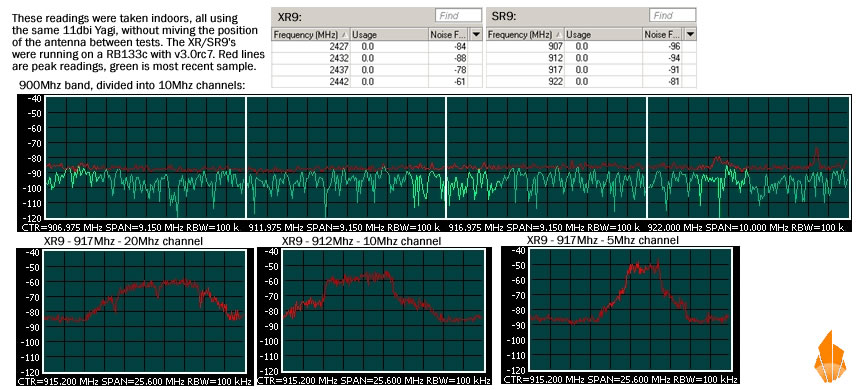
we just got our batch of test XR9’s from ubiquiti, the first thing we noticed was the noise floor differences, and came to the same likley conclusion, the XR9 is far closer to accurate. I’m going to do some testing tomorrow with our spectrum analyzer plugged into the same antenna as the XR9 was to see how they match up.
Here are the results of my testing. As you can see the XR9 reported significantly higher noise floors, and if you closely examine the spectrum analyzer output, the XR9 is reporting much closer to accurate peak noise readings. The difference between the XR9’s reading and the analyzer is almost appreciable to difference in the pigtails used to connect the two to the yagi, although I feel there is still a slight mis-calibration on the part of one or the other causing 1-3 db of skew.
in summary: the XR9 seems to report accurately, based on the highest reading in the channel, although maybe falsely a few db worse then actual, where the SR9 reports a completely false and grossly inaccurate picture of the noise floor. If I had to guess, I would say the SR9 is reporting the average noise floor across the channel, where the XR9 reports the peak noise floor.
I also took some output graphs of the of the XR9 in 5, 10 and 20mhz channel widths to show actual channel usage. While the bulk of the output is clearly 5 or 10mhz, there is still a large bell curve showing that it would be very bad to have 2 radio’s operating near by each other on adjacent channels, in any channel width.
Since you are running 3 sectors, I assume you must be running in 5Mhz channels…
Motorola - 8Mhz Channel Width
center 906Mhz
low 902Mhz
high 910Mhz
XR9 - 5Mhz Channel Width
center 912Mhz
low 909.5
high 914.5
Since there is a 1Mhz channel spacing on the canopy, we must assume that it can bleed up to 1 extra Mhz beyond it’s rated channel width, making the upper boundry of which it will interfere 911Mhz
Since the XR9 when running in 5Mhz channels, on center channel 912, goes down to 909.5Mhz for data purposes (see my other post about how far it actually bleeds down to) you have 1.5Mhz, or 30% of your channel being overlaped by the canopy signal. The only thing you can do is to switch to a higher channel (already in use), or one of you must change polarities.
I would suggest keeping the XR9 as you’re going to want the extra noise handleing abilities it is claimed to have (just got them yesterday, haven’t done any outdoor testing with them as of yet)…
I just got my XR9’s in.
I sent my SR9’s back to UB for replacement(haven’t got them back so I bought some).
I have only one of the same problems with the XR9s as the SR9’s - the 5-10mhz channels didn’t have the range I needed so I put them in straight B mode with just B data rates and got better TX/RX and SNR.
They deffinately perform a lot better!!
I’m wondering if there is a recommended antenna vendor for the XR9’s.
The Rootenna 900 works really great but some of the Yagi’s seem to not like the split ranges.
Rod Neal
 .
.