Hi all,
I am facing very interesting problem. I use several devices connected together via sstp tunnels (I had been running EOIP with IPSEC before, but it looked unstable for me, so I went to SSTP that was easy and reliable). After some time running 6.19 on not so critical devices I decided to update also more critical devices from 6.18 to 6.19.
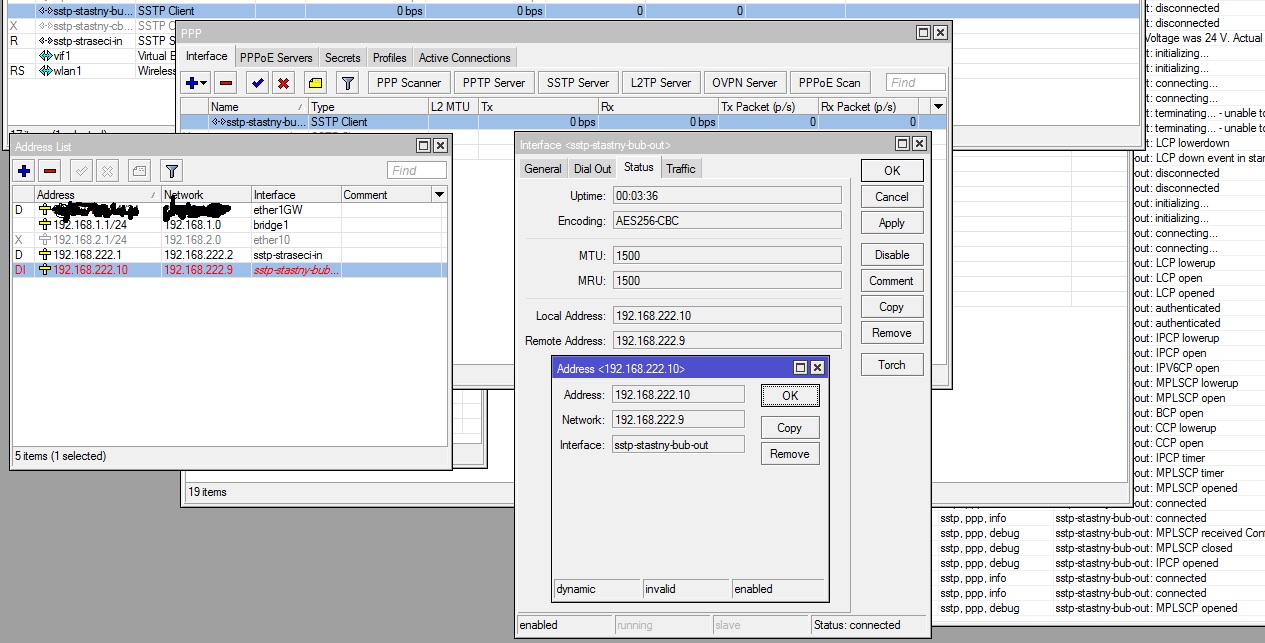
When I updated the RB2011 which serves amongst others like SSTP server and also SSTP client for another connections I realised that those SSTP connections that was dialed from this device with newly installed 6.19 do not work while received SSTP calls from other 6.18 devices are still on. I fiddled around and saw that on server side (6.18) everything looks good, connected and without any problems. Client side (6.19) has also connected status, everything fine, just missing “R” mark. What is more, the keep-alive packets are going forth and back. But none traffic, none pings, nothing. After that I saw that IP address added on client side is marked as invalid:
Why the address is invalid suddenly in 6.19 if it was valid in 6.18?
I tried to remove addresses on server side of sstp config and put addresses manually to the SSTP tunnel, but it also did not work. I also tried to set everything in PPP profile to defaults and tried many other combinatios. Even the tunnel was created, the IP addresses were everytime invalid on clients side (but it worked with 6.18!).
So, what I can do in order to have working SSTP tunnel between 6.18 as server and 6.19 as client?
Reverse, it means 6.19 server and 6.18 client, works continually like before the update. I stopped planned update of other devices until it will be clear how to handle this situation.
I noticed that. But this config works in combination (server-client) 6.18-6.18 and 6.19-6.18 but not for 6.18-6.19. Why just installing 6.19 on client side breakes it? If it is connected and both sides are reporting in debug log that sending and receiving control packet echo request and echo response, how to understand it?
How is it possible that server side on 6.18 reports running status while client on 6.19 reports only connected but not running?
And it is not problem with certificates as I do not use any - anyway the tunnel is connected. Of course sometheing is wrong, but why I am not getting any error?
I thought it was solved, but now exactly the same problem appeared again. I checked the force-aes switch, it si still off like before. I am out of ideas…
Of course I tried to switch it on, off and again, reboot meanwhile all involved RBs, nothing helped.
As this problem was confirmed by other users still not to be solved in 6.28, I owe my recent findings:
Now, all devices involved in my problem run 6.27. When this problem happens time to time, this is the most easy and 100% (so far) working immediate solution:
delete all “DI” marked addresses at SSTP client device.
switch off the SSTP interfaces that belonged to previously deleted ip addresses at client device.
wait for 20-30 seconds
switch on the previously switched SSTP interfaces.
After that the connections are etablished again and the ip addresses are perfectly valid and working. No need to touch the server side.
There is still open ticket [Ticket#2015021466000104] lastly replied from Mikrotik side by this message (after I informed them that the same happens to L2TP also) on 16.3.2015:
Hello,
Thank you about your report. Just now did manage to reproduce this issue with L2TP.
I have forwarded this issue to our programmer. Hopefully he will manage to fix it as soon as possible.
Regards,
Martins S.
Mikrotik is talking with me again.
To all who have the same problem: Please, provide access to your client device to mikrotik staff when you see the “DI” state on SSTP or L2TP client interface address by sending message to support@mikrotik.com.