Two internet and set which client use which one

I have two internet modem, modem A and modem B, they get internet from different service providers
(Actually they are modem/router!)
Also, I have an access point that Wi-Fi devices may connect to that.
My router is a hap lite MikroTik router, Wi-Fi access point and modem A and modem B and one PC connects to my router four ethernet ports. And Wi-Fi devices connect to Wi-Fi access point or router Wi-Fi (depends on signal strength, Wi-Fi clients may connect to Wi-Fi access point SSID or router Wi-Fi SSID)

I want to do this: Divide devices in two group, group A and group B, all of the clients in group A should access to clients group B and vice versa, but their internet gateway is different:

  • Group A should connect to internet just by modem A, if modem A failed to connect to internet, group A shouldn’t have access to internet,
    Group B should connect to internet by modem B, but if modem B failed to connect to internet, group B should have access to internet by modem A.

How can I do that? can I assign different gateways to different devices into the router settings!? remember that I don’t want to set any IP settings on devices, everything should be done in router side.

Everything stated seems reasonable except for this part… remember that I don’t want to set any IP settings on devices, everything should be done in router side.
Thats not how networking works, all the devices will get leased an IP address on their respective LAN. The access point also requires and IP address.

Now its clear that you really dont want TWO LANS, otherwise, why have each totally accessing each other. I can see that it may be an advantageous approach in terms of separating traffic for the internet as you desire. Finally perhaps there is some other reason for having two networks but I dont know that answer…

Start with a firewall approach that is basic and clean.
I made some adjustments for your scenario.

/ip firewall filter
{Input Chain}
add action=accept chain=input comment=“defconf: accept established,related,untracked” connection-state=established,related,untracked
add action=drop chain=input comment=“defconf: drop invalid” connection-state=invalid
add action=accept chain=input comment=“defconf: accept ICMP” protocol=icmp
add action=accept chain=input in-interface-list=LAN
add action=drop chain=input comment=“drop all else”
{forward chain}
add action=fasttrack-connection chain=forward comment=“defconf: fasttrack” connection-state=established,related
add action=accept chain=forward comment=“defconf: accept established,related, untracked” connection-state=established,related,untracked
add action=drop chain=forward comment=“defconf: drop invalid” connection-state=invalid
add action=accept chain=forward comment=“allow internet traffic” in-interface-list=LAN out-interface-list=WAN
add action=accept chain=forward comment=“allow port forwarding” connection-nat-state=dstnat
add action=accept chain=forward comment"allow intervlan traffic" in-interface-list=LAN out-interface-list=LAN
add action=drop chain=forward comment=“drop all else”
/ip firewall nat
either
add action=masquerade chain=srcnat comment=“defconf: masquerade” out-interface**-list=**WAN
OR
add action=masquerade chain=srcnat comment=“defconf: masquerade” out-interface=WANA1
add action=masquerade chain=srcnat comment=“defconf: masquerade” out-interface=WANB2

If your WANIPs provided by the modem/router are fixed private IPs then the format would be
/ip firewall nat
add action=srcnat chain=srcnat out-interface=WANA1 to-addresses=IP_WanA1
add action=srcnat chain=srcnat out-interface=WANB2 to-addresses=IP_WanB2

Note: Since at least one of the subnets should be capable of using both, there is no point in using source addresses for them.

Ensure the WAN interface includes members WANA1 and WANB2
Ensure the LAN interface includes members vlanAA and vlanBB

Create your two vlans for the subnets (will be easy to implement especially on the wifi side).
interface for vlans is bridge
vlans get ip pool, ip address, dhcp-server, dhcp-server network

Complete /interface bridge port setup (where you assign vlan to WLAN port (access port) for local wifi, assign vlan to local users via etherport (access port) and trunk port to smart devices.
Complete /interface bridge vlan setup
Turn bridge vlan filtering on.

The real magic will be done on IP Routes.
Assuming you have public IPs then you dont even need IP DHCP client
Just assign the two WANIPs in the IP ADDRESS location in the config
add address=10.10.10.1/24 interface=ether1 network=10.10.10.0
add address=20.20.20.1/24 interface=ether2 network=20.20.20.0


/ip routes
dst-address=0.0.0.0/0 gwy=10.10.10.1 table=main distance=10
dst-address=0.0.0.0/0 gwy=20.20.20.1 table=main distance**=5** check-ping=gateway

This construct basically say ALL TRAFFIC will go to WanB because it has a shorter distance.
If Wan B is not available all traffic will be switched to WanA, but the router will keep checking to see if WanB comes backup on line and if does then all traffic will go there.

Thus we are partially there. We use simple failover to create the conditions for WANB that meet your requirements. Since all traffic goes to WANB, all WANB users go there.
If WANB fails, they will move to WANA. Check.
Now what about WANA users. We dont want them going to WANB, so we create a special FORCING route for them and thus require a third IP route.

ON version 7 firmware its something like

dst=address=0.0.0.0/0 gwy=10.10.10.1 table=useWAN-A
/routing table fib add name=useWAN-A
/routing rule add src-address=VLANAA/24 action=lookup-only-in-table table=useWAN-A

ON version 6 firmware its something like
dst-address=0.0.0.0/0 gwy=10.10.10.1 routing-mark=useWAN-A
/ip route rule
add action=lookup-only-in-table src-address=VLANAA/24 table=useWAN-A

Note: In both cases if you DID want VLANAA users to be able to access WAN B, if WANA goes down, then simply change action to LOOKUP (vice lookup-only-in table).
They will still be forced to use WANA all the time, unless its down.

++++++++++++++++++++++++++++++++++++++++++++++++++++++++++++++

To clarify you will have two subnets on your router, is one of them trusted and not guests etc or IOT devices on it etc…
The trusted one should be the one that the admin resides on and where the admin will configure the devices from and all smart devices will get their IP from this subnet.
If both those vlans are not trusted, then consider a management vlan .

To setup the MT access point switch have a look at this link & example.
https://forum.mikrotik.com/viewtopic.php?t=182276

well, I did it finally, this is my config:
Both modem A and modem B are in PPPoE mode and their DHCP is on.
“Irancell” and “Sabanet” are two service provider names

/interface bridge
add name=NULL
/interface wireless
set [ find default-name=wlan1 ] ssid=MikroTik
/interface ethernet
set [ find default-name=ether2 ] name=Irancell
set [ find default-name=ether3 ] name=Laptop
set [ find default-name=ether4 ] name=MiWiFi
set [ find default-name=ether1 ] name=Sabanet
/interface wireless security-profiles
set [ find default=yes ] supplicant-identity=MikroTik
/ip pool
add name=dhcp_pool0 ranges=192.168.3.1-192.168.3.99,192.168.3.101-192.168.3.254
add name=dhcp_pool1 ranges=192.168.4.1-192.168.4.99,192.168.4.101-192.168.4.254
/ip dhcp-server
add address-pool=dhcp_pool0 disabled=no interface=Laptop name=dhcp1
add address-pool=dhcp_pool1 disabled=no interface=MiWiFi name=dhcp2
/ip address
add address=192.168.1.100/24 interface=Sabanet network=192.168.1.0
add address=192.168.2.100/24 interface=Irancell network=192.168.2.0
add address=192.168.3.100/24 interface=Laptop network=192.168.3.0
add address=192.168.4.100/24 interface=MiWiFi network=192.168.4.0
/ip dhcp-server lease
add address=192.168.4.93 client-id=1:24:18:1d:cf:c0:69 mac-address=\
    24:18:1D:CF:C0:69 server=dhcp2
/ip dhcp-server network
add address=192.168.3.0/24 dns-server=8.8.8.8 gateway=192.168.3.100
add address=192.168.4.0/24 dns-server=8.8.8.8 gateway=192.168.4.100
/ip dns
set servers=8.8.8.8
/ip firewall address-list
add address=192.168.1.0/24 list=Sabanet_SUBNET
add address=192.168.2.0/24 list=Irancell_SUBNET
add address=192.168.3.0/24 list=Irancell_users
add address=192.168.4.0/24 list=Sabanet_users
add address=192.168.4.93 list=Irancell_users
/ip firewall mangle
add action=accept chain=prerouting dst-address-list=Irancell_SUBNET
add action=accept chain=prerouting dst-address-list=Sabanet_SUBNET
add action=mark-routing chain=prerouting new-routing-mark=TO_IRANCELL \
    passthrough=no src-address-list=Irancell_users
add action=mark-routing chain=prerouting new-routing-mark=TO_SABANET \
    passthrough=no src-address-list=Sabanet_users
/ip firewall nat
add action=masquerade chain=srcnat src-address-list=Sabanet_users
add action=masquerade chain=srcnat src-address-list=Irancell_users
/ip route
add check-gateway=ping comment="Irancell Route" distance=1 gateway=192.168.2.1 \
    routing-mark=TO_IRANCELL
add check-gateway=ping comment="Irancell failover" distance=2 gateway=\
    192.168.1.1 routing-mark=TO_IRANCELL
add check-gateway=ping distance=1 gateway=192.168.1.1 routing-mark=TO_SABANET
add check-gateway=ping disabled=yes distance=1 gateway=192.168.1.1
add check-gateway=ping disabled=yes distance=2 gateway=192.168.2.1
add distance=1 dst-address=4.2.2.1/32 gateway=192.168.2.1
add distance=2 dst-address=4.2.2.1/32 gateway=NULL
/system clock
set time-zone-name=Asia/Tehran
/tool netwatch
add down-script="/ip route set [find comment=\"Irancell failover\"] distance=1\r\
    \n/ip route set [find comment=\"Irancell Route\"] distance=2" host=4.2.2.1 \
    interval=5s up-script="/ip route set [find comment=\"Irancell failover\"] dis\
    tance=2\r\
    \n/ip route set [find comment=\"Irancell Route\"] distance=1"

New problem raised :frowning:
When I’m connected to router and using modem B internet, checking speed using fast.com says the speed is 10mbps. while when I connect directly to modem B, the speed is about 20mbps…

Sorry I cant help you.
The config I provided allows one to keep Fastrack and is far simpler.
As soon as you use mangling, one has to disable Fastrack.

Thank you anav, honestly I couldn’t find out your config completely.
Can you explain it a little bit more?

I didn’t understand this:

interface for vlans is bridge

My 4G modem can not be on bridge mode, it is just support PPPoE mode, what do you mean of bridge interface? We have just 4 interfaces here:

  • WAN1
    WAN2
    LAN1
    LAN2

DONT WORRY ABOUT VLANS, no need as you have two simple subnets and two etherports for those LANS and two separate internet connections.

Okay let me get this straight
You have two internet providers giving you fixed private IPs??? on ether1 and ether 2 respectively
You have two active ethernet ports ether3 to a laptop and ether 4 to an access point ??

You want the ether3 users (LAPTOP) to use the IranCell internet all the time unless it fails and they should switch to Sabanet.
You want the ether4 users (MiWIFI) to ONLY use the Sabanet connection and if that fails, then they have no internet.
One exception. You have one user on the MWIFI network 192.168.4.93/32 that should also access the Irancell internet vice sabat.

You have no Firewall rules for the input chain and forward chain ??????
If not i cannot help as I dont provide assistance if the setup is not secure.
I will assume you simply elected not to show them, which is bad because all the rules are inter-related.
I need to see the complete config.

In any case..................

/ip firewall nat
add action=masquerade chain=srcnat out-interface=Sabanet
add action=masquerade chain=srcnat out-interface=Irancell

If they are indeed fixed IPs this is better.

add action=src-nat chain=srcnat out-interface=Sabanet to-addresses=192.168.1.100
add action=src-nat chain=srcnat out-interface=Irancell to-addresses=192.168.2.100

(need two normal routes and two special routes)
/ip route (items to enter or to configure in winbox)
dst-address=0.0.0.0/0 gwy=192.168.2.1 distance=5 check-ping=gateway
dst-address=0.0.0.0/0 gwy=192.168.1.1 distance=10
dst-address=0.0.0.0/0 gwy=192.168.2.1 distance=5 check-ping=gateway routing-mark=use-Irancell
dst-address=0.0.0.0/0 gwy=192.168.1.1 distance=10 routing-mark=use-Sabat

/ip route (resultant export view)
add check-gateway=ping comment="Irancell Route" distance=5 gateway=192.168.2.1
add comment="Saban Route" distance=10 gateway=192.168.1.1
add check-gateway=ping comment="Irancell Route" distance=5 gateway=192.168.2.1 routing-mark=use-Irancell
add comment="Saban Route" distance=10 gateway=192.168.1.1 routing-mark=use-Sabat

The two standard IP routes as shown apply to all traffic.
Thus, all traffic will use IranCell as the ISP provider because it has a lower distance. If Irancell is not available all users will be passed to SABAT. The ping check command means the router will keep checking to see when Irancell comes back on line and if it does, will send all users back to the Irancell for internet. This is exactly what you want for ETHER3 laptop users. So far so good.
But we dont want ether4 to use the Irancell internet. Dont fear we will create two more IP routes to ensure LAN traffic goes where it should.

We have two additional routes for specific traffic
The first one associates a route mark to a table we create in a subsequent Routing rule for IranCell
The second one associates a route mark to a table we create in a subsequent Routing rule for Sabat.

(need two route rules associated with special routes - here ORDER is important)
/ip route rule (items to enter or to configure in winbox)
src-address=192.168.4.93/32 action=lookup table=use-Irancell
src-address=192.168.4.0/24 interface=MiWiFi action=lookup-only-in-table table=use-Sabanet

/ip route rule (resultant export view)
add action=lookup src-address=192.168.4.93/32 table=use-Irancell
add action=lookup-only-in-table src-address=192.168.4.0/24 interface=MiWiFi table=use-Sabanet

++++++++++++++++++++++++++++++++++++++++++++++++++

In the Second Route rule what we are saying is that for any traffic from the MiWIFI ethernet (with subnet as shown), do NOT use the standard IP routes in the main table but instead
use the Table we identified by Route Marking in the special IP Route. Thus all miwifi traffic will go out the Sabat WAN.
By using the action "lookup only in table" this means that if Sabat WAN is not available, no traffic will pass, as the router is told DONT find another route for this source of traffic.

Now the first rule should make more sense. Before we tell ALL users on Miwifi to go to Sabat, we have to RESCUE the single user in Ether4, so that they follow the LAPTOP users in terms of internet access. So we tell the Router, for any traffic from that user, send that user through the IranCell internet connection.
By using the lesser restrictive action of only "lookup", this tells the router that if the special IranCell connection is down, the router can look for an alternate routing on the main table. Thus if Sabat is up, the user will go through the Sabat WAN, like the rest of the Irancell users on ether3.

Thank you.
I will try that. the config you provided no need to mangle and it’s very better than my current config.

I didn’t decide to not show input chain and forward chain. I use the link below for configuration:
https://aacable.wordpress.com/2011/10/27/mikrotik-policy-routing-based-on-client-ip-address/

and he didn’t set any input chain or forward chain rule.

Also I have another question, your failover is good when our PPPoE connection down or when modem couldn’t connect to ISP.
But sometimes modem can connect to ISP but got an invalid ip from ISP, (for example when my bandwidth ends)
We need another strategy for failover in order to concern about above case, I use netwatch and change distances in this case, do you have any better idea?

Regards

Lets walk before running!
Get the config working the easy way and then we can mess with the IP routes and IP DHCP clients and netwatch after… One step at a time.
I would much rather get the config working right and the firewall rules right First. Then we have a solid config to build on.

Everything is great!
I used your config and everything is working as just it should be :slight_smile:

More importantly did you understand all that we did??

Now can you confirm if you have static fixed WANIPs, never changes??

To see if one truly has a viable internet connection (past the ISP) one needs to invoke recursive routes.
They are a bit tricky.
Basically you say to the router I would to connect to all internet addresses through the google gateway
At the same time you say to the router I would like to connect to google through my ISP.
The Router is smart enough to figure out that to ensure all internet access can be provided by checking to see if the Google gateway is UP/available,
so it uses the ISP gateway to check if google is indeed up. If so, then traffic flows.

Winbox configuration.
dst-address=0.0.0.0/0 gateway=8.8.8.8 check-gateway=ping distance=5 scope=30
dst-address=8.8.8.8/32 gateway=ISP gatewayIP distance=5

What it looks like in export config
add check-gateway=ping distance=5 gateway=1.0.0.1 scope=30
add distance=5 dst-address=8.8.8.8/32 gateway=47.54.56.1 scope=10

What it looks like on IP Print > /ip route print detail
Flags: X - disabled, A - active, D - dynamic, C - connect, S - static, r - rip, b - bgp, o - ospf, m - mme,
B - blackhole, U - unreachable, P - prohibit

AS dst-address=0.0.0.0/0 gateway=8.8.8.8 gateway-status=8.8.8.8 recursive via ISP_Gateway_IP ISP-interface-Name check-gateway=ping>
distance=5 scope=30 target-scope=10

AS dst-address=8.8.8.8/32 gateway=ISP_Gateway_IP gateway-status=ISP_Gateway_IP reachable via ISP-interface-Name distance=5 scope=10
target-scope=10

Yes.

To apply to at least the IranCell try this…
As per my example above!!

Winbox configuration.
dst-address=0.0.0.0/0 gateway=1.0.0.1 check-gateway=ping distance=5 scope=30
dst-address=1.0.0.1/32 gateway=192.168.2.1 distance=5

dst-address=0.0.0.0/0 gwy=192.168.1.1 distance=10
dst-address=0.0.0.0/0 gwy=192.168.2.1 distance=5 check-ping=gateway routing-mark=use-Irancell
dst-address=0.0.0.0/0 gwy=192.168.1.1 distance=10 routing-mark=use-Sabat

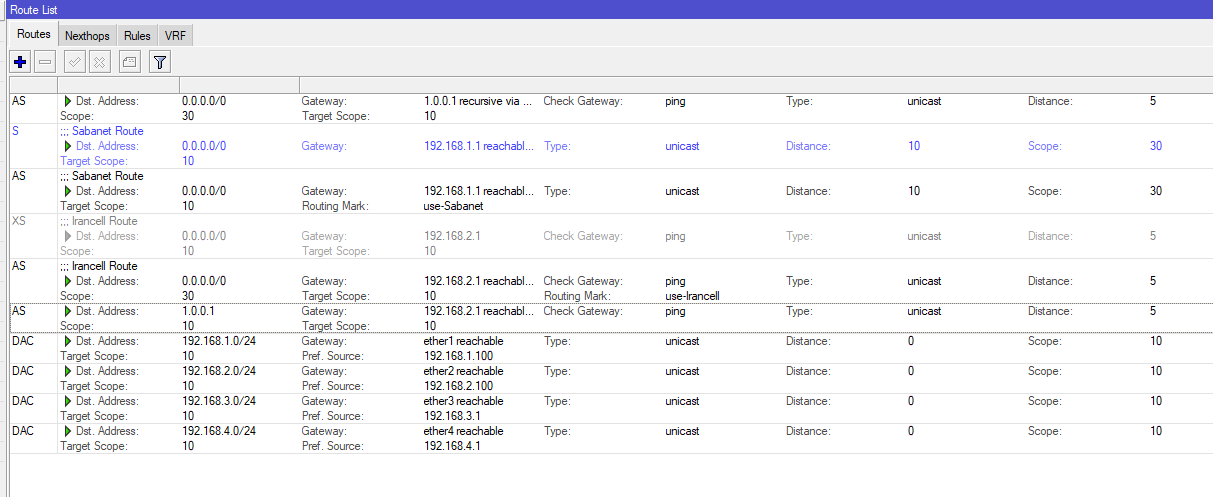
I did that but when I turn of Irancell internet (not the modem itself) failvoer doesn’t work.

/ip route
add check-gateway=ping comment="Irancell Route" distance=5 gateway=192.168.2.1 \
    routing-mark=use-Irancell
add comment="Sabanet Route" distance=10 gateway=192.168.1.1 routing-mark=\
    use-Sabanet
add distance=5 gateway=1.0.0.1
add check-gateway=ping comment="Irancell Route" distance=5 gateway=192.168.2.1
add comment="Sabanet Route" distance=10 gateway=192.168.1.1
add check-gateway=ping distance=5 dst-address=1.0.0.1/32 gateway=192.168.2.1

I cannot work from snippets,
Please post the entire config.
/export hide-sensitive file=anynameyouwish

Just ensure that you put the config in notepad++ and if applicable , change any ISP WAN IP or WAN gateway IP, so they are not the real ones…
ex gatewayIP=24.234.56.3 put aa.123.rt.5 but keep it consistent for every such entry, so everything is relatable.

I attached.
fullconfig.rsc (2.06 KB)

/interface bridge
add name=NULL

nice choice…

dude, modern problems require modern solutions.

I exactly use these 5 rules. I don’t know about other rules scope.


Capture.PNG