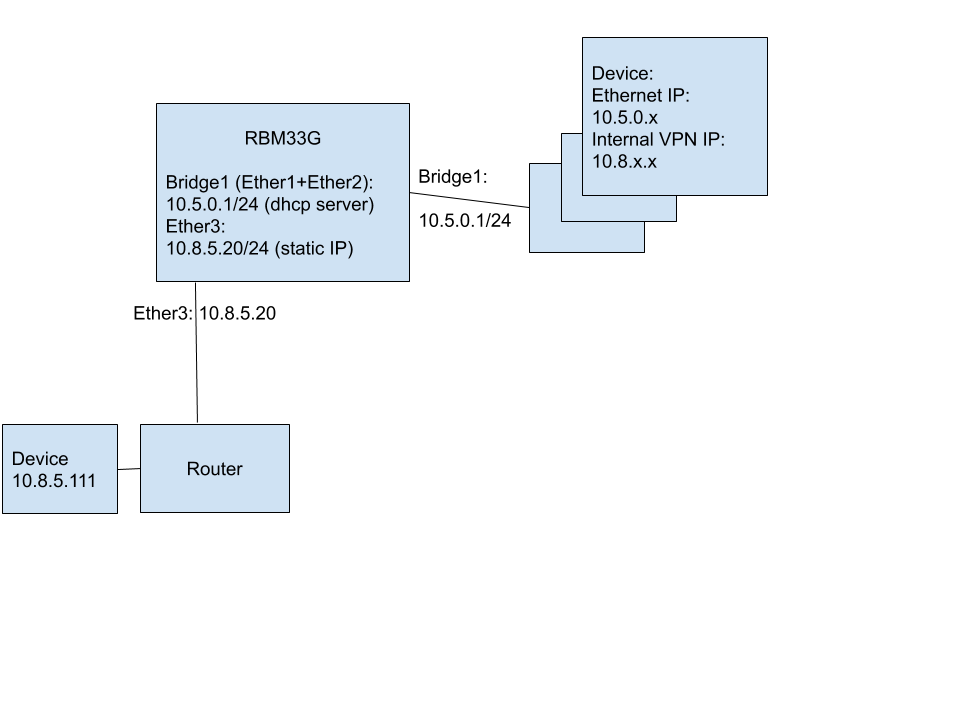
Network diagram attached.
My board (Mikrotik RBM33G) is responsible for multiple subnets but is connected to an external network via ether3.
In ether3 my board is connected with the following IP: 10.8.5.20 netmask 255.255.255.0 (external network).
In bridge1 my board is responsible (runs a dhcp server) for the following net 10.5.0.1/24 (ether3 is not part of bridge1).
A lot of my devices are part of 10.5.0.* but are also part of another 10.8.. network (not the same network the board is part of).
The problem is that I want some of my devices to be able to connect to instance 10.8.5.111 on the board external network.
It’s not possible to change the address space on either nets.
I was able to find some not ideal fix by adding a route to 10.8.5.111 on my devices and adding
/ip firewall nat add action=masquerade chain=srcnat out-interface=ether3
to the mikrotik board.
What I am looking to do is 1:1 NAT mapping where I can map 10.8.5.111 to one of my subnets like having 10.5.0.11 mapped to 10.8.5.111
I tried the following solution https://wiki.mikrotik.com/wiki/Manual:IP/Firewall/NAT#1:1_mapping but it didn’t work.
See example:
/ip firewall nat add chain=dstnat dst-address=10.8.5.111/32 action=netmap to-addresses=10.5.0.11/32
/ip firewall nat add chain=srcnat src-address=10.5.0.11/32 action=netmap to-addresses=10.8.5.111/32
Board info:
[admin@MikroTik] > system resource print
                   uptime: 2d17h25m45s
                  version: 6.44.2 (stable)
               build-time: Apr/01/2019 12:47:57
         factory-software: 6.40.5
              free-memory: 212.6MiB
             total-memory: 256.0MiB
                      cpu: MIPS 1004Kc V2.15
                cpu-count: 4
            cpu-frequency: 880MHz
                 cpu-load: 6%
           free-hdd-space: 5.0MiB
          total-hdd-space: 16.3MiB
  write-sect-since-reboot: 66185
         write-sect-total: 69104
               bad-blocks: 0%
        architecture-name: mmips
               board-name: RBM33G
                 platform: MikroTik
export:
[admin@MikroTik] > export hide-sensitive
# oct/24/2019 08:29:40 by RouterOS 6.44.2
# software id = AUXS-IGT6
#
# model = RouterBOARD M33G
# serial number = A2FD09032BCC
/interface bridge
add name=bridge1
/interface lte
set [ find ] mac-address=02:1E:10:1F:00:00 name=lte1
/interface wireless
set [ find default-name=wlan1 ] band=5ghz-n/ac disabled=no mode=ap-bridge rx-chains=0,1 ssid=nt-cu5-c3 tx-chains=0,1 wireless-protocol=802.11
/interface list
add name=WAN
add name=LAN
add include=dynamic name=ethernet
/interface lte apn
set [ find default=yes ] apn=tracfone-wfm
/interface wireless security-profiles
set [ find default=yes ] authentication-types=wpa2-psk mode=dynamic-keys supplicant-identity=MikroTik
/ip hotspot profile
set [ find default=yes ] html-directory=flash/hotspot
/ip pool
add name=dhcp-wlan ranges=10.7.0.3-10.7.0.254
add name=dhcp-ether ranges=10.5.0.100-10.5.0.254
/ip dhcp-server
add address-pool=dhcp-wlan disabled=no interface=wlan1 name=dhcp2
add address-pool=dhcp-ether disabled=no interface=bridge1 name=dhcp1
/port
set 1 name=usb2
/interface ppp-client
add apn=internet name=ppp-out1 port=usb2
/interface bridge port
add bridge=bridge1 interface=ethernet
/interface list member
add interface=wlan1 list=LAN
add interface=lte1 list=WAN
add interface=ether1 list=LAN
add interface=ether2 list=LAN
add disabled=yes interface=ether3 list=LAN
add interface=ether1 list=ethernet
add interface=ether2 list=ethernet
add disabled=yes interface=ether3 list=ethernet
/ip address
add address=192.168.88.1/24 comment=defconf interface=ether1 network=192.168.88.0
add address=10.7.0.1/24 interface=wlan1 network=10.7.0.0
add address=10.5.0.1/24 interface=bridge1 network=10.5.0.0
add address=10.8.5.20/24 interface=ether3 network=10.8.5.0
/ip dhcp-server network
add address=10.5.0.0/24 gateway=10.5.0.1 netmask=24
add address=10.7.0.0/24 gateway=10.7.0.1 netmask=24
/ip firewall filter
add action=accept chain=input comment="defconf: accept established,related,untracked" connection-state=established,related,untracked
add action=drop chain=input comment="defconf: drop invalid" connection-state=invalid
add action=accept chain=input comment="defconf: accept ICMP" protocol=icmp
add action=drop chain=input comment="defconf: drop all from WAN" in-interface-list=WAN
add action=fasttrack-connection chain=forward comment="defconf: fasttrack" connection-state=established,related disabled=yes
add action=accept chain=forward comment="defconf: accept established,related, untracked" connection-state=established,related,untracked
add action=drop chain=forward comment="defconf: drop invalid" connection-state=invalid
add action=drop chain=forward comment="defconf:  drop all from WAN not DSTNATed" connection-nat-state=!dstnat connection-state=new in-interface-list=WAN
/ip firewall mangle
add action=change-ttl chain=postrouting new-ttl=set:65 out-interface=lte1 passthrough=yes
/ip firewall nat
add action=masquerade chain=srcnat out-interface-list=WAN
add action=masquerade chain=srcnat out-interface=ether3
/system clock
set time-zone-name=America/Chicago
/system leds
add interface=wlan1 leds=wlan1_signal1-led,wlan1_signal2-led,wlan1_signal3-led,wlan1_signal4-led,wlan1_signal5-led type=wireless-signal-strength
add interface=wlan1 leds=wlan1_tx-led type=interface-transmit
add interface=wlan1 leds=wlan1_rx-led type=interface-receive