Hello guys! I am trying to use 1 RADIUS server on 2 different routers. Routers are connected by lan cable and I can ping one another.
On my main/first router, where UM database is, radius server ip is 127.0.0.1 - loopback address. Users are authenticated by hotspot service and everthing works fine on main router.
Problem is I dont know how to share UM database from main/first router to second router. I tried in UM routers section by addind second routers local ip address and its secret by it wont work.
First router is your RADIUS server (User Manager is a RADIUS server.) Second router is the RADIUS client.
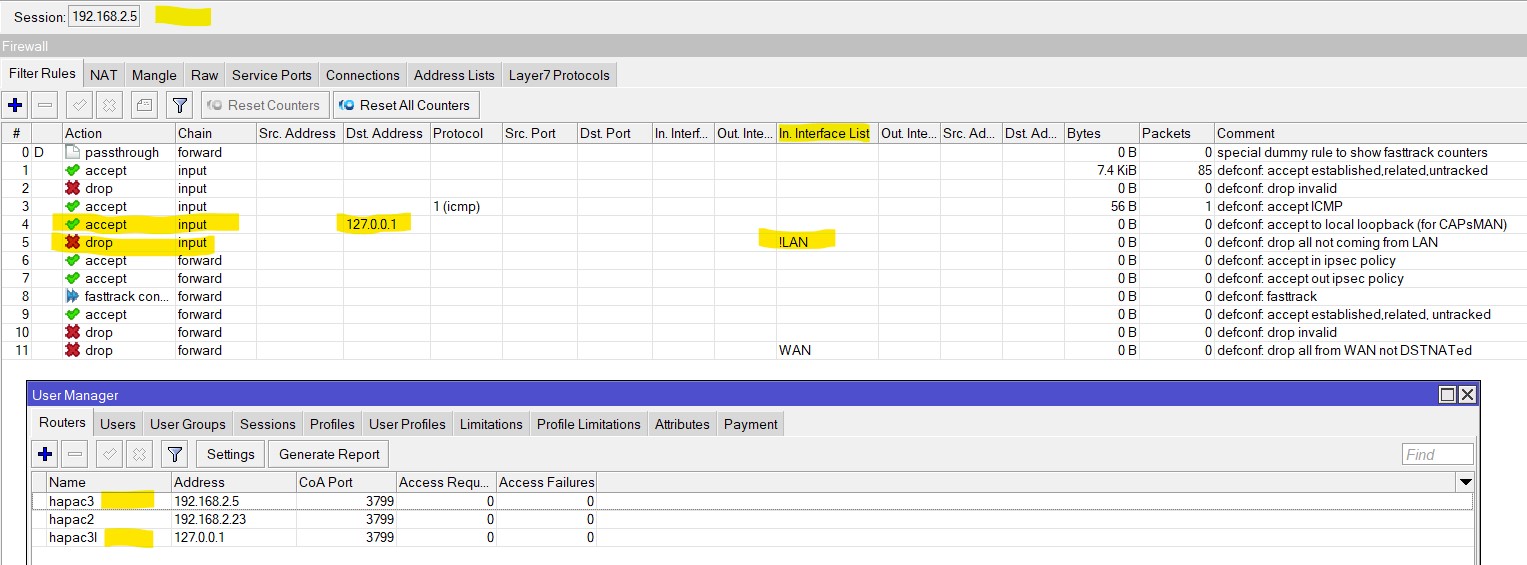
Add second router reachable LAN IP address (not 127.0.0.1) in the “Routers” table of User Manager of first router, define a shared ‘secret’.
In the second router, in RADIUS tab, add the User Manager router (reachable IP address, not 127.0.0.1) for one or more selected services. Use the same ‘secret’. CalledID and Domain may remain blanc.
Check firewall on the RADIUS server for blocking “input” rules on the used ports 1812,1813.
Hello thank you for replying. I forgot to mention in first post, I’m very knew to all this networking.
My first/main routers local ip address is 192.168.88.1 and my other routers local ip address is 192.168.88.2
If I understood you correctly, in second router under radius tab I should put 192.168.88.1? And in User-manager in main router, under section Routers I should add ip 192.168.88.2(the second router)?
I got another question, on my main router in run hotspot as radius service. Should I also check hotspot as service on second radius, even tho the hotspot is on main router?
If I understood you correctly, in second router under radius tab I should put 192.168.88.1? And in User-manager in main router, under section Routers I should add ip 192.168.88.2(the second router)?
Perfectly Correct : two entries for the 2 routers with RADIUS authenticated services, one each
For the first router : - in first router under RADIUS tab put 127.0.0.1 for the services you want to be RADIUS authenticated, e.g. Hotspot
and in User-manager in that first router, under section Routers add 127.0.0.1
For the second router: - in second router under RADIUS tab put 192.168.88.1 for the services you want to be RADIUS authenticated
and in User-manager in main router, under section Routers add ip 192.168.88.2 (the second router) defining a second RADIUS client
If the Hotspot is only on the first router, I see no need for a RADIUS record on the second router for a hotspot service that is not there.
I assume that then the Hotspot service on the main router is also defined for ether1. ( the router interconnect)
You could also use 192.168.88.1 instead of 127.0.0.1 in your setup, if ether1 is member of the LAN interface list. (see Firewall rules)
E.G. my setup for wifi WPA2/enterprise (EAP) authentication
Thank you again for replying, I did everything beside firewall stuff, unfortunetly It won’t work. Thing is I can access User-Manager from second router, see all users, sessions but it just won’t authenticate. I tried with putting services like wireless on radius tab on second router but it won’t work.
Update: I manage to make it work. Apperently I didn’t do the NAT firewall rule right on second router. I also created another seperate hotspot on second router and selected hotspot service in radius tab. Thank your very much for your advices, especially the one for um routers ip address, that really helped me