14 years lasting BUG - disconnected, unicast key exchange timeout

I dont understand, how it’s possible to manufacture so called router os and still have this HUGE, 14 years nover solved problem?
How to fix it??? I have Shelly device, it connects to wifi and after few seconds receives “disconnected, unicast key exchange timeout, signal strength -52”.
WHy this bug is not resolved and this IS bug 100%. Why i NEVER ever had any problems with ANY of my used non MikroTIk routers exept this one, Chateau LTE12.
Im not even talking about super duper unstable 5g wifi it have.
Group Key update is set to 35mins. NO matter this setting, no matter frequency..nothing matters… this is why this is bug and MikroTik fails to fix it 14 years already!
Using latest fw 7.2RC3, but this happens on ANY fw.
I have like 20 such devices… What a piece of sh. is MikroTik soft!

image_2022-01-30_171617.png

So you have an issue and instead of posting with an actual question and your config, you wait 14 years and post a rant (without proofreading)?

Try setting key update to “1d 00:00:00”

2 hints seen in the forum:

No special characters in PSK: http://forum.mikrotik.com/t/rb951g-2hnd-unicast-key-exchange-timeout/104896/1
Setting Advanced ‘distance’ to “indoors” instead of “dynamic” may stabilise the timing for key exchange. One can even set a value : http://forum.mikrotik.com/t/wireless-problem-android/148451/21

NOTHING helps that’s the problem. This issue is leading MikroTik 14 years and till this day there is no solution! I tried every one i found on the this forum, and there is ike 12 topics about this and as always 0 attention from MikroTIk. Latvian devlopers just like russian ones - never accepts that they made misstake and should fix it.
How crappy software have to be so that client can not connect to router!?? What i have to do now? i have 20 smart devices that can not connect to this router! With Asus i have 0 problems, with TP-LINK have 0 problems… for some reason this “Advanced” router so advanced that even most basic stuff doesn’t work!
MikroTIk 13 years ago had to make setting to disable this unicast key check! If they dont know how to fix it.

You giving 0 value to this topic so move on to some other topic. I provided all info needed - all the rest routers in the world works and MikroTik doesnt. That’s it!

Last time i had to deal with that issue was with some wireless automation devices that someone else had installed to a customer, it wasn’t the password the problem in that case, but to my surprise it was the SSID name.
The devices would not connect at all, i had repeated unicast exchange timeout messages in the log from all the devices, after trying almost everything, i just changed the SSID name, before it had some numbers and spaces in it if i remember correctly, changing it to just a simple word without numbers, spaces, symbols etc the devices connected right away…

When you experience this bug for 14 years now, you are probably able to write down the needed steps to reproduce the issue. Or post your configuration (/export hide-sensitive). This kind of improves the chance to find a solution. And even with all that information and details you could post here, a solution may still not be found by simply config tinkering. BUT then you could head over to MT support, provide them a link to this topic with all the high quality background information. MT then can try to reproduce the issue in their labs and this long lasting nasty bug could finally be resolved after so many many years.

A bit rich. You haven’t provided and detail. Where are the steps to reproduce? Where is your config? What have you tried? Where is your MT ticket?

Roger wilco

I don’t like the guy’s writing style either…

But there are some “issues” in Mikrotik wireless that relate DIRECTLY to their proprietary driver.

My tickets were addressed and Mikrotik clearly stated that they could reproduce the issue I was having.

Switching vendors for wifi was a bitter pill to swallow… But the amount of complaints and trouble tickets made it absolutely essential.

This and the simple fact that MT WiFi still lacks MU-MIMO, Bandsteering, 802.11k/v/r mandated for almost all customer installation those days.
The “wave2” package does not count as it only runs on a few devices and still misses most of the things above. No to speak of the poor stability, lack of 2.4G support on RB4011 and no CAPSMAN.

As a csutomer, it looks like MT has given up on WiFi after they lost touch with WiFi technology progress some 5 years ago.

I agree with that. MikroTik are not in competition anymore in the indoor WiFi market. Their own fault.

OK here’s update. And news are good.

Im NOT sure what helpped! But now all devices connects!

Also what i found BY MYSELF! Thank’s to crappy Latvian english MikroTik when logging error “unicast key exchange timeout” - they really mean INCORRECT PASSWORD! (tried loggin to wifi with phone by entering wrong wifi pass and logged the same error).
Anyway i created many virtual AP, done OPEN security, done easy pass, complex pass, any possible encryption combination and solo…Changed many channels, changed billion times group key update interval..and so on. Nothing helped.

BUT today i wanted to last time try it.. so again i go to Shelly web interface again enter wifi datails and it connected! I did this 30x times prevously-never helped..and now i works.
So i did this with other shelly device [other type] - worked too! Dont know why…i changed NOTHING from previuos tries.
SO as always with MikroTik and X-Files - The Truth Is Out There.. :smiley: ate fanboys who are sooo USLESS in this forum, seen so many topic when those idiots just thinks that every user is god damn RouterOs wizard and knows every possible command…
RouterOs is crappy os. There should be 2 layers, easy one and advanced. Im developer myself and when you give users all the possible options -this ALWAYS leads to probles.
MikroTik would be GREAT in home user sector..but FAILS big time at configuration UI. There are so many openSOurce projects they can take inspiration from.. but no…
BUt i guess they are doing it… will release in 2022 Q4 :smiley:

Longstory short: You may need to tripple check if your pass correct! if yes -then wait… magic happens.

BUGS in Layer 8 are much older than 14 years… and will last forever

1 Like

As a native English speaker, I can tell you that “unicast key exchange timeout” is perfectly cromulent English. Unhelpful in your case, yes, but there’s no problem of language translation here.

The real mystery to me is why you’re digging into the router logs to learn of a bad WiFi PSK in the first place. Shouldn’t diagnosing that be up to your client OS?


MikroTik when logging error "> unicast key exchange timeout> " - they really mean > INCORRECT PASSWORD> !

I’m sure it means exactly what it says.

I don’t think the message needs to change, but possibly to be augmented with further information between the “connected” and “disconnected” states to explain how you got from one to the next.

That said, let us not forget that these devices are storage and CPU-constrained, so they must be riding a line of how much information to log. I’ve seen too-verbose logging take big Xeon servers down.


RouterOs is crappy os.

I agree! It could not possibly be the case that one who makes so many typos and spelling mistakes could be at fault when it comes to typing a WiFi PSK. It’s definitely the fault of RouterOS. :roll_eyes:


easy one and advanced.

There are easy UIs for RouterOS: Quick Set and the mobile apps. You could arguably toss SwOS into that box, too.

I’ve used network equipment with simplified interfaces, and what it always means is that to achieve it, the vendor has either pre-set or neglected to support every advanced option you might want. Yes, RouterOS takes more time to master, but I’d rather have the option to learn something new about it than to not have the features at all.

In any case, I fail to see how paring the configuration UIs down even further would help in this case. To take it to an extreme, you can imagine a single input box on the UI taking the PSK and nothing else, everything else pre-set. if you’re making typos all the time, you’ll still make typos on this thought experiment’s single-input screen, too. In just this single message of yours I’m replying to, I count over a dozen spelling and capitalization errors.

That doesn’t count quibbles like wifi vs WiFi, Shelly vs shelly, RouterOS vs RouterOs… I’m talking outright errors like “english”, which when lowercased means something different from “English”. Computers are literal-minded: case often matters!

It’s no wonder you kept getting your PSK wrong so many times in a row.


fanboys who are sooo USLESS in this forum, seen so many topic when those idiots just thinks that every user is god damn RouterOs wizard and knows every possible command…

I truly do agree with this one. This forum could most definitely use a professionalism upgrade, focusing more on helping people rather than belittling them.

Believe it or not, that’s what I’m trying to do with this reply: holding up a mirror to the problem. Do you see it now? PEBKAC!

Regardless of whether you think I’ve succeeded in being helpful, though, I fail to see how even an infinite number of “idiots” and “wizards” on the other side of the Internet are responsible for your repeated WiFi PSK typos.


The Truth Is Out There

Yes, and the truth in this case is that you mistyped your password. Own it.
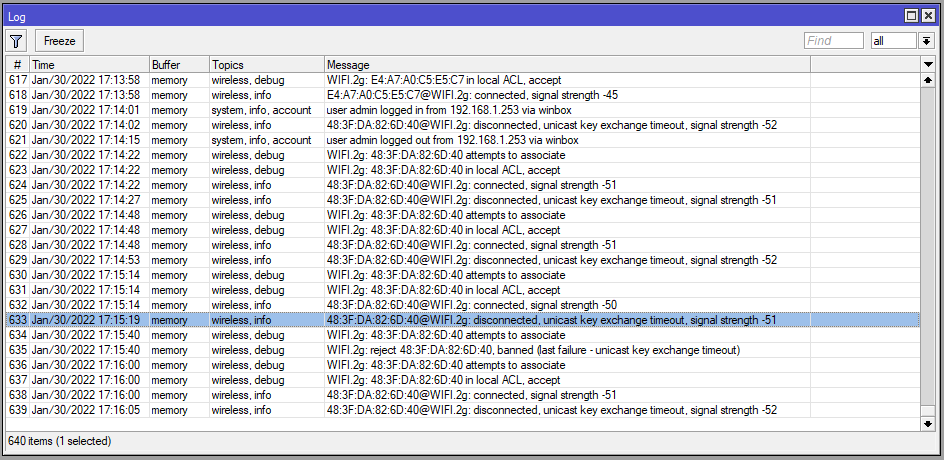
Well, he is right. When you try to connect with an incorrect password, you get “unicast key exchange timeout” on the AP.
That is indeed an error message that could be improved, e.g. “unicast key exchange timeout (likely incorrect password)”.

Exactly the same is happening in IPsec PSK, there the router also cannot know why the handshake fails and logs something like that:

phase1 negotiation failed due to time up

but the message has been improved for some cases:

parsing packet failed, possible cause: wrong password

Yes, I see that in the first post’s logs. My point is that this is the “disconnected” message, immediately following the “connected” message. What we need isn’t a change to the final state’s message but a third message between that says how you get from “connected” to “disconnected.”

What we have now is a state diagram with the transition lines left out. While debugging the problem way down at this level is probably not the best way to have diagnosed this issue, it’s no wonder the OP was left unenlightened.

This might explain while people think the extra space at the end of the PSK is causing this. The PSK with extra space is just the wrong PSK. No?
http://forum.mikrotik.com/t/rb951g-2hnd-unicast-key-exchange-timeout/104896/1

Happy that you found “your” issue - but unfortunately it is not everytime a layer 8 issue.

http://forum.mikrotik.com/t/wifi-issue-with-linux-driver-r8712u-unicast-key-exchange-timeout/156292/2

Just post it here to raise awareness, that it does not always a wrong PSK (maybe the formatting or something similar?).

On wireless; “indoor” means 150 feet (46 meters) while outdoor means 300 feet. then you set “any” in “Installation”.

set wireless-advanced-distance = 1 km instead of indoors or dynamic, then you get higher ACK timeout, but probably less speed.

set on-fail-retry-time=0.1s , set hw-retries=15 , set frame-lifetime=1.6 , set guard-interval and preamble-mode = long ; everything should be OK

set group key update in security profile to 1d. unfortunately best (stable) settings can mean less speed.

note: old (standard) wireless package seems EOL. Try new wifiwave2 package if your devices support it.

dont forget to disable station-roaming on CPEs; if you dont have multiple APs

you can also use wireless access list (for connection of clients) / wireless connect list (for connection to APs), there you can setup allow-signal-out-of-range for 15 seconds?