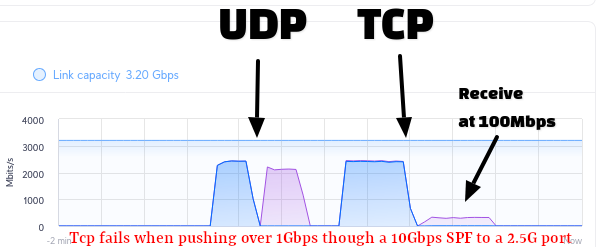
If I have a 10Gbps SFP+ in a RB5009 or CCR2116 and connect it to a device with a 2.5Gbps port, there is loss of TCP packets over 1Gbps.
The 10Gbps coppert SFP+ module ‘auto negotiates’ down to 2.5Gbps – the remote site reports 2.5Gbps, but the RB5009 and CCR2116 report 10Gbps (incorrect!).
When using that port, UDP will flow through at expected speeds, but TCP gets retransmits and bottlenecks down to 100 - 200Mbps:
Interestingly, if I run a speedtest limited to 1Gbps (by plugging in a device into a 1gbps port on the RB5009) and then send backed through the RB5009 and out the 10Gbps port, I can get 1Gbps symmetric with TCP. The ‘bottleneck’ only starts happening at over 1Gbps.
ADVICE: DO NOT USE 10GBPS copper SFP+ to connect to 2.5Gbps ports!
I am running 7.15.3 - Will there be a fix in future releases to show a port at ‘2.5Gbps’ when that is what the SFP negotiates at? That may fix the issue.
(Image above is from a UBNT Wave antenna blue is RX on the Mikoritk SFP+ port, Purple is TX on the port. Note the low speeds with TCP TX.)
Given the routers are fairly powerful.
For the outbound traffic, you can probably attach some sort of queue to the sfp+ interface.
Queues based on cake are usually easy, perhaps fqcodel might be better in this case but
I am no expert on queues. (I have had success with red queues in the past)
Set it up with packet-mark=no-mark and all the other packet marks you use (if any).
Start with a maximum limit of 2.5G
It actually refers specifically to 2.5GB transceivers, but it is likewise applicable to 10G transceivers intended to operate with a 2.5G link speed.
In short, turn off auto negotiation and set link speed to 2.5G-baseX. I had to learn that as well in a hard way and after spending lots of hours in troubleshooting to get the connection working reliably as a 2.5G link.
Hi, will that settings work for direct attach cables, suhc as S+AO0005? I am considering this way to connect L009 with CRS310-8G+2S+ and this seems to be a very reasonable solution…. if it supports 2,5Gbps…
Yes. Maybe I am a bit slower, but what I miss is the simple explantion of what interfaces does support 2.5 Gbps. Actually the only one which has 2.5 Gbps support listed is the 10 Gbps RJ45 SFP+. But some Mikrotik devices has SFP with 2.5 Gbps support, some have SFP+ with 2.5 Gbps support and the support of 2.5 Gbps is generally not mentioned in SFP/SFP+ modules… This is the reason why I feel some uncertainty…
So in case of L009 we're talking about 2.5Gbps rate on SFP host interface which is not really a standard (hence higher probability for problems with connection, including working with SFP+ modules, both RJ45 and FO).
And when using DAC to connect two devices, you're basically skipping use of those tiny communication devices (with their (auto)configuration possibilities), you're down to possible settings on SFP/SFP+ port on particular devices. If both run same SFP generation (e.g. full SFP+), then DAC connection will likely work without issues. However, when using DAC to connect ports with different "native" properties (speed, coding, etc.), one has to do some manual configuration. In case of connecting L009 with CRS310, it really depends on CRS310 capabilities: can host interface of SFP+ work at 2.5Gbps (while its "native" speed is 10Gbps) and is it possible to set it that way? In different use case, where one would like to connect "legacy" SFP (running at 1Gbps) with SFP+ (10Gbps), chances of getting it working are usually higher since SFP (with its 1Gbps) is actually standard and SFP+ host will more likely implement such backward compatibility mode.