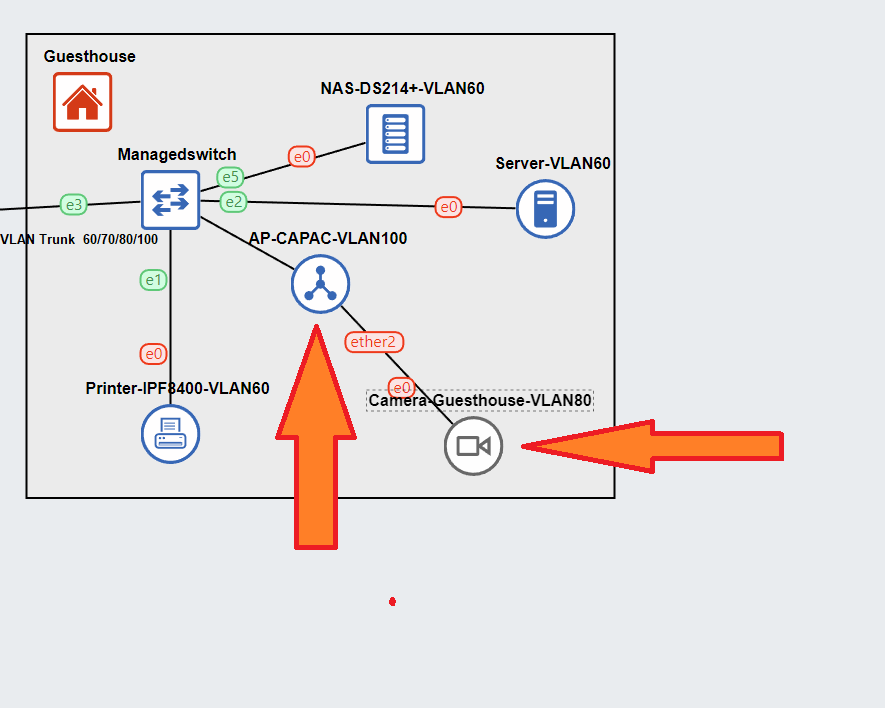
Hi Mikrotik newbie here, idont know how to lable this but i will try to discribe what i try to do.
I have a RB5009UG router running 4 VLAN´s (60/70/80/100) based on #1 below and it also runs CapsMan.
I want to use ether2 on my CAP Ac´s (on VLAN100) to power and run my cameras but they are on VLAN 80 and what ever i try i cant get ether2 on the CAP Ac to function properly. I can make it work if i run the cameras on VLAN 100 but i dont want to do that.
I haved tried alot of stuff but i think it´s better to ask here and have you come with idea´s then i try to describe all of my attempts
EDIT: Reason i want to use ether2 on CAPAc is to run the cameras the PoE pass through, and all MikroTik stuff runs v7.4.1
I can help if you drop capsman. For me a totally unnecessary layer of complexity and CPU usage and thus do not know configuring with it.
Hopefully someone else will come by comfortable in such excesses.
The VLAN part is easy peasy. The issue I am fuzzy on is this Eth2 powering your cameras. The POE out from capac is I would say a tad proprietary and as far as I know works okay for other MK small draw products but nothing that is expecting a standard?? IF it works for you great, we can move on.
In terms of the capac the basics are
a. one bridge
b. the only vlan that actually needs to be identified as a vlan and associated with the bridge is the management or trusted vlan.
Clearly this is not the cameras, so which vlan is your trusted vlan and the one that is used to configure all the smart devices.
Clue: This is the vlan that the smart switch and Capac should have their IP address from!
Powerwise i have changed to Ubiquiti POE-injektor 50V 60W injcetors and they work fine and i manage to get the cameras working on the MGM VLAN100 that gives Ip´s to my routers and switches, they problem has been getting the ether2 port to get on VLAN80 that is for the cameras and has no internet. i have a few times managed thru pure magic to get ether2 to get an IP from VLAN80 and even sometimes give one to the camera, but never get to connect to the camera or ping it from the router that has given it it´s IP, i can see the IP i DHCP server so i dont get it
Sure i can give up capsman i only have like 4 AP´s, but i kind of like it
Yeah, I can see 4 as being an incentive to use it, but for me the config of a capac is so simple why go to all the hassle.
Provide your config for the capac and let me know which is the management (trusted vlan) on the network.
Well my capac is now blank
My VLAN´s look like this numbervice
MAIN_VLAN=60
IoT_VLAN=70
CAMERA_VLAN=80 (no internet access)
MGM_BASE_VLAN=100 This is (i hope) the trusted VLAN all my switches, router and AP´s get it´s IP´s from
The SW right is the CSS610-8G-2S+IN and the AP is on port 7.
So in my world if i cant run capsman i would run the AP as a simple switch and have a Trunk with VLAN´s on ether1, but i cant get that to work either so i must be doing something really wrong when trying to set that up
Assuming you have the switch configured correctly as a trunk port passing data and management.
Assuming your not passing any other vlans (perhaps the vlan100 is also put on wifi by your capac??)
Lets assume your vlan100 has an IP of 192.168.10.1/24 and the IP of the capac manually set and static lease on vlan100 on the main router is 192.168.10.84
…
/interface bridge
add ingress-filtering=no name=capacONE  vlan-filtering=yes
/interface ethernet
set [ find default-name=ether1 ]
set [ find default-name=ether2 ]
/interface vlan
add interface=capacONE name=trustedvlan  vlan-ids=100
/interface list
add name=management
/interface list member
add interface=trustedvlan list=management
/interface wireless
{will assume you are running both wlan1 2ghz, and wlan2 5ghz on your capac }
/interface bridge port
add bridge=capacONE interface=ether1 frame-types=admit-only-tagged ingress filtering=yes
add bridge=capacONE interface=ether2 frame-types=admit-priority-and-untagged ingress-filtering=yes pvid=80
add bridge=capacONE interface=wlan1  frame-types=admit-priority-and-untagged ingress-filtering=yes pvid=100
add bridge=capacONE interface=wlan2  frame-types=admit-priority-and-untagged ingress-filtering=yes pvid=100
/interface bridge vlan
add bridge=capacONE  tagged=capacONE,ether1  untagged=wlan1,wlan2  vlan-ids=100
add bridge=capacONE  tagged=capacONE,ether1  untagged=ether2  vlan-ids=80
/ip neighbor discovery-settings
set discover-interface-list=management
/ip address
add address=192.168.10.84/24 interface=trustedvlan network=192.168.10.0  comment="IP of capac on trusted subnet"
/ip dns
set allow-remote-requests=yes servers=192.168.10.1 comment="dns through trusted subnet gateway"
/ip route
add disabled=no dst-address=0.0.0.0/0 gateway=192.168.10.1 comment="ensures route avail through trusted subnet gateway"
/ip service
set telnet disabled=yes
set ftp disabled=yes
set www disabled=yes
set ssh address=x.x.x.x
set api disabled=yes
set winbox address=as required
set api-ssl disabled=yes
/system ntp client
set enabled=yes
/system ntp client servers
add address=192.168.10.1
/tool mac-server
set allowed-interface-list=none
/tool mac-server mac-winbox
set allowed-interface-list=management
…
Note: If you dont have wlans on the capac simply remove the two entries in /interface bridge ports that refers to them and remove the untagging for both on the first line of /interface bridge vlans.
The basic concept is to trunk in from the switch both vlans (100 and 80) and bring vlan100 to the bridge and vlan80 to the camera. Since the camera is a dumb device we use access port functionality which untags the traffic leaving ether 2 heading for the camera and then applies vlan80 tags to the traffic entering ether2 from the camera. If you do have wlans, they are essentially going to be communicating over wifi to dumb devices, so the capac will also strip any tags on the data outbound to devices and then tag the returning data.
I spent some time with it today with a friend we got it working with CapsMan, it took some tinkering hence i thougt i was close before to get to work we gave it a shoot and it payed off.
I think the solution was to use PVID on ether2, vlans is not in my comfort zone but now it works, i need to secure it a bit more the basic setup looks like this tho.