I have difficulties configuring my HEX device. Here is my scenario:
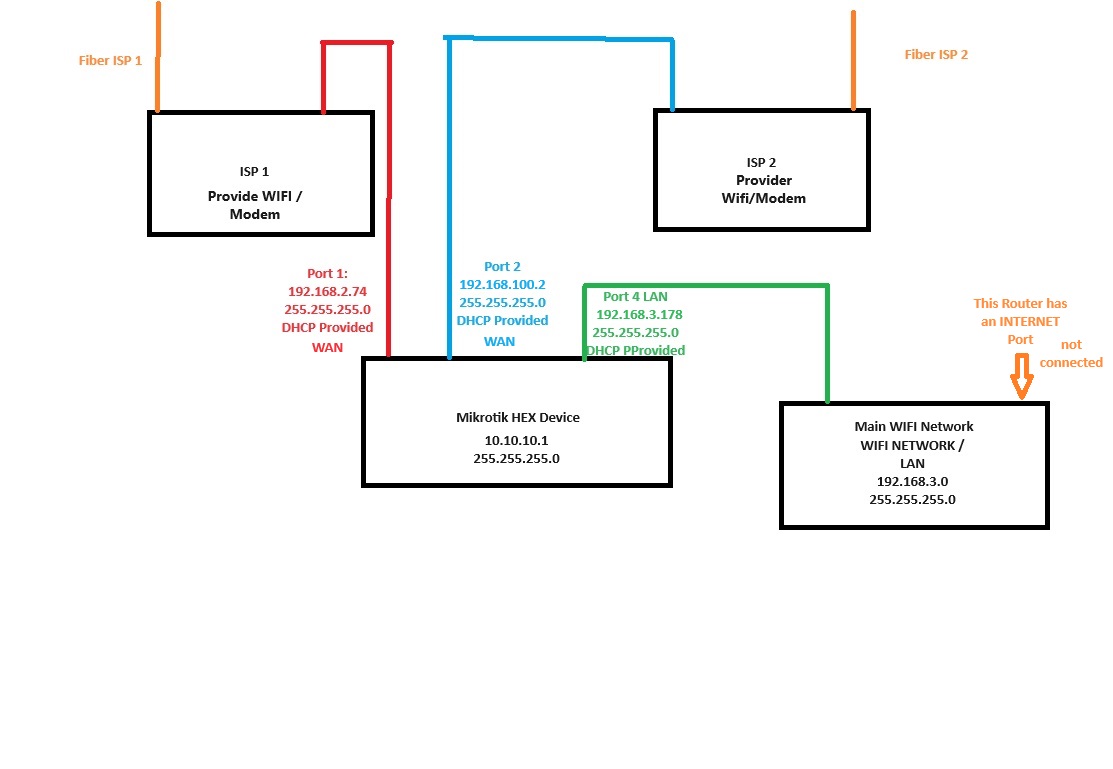
I have 2 ISP (modem/WIFI device) from different ISPs (192.168.100.0 and 192.168.2.0 networks). I am using a LAN port from those ISP devices to connect to my Mikrotik HEX (Port Ether1 and Ether2 - WAN Setting)
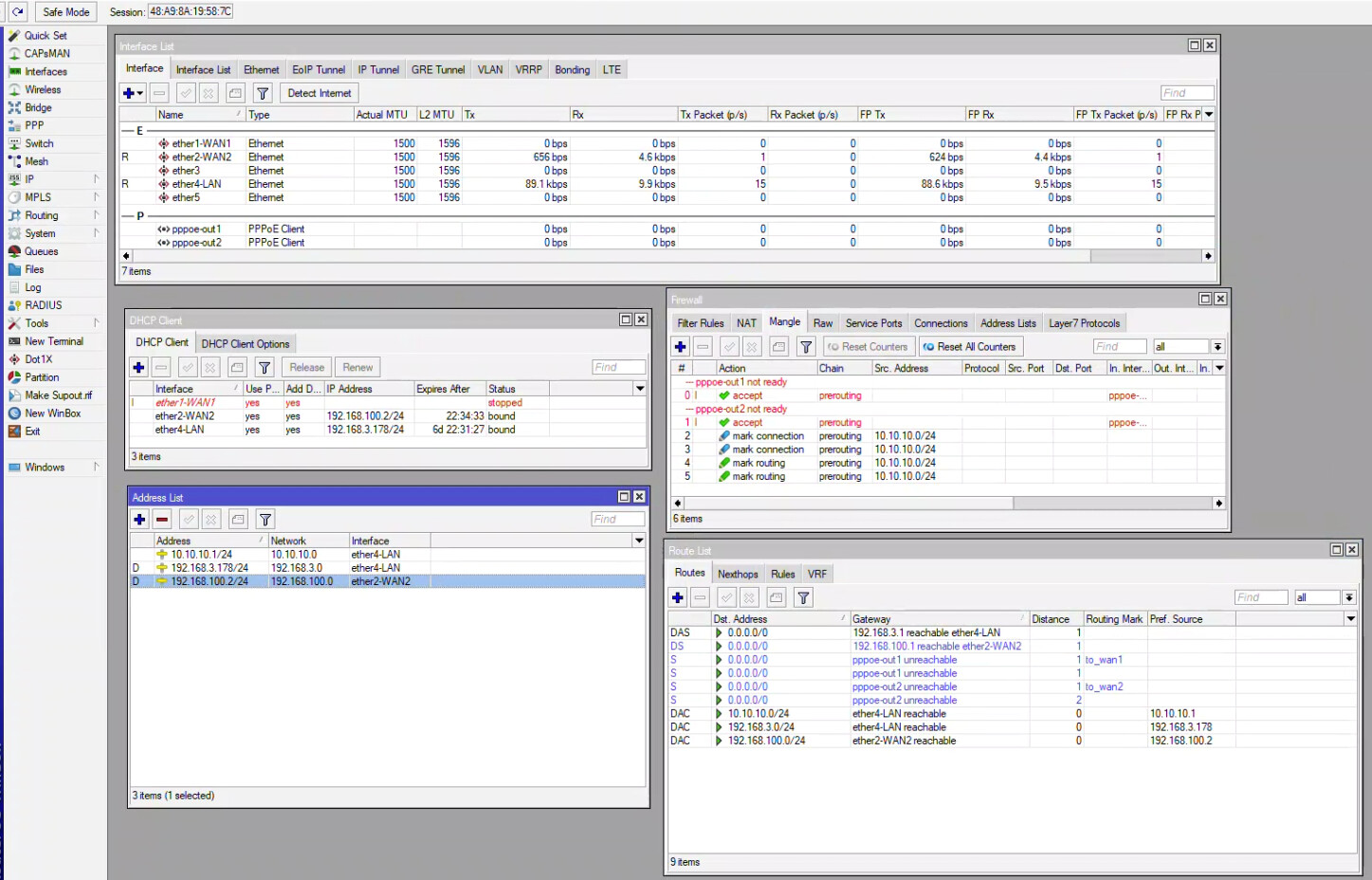
I also have a Router that is my LAN ( 192.168.3.0 - Ether 4 - LAN). I want to combine both ISPs as my out to the internet for LAN-Ether4. But I cannot make it work, my ppp-out1 and ppp-out2 are not ready. I attached also an image from my dashboard and Network setup.
What is missing?
Your help is appreciated. Thanks
This is the script i used:
/interface ethernet
set [ find default-name=ether1 ] name=ether1-WAN1
set [ find default-name=ether2 ] name=ether2-WAN2
set [ find default-name=ether4 ] name=ether4-LAN
Your PPPoE connections are not running. Could your ISPs be using VLANs or maybe only the ISP devices authenticate via PPPoE and you only need DHCP clients on the hEX
Before you see why you must use only DHCP clients,
know that your efforts to “add” ISPs to get more speed in the end, are completely futile.
At most a single device can go as fast as the fastest ISP. Normally it will always be like this, and you can’t do anything about it.
Now that you know that, go ahead and see the rest with PCC & Co.
If you take (temporarily) the Hex out of the equation and you connect a PC to one of the two ISP devices do you have internet or not?
Most ISP dsl devices are not modems [1], they are modem/routers.
A good hint Is the number of ports they have, a modem usually has two ports, a modem/router usually has five, of which four, often coloured yellow, are the LAN ones, in a bridge.
If it Is a modem router, the bridge (yellow ports) has an IP address (the 192.168.100.0 and 192.168.2.0 you mentioned) and has a DHCP server running.
So, it is the ISP device that uses a pppoe connection and provides a normal network connection on the LAN side.
[1] even if very little is modulated and demodulated in these devices
In summary,
You may simply need to use IP DHCP Client settings for both incoming WAN signals to the hex router and not use PPPOE.
Would take a second to test.
disable PPPOE for both
enable IP DHCP client on ether1 or ether2 or both…
Sounds like your ingesting non-medicinal drugs there milllenium.
One cannot increase the speed of single session unless you have the cooperation of the iSP and bond on both sides of the connection.
The problem here is not the MT, its the OP figuring out the ISP connectivity parameters, and whether or not they apply to the ISP device or to the MT device etc…
Well, if you provide your actual configuration (no, “it is the same as the one in this video” doesn’t count) surely some experienced members will have a look at it.
Follow the instructions here: http://forum.mikrotik.com/t/forum-rules/173010/1
[quote=millenium7 post_id=1091063 time=1723515312 user_id=87628] [quote=rextended post_id=1091020 time=1723490946 user_id=68609]
Before you see why you must use only DHCP clients, […]
[/quote]
This is one area where Ubiquiti is substantially better as a router. […]
[/quote]
This is MikroTik forum, you can not advertise other competitor brands.
If you want provide a solution, must still inside MikroTik products.
You mean like hinting on an Alfa Romeo forum that a given BMW model drives better?
It might be frown upon by other members but I doubt that it is against the forum rules.
There is a fine line between appreciating and being loyal to a brand and becoming a fanboy.
Rextended is simply attempting to dissuade the perp from future posts of such nature.
The OP wants to ensure that his mikrotik device can handle two ISP connections so that his LAN can take advantage of them.
Its not a request to change routing devices, nor to provide bonding.
Thus the post is nothing more than nuisance coital interruption, that you seem to have more tolerance for…
We dont!
Our time is precious and is with the goal to help others, distractions of no value that get in the way are not appreciated.
Once we understand and can help the OP with his internet connections, the next step will be to elicit requirements for the WAN connections,
be it primary/failover or some sort of load balancing.
I would never have thought of rextended as any type of ‘fanboy’ of MT equipment, or of any It related equipment, he is unrelenting in his criticism of any config, equipment, network, script that is sub-optimal. But hey for someone that has been here for a nano-second, it may not be as easy to discern.