INTERNET ----------> - RB 750 PCC- (192.168.0.1) -------> (192.168.0.3) - MK PC- --------> - CLIENTS–
First, xcuse my english, im from Argentina.
The Question? Quite simple, i want to access remotely to the MK PC SERVER via internet (outside the network)
The RB 750 Handles 3 Wan (ADSL) connections, with dynamic IP Addresses.
Its handling a DynDNS , works perfect, i can access the RB750 winbox from the outside without problems.
So, ive tested two ways:
-Forwarding winbox incoming connection to the MK PC SERVER interface , someting like:
(IN RB 750)
/ip firewall nat add chain=dstnat dst-address=(RB 750 INTERFACE) protocol=tcp dst-port=8291
action=dst-nat to-addresses=(MK PC SERVER) to-ports=8291
That didnt work..
-Windows VPN Access (PPTP) to RB 750 (192.168.0 network) and then try to connect to the Boxes. winbox RB750, no problems. MK PC Failed.
and yes, i can access to the rb 750 an then mac telnet to the neighbor PC, but thats not what i need.
I really REAAALLLY apreciate any help with this!!
did the rule count packets?
only one or two packets.
heres the NAT lines:
[skynet@RB750] /ip firewall nat> pr
Flags: X - disabled, I - invalid, D - dynamic
0 chain=srcnat action=masquerade out-interface=wlan2
1 chain=srcnat action=masquerade out-interface=wlan1
2 chain=srcnat action=masquerade out-interface=wlan3
3 chain=dstnat action=dst-nat to-addresses=192.168.0.3 to-ports=8291 protocol=tcp dst-address=10.111.0.2 dst-port=8291
4 chain=dstnat action=dst-nat to-addresses=192.168.0.3 to-ports=8291 protocol=tcp dst-address=10.112.0.2 dst-port=8291
5 chain=dstnat action=dst-nat to-addresses=192.168.0.3 to-ports=8291 protocol=tcp dst-address=10.113.0.2 dst-port=8291
the first 3 for the PCC load balance. then 3 forward to the MK PC BOX (192.168.0.3)
In the attach other settings.
Thanx again for your help.
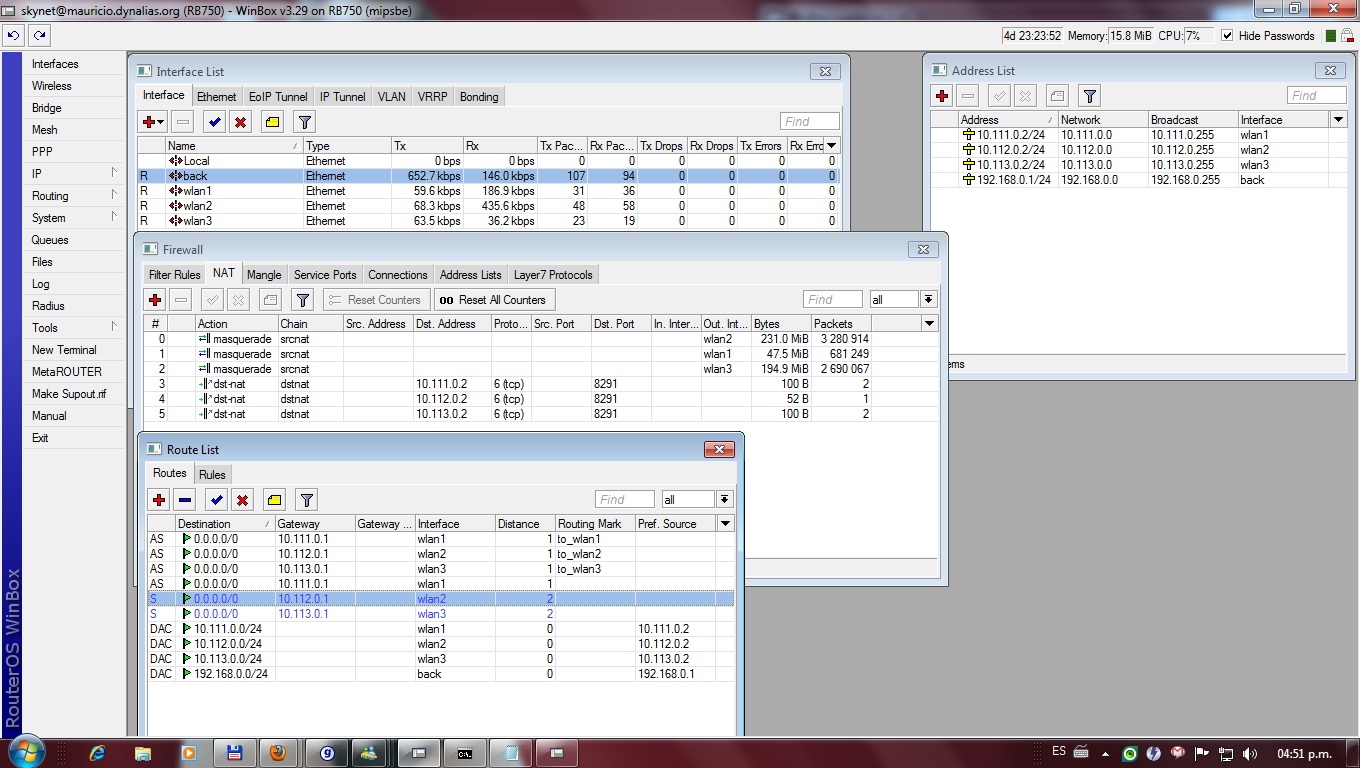
I think AFAIK that you should put the Redirect Rules before any Natting and if you want the internal server to answer you, it’s necessary to add a src-nat rule for each machine you want to reach. I mean, something this way:
INTERNET <—> MT_1 <—> MT_2
/ip firewall nat
add chain=dstnat dst-address=$WAN_MT_1 action=dst-nat to-addresses=$WAN_MT_2
add chain=srcnat src-address=$WAN_MT_2 action src-nat to-addresses=$WAN_MT_1
Don’t forget that IP at WAN_MT_1 to grant access to your local server (MT_2) should be different from that the other hosts (if any) use to go out to Internet; though in a dynamic IP environment I’m not utterly sure and you have thousands of ports to custom the above rules to fit. Hope it helps you.
go through your setup and ckeck that packets from the Internet coming via wanN, are returned via the same interface, not via wanM