I am trying to deploy for first time hotspot with user manager
I have already installed the package and all configured and working.
First question: how can I set a user to use a total of 1 hours every day?
Second question: how can I access to user manager portal? I have tried with /um and /userman
My scenario:
RouterOS 7.18.2
I created a new virtual WiFi interface with the default security profile (without password)
I set the IP address 192.168.222.1/24 for this interface and followed the hotspot wizard in winbox
The IP address of the Mikrotik on the LAN is 192.168.111.1
This is my user manager config:
/user-manager profile
add name=perfil1 name-for-users=perfil1 validity=unlimited
/user-manager user group
add attributes=Mikrotik-Group:1M inner-auths=ttls-pap,ttls-chap,ttls-mschap1,ttls-mschap2,peap-mschap2 name=group1 outer-auths=pap,chap,mschap1,mschap2,eap-tls,eap-ttls,eap-peap,eap-mschap2
/user-manager user
add attributes=Mikrotik-Rate-Limit:10M group=group1 name=usuario1
/user-manager
set certificate=*0 enabled=yes
/user-manager router
add address=192.168.111.1 name=router1
I can use “Usuario1”, connected to the new SSID and I have 10 Mbps max.
Which IP address should I use to access user manager portal? I need to connect from my lan or from the hotspot wifi?
You were right with the service www, this was disabled, when I enabled this, I could access to the portal. Now, I dont know which credentials I need to use to manage users, anyway, I will only need this, if there is something that cannot be done in Winbox.
There is a parameter uptime-limit at the end if you look at the terminal snippet you posted. You configure and apply it to a profile through /user-manager profile-limitation
I think that since v7 it is only accessible via Winbox or Webfig, so there shouldn’t be anything that cannot be done through Winbox. If there were such, there would be certainly a command for it which could be applied through the CLI
You are right again, sorry, I dont know why I didnt see this.
Now I have 2 new questions, sorry:
I see that in the Profile Limitation, by default, all the days are selected, from_time is 00:00:00 and till_time is 23:59:59. This means that the user will have 1 hour all the days? This is what I need
I see that I can select a “profile” and a “limitation” in a “profile_limitation”, but I didnt see where can I assign this setting to a created user. If I add batch users, I can select this profile, but once the user is created I dont understand how it this linked. The link is maybe using the field “Name for users” in the profile? How can I link this limitation to a user?
TheCat12, thank you!!
This is right, but still this isnt working for me.
I set the time to 2 minutes instead 1 hour, just for testing.
I can connect with “usuario1”, the user has only 10 Mbps, but after 2 minutes, Internet is still accessible.
Any idea?
An asterisk and a number following it always means error (removed, renamed, etc. entity), so check/remove the non-existent certificate from /user-manager and check the user in the user-profile section
and this now appears as “none”
However, when I try to change the user in the user-profile, winbox show me the following error: Couldn't change User Profile <usuario1> feature is not implemented (3)
I try with a new user, but I get still the same error.
That table stores the associations of the m:n relation between users and profiles. You cannot edit the associations, what you can do is to remove the old unwanted entry / the entry with the error, and to add a new correct entry for the association.
Thanks CGGXANNX!
Stil does not work.
Before, I realiced that in the user-profile section (In the winbox gui), the user appeared as “unknow”
After I deleted this and added the user-profile again, this seems to be solved, however, the user can still navigate without this limitation.
This is the config now:
Still not working
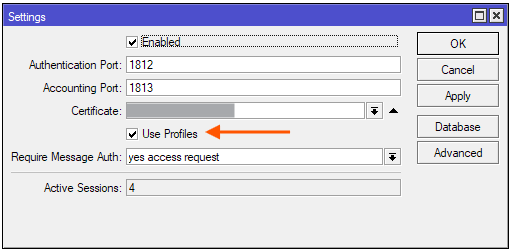
The “Use Profiles” check was disabled, I enabled this and still the same issue.
I did another export and saw again: set certificate=*0
Again, changed this to set certificate=“”
After this, I removed the cookies in Hotspot, and deleted active sessions in user manager.
Now when I try to access, I get:
“RADIUS server is not responding”
Because probably the certificate has to be removed from the /radius menu too. After you do that, would you export the whole config if it still doesn’t work?
/export file=anynameyouwish (minus sensitive info like serial numbers, keys, public IPs, etc.)
This could be a good idea.
However, I am still getting “RADIUS server is not responding”
Tried to reboot the Mikrotik, but the same
This does not makes sense to me that this error started when I deleted the cookies and the active sessions.
That probably happened after enabling “Use Profiles” in the UM settings
You are right, disabling again the “Use Profiles”, I could login again and after 30 seconds, I am logged out (I set 30 seconds in the Session-timeout, in the group)
Now, if I login again, I can use again Internet for 30 seconds.
How can I fix this?
How to accomplish that a user can only use Internet for 1 hour each day?
Sorry, I was confused by the RADIUS server not connecting problem and the missing certificate, and blamed the limitation when it is the only way to limit the session on a daily basis, so back to the original concept: add a limitation, connect it to a profile via profile limitation