2 VLANs one Subnet (I know you cant do this but bear with me)

Hello,

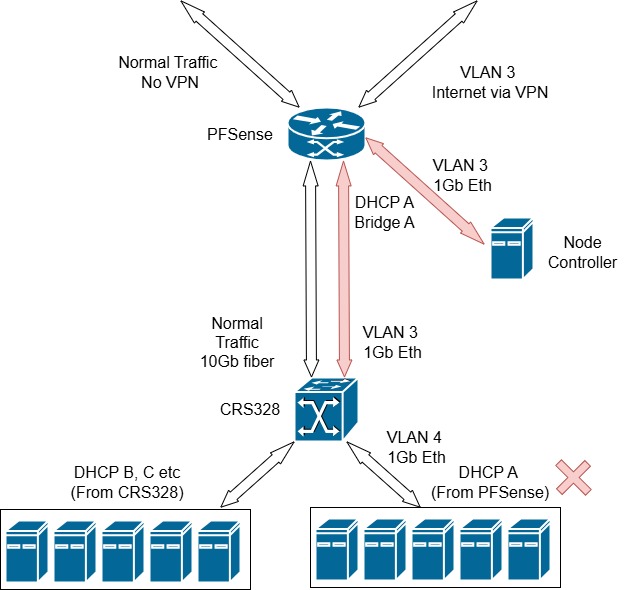
I have an interesting problem where 90% of my network works just fine but a small part of it I cannot make to work right. I have a bunch of VLANs all controlled by the CRS and they all route out through my PFSense box, but (and I cannot change the physical topology) VLAN 3 has the DHCP Server on the PFsense box, and tere is a bridge on the PFSense box between two ports as there is a mission critical machine that needs to connect directly to PFsense (security blah blah blah who cares) and then the other part of the bridge connects to the CRS and then onto another 20 or so devices. These need to be strictly on the same subnet as each other. Like so:
Network.jpg
I cannot make this work. I have been at it for days now. the problem is obviously having VLAN 3 (which is the uplink port on the CRS (they are physically different cables from the other machines I have) on the same subnet as VLAN 4 which is the VLAN on which all the devices are.

How do I do this? I did have it working if I used a separate bridge and put VLAN 3 and 4 in that bridge, but then the uplink port is a slave interface and only keeps its IP until renewal and then it all falls apart.

Thx

Julian

Conceptually what you have is the CRS328 acting as a router ( own vlans behind it ) while transparently passing through the upstream router subnet to some of the ports on the CRS328.
This is not that unusual.

I will assume the pfsense is s flat subnet and the CRS328 simply tags that stream of data coming in to call it VLAN3.
This stream is used for three purposes.
a. terminate the WAN connection on the CRS328 so there is a clear path to the internet
b. give the CRS328 an IP address on the pfsense LAN ( admin access )
c. pass transparently the pfsense subnet to devices behind the router.

All good so far??
Cant help any further without confirmation of the facts and a full export

/export file=anynameyouwish (minus router serial number, any public WANIP information, keys )

[admin@CRS328-Master] > /export

# 2025-03-01 14:30:56 by RouterOS 7.12.1
# model = CRS328-4C-20S-4S+
/interface bridge
add comment=B1-CRS328-Master-Bridge name=B1-CRS328-Master-Bridge vlan-filtering=yes
/interface ethernet
set [ find default-name=combo1 ] comment="MAN Controller (VL600)"
set [ find default-name=combo2 ] comment="LAN Controller (VL630)"
set [ find default-name=combo3 ] comment="IOT COntroller (VL710)"
set [ find default-name=combo4 ] comment=">> VRF1-V8-VL710-IOT Uplink"
set [ find default-name=sfp-sfpplus1 ] comment=">> Main uplink to PFSense"
set [ find default-name=sfp-sfpplus2 ] comment="Dell R740 OAI gNB (Build8d47c0b2) (VL638)"
set [ find default-name=sfp-sfpplus3 ] comment="Dell R640 Open5GS Core (VL638)"
set [ find default-name=sfp-sfpplus4 ] comment="Dell R630 Zabbix+Grafana (VL638)"
set [ find default-name=sfp1 ] auto-negotiation=no comment="Spare SFP (VL630)"
set [ find default-name=sfp2 ] auto-negotiation=no comment="KVM1 (VL646)"
set [ find default-name=sfp3 ] auto-negotiation=no comment="CRS109-3(Upstairs) (VL600)"
set [ find default-name=sfp4 ] auto-negotiation=no comment="KVM2 (VL646)"
set [ find default-name=sfp5 ] auto-negotiation=no comment="CRS109-2(Lounge) (VL600)"
set [ find default-name=sfp6 ] auto-negotiation=no comment="KVM3 (VL646)"
set [ find default-name=sfp7 ] auto-negotiation=no comment="CRS109-1(Office) (VL600)"
set [ find default-name=sfp8 ] auto-negotiation=no comment="KVM4 (VL646)"
set [ find default-name=sfp9 ] auto-negotiation=no comment="Google Wifi (VL630)"
set [ find default-name=sfp10 ] auto-negotiation=no comment="Old Rackmount Server (VL630)"
set [ find default-name=sfp11 ] auto-negotiation=no comment="iDRAC1-R740 (VL600)"
set [ find default-name=sfp12 ] auto-negotiation=no comment="Z820 (VL630)"
set [ find default-name=sfp13 ] auto-negotiation=no comment="iDRAC2-R640 (VL600)"
set [ find default-name=sfp14 ] auto-negotiation=no comment="A Corp Machine (VL630)"
set [ find default-name=sfp15 ] auto-negotiation=no comment="iDRAC3-R630 (VL600)"
set [ find default-name=sfp16 ] auto-negotiation=no comment="B Corp Machine (VL630)"
set [ find default-name=sfp17 ] auto-negotiation=no comment="NAS (VL630)"
set [ find default-name=sfp18 ] auto-negotiation=no comment="GW and DS Printer (VL630)"
set [ find default-name=sfp19 ] auto-negotiation=no comment="Mail Machine (VL630)"
set [ find default-name=sfp20 ] auto-negotiation=no comment="Spare Controller Port (VL600)"
/interface vlan
add comment=V1-S5-VL600-MAN interface=B1-CRS328-Master-Bridge name=V1-S5-VL600-MAN vlan-id=600
add comment="V2-S4-LAN VLAN" interface=B1-CRS328-Master-Bridge name=V2-S4-VL630-LAN vlan-id=630
add comment="V3-S5-SEC VLAN" interface=B1-CRS328-Master-Bridge name=V3-S5-VL638-SEC vlan-id=638
add comment="V5-S3-KVM VLAN" interface=B1-CRS328-Master-Bridge name=V5-Sx-VL646-KVM vlan-id=646
add comment="V6-S4-IDR VLAN" interface=B1-CRS328-Master-Bridge name=V6-S4-VL654-IDR vlan-id=654
add comment="V7-S2-JAP VLAN" interface=B1-CRS328-Master-Bridge name=V7-S2-VL662-JAP vlan-id=662
add comment=">> V7-VL662-JAP-UPLINK_VLAN" interface=sfp-sfpplus1 name=V7-VL662-JAP-UPLINK_WAN vlan-id=662
add comment="V8-S1-IOT VLAN" interface=B1-CRS328-Master-Bridge name=V8-S1-VL710-IOT vlan-id=710
add comment=">> VRF1-V8-VL710-IOT Uplink-VLAN" interface=combo4 name=V8-VL710-IOT-UPLINK_WAN vlan-id=710
/caps-man datapath
add bridge=B1-CRS328-Master-Bridge client-to-client-forwarding=yes local-forwarding=no name=Datapath1-VL630-LAN vlan-id=630 vlan-mode=use-tag
add bridge=B1-CRS328-Master-Bridge client-to-client-forwarding=yes local-forwarding=no name=Datapath2-VL710-IOT vlan-id=710 vlan-mode=use-tag
/caps-man security
add authentication-types=wpa2-psk name=SEC1-DP1-VL630-LAN
add authentication-types=wpa2-psk name=SEC2-DP2-VL710-IOT
/caps-man configuration
add country="united kingdom" datapath=Datapath1-VL630-LAN datapath.bridge=B1-CRS328-Master-Bridge .client-to-client-forwarding=yes .local-forwarding=no .vlan-id=630 .vlan-mode=use-tag mode=ap name=W1-CFG1-VL630-LAN-2 security=\
    SEC1-DP1-VL630-LAN ssid=W1-S4-MI-VL630-LAN-2
add country="united kingdom" datapath=Datapath2-VL710-IOT datapath.bridge=B1-CRS328-Master-Bridge .client-to-client-forwarding=yes .local-forwarding=no .vlan-id=710 .vlan-mode=use-tag name=W2-CFG2-VL710-IOT-2 security=SEC2-DP2-VL710-IOT ssid=\
    W2-S2-MI-VL710-IOT-2
/caps-man interface
add configuration=W1-CFG1-VL630-LAN-2 datapath=Datapath1-VL630-LAN disabled=no l2mtu=1600 mac-address=18:FD:74:CA:86:B9 master-interface=none name=CRS109-W-1 radio-mac=18:FD:74:CA:86:B9 radio-name=18FD74CA86B9
add configuration=W2-CFG2-VL710-IOT-2 datapath=Datapath2-VL710-IOT disabled=no l2mtu=1600 mac-address=1A:FD:74:CA:86:B9 master-interface=CRS109-W-1 name=CRS109-W-1-1 radio-mac=00:00:00:00:00:00 radio-name=1AFD74CA86B9
add configuration=W1-CFG1-VL630-LAN-2 datapath=Datapath1-VL630-LAN disabled=no l2mtu=1600 mac-address=2C:C8:1B:AD:26:0A master-interface=none name=CRS109-W-2 radio-mac=2C:C8:1B:AD:26:0A radio-name=2CC81BAD260A
add configuration=W2-CFG2-VL710-IOT-2 datapath=Datapath2-VL710-IOT disabled=no l2mtu=1600 mac-address=2E:C8:1B:AD:26:0A master-interface=CRS109-W-2 mtu=32 name=CRS109-W-2-1 radio-mac=00:00:00:00:00:00 radio-name=2EC81BAD260A
add configuration=W1-CFG1-VL630-LAN-2 datapath=Datapath1-VL630-LAN disabled=no l2mtu=1600 mac-address=18:FD:74:CA:86:D7 master-interface=none name=CRS109-W-3 radio-mac=18:FD:74:CA:86:D7 radio-name=18FD74CA86D7
add configuration=W2-CFG2-VL710-IOT-2 datapath=Datapath2-VL710-IOT disabled=no l2mtu=1600 mac-address=1A:FD:74:CA:86:D7 master-interface=CRS109-W-3 name=CRS109-W-3-1 radio-mac=00:00:00:00:00:00 radio-name=1AFD74CA86D7
/interface list
add name=WANPRIME
add name=LAN
add name=IOT
add name=KVM
add name=IDR
add name=JAP
add name=SEC
add name=MAN
add name=WANSECOND
/interface lte apn
set [ find default=yes ] ip-type=ipv4 use-network-apn=no
/interface wireless security-profiles
set [ find default=yes ] supplicant-identity=MikroTik
/ip pool
add name=BRIDGE-DHCP ranges=80.144.1.64/26
add name=DP2-VL630-LAN ranges=222.10.50.64/26
add name=DP3-VL638-SEC ranges=222.10.60.64/29
add name=DS8-VL710-IOT ranges=222.20.10.64/26
add name=DP1-VL600-MAN ranges=222.10.1.64/26
add name=DS7-VL662-JAP ranges=222.10.70.64/27
/ip dhcp-server
add add-arp=yes address-pool=BRIDGE-DHCP interface=B1-CRS328-Master-Bridge lease-time=10m name=BRIDGE-DHCP
add add-arp=yes address-pool=DP2-VL630-LAN interface=V2-S4-VL630-LAN lease-time=10m name=DS2-VL630-LAN
add add-arp=yes address-pool=DP3-VL638-SEC interface=V3-S5-VL638-SEC lease-time=10m name=DS3-VL638-SEC
add add-arp=yes address-pool=DS8-VL710-IOT disabled=yes interface=V8-S1-VL710-IOT lease-time=10m name=DS8-VL710-IOT
add add-arp=yes address-pool=DP1-VL600-MAN interface=V1-S5-VL600-MAN lease-time=10m name=DS1-VL600-MAN
add add-arp=yes address-pool=DS7-VL662-JAP interface=V7-S2-VL662-JAP name=DS7-VL662-JAP
/port
set 0 name=serial0
/routing bgp template
set default disabled=no output.network=bgp-networks
/routing ospf instance
add disabled=no name=default-v2
/routing ospf area
add disabled=yes instance=default-v2 name=backbone-v2
/routing table
add disabled=no fib name=VRF2-VL662-JAP
add disabled=no fib name=VRF1-VL710-IOT
/caps-man manager
set enabled=yes upgrade-policy=suggest-same-version
/caps-man provisioning
add action=create-enabled master-configuration=W1-CFG1-VL630-LAN-2 name-format=prefix name-prefix=CRS109-W- slave-configurations=W2-CFG2-VL710-IOT-2
/interface bridge port
add bridge=B1-CRS328-Master-Bridge comment="Dell R740 OAI gNB (Build8d47c0b2) (VL638)" interface=sfp-sfpplus2 pvid=638
add bridge=B1-CRS328-Master-Bridge comment="Dell R640 Open5GS Core (VL638)" frame-types=admit-only-untagged-and-priority-tagged interface=sfp-sfpplus3 pvid=638
add bridge=B1-CRS328-Master-Bridge comment="Dell R630 Zabbix+Grafana (VL638)" frame-types=admit-only-untagged-and-priority-tagged interface=sfp-sfpplus4 pvid=638
add bridge=B1-CRS328-Master-Bridge comment="Spare SFP (VL630)" frame-types=admit-only-untagged-and-priority-tagged ingress-filtering=no interface=sfp1 pvid=630
add bridge=B1-CRS328-Master-Bridge comment="KVM1 (VL646)" frame-types=admit-only-untagged-and-priority-tagged ingress-filtering=no interface=sfp2 pvid=646
add bridge=B1-CRS328-Master-Bridge comment="KVM2 (VL646)" frame-types=admit-only-untagged-and-priority-tagged interface=sfp4 pvid=646
add bridge=B1-CRS328-Master-Bridge comment="KVM3 (VL646)" frame-types=admit-only-untagged-and-priority-tagged interface=sfp6 pvid=646
add bridge=B1-CRS328-Master-Bridge comment="KVM4 (VL646)" frame-types=admit-only-untagged-and-priority-tagged interface=sfp8 pvid=646
add bridge=B1-CRS328-Master-Bridge comment="Google Wifi (VL630)" frame-types=admit-only-untagged-and-priority-tagged interface=sfp9 pvid=630
add bridge=B1-CRS328-Master-Bridge comment="Old Rack Server (Backup) (VL630)" frame-types=admit-only-untagged-and-priority-tagged interface=sfp10 pvid=630
add bridge=B1-CRS328-Master-Bridge comment="iDRAC1-R740 (VL600)" frame-types=admit-only-untagged-and-priority-tagged interface=sfp11 pvid=600
add bridge=B1-CRS328-Master-Bridge comment="Z820 Workstation (VL630)" frame-types=admit-only-untagged-and-priority-tagged interface=sfp12 pvid=630
add bridge=B1-CRS328-Master-Bridge comment="iDRAC2-R640 (VL600)" frame-types=admit-only-untagged-and-priority-tagged interface=sfp13 pvid=600
add bridge=B1-CRS328-Master-Bridge comment="A Corp Laptop (VL630)" frame-types=admit-only-untagged-and-priority-tagged interface=sfp14 pvid=630
add bridge=B1-CRS328-Master-Bridge comment="iDRAC3-R630 (VL600)" frame-types=admit-only-untagged-and-priority-tagged interface=sfp15 pvid=600
add bridge=B1-CRS328-Master-Bridge comment="B Corp Laptop (VL630)" frame-types=admit-only-untagged-and-priority-tagged interface=sfp16 pvid=630
add bridge=B1-CRS328-Master-Bridge comment="NAS (VL630)" frame-types=admit-only-untagged-and-priority-tagged interface=sfp17 pvid=630
add bridge=B1-CRS328-Master-Bridge comment="GW and DS Printer (VL630)" frame-types=admit-only-untagged-and-priority-tagged interface=sfp18 pvid=630
add bridge=B1-CRS328-Master-Bridge comment="Mail Machine (VL630)" frame-types=admit-only-untagged-and-priority-tagged interface=sfp19 pvid=630
add bridge=B1-CRS328-Master-Bridge comment="Spare Controller Port (VL600)" interface=sfp20 pvid=600
add bridge=B1-CRS328-Master-Bridge comment="MAN Controller (VL600)" frame-types=admit-only-untagged-and-priority-tagged interface=combo1 pvid=600
add bridge=B1-CRS328-Master-Bridge comment="LAN Controller (VL630)" frame-types=admit-only-untagged-and-priority-tagged interface=combo2 pvid=630
add bridge=B1-CRS328-Master-Bridge comment="IOT COntroller (VL710)" frame-types=admit-only-untagged-and-priority-tagged interface=combo3 pvid=710
add bridge=B1-CRS328-Master-Bridge comment=CRS109-1-VL710-IOT-Office interface=CRS109-W-1-1 pvid=710
add bridge=B1-CRS328-Master-Bridge broadcast-flood=no comment=CRS109-2-VL710-IOT-Lounge interface=CRS109-W-2-1 pvid=710
add bridge=B1-CRS328-Master-Bridge comment=CRS109-3-VL710-IOT-Upstairs interface=CRS109-W-3-1 pvid=710
add bridge=B1-CRS328-Master-Bridge comment=CRS109-1-VL630-LAN-Office frame-types=admit-only-vlan-tagged interface=CRS109-W-1 pvid=630
add bridge=B1-CRS328-Master-Bridge comment=CRS109-2-VL630-LAN-Lounge interface=CRS109-W-2 pvid=630
add bridge=B1-CRS328-Master-Bridge comment=CRS109-2-VL630-LAN-Upstairs interface=CRS109-W-3 pvid=630
add bridge=B1-CRS328-Master-Bridge comment="CRS109-1 (Upstairs)" interface=sfp3 pvid=600
add bridge=B1-CRS328-Master-Bridge comment="CRS109-1 (Office 2)" interface=sfp5 pvid=600
add bridge=B1-CRS328-Master-Bridge comment="CRS109-1 (Office)" interface=sfp7 pvid=600
/ip settings
set max-neighbor-entries=8192
/ipv6 settings
set disable-ipv6=yes
/interface bridge vlan
add bridge=B1-CRS328-Master-Bridge comment=V1-S5-VL600-MAN tagged=B1-CRS328-Master-Bridge,sfp3,sfp5,sfp7 untagged=sfp11,sfp13,sfp15,sfp20,combo1 vlan-ids=600
add bridge=B1-CRS328-Master-Bridge comment=V2-S4-VL630-LAN tagged=B1-CRS328-Master-Bridge,sfp3,sfp5,sfp7,CRS109-W-1,CRS109-W-2,CRS109-W-3 untagged=combo2,sfp1,sfp9,sfp10,sfp12,sfp14,sfp16,sfp17,sfp18,sfp19 vlan-ids=630
add bridge=B1-CRS328-Master-Bridge comment=V3-S5-VL638-SEC tagged=B1-CRS328-Master-Bridge untagged=sfp-sfpplus2,sfp-sfpplus3,sfp-sfpplus4 vlan-ids=638
add bridge=B1-CRS328-Master-Bridge comment=V5-Sx-VL646-KVM vlan-ids=646
add bridge=B1-CRS328-Master-Bridge comment=V6-S4-VL654-IDR vlan-ids=654
add bridge=B1-CRS328-Master-Bridge comment=V7-S2-VL662-JAP tagged=B1-CRS328-Master-Bridge,sfp3,sfp5 vlan-ids=662
add bridge=B1-CRS328-Master-Bridge tagged=B1-CRS328-Master-Bridge,sfp3,sfp5,sfp7,CRS109-W-1-1,CRS109-W-2-1,CRS109-W-3-1 untagged=combo3 vlan-ids=710
/interface list member
add interface=sfp-sfpplus1 list=WANPRIME
add interface=B1-CRS328-Master-Bridge list=LAN
add interface=B1-CRS328-Master-Bridge list=SEC
add interface=B1-CRS328-Master-Bridge list=MAN
add interface=B1-CRS328-Master-Bridge list=JAP
add interface=V8-S1-VL710-IOT list=IOT
add interface=combo4 list=WANSECOND
/interface ovpn-server server
set auth=sha1,md5
/ip address
add address=80.144.1.1/24 interface=B1-CRS328-Master-Bridge network=80.144.1.0
add address=222.10.50.1/24 interface=V2-S4-VL630-LAN network=222.10.50.0
add address=222.10.1.1/24 interface=V1-S5-VL600-MAN network=222.10.1.0
add address=222.10.60.1/24 interface=V3-S5-VL638-SEC network=222.10.60.0
add address=222.10.70.1/24 interface=V7-S2-VL662-JAP network=222.10.70.0
add address=222.10.71.1/24 interface=V7-VL662-JAP-UPLINK_WAN network=222.10.71.0
add address=100.48.58.1/24 interface=combo4 network=100.48.58.0
/ip dhcp-client
add interface=sfp-sfpplus1
add disabled=yes interface=V8-VL710-IOT-UPLINK_WAN
add disabled=yes interface=V7-VL662-JAP-UPLINK_WAN
add disabled=yes interface=V8-VL710-IOT-UPLINK_WAN
add interface=V8-VL710-IOT-UPLINK_WAN
/ip dhcp-server lease
add address=222.10.60.64 client-id=1:0:e:1e:9b:a2:2 mac-address=00:0E:1E:9B:A2:02 server=DS3-VL638-SEC
/ip dhcp-server network
add address=80.144.1.0/24 comment=BRIDGE-DHCP dns-server=100.48.50.1 gateway=80.144.1.1 netmask=24
add address=222.10.1.0/24 comment=DS1-V1-VL600-MAN dns-server=100.48.50.1 gateway=222.10.1.1 netmask=24
add address=222.10.50.0/24 comment=DS2-V2-VL630-LAN dns-server=100.48.50.1 gateway=222.10.50.1 netmask=24
add address=222.10.60.0/24 comment=DS3-V3-VL638-SEC dns-server=100.48.50.1 gateway=222.10.60.1 netmask=24
add address=222.10.70.0/24 comment=DS7-V7-VL662-JAP dns-server=100.48.50.1 gateway=222.10.70.1 netmask=24
add address=222.20.10.0/24 comment=DS8-V8-VL710-IOT dns-server=100.48.50.1 gateway=222.20.10.1 netmask=24
/ip dns
set allow-remote-requests=yes servers=8.8.8.8
/ip firewall filter
add action=fasttrack-connection chain=forward connection-state=established,related hw-offload=yes out-interface-list=WANPRIME
add action=fasttrack-connection chain=output connection-state=established,related hw-offload=yes out-interface-list=WANPRIME
add action=fasttrack-connection chain=forward connection-state=established,related,new hw-offload=yes out-interface=V8-VL710-IOT-UPLINK_WAN routing-mark=*1 src-address=222.20.20.0/24
add action=fasttrack-connection chain=output connection-state=established,related,new hw-offload=no out-interface=V8-VL710-IOT-UPLINK_WAN routing-mark=*1 src-address=222.20.20.0/24
add action=accept chain=output connection-state=established,related,new out-interface=V8-VL710-IOT-UPLINK_WAN routing-mark=*1 src-address=222.20.20.0/24
add action=accept chain=forward connection-state=established,related,new out-interface=V8-VL710-IOT-UPLINK_WAN routing-mark=*1 src-address=222.20.20.0/24
add action=accept chain=forward connection-state=established,related out-interface-list=WANPRIME
add action=accept chain=output connection-state=established,related out-interface-list=WANPRIME
add action=accept chain=forward connection-state=new dst-port=53 out-interface-list=WANPRIME protocol=tcp
add action=accept chain=forward connection-state=new dst-port=53 out-interface-list=WANPRIME protocol=udp
add action=accept chain=forward connection-state=established,related out-interface=V7-VL662-JAP-UPLINK_WAN src-address=222.10.70.0/24
add action=accept chain=input connection-state=established,related,new dst-port=5247 protocol=udp
add action=accept chain=forward connection-state=established,related out-interface-list=WANSECOND
add action=accept chain=output connection-state=established,related out-interface-list=WANSECOND
/ip firewall mangle
add action=mark-routing chain=prerouting connection-state=established,related,new in-interface=V8-VL710-IOT-UPLINK_WAN new-routing-mark=*1 passthrough=yes
add action=mark-routing chain=prerouting in-interface=V7-S2-VL662-JAP new-routing-mark=VRF2-VL662-JAP passthrough=yes
add action=mark-routing chain=prerouting connection-state=established,related,new in-interface=combo4 new-routing-mark=*1 passthrough=yes
/ip firewall nat
add action=masquerade chain=srcnat out-interface-list=WANPRIME
add action=masquerade chain=srcnat out-interface=V8-VL710-IOT-UPLINK_WAN routing-mark=VRF1-VL710-IOT src-address=222.20.20.0/24
add action=masquerade chain=srcnat out-interface=V7-VL662-JAP-UPLINK_WAN src-address=222.10.70.0/24
/ip route
add check-gateway=ping disabled=no distance=1 dst-address=0.0.0.0/0 gateway=222.10.71.2 pref-src="" routing-table=VRF2-VL662-JAP scope=30 suppress-hw-offload=no target-scope=10
add check-gateway=ping disabled=no distance=1 dst-address=222.10.70.0/24 gateway=222.10.71.2 pref-src="" routing-table=VRF2-VL662-JAP scope=30 suppress-hw-offload=no target-scope=10
add disabled=no distance=1 dst-address=0.0.0.0/0 gateway=100.48.58.2@main pref-src="" routing-table=VRF1-VL710-IOT scope=30 suppress-hw-offload=no target-scope=10
/routing bfd configuration
add disabled=no interfaces=all min-rx=200ms min-tx=200ms multiplier=5
/routing rule
add action=lookup-only-in-table disabled=no routing-mark=VRF2-VL662-JAP src-address=222.10.70.1/24 table=VRF2-VL662-JAP
add action=lookup-only-in-table disabled=no routing-mark=VRF1-VL710-IOT src-address=222.20.20.0/24 table=VRF1-VL710-IOT
/system clock
set time-zone-name=Europe/London
/system identity
set name=CRS328-Master
/system note
set show-at-login=no
/system routerboard settings
set boot-os=router-os
/system swos
set allow-from-vlan=600
/tool sniffer
set filter-interface=V8-S1-VL710-IOT

[admin@CRS328-Master] >

Corrections and comments inline in bold

Thanks

No, the reverse will not happen unless the PFSENSE is vlan capable and that becomes a PFSENSE problem
I am strictly stating that if the pfsense has no vlan capability and has one flat network then

a. the CRS326 acting as a router will get its WANIP from the pfsense LANsubnet.
b. we simply tag the pfsense flat subnet coming in as a vlan
c. the CRS will terminate that subnet as its WAN and we can do this by assigning an IP address for that subnet on the vlan we have designated
d. we can also pass the flat subnet to ports on the switch but these are transparent and the switch will have no control over them…
e. we cannot pass switch own subnets to ports on the pfsense, unless pfsense can do vlans and other stuff not my problem.
f. users on switch subnets could reach pfsense users, as they are natted to the IP of the MT router on the way out so return traffic will get back to the MT and be unsourcenatted to the originator.
g. users on the pfsense CANNOT reach mt subnet users, UNLESS, there is a static route on the pfsense pointing such traffic to the IP address of the MT router.

Rereading your replies…
To be clear the traffic from pfsense to mikrotik is over a single port.
This traffic is it TAGGED vlan3 or is it arriving untagged??

You have six pools dhpc etc.
BUT NINE vlans, and SEVEN of those are bridge
why two vlans not on bridge???
why seven addresses? nothing adds up.

If you indeed have seven data vlans, they should be all on the bridge.
Even if one of them is vlan3 coming from the pfsense, either tagged or untagged for that matter.

There should be six pools/addresses/dhcp for the six data vlans, and one address for the pfsense vlan
There should be three interface lists
wan VLAN3
lan - all six data vlans
trusted → used for the vlan3 where the MT gets its internet address from

+++++++++++++++++++++++++++++++++++++++++++++++++++++

Use this as a guide, THERE IS NO BRIDGE DHCP etc, all done via vlans.
http://forum.mikrotik.com/t/using-routeros-to-vlan-your-network/126489/1

Some of those VLANs are unused.

V1-S5-VL600-MAN - In use
V2-S4-LAN VLAN - In use
V3-S5-SEC VLAN - In use
V5-S3-KVM VLAN - Not in use
V6-S4-IDR VLAN Not in use
V7-S2-JAP VLAN In use
V7-VL662-JAP-UPLINK_VLAN In use (as a point to point link on a different subnet towards the PFSense box - this works fine
V8-S1-IOT VLAN In use
V8-S1-IOT UPLINK_VLAN In use (needs to be bonded to V8-S1-IOT VLAN the aim of this exercise

Traffic is tagged on the PFSense box (VLAN710 - I abbreviated it as VLAN 3 earlier - its really VLAN 710) so the link from the PFSense box towards the CRS328 is considered a trunk link. Northbound towards the internet gateway is treated as an access port.

@youcangetholdofjules

Please use proper tags when you post otherwise we have to scroll dozens of pages of configuration. It’s easy, use code button to mark the code.
Zrzut ekranu 2025-03-01 165533.png

What do you mean by bonded …do you mean LACP, two ports bonded together or do you simply mean added to… like take two vlans and make them into one vlan, or do you mean, in firewall rules one vlan should have access to the other, the ability to originate traffic from one vlan to another vlan.

Highly recommend take one port off the bridge and do all the config from there.
I asked for the managment, base or trusted vlan which is i (710?)… the one you use the bridge to dhcp…please identify


also another thought on bonded, do you mean this is another vlan on the pfsense and you need it on some ports of the MT device ( transparently )

Wrong, its either a trunk port ( in both directions tagged vlans travel ), OR its a flat subnet coming from the pfsense port no tags.
and the MT then tags that when it comes in on MT port as 710.

I suspect the former is correct, as it makes no sense to leave pfsense tagged, and then in opposite direction leave MT untagged. just not possible.

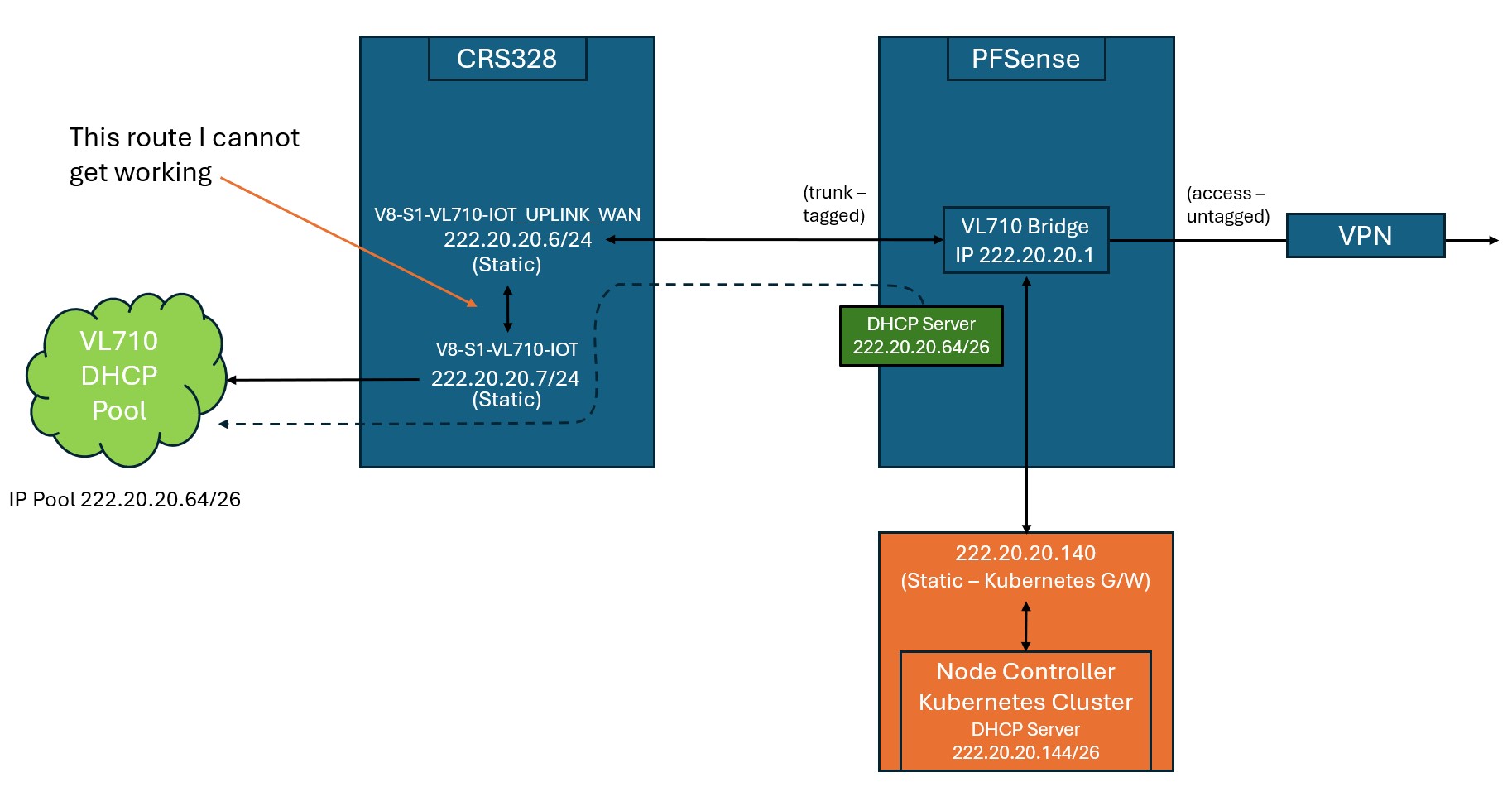
Hopefully this makes it clearer:
710-4.jpg
Sorry, the previous one had some errors. Long day and a glass of wine etc…

Okay lets have a look.

The trusted vlan providing the MT switch its address on the PFsense is 222.20.220.0/24
a. MT switch IP address is on VLAN 710 and is 222.20.220.6/24

b. Also on the PF sense is another DHCP service this time on subnet 222.20.20.024

c. this NEEDS to also come in as a tagged vlan on the same trunk port.

d. The reason is that on one of the switch ports a device needs to connect back to the PFSENSE.

  1. The route you wish to get working is not correct, the switch does NO routing when it comes to pfsense subnets, ONLY for switch subnets.
    The plain fact is that the the tagged vlan comes in on etherx on the switch and goes out on ether7, transparently.

See above- mistakes corrected.

Would converting V8-S1_VL710-IOT_UPLINK_WAN and V8-S1_VL710-IOT to ARP-Proxy work?

Short example.... I included one native subnet for clarity vlan630, .
THe big mistake is thinking that the vlan tagging for two subnets is the same WRONG
the iot uplink is NOT 710 and is in fact associated with the PFSENSE Subnet associated 222.20.222.0, where the LANIP to the MT is also the MTs WANIP 222.20.222.6
we will call this vlan 222 on the MT.
the IOT vlan is indeed 710, and is associated with the dhcp setup as per your diagram. I asked you for clarity and you failed to provide.
So how is the bridge subnet hitting the port leading to the MT, I will for this exercise ASSUME its untagged as that is most complicated.
If its tagged then its easier as that a clear trunk port, but if its just an untagged subnet then we have to deal with a hybrid port at the MT.


OPTION1 --> No base vlan ( two vlans in hybrid, the untagged wan source and the tagged dhcp 710 vlan, both entering the MT)

# model = CRS328-4C-20S-4S+
/interface bridge
add comment=B1-CRS328-Master-Bridge name=B1-CRS328-Master-Bridge vlan-filtering=yes
/interface ethernet
set [ find default-name=combo3 ] comment="IOT COntroller (VL710)"
{ assume this is the etherport to the iot device affliated with the pfsense subent .20 subnet }
set [ find default-name=combo4 ] comment=">> VRF1-V8-VL222-IOT Uplink" { assume this is the HYBRID port from the pfsense }
set [ find default-name=sfp18 ] auto-negotiation=no comment="GW and DS Printer (VL630)"
/interface vlan
add comment=">> VRF1-V8-VL222-IOT Uplink-VLAN" interface=B1-CRS328-Master-Bridge name=V8-VL222-IOT-UPLINK_WAN vlan-id=222
add comment="local vlan for printer etc" interface=B1-CRS328-Master-Bridge name=V2-S4-VL630-LAN vlan-id=630

Note1: The pfsense transparent vlan is NOT identified in vlans.
Note2: the Uplink VLAN interface is the BRIDGE not the port.

/interface list
add name=WAN
add name=LAN
add name=TRUSTED

/interface bridge port
add bridge=B1-CRS328-Master-Bridge interface=combo4 pvid=222 comment="hybrid Trunk with WAN and transparent pfsense vlan"
add bridge=B1-CRS328-Master-Bridge ingress-filtering=yes frame-types=admit-only-priority-and-untagged interface=spf18 pvid=630 comment="local vlan for printer etc"
add bridge=B1-CRS328-Master-Bridge ingress-filtering=yes frame-types=admit-only-priority-and-untagged interface=combo3 pvid=710 comment="pfsense device"

/interface bridge vlan
add bridge=B1-CRS328-Master-Bridge tagged=B1-CRS328-Master-Bridge untagged=combo4 vlan-ids=222
add bridge=B1-CRS328-Master-Bridge tagged=B1-CRS328-Master-Bridge untagged=spf18 vlan-ids=630
add bridge=B1-CRS328-Master-Bridge tagged=combo4 untagged=combo3 vlan-ids=710

/interface list member
add interface=V8-VL222-IOT-UPLINK_WAN list=WAN
add interface=V2-S4-VL630-LAN list=LAN

add interface=V8-VL222-IOT-UPLINK_WAN list=TRUSTED

/ip address
add address=222.10.50.1/24 interface=V2-S4-VL630-LAN network=222.10.50.0 comment="Switch subnet"
add address=222.20.20.6/24 interface=V8-VL222-IOT-UPLINK_WAN network=222.10.50.0 comment="Switch WAN IP and switch address"

/ip route
add dst-address=0.0.0.0/0 gateway=222.20.20.1 routing-table=main

/ip dns
set server=222.20.20.1

/ip neighbor discovery-settings
set discover-interface-list=TRUSTED

/tool mac-server
set allowed-interface-list=none
/tool mac-server mac-winbox
set allowed-interface-list=TRUSTED
++++++++++++++++++++++++++++++++++++++++++++++++++++++++++++++++++++++++++++++++++++++++++++

OPTION2 --> Base-Trusted vlan from pfsense added ( 2 tagged vlans in trunk, one untagged (wan) )

model = CRS328-4C-20S-4S+

/interface bridge
add comment=B1-CRS328-Master-Bridge name=B1-CRS328-Master-Bridge vlan-filtering=yes
/interface ethernet
set [ find default-name=combo3 ] comment="IOT COntroller (VL710)" { assume this is the port to the device on the pfsense .20 subnet }
set [ find default-name=combo4 ] comment=">> VRF1-V8-VL222-IOT Uplink" { assume this is the hybrid port to the pfsense }
set [ find default-name=sfp18 ] auto-negotiation=no comment="GW and DS Printer (VL630)"
set [ find default-name=sfp20 ] auto-negotiation=no comment="Management port on switch"

/interface vlan
add comment=">> VRF1-V8-VL222-IOT Uplink-VLAN" interface=B1-CRS328-Master-Bridge name=V8-VL222-IOT-UPLINK_WAN vlan-id=222

add comment="local vlan for printer etc" interface=B1-CRS328-Master-Bridge name=V2-S4-VL630-LAN vlan-id=630
add interface=B1-CRS328-Master-Bridge name=Trusted-VLAN vlan-id=987 { just using this vlan as an example of a management vlan } [/i]
Note1: The pfsense transparent vlan is NOT identified in vlans.
Note2: the Uplink VLAN interface is the BRIDGE not the port.

/interface list
add name=WAN
add name=LAN
add name=TRUSTED

/interface bridge port
add bridge=B1-CRS328-Master-Bridge interface=combo4 pvid=222 comment="hybrid Trunk with WAN , transparent pfsense vlan, base vlan"
add bridge=B1-CRS328-Master-Bridge ingress-filtering=yes frame-types=admit-only-priority-and-untagged interface=spf18 pvid=630 comment="local vlan for printer etc"
add bridge=B1-CRS328-Master-Bridge ingress-filtering=yes frame-types=admit-only-priority-and-untagged interface=combo3 pvid=710 comment="pfsense device"
add bridge=B1-CRS328-Master-Bridge ingress-filtering=yes frame-types=admit-only-priority-and-untagged interface=sfp20 pvid=987 comment="mgmt port"

//interface bridge vlan
add bridge=B1-CRS328-Master-Bridge tagged=B1-CRS328-Master-Bridge untagged=combo4 vlan-ids=222
add bridge=B1-CRS328-Master-Bridge tagged=B1-CRS328-Master-Bridge untagged=spf18 vlan-ids=630
add bridge=B1-CRS328-Master-Bridge tagged=combo4 untagged=combo3 vlan-ids=710
add bridge=B1-CRS328-Master-Bridge tagged=B1-CRS328-Master-Bridge,combo4 untagged=sfp20 vlan-ids=987

/interface list member
add interface=V8-VL222-IOT-UPLINK_WAN list=WAN
add interface=V2-S4-VL630-LAN list=LAN
add interface=Trusted-VLAN list=LAN
add interface=Trusted-VLAN list=TRUSTED

/ip address
add address=222.10.50.1/24 interface=V2-S4-VL630-LAN network=222.10.50.0 comment="Switch subnet"
add address=222.20.20.6/24 interface=V8-VL222-IOT-UPLINK_WAN network=222.10.50.0 comment="Switch WAN IP"
add address=222.20.98.7/24 interface=Trusted-VLAN network=222.20.98.0 comment=Switch Address

Note: not shown for simplicity is the dhcp pool, dhcp server dhcp-server network for VLAN 630.

/ip route
add dst-address=0.0.0.0/0 gateway=222.20.20.1 routing-table=main

/ip dns
set server=222.20.20.1

/ip neighbor discovery-settings
set discover-interface-list=TRUSTED

/tool mac-server
set allowed-interface-list=none
/tool mac-server mac-winbox
set allowed-interface-list=TRUSTED
Thanks guys it’s all working now.

One final issue. There were a number of devices that the DHCP on the PFsense box had issued previously. All of those (9) fired up immediately and work fine.

It’s not issuing new IP addresses however.

I have had to use a relay. Any ideas here?

Not sure what you mean?
If not statically set, then they should ask for an IP and get one from the correct DHCP server.
Without seeing your config now, its hard to provide any advice. Relay should NOT be required.
You may need to set the dhcp lease to like 5 minutes or so vice 10 days LOL.

I do recommend getting rid of any unused or disabled config lines to clean up the presentation here.