Ive been looking into changing my ISP provided CPE to something a bit better and could be good for a power user who wants to learn more about networking like me and was wondering if two of the hAP ax S’s would be suitable for this. The configuration I would be using would be either one in the living room and one in my parents room or one in the living room and one in my room. Parents room would be 1 wall and to my room would be 1-2. if it was in my room it would be 2-4 walls to the living room. There’s about 20 devices or so in my house. The second one would be a wireless AP not wired.
Yes, it will work, but the solution itself is overly expensive, and you'll likely get worse Wi-Fi quality (if you use it) than with similar, simple access points.
i.e., 1) the device itself is expensive.
2) If we take the AX2 for comparison, with two such access points in two houses, I have a number of problems. Each house has clients that either don't work (for example, a Mercsys USB Wi-Fi MW150US or a Huawei Matebook D15) or have very poor Wi-Fi.
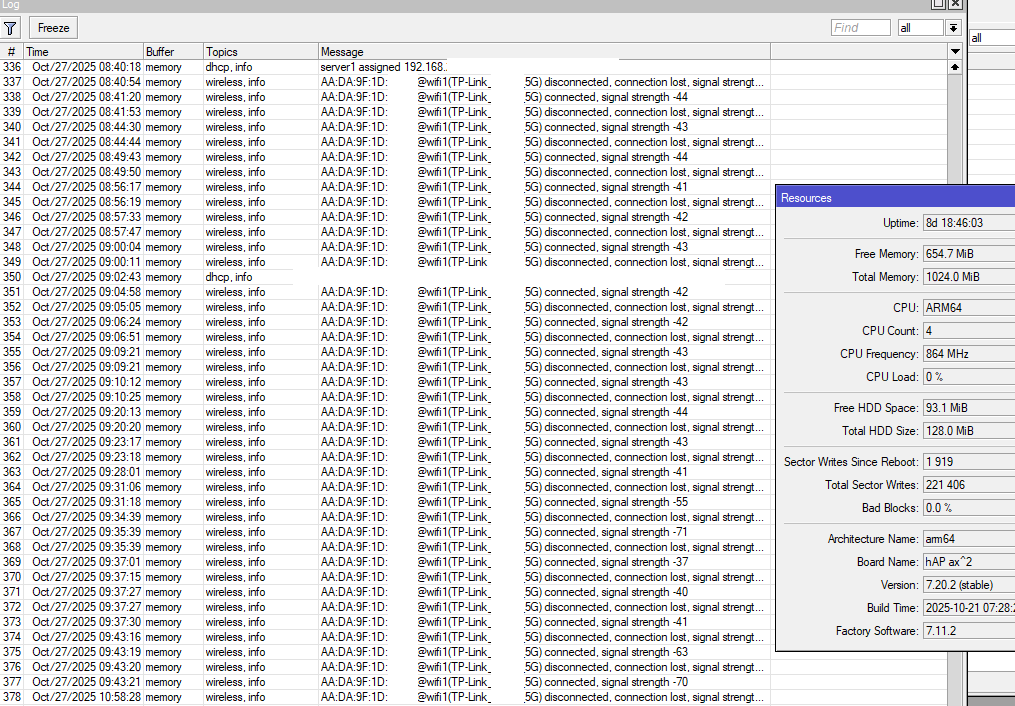
This is an iPhone 15, and the settings don't help; there's nothing to configure. It's a broken Wi-Fi device.
3) The range of the built-in antennas is lower than that of a regular router with antennas.
So, maybe you'd be better off using a single Mikrotik router as the core of your network, and any other Wi-Fi access points from a different manufacturer?
Hi
The main problem is that the word "wall" is very deceptive.
Cartonboard ones are more WiFi friendly than concrete or glass. It's always a guess if the coveragewould be good enough or not.
It would be a house built in the 50s
And…what? You were under the impression that they used only one material back then? This answers none of @BartoszP's concern.
The only thing I know is there's drywall and mostly only two prong outlets. And they're pretty thick.
I don't know what criteria @Nikalia is using to class a $79 AP as "expensive," but that's not why I'd avoid your proposed configuration. It is that "wireless AP" sucks. Either run a wire between them or do without the second AP, is my philosophy. I'd rather reach clear across the house to a single good AP than clog the airwaves with repeater traffic.
You say you want to learn networking. Fine. Learning to run wires through attics and air ducts and drywall…that's a huge part of networking.
Alternate plan: one big torch of an AP centrally located, with wires run to rooms where there are high concentrations of techie devices, where it fans out to a small room switch. In my case, that's a Chateau Pro ax and a CRS3xx, but there are lots of combinations that can work here.
I can't run wires due to it being a rental house.
Then start with one big torch, and branch out only on proof of necessity.
The Chateau Pro ax is a 4-chain device, thus stronger than this new 3-chain AP you're looking at, but up to a limit, it should be perfectly fine, presuming you don't have something like concrete and rebar walls somewhere in the mix.
Do the rooms have existing cable TV connections? If so you may be able to use them with a pair of MoCA adapters. Here's a high level overview by Linus Tech Tips Bad Wi-Fi Signal? Use This! - MoCA Explained I suggest you test your coax cables before buying moca adapters.
This next video show the types of problems you can run into when working on networking projects, things usually don't go as planned on the first try. I Will FIX Your Wifi - MoCA and Powerline at Colton's House
Well, if goal is learn about networking. The first step is a "site survey" before getting to buying hardware. So I'd start with some homework.
-
Since you're concern about Wi-Fi, I'd start by mapping your current coverage using your current ISP CPE's Wi-Fi to measure strength in various part of your home. There are plenty of Wi-Fi scanning apps on Android, and on iPhone you can use old "AirPort" tool which has a Wi-Fi scanner. Plenty of apps on Windows/Mac too (but walking around a house with a laptop is PITA IMO). But if know your current coverage, that help determine what to do improve it.
-
Think about what device you have and how you want to organize the network. In most case, a single LAN is fine, but it depends on what you want to achieve. If any devices need to be available on the internet (like a web or game server), you should collect their networking requirements. Like what ports they use. For example, you can limit limit devices from "hogging" the network with QoS, or isolate untrusted devices to a different network, etc.
-
If you interested in things like storage or containers on the router, you'll like want something that run 64-bit RouterOS. The hAPaxS is 32-bit so containers be tricky.
-
Similarly, with remote VPN access to your LAN... If that be a common use-case or especially for multiple users at same time, that will impact performance of router/network on lower end devices since symmetrical 1Gb/s is pushing limits of devices like hAPax* before adding CPU overhead for VPN encryption.
-
Look for a good spot for the router/AP. Wi-Fi works best with line-of-site. So while you can't do much about walls, but getting about people/furniture is often more helpful than new hardware if router/AP is say on ground under desk. But getting a router "higher up" like on a bookshelf/mounted may also require thinking about "cable routing" since few people like seeing cables strung about a house.
Anyway just a few things to consider before clicking buy-it-now.
Alright, I did a partial scan before only because my parents were sleeping but when i get home from work tomorrow i will definitely do a full scan. Something I’ve noticed when scanning with the app though is my WiFi won’t jump to the other AP. I wont need to VPN, The only reasons I’d need to VPN wouldn’t be a good idea to use my home network. I didn’t even know what a container on RouterOS was until you mentioned it. If i did ever use that it would just probably be PiHole. The only device that could hog the network is my PC primarily since I do a bit of torrenting but that’s it and I often limit the speed between 10-100 mbits anyway. The primary reason I’m interesting in Mikrotik is some of the equipment appear to be pretty cheap and I plan on using Mikrotik for a lot of stuff for an ISP I plan to create which I’m still planning because I do not want to screw myself financially. The primary devices are two PCs and three phones. We also have three TVs and Three consoles. I have a Raspberry Pi for my 3d printer and whatever other random shit my parents have. The primary rooms of usage are the Living room and three rooms around my Parent’s room. with occasional usage in the garage but speeds don’t need to be optimal since its just my mom browsing TikTok or looking up tutorials for something.
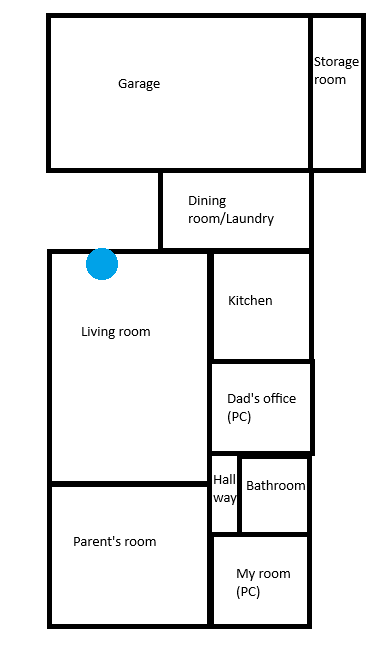
I attached an image of my rough floor plan. The blue dot indicates where my ISP’s connection comes into the house
Some other brands offer a software to have a rough idea of coverage, but of course those have no data for Mikrotik devices.
Still they could give a rough approximation.
Form the plan you posted, (and assuming that you don't need/want wifi in your garage, I would think of using a wAP Ax where the blue dot is, that - unlike most if not all Access Points - is not omnidirectional but having a coverage in a 90-120° angle, would cover the main rooms.
Then - if the coverage isn't enough the logical placement of a second AP (with a radio set as station/client, i.e. a repeater) would be in the small hallway.
From there running a short, superflat cable (external) to your room should be possible, you could place the device in the hallway just above the door to your room and make the cable go under the door external frame.
Sometimes one learning path implies gaining other kind of proficiency. WiFi and networking implies getting a badge in the economics 
You have to buy some devices, test if and why they fit or not your needs, and then decide if you have to buy another set of them or not.
After a few rounds you start to have gut feelings what kind of devices should be installed. It's a learning by doing path.
Good point:
In another thread, this show the antenna pattern for the wAP ax. So if goal is maximize the speeds in your room, the maximum energy can be directed that way.
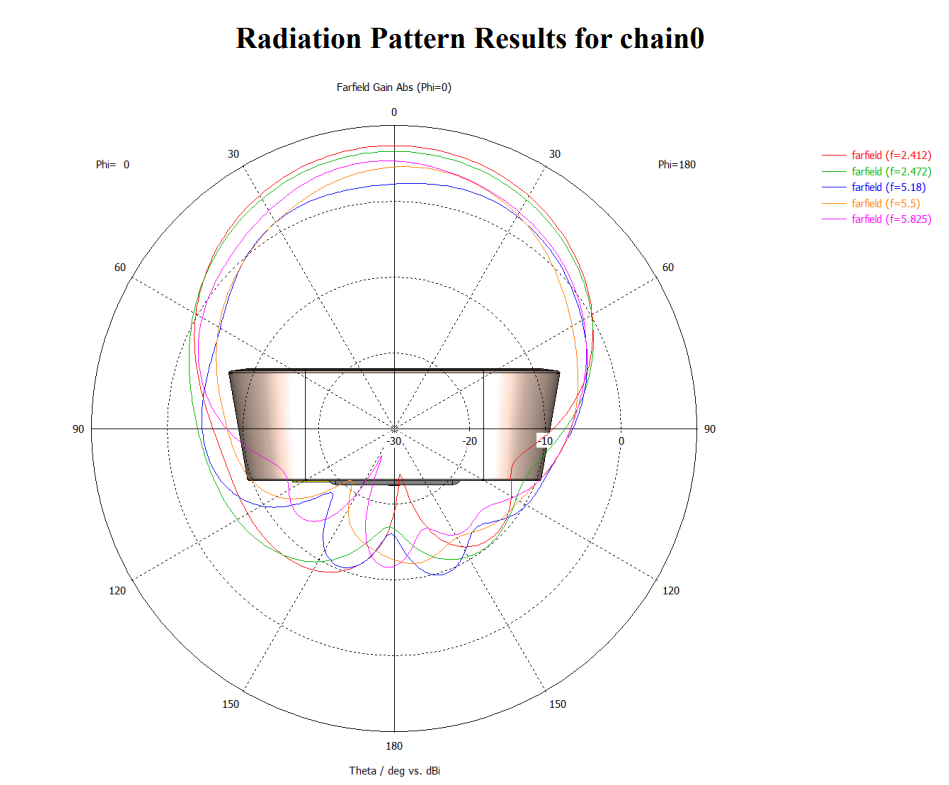
Amazing! Thanks for sharing the wAP ax radiation pattern. Where did you get it from? I remember searching for this, and found nothing. Is this radiation pattern official? I have wAP ax at home and a Chateau PRO ax, used as a CAPsMAN, so far I wasn’t able to find an official radiation pattern…
Its on the FCC Application
And, I believe, the US FCC Part 15 docs have them.
Hmm alright
The posted image comes from the FCC documentation, but in an unnoticeable corner of the wAP Ax brochure:
it is mentioned that Antenna Beam Width is 180°.
The way everyone measures this width in degrees may vary, of course, but calling the actual shape as 180° is a bit optimistic IMHO.
I stand by my "ball with flat bottom" definition:
this latter link includes a link to the FCC documentation containing the posted image.