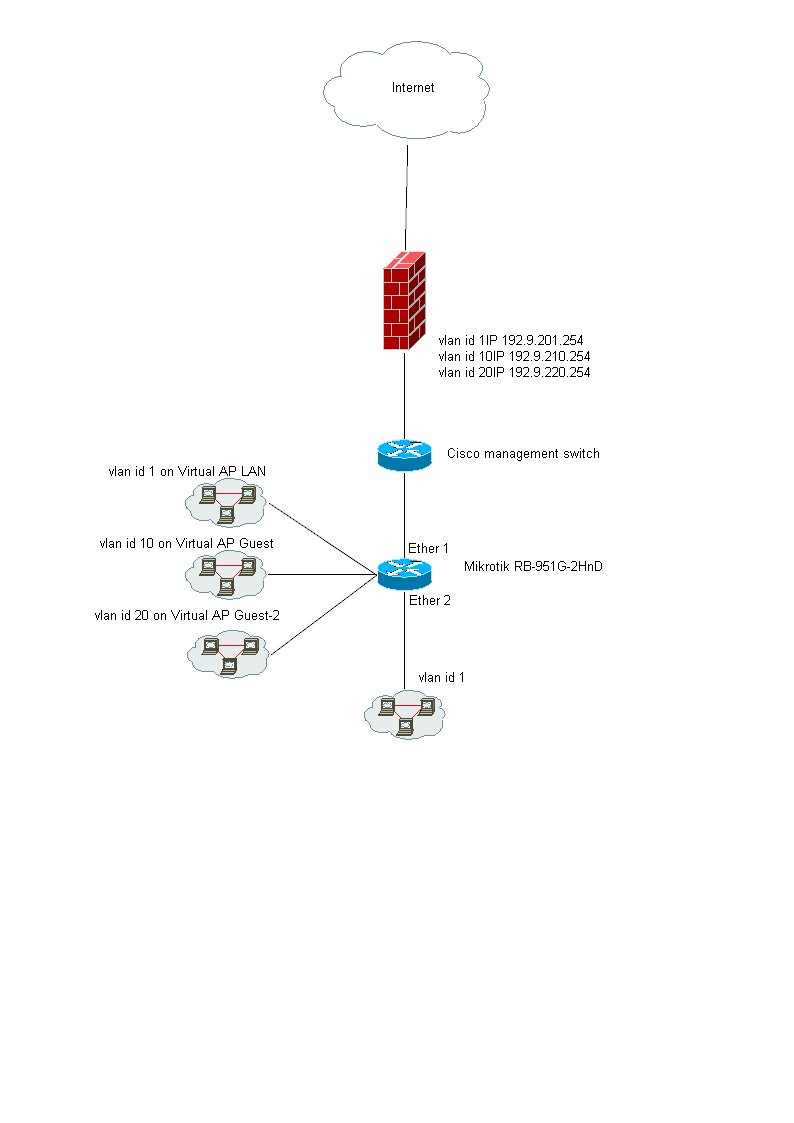
Hi, As you can see in my picture I want to configure 3 VLANS and on my Firewall I have allso 3 VLANS.
I want that each VLAN use his own Gateway on the firewall
How do I configure this?
On the Mikrotik I have configured 3 Virtual AP’s on WLAN1.
I some wired computers on Ether 2 (VLAN id 1)
Ether 1 is connected to an switch (Cisco) and in the Cisco I configured Tagged and untagged VLANS
The question would be clearer if you could mark the diagram with where each VLAN is to be tagged or untagged. e.g. Cisco trunk ports using 802.1q by default have VLAN 1 as the native (untagged) VLAN.
Thanks for your reply.
I want three Virtual AP’s on the Mikrotik And don’t use the WLAN1 itself but only the virtual AP’s
So How do I have to do this (in command line)?
I don’t see tagged or untagged options in the Mikrotik. So don’t know how to do this and creat this.
To access the tagged VLANs coming from the Cisco you need to create VLAN interfaces under /interface/vlan and assign them to the Ether port connected to the Cisco with the correct VLAN IDs. Then create the same number of bridges and add both the relevant VLAN interface and the corresponding WLAN (Virtual AP) interface in pairs as ports to the bridges.
i.e. you create VLAN interfaces and then bridge those interfaces to the Virtual AP interfaces.
Hi,
The VLANS, BRIDGES and Port to BRIDGES are ok now I think but now the right routes for the VLAN’s How do i do this?
I want that each VLAN use it’s one gateway.
I’m not sure what you mean by “right routes for the VLANs”. How are you providing IP numbers to the wireless clients? If you have an upstream device doing that then it would set the gateway as required. If you want the routerboard to do that you would have to attach DHCP servers to the VLAN bridge interfaces.
Hi, Thanks for your reply.
Yes of cource you have a point and yes you are right.
But let me explain what I’m doing.
I build a test enviroment with 20 users.
I use the RB951G-2HnD (because it is cheap and ok for the test.
If it works we will work it out in our production enviroment.
But it is crisis time and it is hard to get budget for a test enviroment so I try to do it this way.
I’m new with Mikrotik so must first have a good feeling with it and I must test if it is working.
Than I can go to the management and tell them I need more and bigger hardware to build it in the production enviroment.
Other question. The pictures you make are verry nice. What progamm do you use?
I like it verry much and want to try that allso.
Great tips.
Thanks a lot.
These books, where can I buy them??
Maybe I ask you alter for some advise for the routing device.
I want to test what I draw in the picture at the start of this topic.
But You told me it is much better to let an other device do the routing.
If want want to use usermanager with wifi (for guests and 2 oterh vlans for wifi with DHCP.
What must I do?