Hi,
I have the “MikroTik hAP ax lite LTE6” router ( https://mikrotik.com/product/hap_ax_lite_lte6 ).
It has only 1 SIM slot. But I now need to have a solution that does an automatic
failover between 2 mobile providers (ie. 2 SIMs).
And which also allows to use both SIMs at the same time, for example
routing a specific traffic to a selected one (for example traffic to my streaming provider).
While searching on the Web for such an 4G/LTE router with Dual SIM,
I was very surprized to see that RouterOS gets used also in products
by other companies, like in this product model (“LT12”) by CUDY: https://www.amazon.de/Cudy-Cellular-Gigabit-OpenVPN-WireGuard/dp/B0BN2SY589
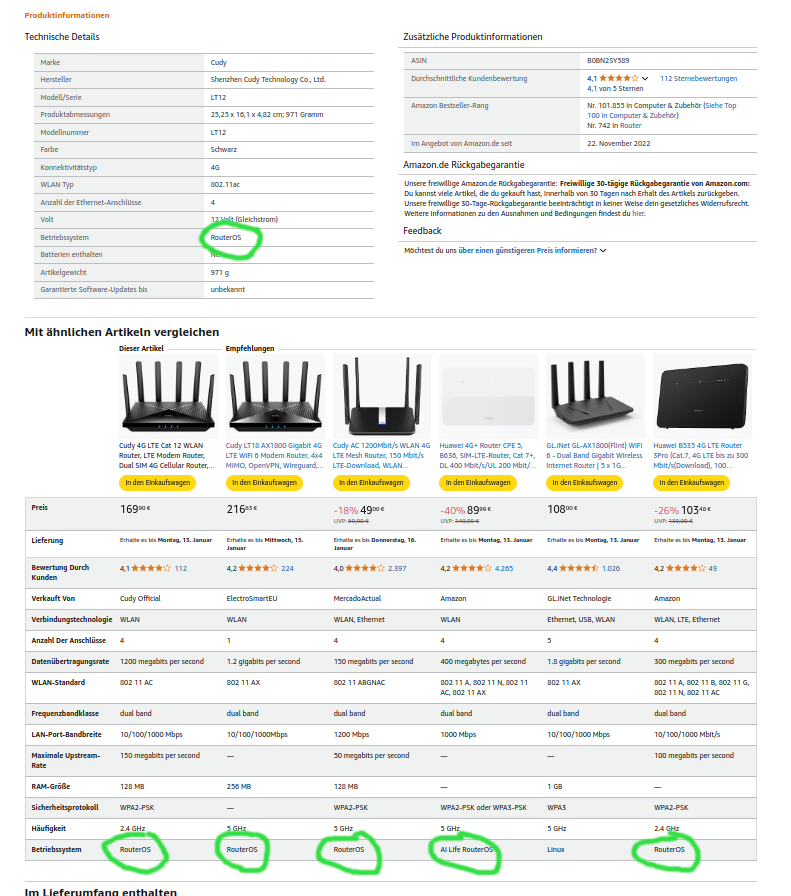
It explicitly says “Operating System: RouterOS” (in German “Betriebssystem: RouterOS”).
Is it the same RouterOS from MikroTik? Ie. is it a licensed use by them?
(But on the CUDY website for the above “LT12” model at https://www.cudy.com/products/lt12-1-0
there is “RouterOS” not mentioned).
Are there any other companies that use RouterOS in their products?
Btw. I need a budget solution for my above described use-case with 2 SIMs.
Can any of you recommend a product or solution and/or experience?
Thx.
Btw, I have some more MikroTik devices, for example the “hAP ac^2” router ( https://mikrotik.com/product/hap_ac2 ).
It unfortunately does not have any SIM slots, but it has a USB port.
If I attach to it a passive USB2 hub and to that hub then attach 2 LTE sticks with SIMs,
would it then be possible to control these 2 LTE devices via RouterOS ?
B/c somewhere I once had read that attaching a single LTE stick directly to the USB port
would make LTE possible in RouterOS, so the question is: what if I need to attach 2 LTE sticks to that single USB port ?
Will it work?
In general, a USB stick with LTE should work via USB, and multiple via a hub should too. But not all modems are compatible, and some may require issuing AT commands to switch modes. Mikrotik has a list of modem here: https://help.mikrotik.com/docs/spaces/ROS/pages/13500447/Peripherals#Peripherals-Cellularmodems. Now just because something is not listed, it still may work & conversely also possible a listed modem may not work because of firmware/etc…
If a modem works with Windows without drivers, it’s likely to work on RouterOS.
Two USB stick mean you have two modem, and the be better for redudency, than any “dual SIM” devices. The way dual SIM work is only one SIM is active at a time. Both the LtAP and LtAP mini support dual SIMs. The “bigger” LtAP has both a dual SIM, and ALSO has 2nd slot for another modem inside. Now using the LtAP with two modem take some DIY effort to instal modem and pigtails+antennas.
Ok, thanks for the link. I’ll try to find LTE sticks from that list.
Two USB stick mean you have two modem, and the be better for redudency, than any “dual SIM” devices.
The way dual SIM work is only one SIM is active at a time.
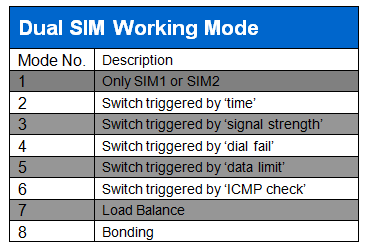
But some companies do advertise also with “Load balancing” and “Bonding” with their Dual SIM device.
Both the LtAP and LtAP mini support dual SIMs. The “bigger” LtAP has both a dual SIM, and ALSO has 2nd slot for another modem inside.
Now using the LtAP with two modem take some DIY effort to instal modem and pigtails+antennas.
I think I should stick to the “2 stick solution”, as it seems more flexible, and much cheaper, I think.
Some RouterOS programming is surely required, but that’s OK.
I had asked CUDY (the above said company) some questions on their Dual SIM routers etc.
Here their answers:
They say that their devices use the OpenWrt operating system, not RouterOS.
But then one wonders why in their advertisements (at amazon.de etc.)
they claim to be using “RouterOS”.
He says that their router software does not support SSH and Telnet login. This is unbelievable!
3+5) And that in all their Dual SIM devices only 1 SIM can be active at the same time, not both.
Says one can download their Quick Start Manual from their website. I’ve not seen this yet.
EMail exchange was in German language (sanitized):
"
Date: Thu, 9 Jan 2025 17:09:59 +0800
From: “support@cudy.com” <support@cudy.com>
To: XXXXX
Subject: Re: Fragen zu Cudy LT700
Hallo (höflich)
Vielen Dank, dass Sie sich an das technische Team von Cudy wenden.
Bezüglich Ihrer Frage.
1, die Firmware des Routers wird auf der Basis von Openwrt mit einigen Cudy-Funktionen entwickelt.
2、Die offizielle Firmware unterstützt keine SSH- und Telnet-Anmeldung;
3, unterstützt nicht die Verwendung von zwei SIM-Karten zur gleichen Zeit. Der Router schaltet nur dann auf die zweite SIM-Karte um, wenn eine der beiden nicht auf das Internet zugreifen kann.
4, Sie können die einfache Bedienungsanleitung von der offiziellen Website von Cudy herunterladen;
5, Die Router von Cudy unterstützen zwei SIM-Karten, aber keine von ihnen unterstützt zwei SIM-Karten für den gleichzeitigen Internetzugang.
While I mainly use Mikrotik router as LTE devices, I do have one site with an inherited Cudy LT something. Amazon is wrong, it’s not RouterOS. It has decent web UI, but all the features are pretty fixed in how they work and there aren’t a lot of customizations. Small example, Cudy’s do support ZeroTier but they don’t let you customize anything about it which then makes it hard to more granular route selection. Now, RouterOS offers way more flexibility, at the expense of complexity.
My point about “dual SIM” does not tell the whole story, while the number of modems does… basically a product that offers “dual sim” does not mean it run both at same time, unless it had two modems.
Personally, two LTE sticks to an RB5009/hAPax3/hAPac2/etc is an entirely reasonable approach. Mikrotik’s modems are pretty dated, and using LTE USB modems known to work in your country/carrier has some advantages over the generic modems Mikrotik uses since presumable they were tested by the local carrier. And since RouterOS uses the Microsoft’s MBIM modem protocol, most recent USB modem support. As noted, RouterOS should look for all modems on the USB bus, even through a hub. And RouterOS will act exactly the same in configuration as if it was a LTE-enabled RouterBoard, or just a router with USB modem attached.
Just for the record, before it gets “fixed”:
here’s proof that the said CUDY company advertises unlawfully
by wrongly claiming that their own products are using RouterOS.
Below is just 1 example, there are many such product pages of them at amazon.de (see link above;
and maybe also at other sites, I haven’t checked) :
I always need CLI access (ie. login via ssh) for every network device. Otherwise it’s useless for me.
The HW specs of the products of CUDY and ZBT look not bad, but it seems they lack at the software and documentation side.
It’s not even possible for interested potential customers to RTFM
My point about “dual SIM” does not tell the whole story, while the number of modems does… basically a product that offers “dual sim” does not mean it run both at same time, unless it had two modems.
Personally, two LTE sticks to an RB5009/hAPax3/hAPac2/etc is an entirely reasonable approach. Mikrotik’s modems are pretty dated, and using LTE USB modems known to work in your country/carrier has some advantages over the generic modems Mikrotik uses since presumable they were tested by the local carrier. And since RouterOS uses the Microsoft’s MBIM modem protocol, most recent USB modem support. As noted, RouterOS should look for all modems on the USB bus, even through a hub. And RouterOS will act exactly the same in configuration as if it was a LTE-enabled RouterBoard, or just a router with USB modem attached.
Yes, I too am going that very path I just have ordered 2 LTE sticks, and will first test a solution on the PC (Linux),
and later move it to a dedicated small router device…
To be fair on the posted image, also Huawei claims the same.
It seems more likely that it is something lost in translation (or whatever) connected with amazon than originating from the manufacturers.
Just for the sake of completeness: during my (re)search I came up also over this professional/industrial device: Multi SIM 4G Router for Wireless M2M / IoT https://www.e-lins.com/DE/H750-4G-Router.html
I think it has 2 modems as it’s capable to do all these things:


 .
.