I took your advice since you are more competent than me, and I disabled CAPsMAN, put my downstairs AP to WISP AP mode, bridge, not the router.
This is the screenshot of a quick set in downstairs AP (Note: It won’t let me change the country and it has only a 5GHz band but I configured each interface manually anyway, not through Quick set)
Then I set SSID, one for 2.4 and another one for 5GHz (Note: Main router 2.4GHz interface and downstairs AP interface have the same SSID. And the same is done for the 5 GHz interface)
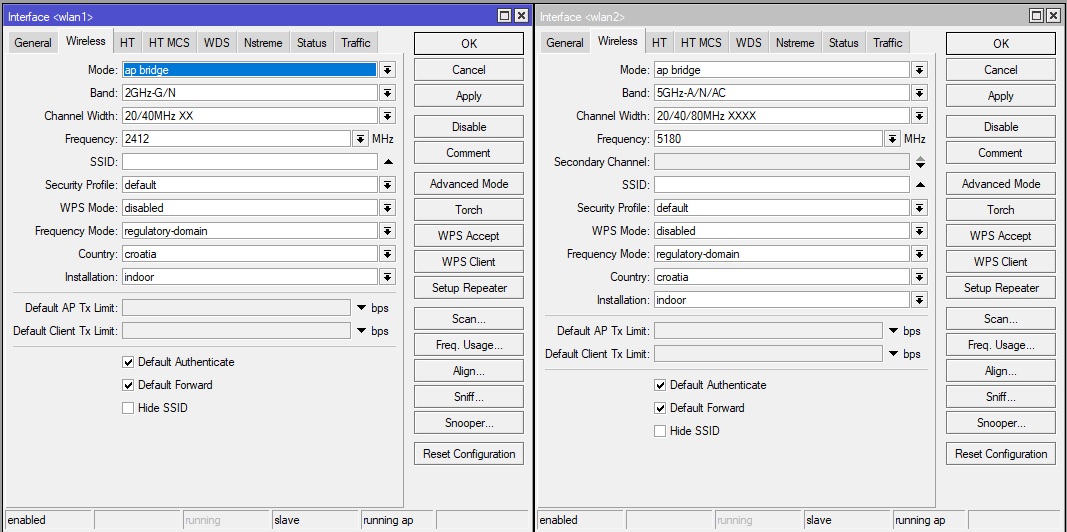
I don’t know which setting to use for channel width so I put these for testing, aaaand it’s working like a charm.
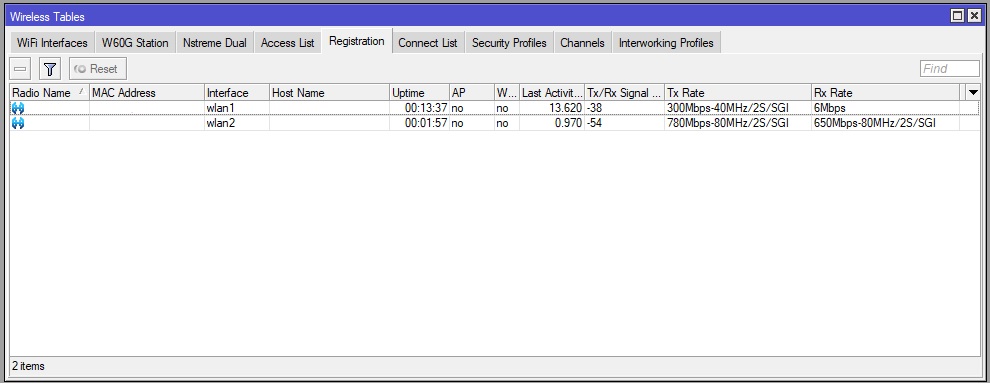
As you can see below, in the registration table of the downstairs AP, the first device is my older laptop with only 2.4GHz, but the second device is my mobile phone that connects with maximum speed.
(Note: there is a solid brick wall between AP and mobile phone)
Here are the settings for the main router
Now, is it possible in connect list to add devices and then via signal strength force device to connect to another AP? For eg. when I go upstairs signal level drops, I can test to which level signal drop and then put a slightly stronger signal value in the router at which the router disconnects the device. Then the device will connect to another AP which have the same SSID.
You cannot force a client to connect to another AP. The client decides! We tend to trigger the client into re-evaluating its connection by kicking it off the current AP. Not very nice , but a “sticky client” can be very sticky and sink to the ultra lowest rate before it disconnects, or just never disconnects.
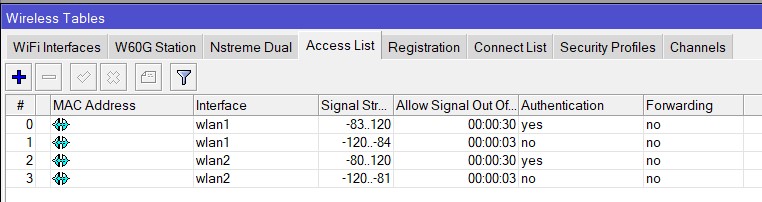
“Access list” is the tool to reject a connection of a client with a too low signal.
Settings tuned per AP in the multi-AP environment.
(Out of range for the reject is shorter than the accept, you want to allow the client to connect again soon, when one comes back.)
Be aware of the other settings like “forwarding” and VLAN, that will overrule the default of the WLAN interface!
You need both: accept and reject rule. Reject only will not work (see wiki)
Is there any diference in setting up wireless with that extra package ? I would like to give it a try.
gigabyte, to test wifiwave2 just use “quickset” to set up a plain vanilla Home AP with password and see what range/perf you get.
If you are satisfied, start over and set it up with winbox/CLI correctly.
wifiwave 2 is a slightly different approach, but not so different from current way of doing it.
If you have used quickset for setup, look through the winbox config to see what has been changed/set in wireless. Then its trivial to add/extend config via Winbox.
Big improvement is, wifiwave2 uses latest manufacturer Wifi drivers for Wifi chip inside hap ac3/Audience.
No need to tune anything anymore as it “just works”
That’s exactly what i meant, I wanted router to disconnect client if signal gets to weak so client reconnects (hopefully) to another AP. Only I need to set it up in Access List instead of Connect List.
Do you have any other suggestions regarding my configuration ? For eg. extension channels ? Should I change it ? Can I set same SSID for all interfaces ? So 2.4 and 5 GHz have same SSID ?
Regarding VLANs, I will have several security cameras on diferent VLAN but I was only thinking about adding mobile clients to Access list. For cameras there is no need as they are stationary.
I personally would not use XXXX as extension channels (except for “station” setup) because it is undefined if it is Ceee, eCee, eeCe or eeeC.
5180/Ceee is very specific. 5180/XXXX not but here only Ceee is possible because 5180 is at the edge.
Freq 5500 and up have a higher TX power allowed. (/interface wireless info country-info croatia), but that is DFS, may be used indoor and outdoor.
The specification installation “indoor” is no problem for “croatia” because the “outdoor” frequencies are not tagged as such for the croatia list. Other countries may have this, and the “installation=any” must be used there.
Don’t specify “5GHz-A” if you don’t use “A” as protocol. (A= Old USA protocol). Just “5GHz-N/AC” or even “5GHz-onlyAC” if all devices support AC.
You can set the SSID just as you want , equal or different from each other. They all end up in the same L2 bridged network.
More SSID can be added as “Virtual interface” , but don’t forget to add those WLAN to the bridge. So you can have a common SSID and a specific one at the same time.
VLAN per SSID is easy if it does not need to be strongly secured, just use the VLAN id different from 1 and tagged in that WLAN. (attenton for the access-list entries !!!). Wifi can transport tagged VLAN that are untagged at the client device also. The VLAN must end somewhere in the network in a VLAN interface with it’s own DHCP etc). Full VLAN filtering on the bridges is a totally different story, tag/untag can be done on the bridge ports.
The problem is that internet is full of recomendations “use 1,6,11” which very well applies to US but not so good elsewhere. So quite many APs in Europe follow the same recipe throwing away chance to have two non-overlapping 40MHz channels.
Using different freq for the different AP’s is maximizing the free airtime to transmit: If there are enough free channels. If not, set the APs on EXACTLY the same frequency (eg: all on 5180/Ceee and not one on 5180/Ceee and the other on 5200/eCee or even worse 5200/Ceee). If the 866Mbps interface rate is NOT needed , then using 40 MHz wide channels in 5 GHz might just be better for the signal quality. https://metis.fi/en/2018/02/5ghz-channels/ . Mikrotik does NOT use mid-channel frequencies naming as in this text, but control+extension channel naming.
Ok, I put 2.4 GHz to 20/40 MHz XX 2412 MHz, and 5GHz to 20/40/80 Ceee 5180 MHz (I tried to select another frequency but then i get “searching for frequency” and after that “detecting radar”)
If I want to use 20/40 MHz for 5GHz should I use XX or Ce or eC ? (Maybe i will choose 20/40 because that is more than enough for my internet speed)
And this message: “searching for frequency” and “detecting radar” is this related to country settings ? because i get that message for every frequency except 5180
Related to DFS (including weather channels), but is country specific. http://forum.mikrotik.com/t/5-ghz-wifi-speed/156353/1 . N-America and Europe are similar, See also the “/interface wireless info country-info” terminal output.
DFS cannot be disabled. Avoid “weather channels” first : “Skip DFS channels = 10minCAC” in WLAN2 config.


 I will try it, why not, if it supported by the router hehe