I have hAP ac3 as my router for city provided internet. But that router is upstairs so wifi signal is weak downstairs. So i bought cAP ac so i can add AP downstairs and im running capsman on the hAP ac3.
My problem is, i noticed that when im upstairs i have full net speed and mobile phone says that wifi link speed is 866 mbps.
When im downstairs, wifi link speed is 192 mbps and im standing right below the AP. (I checked with winbox in the router to be sure that phone is indeed connected to downstairs ap)
My xiaomi 4k tv stick that is about 4meters away and there is wall between AP and the stick reports wifi link speed of about 780mbps.
My problem is, i noticed that when im upstairs i have full net speed and mobile phone says that wifi link speed is 866 mbps.
When im downstairs, wifi link speed is 192 mbps and im standing right below the AP. (I checked with winbox in the router to be sure that phone is indeed connected to downstairs ap)
866Mbps is the best case raw speed on 5GHz with 80MHz channel width (2x MIMO)
192Mpbs is the best case raw speed on 5GHz with 20MHz channel width
Looks like your smartphone only connects with 20MHz channel width to your cAP. While the TV stick uses 80MHz on the same cAP.
Hard to tell what the reason is. Probably some incompatibility beween the cAP and your smartphone. Tried some google-fu?
Yea, i tried samsung S10 and Xiaomi 11T and results are the same, upstairs router 866 Mbps, downstairs 192 Mbps.
First i thought that i didn’t set up correctly something but then tv stick wouldn’t connect with that speed.
Edit: I installed same AP at work and it’s connecting with 866 mbps link speed. Only diference is that main router is Hex S with no wifi interface
Edit 2: At home, cAP is powered via gigabit poe injector provided with AP, at office, AP is connected directly to poe port on the router.
If i set control channel width to 20MHz, and extension channel to eCee then phone connects with full speed but i lose 2.4 GHz, phone reports that SSID is 5 GHz network only.
Really looks like using a different main router makes both of your smartphones connecting with 20MHz only while the TV stick is able to connect with 80MHz at the same time.
Very weird indeed…
Looks like an obscure bug only happening for some “special” combination. I suggest to contact MikroTik support.
What frequencies are used? Some devices do not support all frequencies !!!
eCee does not exist in 2.4GHz , that would need 16 channels
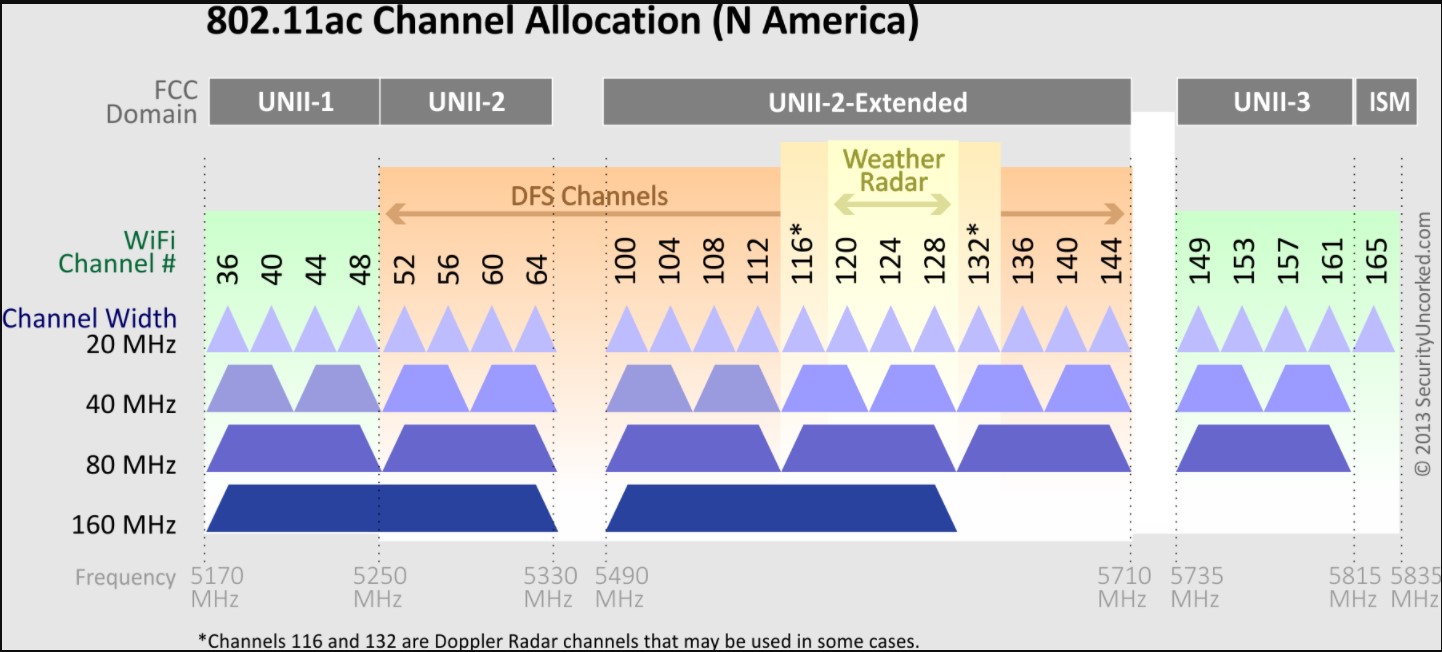
The channel blocks are not continuous in 5 GHz neither. The possibility to use 80 MHz wide channels is lmited to continous blocks.
Only 40,56,104,153 are safe to use as eCee (the last one not in Europe). 120 has a 10 minute delay and depends on 116, and 136 may have problems with 132 or 144.
.
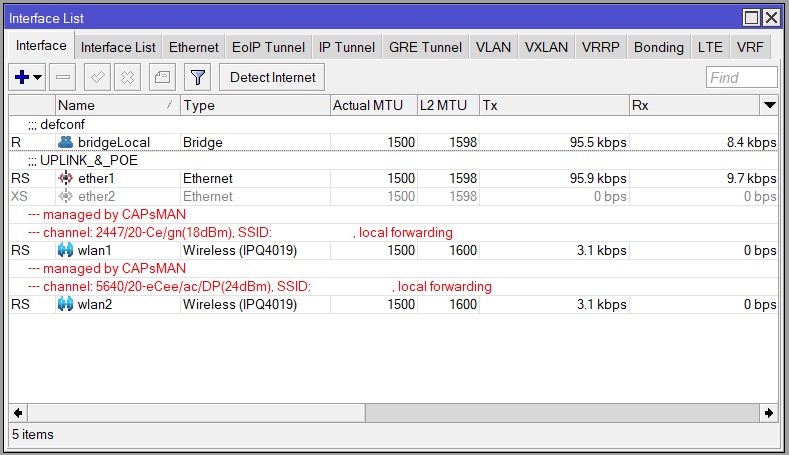
OK , so you have a CAP on channel “6-7-8-9-10-11-12-13” in the 2.4 Mhz band, and channel “124-128-132-136” in the 5 GHz band. (=10 minutes weather radar check before starting)
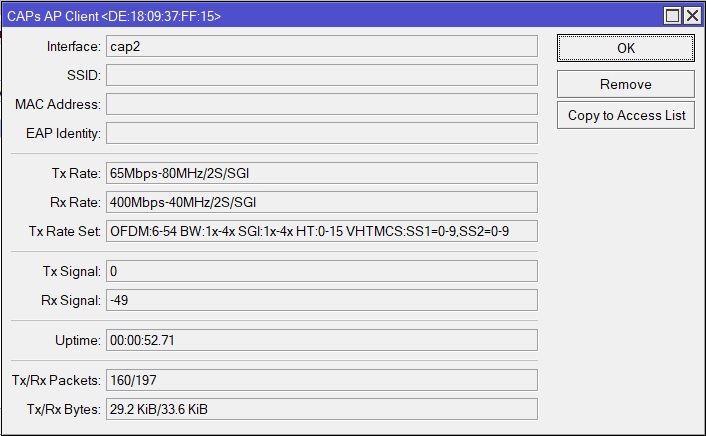
The client device quite often does not support 80MHz. Could be the reason why the RX is only 40MHz.
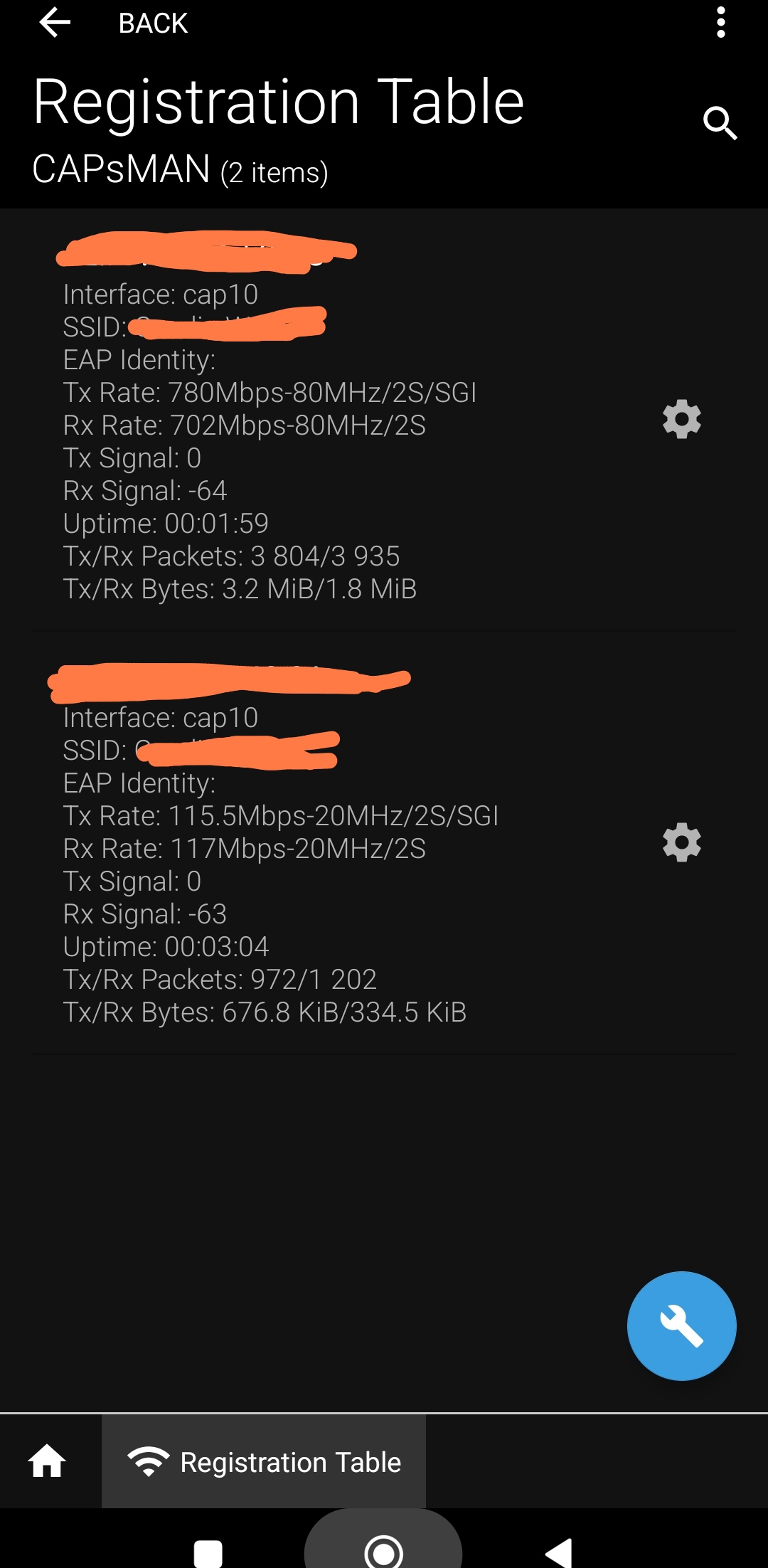
These “auto” selected channels may have quite some interference depending on the RF environment, what can reduce the TX to 65Mbps. (Interface rate is lowered when transmissions fail) This is a very low MCS1 (https://mcsindex.com/) here now.
Low MCS can also be because there is not enough traffic yet to ramp up the interface rate (only 160 packets so far). MT is slow in ramping up.
With “auto” it’s difficult to know what channels will be used. So wifi experience can vary a lot depending on the channels and the RF environment.
Just a wild guess: “What if the client device can/may not support channel 132?” TX will fail often until the AP reduces the channel width in it’s stepping down. RX will be at 40MHz as 132 is not used. [Beware: wild guess]
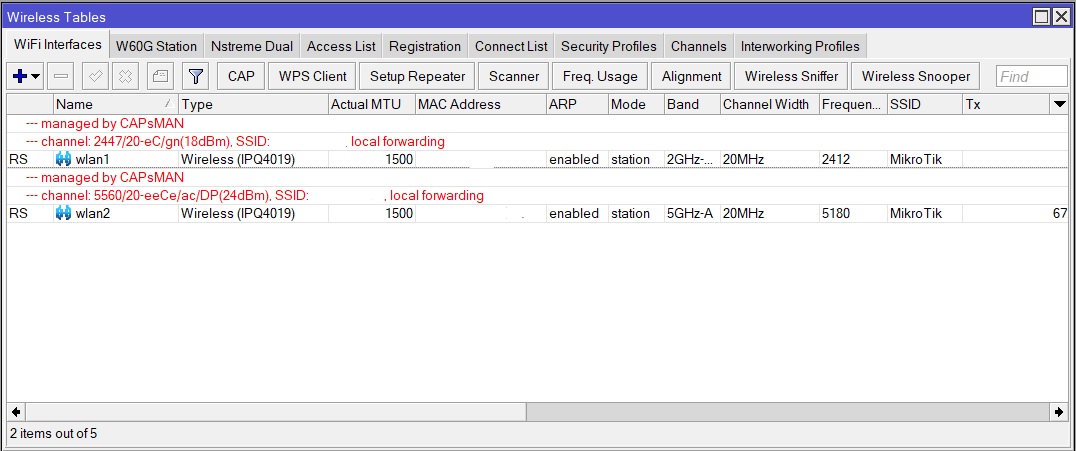
This first post is at work, where everything is working at max speed
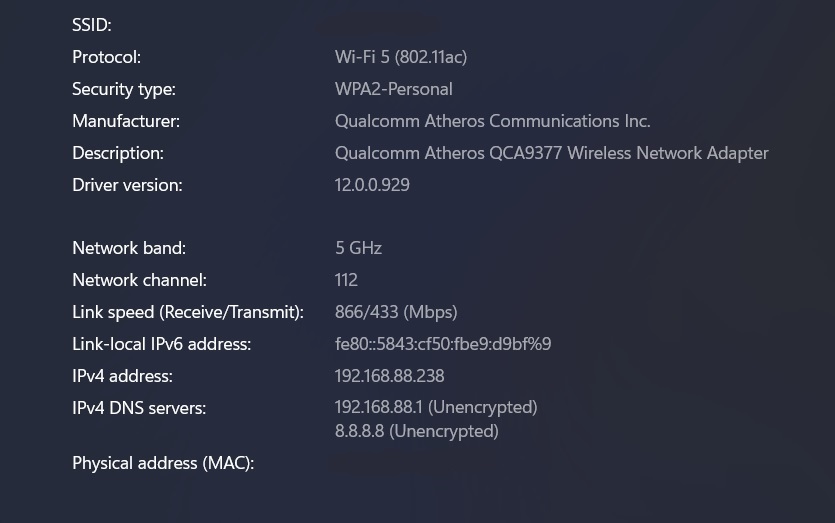
So this is situation at home, i tried to connect with laptop and this is reported by windows:
This is wireless interface of AP that is managed by my router
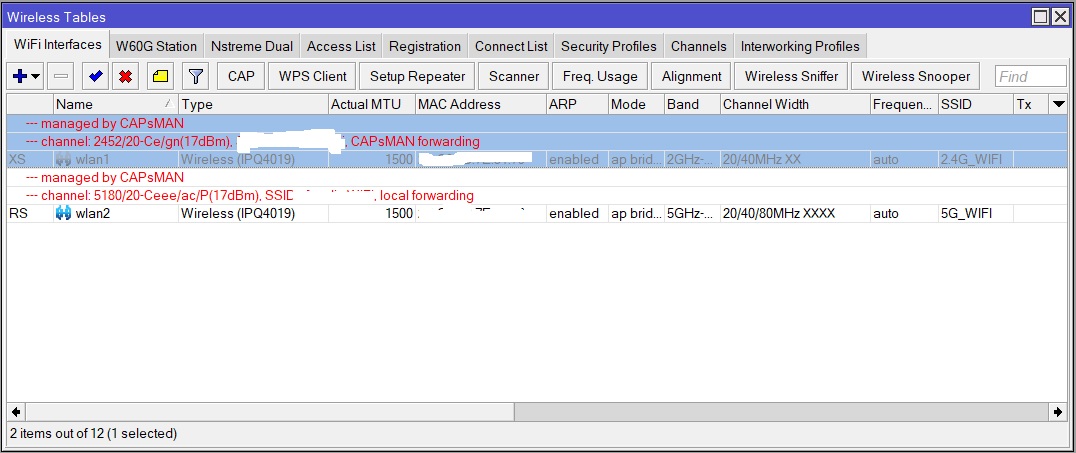
This is wireless interface of my main router that is CAPsMAN controller
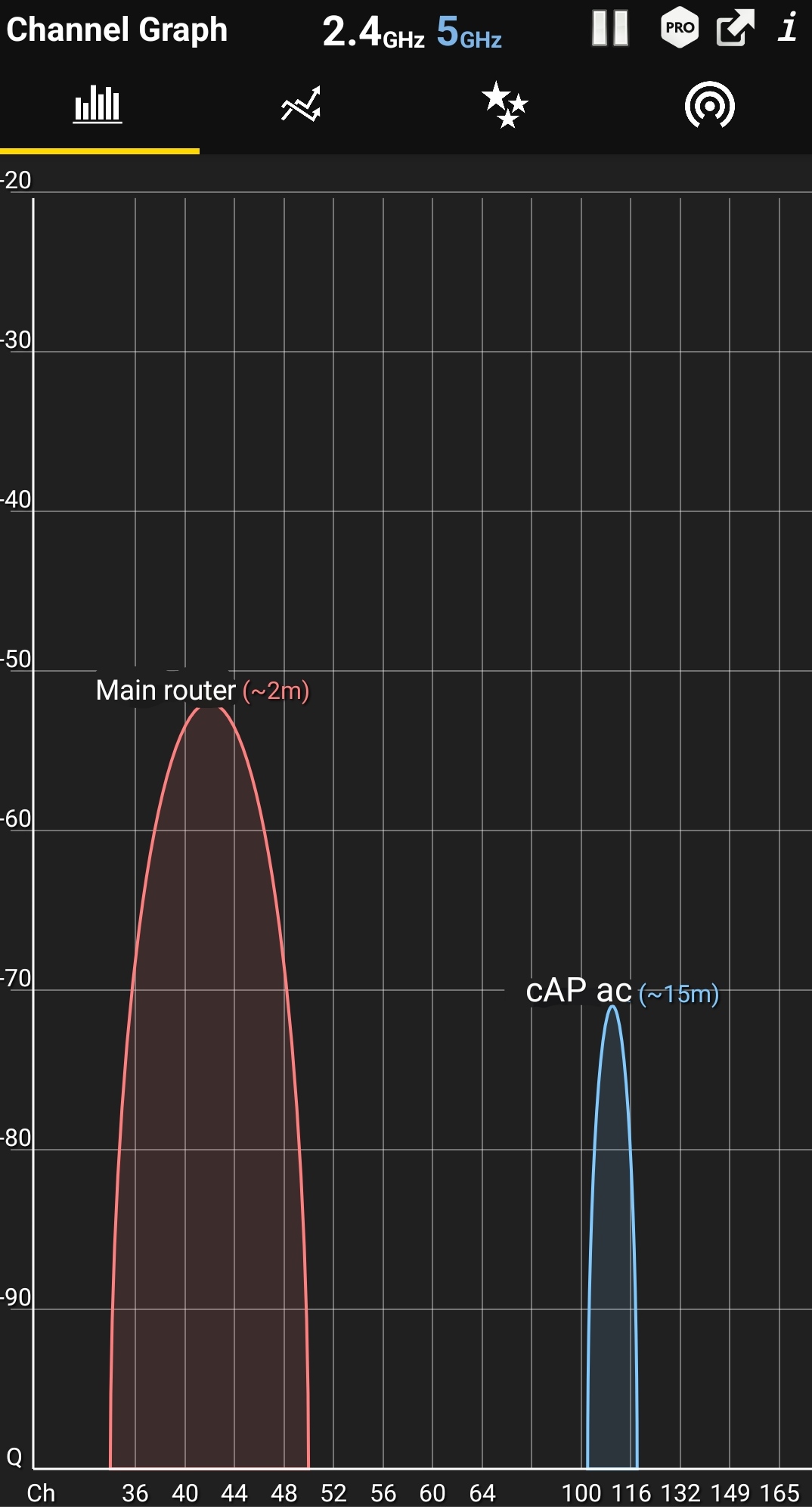
At home there is no other source of 5GHz WiFi network except main router upstairs. Also i can pick up my neighbour WiFi but it’s 2.4GHz and is very weak (I live in the house so i don’t have any other source of WiFI except my.) I also choose my country so router knows what frequencies are available (Croatia).
At work there is a lot of 2.4 GHz networks but only one 5GHz except ours, and that signal is very weak.
All this screenshots are taken after i take speedtest so there is some load on the network
Interesting to see CAPsMAN at work with “auto” and no channel list given.
Windows
Confirms the 80MHz reception, and 40 MHz sending bandwidth from the PC with the respective max possible interface rate of 866 and 433 Mbps. (Windows does not report the actual used MCS, but just gives the speed of the highest possible MCS). The actual value is in the “Registration Table”, and varies over time and possition. That is the real interface performance indicator. But still does not include co-channel coexistence (channel busy?) and adjacent channel interference or noise, or failed transmissions due to distortion. (wall, ceiling, reflective surfaces, …). However a reduced MCS is an indication of reduced quality (failed transmissions). CAPsMAN registration table does not give as much information as the WLAN used without CAPsMAN (SNR, retransmits, CCQ, signal per stream, …)
cAP ac
2.4GHz : channels used 2447eC = 2 3 4 5 6 7 8 9 10
5 GHz : channels used 5560eeCe = 104 108 112 116
hAP ac3
2.4GHz : channels used 2452Ce = 7 8 9 10 11 12 13 14 (nice job CAPsMAN auto, you hit the strongest adjacent channel destructive interference possible)
5 GHz: channels used 5180Ceee = 36 40 44 48 (OK, no DFS, the only non-DFS range in Europe)
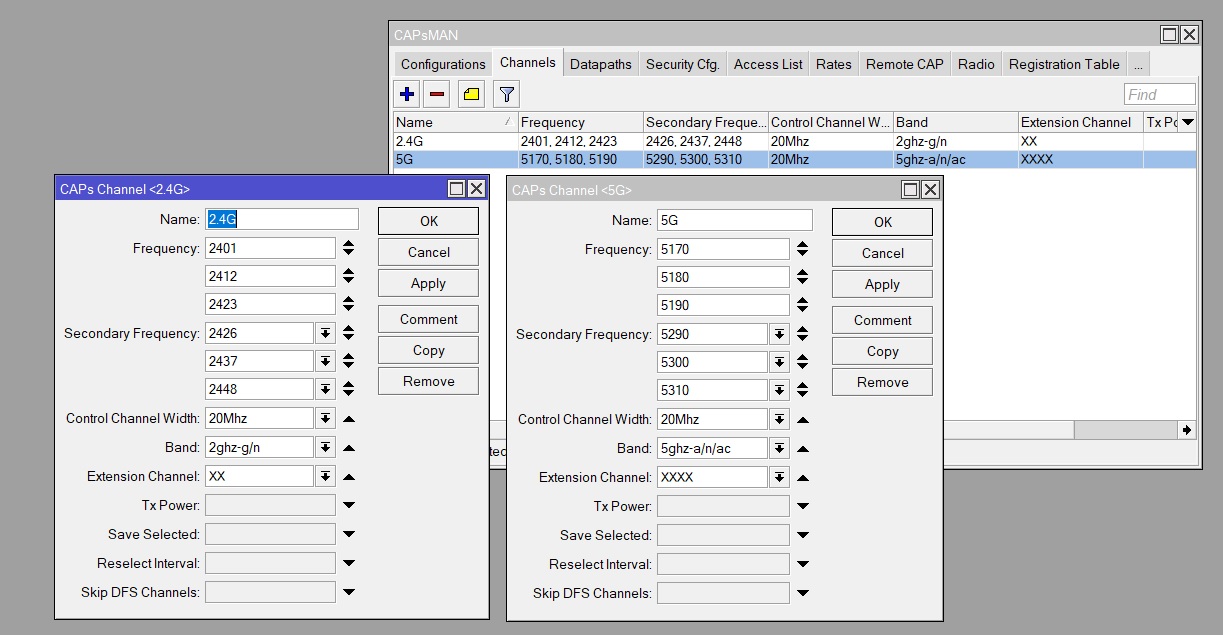
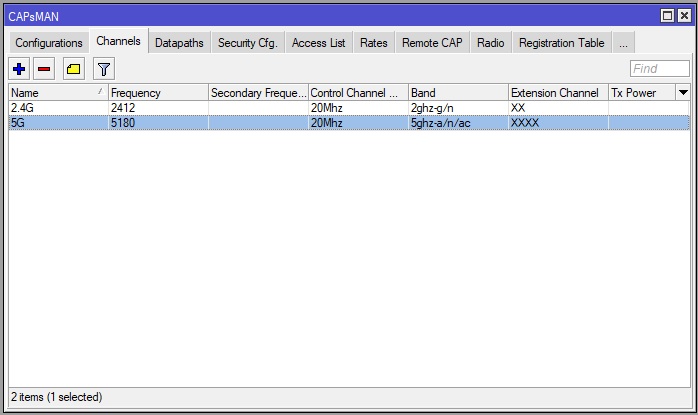
Ok, so i tried to make Channel list, for 2.4 and 5 GHz, but i didn’t add it to the configuration yet.
So i need to make 2 lists, one for 2.4G and one for 5G, for 2.4G i used frequency for ch 1 and 6 as i detected wifi on channel 11. For 5G i used ch 36 and 60, added control channel, and extension channels XX (20/40) for 2.4G and XXXX (20/40/80) for 5G.
secondary-channel (integer; Default: "") Specifies secondary channel, required to enable 80+80MHz transmission. To disable 80+80MHz functionality, set secondary-channel to "" or unset the value via CLI/GUI.
Only channels to be selected are 2412 (1) and 2437 (6) , as you have something already in 2462 (11). Channels for wifi are 20 MHz wide, the numbered channels are 5 MHz wide! If you use Ce, eC or XX then the channel is 40 MHz wide. So only 2412/Ce (1C+6e) or 2437/ec (1e+6C) are possible, and are both using the same channels. [Specifying 2637/XX is leaving it to CAPsMAN again, could be eC or Ce, (1e+6C) or (6C+11e) as setting]
Idem for 5 GHz, wifi channels are 20 MHz wide (numbered channels are 5 wide but they go up by 4 for this)(5180-5200-5220-5240…aka 36-40-44-48) , and XXXX or Ceee, eCee, eeCe, eeeC combine 4 of those 20 MHz channels, using 4 channels like 36+40+44+48.
So it should look like this, i choose one channel only ? So one frequency only. I left extension channel to XX and XXXX for now
Also I noticed that in configuration i can only choose one channel config, but i have combined 2.4 and 5 GHz into one SSID.
You have a hap-ac3 which can use with ROS7 the wifiwave2 package.
I have seen significant performance and range improvmenets using the wifiwave2 package.
You will loose capsman capability but maybe thats not needed anymore.
Problem is that my hap-ac3 is upstairs, and i can’t connect to it’s 5 GHz wifi from downstairs. And i bought cAP ac so i would like to use it. Also im planning to add one AP to my garage/workshop, and that is separate building on my property so i would like to keep CAPsMAN if possible.
I understand that point, but thought it could be worth for you trying to see if you could skip the 2nd AP all together.
The issue with an AP-Repeater setup with dual band 2x2 products is, the 5G band is used for backhaul and fronthaul.
In addition having only 2x2 RF capability is not enough and you quickly get into capacity issues.
On my Audience high band 5Ghz (which is 4x4 versus your 2x2) the 5G range and performance with Wifiwave2 is significantly bigger/better then with classic wifi package.
I get good/very good 5G connection where before I had to be on 2G.
I could even reduce Windows client output power to medium from high.
Basically now all 5G capable clients are on 5G, regardless where they are in my house.
2G is now pretty much only for “legacy” products.
I have not seen wifiwave2 on 2x2 device (don’t have a compatible device), but believe it is worth trying with some basic setup, and if not working just backup to the previous config.
It’s really good that you managed that with only one router.
I don’t have repeater setup, I have wired connection to the second AP (cat6 cable). If i could i would disable 2.4 GHz as all my devices except CCTV cameras and one older laptop are 5GHz capable.
Also i don’t think that i would be able to connect to one router from my garage, that’s 4 solid brick walls and about 20 meters from router.
Without knowing who you are, how you handle technical challenges, what is important and what not, it is not eveident to make suggestions.
But I can tell my impressions. Take it as just someone elses view and preference.
I would not use CAPsMAN for only 3 AP’s. (I dont even use it for 35 AP’s, remote installation). And I do use multiple SSID’s for multiple functions (family, visitors, IoT devices, test)
Mikrotik AP can be setup as just an extra (C)AP. It’s a bit hidden how to do it. It basically is just bridging all ethernet and WLAN together. Using Quickset (aaargh) you get very close with "WISP AP - mode=BRIDGE). The only thing to set are the WLAN interfaces : channel/SSID/country/copy of security , and all you want to tune locally. All the rest of RouterOS is not used.
DHCP server, firewall rules, NAT, DNS, gateway is all handled in the hAP ac3 only
Why? You have different tuning requirements per AP. For controlling the use of different channels among the AP you need multiple configurations. There is a performance gain (better aggregation) when not using CAPsMAN. There is better wifi feedback (Registration table).
If the overal view is important, then (I) use DUDE. It collects all information, has a nice map with devices and links, is a central Syslog, monitors and warns, has a long history of data and logs, collects and displays SNMP data, many tools with ‘right click’, …
If you have ethernet between cap and AP connection I would try out bwpl suggestions:
Skip capsmam, which allows you to use wifiwave2 on the main AP. This alone might already solve the 5Ghz problems
of closed by clients you have today.