5G modem issue ATLGM&RG520F-EU

The 5G router is brand new, I'm very happy with OS and features, the antenna is great with bad signals. The main issue is with modem, after running a speedtest gets stuck, I can still ping external sites but it's not possible to navigate from the browser. No DNS or APN issue, I forced Google and Cloudflare DNS and ping is also fine. Signal is ok too, but after maxing out the band with a speedtest internet goes down.

The solution is very simple, I wrote a small script to restart LTE:

/interface lte disable lte1
:delay 5
/interface lte enable lte1

As soon as it's rebooted internet is up again, so it seems that the modem gets stuck. I'd love to have an advice on how to do from more skilled people, both stable and latest development OS are affected so probably is not OS related

Have you already checked modem firmware?

/interface/lte/firmware-upgrade lte1

Thanks for the tip, yes is latest version: RG520FEUEAR03A07M4GX_01.300.01.300

I wonder iif it's an operator issue that messes up with the modem, I tested Vodafone IT so far and basically after a successful speedtest that saturates the band I have always to restart LTE

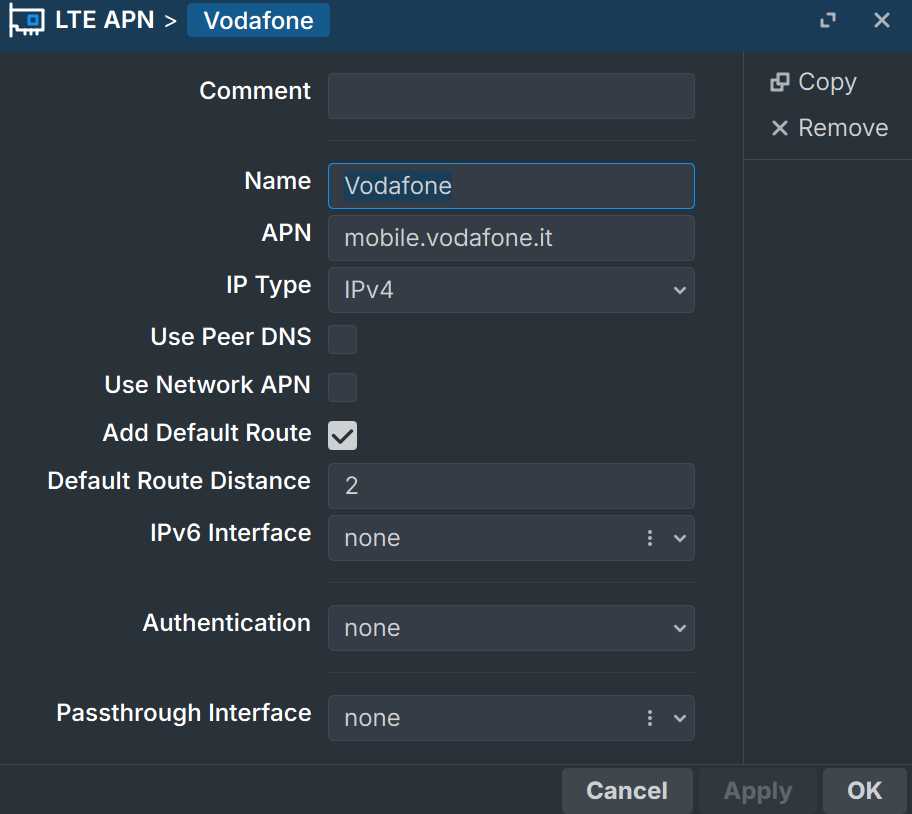
I switched from physical Vodafone to physical WindTre SIM card. I run 10 speedtest in a raw, LTE never gets stuck. So it's compatibility issue with Vodafone or operator limitation, both are unlimited internet plans. The APN profiles are ok so I don't know what to do to prevent Vodafone from messing up with the LTE modem, both use the DNS server and ipv4:

Hello,

with Tim 5g nsa, i see the same behavior to my enviroment that is based on a hap ax3 with usb3.1 to m.2 adapter with quectel rm520ngl.

I'm using same netwatch script to disable/enable lte interface for 2 sec.

I opened a tkt to supportand they said "due to the script, lte interface is disabled/enabled every lost connection"!!!

so the solution is the problem? we should keep the lte down?

i'm 99,9% sure problem is created by bts, but i suppose mikrotik with routeros could fix it.

i tried external power, additional thermal protection, different cabling, all Ros, beta and stable and long term.

Hi,

yes, we definitely have the same issue. In my case Vodafone sends something to the modem after the speedtest, it immediately gets stuck after the upload test. It's kind of an attack that blocks LTE.

I can understand the frustration, in my case it's clearly how the modem handles it with the specific operator, with another BTS it does not happen. Disable the script and show them the output of the LTE state, in my case it's pretty easy to reproduce the issue. How does it happen for you?

it's very simple to show the disconnection, every single speed test, or after a download burst.

after i disabled the script, they said it involves a 3rd part modem ask to modem support....

today i found a new firmware ...305, i'm testing it but it's the same as before

I can confirm that I experienced a very similar issue in Georgia with an ATLGM and Quectel RG520F-EU modem.

In my case, the problem turned out to be related to the mobile operator/network rather than RouterOS itself or the LTE interface.

One important detail from my troubleshooting is that the problem was very difficult to identify using the RouterOS graphical interface or the normal RouterOS CLI alone. The situation became much clearer only after accessing the modem directly through AT commands.

I used AT commands to check the actual modem state, serving cell information and carrier aggregation, including commands such as:

AT+QCAINFO

as well as other Quectel diagnostic AT commands for serving-cell and network information.

These commands did not, by themselves, prove that the operator was responsible. However, they allowed me to see the actual state of the modem and the cellular connection at a level that was not visible through the normal RouterOS GUI or CLI. By combining this information with repeated tests and changing SIM cards/operators, I was able to identify a strong correlation with the mobile network.

In Georgia, I was able to reproduce the problem with MagtiCom. The connection to the MagtiCom network/cells was problematic and the modem could enter an abnormal state. When I tested SIM cards from other Georgian operators, particularly Geocell and Silknet, I experienced significantly more stable connectivity, better speeds, and I did not encounter the same connection problems.

After changing the operator/SIM card and configuring the connection correctly for the new operator, the problem completely disappeared.

I am now running RouterOS 7.24, the same version mentioned in this discussion, together with the RG520F-EU modem, and the ATLGM has been working flawlessly. I no longer need to disable/enable the LTE interface or use an LTE restart/watchdog script.

So, at least in my case in Georgia, changing the mobile operator and applying the correct operator settings resolved the issue without any additional LTE restart or watchdog configuration.

The important point is that AT-command diagnostics were essential for understanding what was happening. Without accessing the modem directly, it was extremely difficult to determine whether the problem was caused by RouterOS, the modem firmware, the LTE interface, or the mobile network.

My experience therefore suggests that similar ATLGM/RG520F-EU problems may depend strongly on the particular mobile operator and its network/BTS configuration. In my case, the problem was associated with MagtiCom, while Geocell and Silknet provided a much more stable connection with better performance.

For anyone troubleshooting a similar issue, I would recommend checking the modem directly with AT commands and testing the same hardware with another operator before adding LTE restart scripts or watchdogs. The problem may not necessarily be caused by RouterOS or the modem firmware.
i agree with you, i think problem is on bts power saving...i tested with a "urban" bts and it works properly, the one creating disconnections is on a little rural island, it switch off bands during day and night randomly...i tried collecting off/on logs but there are no rules (B7 B1 B3 B20 B28 B32 + N28)

Hi, thank you for sharing your experience. I came to the conclusion that the modem "issue" is operator related because with the same BTS I had very different results and only Vodafone was affected. It'd be interesting to see the output of AT+QCAINFO comand when the modem is stuck, I'll try to reproduce the issue. Very interested in latest OS too, it seems that they are working on stability looking at the LTE fixes, main issue for me is 5G NSA that is not so stable with frequencies that change very fast

when i ask bandwidth (speedtest or download peak), Ros ask modem to upgrade connection from NSA to SA, even if there is no SA transmitted by bts.

but if i force to connect only to nsa with

AT+QNWPREFCFG="nr5g_disable_mode",1

and i do a reboot of modem with cfun=1,1

after reboot , when peak is reached SA query is still there and at command was not saved, and disconnections are still there....should i force a script after reboot on Ros level, or should i disable something different?

on lte interface setting "network mode" is selected lte+5g

cfun=1,1` is an hard modem reset you should first try /interface/lte/reset lte1 to see if it sticks
, but the easiest way to check if NA mode causes the drop is to uncheck all pure 5G SA bands leaving active only those used by your provider in NSA mode, typically n78 or n1/n3/n7 depending on the carrier

same result when resetting interface.

on bts i see B7 B1 B3 B20 B28 B32 on lte and n28 on dss/passive fdd 5g,

if i force lte i see good results on download, but i have 50% of upload and more latency, but no disconnection...