5WAN_PCC very slow speed internet or no internet

Dear all,
I have 6 WAN Load balancing. And pppoe server for my users,
My PCC load balancing is not working fine. Sometimes it works well and sometimes it gets worse. the user faces very slow internet
I have attached my ROS configuration.


/interface bridge
add admin-mac=B8:69:F4:AE:BC:FD auto-mac=no comment=asad61 name=Bridge_WAN-1
add admin-mac=14:46:58:BC:18:1E auto-mac=no comment=mubasharahmad01 name=
Bridge_WAN-2
add admin-mac=50:D4:F7:ED:0A:8E auto-mac=no comment=mubasharahmad02 name=
Bridge_WAN-3
add admin-mac=E8:A6:60:B7:61:8F auto-mac=no comment=m-rizwan name=
Bridge_WAN-4
add admin-mac=D8:0D:17:04:47:D9 auto-mac=no comment=m-rizwan2p name=
Bridge_WAN-5
add admin-mac=C4:AD:34:D3:AD:72 auto-mac=no comment=kamran7100 disabled=yes
name=Bridge_WAN-6
add name=Bridge_ether2 priority=0x7000
/interface ethernet
set [ find default-name=ether2 ] name=ether2_WAN
set [ find default-name=ether3 ] name=ether3_Loop
set [ find default-name=ether4 ] name=ether4_Loop
set [ find default-name=ether7 ] disabled=yes
set [ find default-name=ether8 ] name=“ether8_LAN PPPoE”
/interface wireguard
add comment=back-to-home-vpn listen-port=65535 mtu=1420 name=back-to-home-vpn
add listen-port=13231 mtu=1420 name=wireguard1
/interface vlan
add interface=ether3_Loop name=vlan501_ether3 vlan-id=501
add interface=ether4_Loop name=vlan501_ether4 vlan-id=501
add interface=ether3_Loop name=vlan502_ether3 vlan-id=502
add interface=ether4_Loop name=vlan502_ether4 vlan-id=502
add interface=ether3_Loop name=vlan503_ether3 vlan-id=503
add interface=ether4_Loop name=vlan503_ether4 vlan-id=503
add interface=ether3_Loop name=vlan504_ether3 vlan-id=504
add interface=ether4_Loop name=vlan504_ether4 vlan-id=504
add interface=ether3_Loop name=vlan505_ether3 vlan-id=505
add interface=ether4_Loop name=vlan505_ether4 vlan-id=505
add interface=ether3_Loop name=vlan506_ether3 vlan-id=506
add interface=ether4_Loop name=vlan506_ether4 vlan-id=506
/interface pppoe-client
add disabled=no interface=Bridge_WAN-1 name=1_WAN1 user=ABC1
add disabled=no interface=Bridge_WAN-2 name=2_WAN2 user=ABC2
add disabled=no interface=Bridge_WAN-3 name=3_WAN3 user=ABC3
add disabled=no interface=Bridge_WAN-4 name=4_WAN4 user=ABC4
add disabled=no interface=Bridge_WAN-5 name=5_WAN5 user=ABC5
/interface list
add include=none name=WAN-Interface
/interface wireless security-profiles
set [ find default=yes ] supplicant-identity=MikroTik
/ip pool
add name=“PPPoE Pool” ranges=172.30.30.10-172.30.30.250
/ppp profile
add dns-server=8.8.8.8,1.1.1.1 local-address=172.30.30.1 name=“PPPoE Profile”
remote-address=“PPPoE Pool”

/routing table
add disabled=no fib name=to_wan1
add disabled=no fib name=to_wan2
add disabled=no fib name=to_wan3
add disabled=no fib name=to_wan4
add disabled=no fib name=to_wan5
/interface bridge port
add bridge=Bridge_ether2 interface=ether2_WAN
add bridge=Bridge_ether2 interface=vlan501_ether3
add bridge=Bridge_ether2 interface=vlan502_ether3
add bridge=Bridge_ether2 interface=vlan503_ether3
add bridge=Bridge_ether2 interface=vlan504_ether3
add bridge=Bridge_ether2 interface=vlan505_ether3
add bridge=Bridge_ether2 interface=vlan506_ether3
add bridge=Bridge_WAN-1 interface=vlan501_ether4
add bridge=Bridge_WAN-2 interface=vlan502_ether4
add bridge=Bridge_WAN-3 interface=vlan503_ether4
add bridge=Bridge_WAN-4 interface=vlan504_ether4
add bridge=Bridge_WAN-5 interface=vlan505_ether4
add bridge=Bridge_WAN-6 interface=vlan506_ether4
/ip neighbor discovery-settings
set discover-interface-list=!all
/ipv6 settings
set disable-ipv6=yes forward=no
/interface l2tp-server server
set one-session-per-host=yes use-ipsec=required
/interface list member
add interface=1_WAN1 list=WAN-Interface
add interface=2_WAN2 list=WAN-Interface
add interface=3_WAN3 list=WAN-Interface
add interface=4_WAN4 list=WAN-Interface
add interface=5_WAN5 list=WAN-Interface
/interface pppoe-server server
add authentication=pap default-profile=“PPPoE Profile” disabled=no interface=
“ether8_LAN PPPoE” max-mtu=1500 one-session-per-host=yes service-name=
service_one
/ip address
add address=192.168.220.1/29 comment=Wireguard interface=wireguard1 network=
192.168.220.0
/ip cloud
set back-to-home-vpn=enabled ddns-enabled=yes ddns-update-interval=1m
/ip dns
set allow-remote-requests=yes cache-size=10000KiB servers=8.8.8.8,1.1.1.1
/ip firewall filter
add action=accept chain=input comment=Wireguard dst-port=13231 protocol=udp
add action=accept chain=input comment=“Router Access Remotely” dst-port=
8295,8296 protocol=tcp
add action=drop chain=input comment=“Block Ping” in-interface-list=
WAN-Interface protocol=icmp
add action=drop chain=input comment=“Block Attack” dst-port=
25,53,87,512-515,543,544,7547,8080 protocol=tcp
add action=drop chain=input comment=“Block Attack” dst-port=
53,80,87,161,162,1900,4520-4524,8080 protocol=udp
add action=add-src-to-address-list address-list=“Port Scanners”
address-list-timeout=none-dynamic chain=input comment=
“Port Scanners to Address List " protocol=tcp psd=21,3s,3,1
add action=add-src-to-address-list address-list=“Port Scanners”
address-list-timeout=none-dynamic chain=input comment=
“TCP Flag-NMAP FIN Stealth scan” protocol=tcp tcp-flags=
fin,!syn,!rst,!psh,!ack,!urg
add action=add-src-to-address-list address-list=“Port Scanners”
address-list-timeout=none-dynamic chain=input comment=
“TCP Flag-FIN/SYN scan” protocol=tcp tcp-flags=fin,syn
add action=add-src-to-address-list address-list=“Port Scanners”
address-list-timeout=none-dynamic chain=input comment=
“TCP Flag-RST/SYN scan” protocol=tcp tcp-flags=syn,rst
add action=add-src-to-address-list address-list=“Port Scanners”
address-list-timeout=none-dynamic chain=input comment=
“TCP Flag-FIN/PSH/URG scan” protocol=tcp tcp-flags=
fin,psh,urg,!syn,!rst,!ack
add action=add-src-to-address-list address-list=“Port Scanners”
address-list-timeout=none-dynamic chain=input comment=
“TCP Flag-ALL/ALL scan” protocol=tcp tcp-flags=fin,syn,rst,psh,ack,urg
add action=add-src-to-address-list address-list=“Port Scanners”
address-list-timeout=none-dynamic chain=input comment=
“TCP Flag-NMAP NULL scan” protocol=tcp tcp-flags=
!fin,!syn,!rst,!psh,!ack,!urg
add action=drop chain=input comment=“Dropping Port Scanners”
src-address-list=“Port Scanners”
/ip firewall mangle
add action=mark-connection chain=input comment=“Old PCC” in-interface=1_WAN1
new-connection-mark=wan1_conn passthrough=yes
add action=mark-connection chain=input in-interface=2_WAN2
new-connection-mark=wan2_conn passthrough=yes
add action=mark-connection chain=input in-interface=3_WAN3
new-connection-mark=wan3_conn passthrough=yes
add action=mark-connection chain=input in-interface=4_WAN4
new-connection-mark=wan4_conn passthrough=yes
add action=mark-connection chain=input in-interface=5_WAN5
new-connection-mark=wan5_conn passthrough=yes
add action=mark-routing chain=output connection-mark=wan1_conn
new-routing-mark=to_wan1 passthrough=yes
add action=mark-routing chain=output connection-mark=wan2_conn
new-routing-mark=to_wan2 passthrough=yes
add action=mark-routing chain=output connection-mark=wan3_conn
new-routing-mark=to_wan3 passthrough=yes
add action=mark-routing chain=output connection-mark=wan4_conn
new-routing-mark=to_wan4 passthrough=yes
add action=mark-routing chain=output connection-mark=wan5_conn
new-routing-mark=to_wan5 passthrough=yes
add action=accept chain=prerouting in-interface=1_WAN1
add action=accept chain=prerouting in-interface=2_WAN2
add action=accept chain=prerouting in-interface=3_WAN3
add action=accept chain=prerouting in-interface=4_WAN4
add action=accept chain=prerouting in-interface=5_WAN5
add action=mark-connection chain=prerouting dst-address-type=!local
new-connection-mark=wan1_conn passthrough=yes per-connection-classifier=
src-address-and-port:5/0
add action=mark-connection chain=prerouting dst-address-type=!local
new-connection-mark=wan2_conn passthrough=yes per-connection-classifier=
src-address-and-port:5/1
add action=mark-connection chain=prerouting dst-address-type=!local
new-connection-mark=wan3_conn passthrough=yes per-connection-classifier=
src-address-and-port:5/2
add action=mark-connection chain=prerouting dst-address-type=!local
new-connection-mark=wan4_conn passthrough=yes per-connection-classifier=
src-address-and-port:5/3
add action=mark-connection chain=prerouting dst-address-type=!local
new-connection-mark=wan5_conn passthrough=yes per-connection-classifier=
src-address-and-port:5/4
add action=mark-routing chain=prerouting connection-mark=wan1_conn
new-routing-mark=to_wan1 passthrough=no
add action=mark-routing chain=prerouting connection-mark=wan2_conn
new-routing-mark=to_wan2 passthrough=no
add action=mark-routing chain=prerouting connection-mark=wan3_conn
new-routing-mark=to_wan3 passthrough=no
add action=mark-routing chain=prerouting connection-mark=wan4_conn
new-routing-mark=to_wan4 passthrough=no
add action=mark-routing chain=prerouting connection-mark=wan5_conn
new-routing-mark=to_wan5 passthrough=no
/ip firewall nat
add action=masquerade chain=srcnat comment=Wireguard src-address=
192.168.220.0/29
add action=masquerade chain=srcnat comment=PPPoE
/ip route
add disabled=no dst-address=0.0.0.0/0 gateway=1_WAN1 routing-table=to_wan1
suppress-hw-offload=no
add disabled=no distance=1 dst-address=0.0.0.0/0 gateway=2_WAN2
routing-table=to_wan2 scope=30 suppress-hw-offload=no target-scope=10
add disabled=no distance=1 dst-address=0.0.0.0/0 gateway=3_WAN3
routing-table=to_wan3 scope=30 suppress-hw-offload=no target-scope=10
add disabled=no distance=1 dst-address=0.0.0.0/0 gateway=4_WAN4
routing-table=to_wan4 scope=30 suppress-hw-offload=no target-scope=10
add disabled=no distance=1 dst-address=0.0.0.0/0 gateway=5_WAN5
routing-table=to_wan5 scope=30 suppress-hw-offload=no target-scope=10
add comment=Main disabled=no distance=1 dst-address=0.0.0.0/0 gateway=1_WAN1
pref-src=”" routing-table=main scope=30 suppress-hw-offload=no
target-scope=10
add disabled=no distance=2 dst-address=0.0.0.0/0 gateway=2_WAN2
routing-table=main scope=30 suppress-hw-offload=no target-scope=10
add disabled=no distance=3 dst-address=0.0.0.0/0 gateway=3_WAN3
routing-table=main scope=30 suppress-hw-offload=no target-scope=10
add disabled=no distance=4 dst-address=0.0.0.0/0 gateway=4_WAN4
routing-table=main scope=30 suppress-hw-offload=no target-scope=10
add disabled=no distance=5 dst-address=0.0.0.0/0 gateway=5_WAN5
routing-table=main scope=30 suppress-hw-offload=no target-scope=10
/ip service
set telnet disabled=yes
set ftp disabled=yes
set www port=8296
set ssh disabled=yes
set api disabled=yes
set winbox port=8295
set api-ssl disabled=yes

/system clock
set time-zone-name=Asia/Karachi
/system identity
set name=“RoshanNet PPPoE Server”
/system note
set show-at-login=no

/tool bandwidth-server
set enabled=no

/tool romon
set enabled=yes

  1. Remove all WAN bridges, not required.

  2. None of the WANs have a reachable public IP??? no need to use back to home VPN if you have an accessible public IP.

  3. The actual use of a bridge would be to assign all vlans to Bridge-Loop
    Bridge ports would consist of ether3, and ether4 and correct me if wrong, there are no other LAN subnets or ports ???

  4. Seem confused, 5 or 6 wans??

  5. No understanding of vlans have you read —> http://forum.mikrotik.com/t/using-routeros-to-vlan-your-network/126489/1 if not, its a must read, if yes, you didnt learn it yet.

  6. Very unsafe setup, exposing both winbox and www, to the internet…

  7. In contrast to 6. your firewall rules are a tad paranoid in that the focus is on blocking instead of on needed traffic, but thats personal preference just saying its actually contradictory to be worried about stuff that rarely happens if ever and not be concerned about making it easy to get hacked. In any case your firewall rules are not complete at all.

  8. Can you tell me the purpose of this set of rules, why do you have this set of mangles included???
    add action=mark-connection chain=input in-interface=1_ISP1_30M+50M
    new-connection-mark=wan1_conn passthrough=yes
    add action=mark-connection chain=input in-interface=2_ISP2_30M+50M
    new-connection-mark=wan2_conn passthrough=yes
    add action=mark-connection chain=input in-interface=3_ISP3_30M+50M
    new-connection-mark=wan3_conn passthrough=yes
    add action=mark-connection chain=input in-interface=4_ISP4_30M+50M
    new-connection-mark=wan4_conn passthrough=yes
    add action=mark-connection chain=input in-interface=5_ISP5_30+50M
    new-connection-mark=wan5_conn passthrough=yes
    add action=mark-routing chain=output connection-mark=wan1_conn
    new-routing-mark=to_wan1 passthrough=yes
    add action=mark-routing chain=output connection-mark=wan2_conn
    new-routing-mark=to_wan2 passthrough=yes
    add action=mark-routing chain=output connection-mark=wan3_conn
    new-routing-mark=to_wan3 passthrough=yes
    add action=mark-routing chain=output connection-mark=wan4_conn
    new-routing-mark=to_wan4 passthrough=yes
    add action=mark-routing chain=output connection-mark=wan5_conn
    new-routing-mark=to_wan5 passthrough=yes

  9. Can you tell me the purpose of this set of rules??
    add action=accept chain=prerouting in-interface=1_ISP1_30M+50M
    add action=accept chain=prerouting in-interface=2_ISP2_30M+50M
    add action=accept chain=prerouting in-interface=3_ISP3_30M+50M
    add action=accept chain=prerouting in-interface=4_ISP4_30M+50M
    add action=accept chain=prerouting in-interface=5_ISP5_30M+50M

  10. For pcc mangles, and the routing-marks, you do not need to restate the source address and passthrough=no ( not yes )

  11. Routes seem okay.

++++++++++++++++++++++++++++++++++++++++++

Summary, a bit messy, vlan understanding needs works and major changes, mangles need to be rationalized ( pcc mangles for the most part are good). Firewall rules need work.

Perhaps some explanation of what is happening for each WAN.
Which WAN is vpn travelling over, any incoming traffic for port forwarding and if so which WAN
what happens when a WAN fails or are they all from the same provider so if one goes down likely they are all not working?

In terms of the VLANS, you have one subnet but many vlans which doesnt make sense.
Can you explain what each port NOT THE WAN PORTs, but other ether ports do… what are they attached too
What the purpose is for each vlan, seeing as they have no structure??? ( ip address, pool, etc..)

Hello,
Dear I have 5(PPPoE)WANs from the same ISP (FTTH)
So I no need recursive routing or backup link because I have a single ISP.
So, I dialled these PPPoE 5 connections in my Mikrotik (with the help of Bridges and Vlans) and Load-balanced them for my PPPoE users.
I got the PCC Load Balance configuration from here: you can check please
https://aacable.wordpress.com/2011/06/04/mikrotik-4-wan-load-balance-pcc-complete-script-by-zaib/
So you can check here the purpose of these (Input rule and accept rules).
Some time I need bth so that’s why I enable the bth.

Please correct me where I am wrong.

I need help just to set up my PCCLoadBalance Nicely.

I have changed a few config:

/interface bridge
add admin-mac=B8:69:F4:AE:BC:FD auto-mac=no comment=asad61 name=Bridge_WAN-1
add admin-mac=14:46:58:BC:18:1E auto-mac=no comment=mubasharahmad01 name=
Bridge_WAN-2
add admin-mac=50:D4:F7:ED:0A:8E auto-mac=no comment=mubasharahmad02 name=
Bridge_WAN-3
add admin-mac=E8:A6:60:B7:61:8F auto-mac=no comment=m-rizwan name=
Bridge_WAN-4
add admin-mac=D8:0D:17:04:47:D9 auto-mac=no comment=m-rizwan2p name=
Bridge_WAN-5
add admin-mac=C4:AD:34:D3:AD:72 auto-mac=no comment=kamran7100 disabled=yes
name=Bridge_WAN-6
add name=Bridge_ether2 priority=0x7000
/interface ethernet
set [ find default-name=ether2 ] name=ether2_WAN
set [ find default-name=ether3 ] name=ether3_Loop
set [ find default-name=ether4 ] name=ether4_Loop
set [ find default-name=ether7 ] disabled=yes
set [ find default-name=ether8 ] name=“ether8_LAN PPPoE”
/interface wireguard
add comment=back-to-home-vpn listen-port=65535 mtu=1420 name=back-to-home-vpn
add listen-port=13231 mtu=1420 name=wireguard1
/interface vlan
add interface=ether3_Loop name=vlan501_ether3 vlan-id=501
add interface=ether4_Loop name=vlan501_ether4 vlan-id=501
add interface=ether3_Loop name=vlan502_ether3 vlan-id=502
add interface=ether4_Loop name=vlan502_ether4 vlan-id=502
add interface=ether3_Loop name=vlan503_ether3 vlan-id=503
add interface=ether4_Loop name=vlan503_ether4 vlan-id=503
add interface=ether3_Loop name=vlan504_ether3 vlan-id=504
add interface=ether4_Loop name=vlan504_ether4 vlan-id=504
add interface=ether3_Loop name=vlan505_ether3 vlan-id=505
add interface=ether4_Loop name=vlan505_ether4 vlan-id=505
add interface=ether3_Loop name=vlan506_ether3 vlan-id=506
add interface=ether4_Loop name=vlan506_ether4 vlan-id=506
/interface pppoe-client
add disabled=no interface=Bridge_WAN-1 name=1_WAN1 user=ABC1
add disabled=no interface=Bridge_WAN-2 name=2_WAN2 user=ABC2
add disabled=no interface=Bridge_WAN-3 name=3_WAN3 user=ABC3
add disabled=no interface=Bridge_WAN-4 name=4_WAN4 user=ABC4
add disabled=no interface=Bridge_WAN-5 name=5_WAN5 user=ABC5
/interface list
add include=none name=WAN-Interface
/interface wireless security-profiles
set [ find default=yes ] supplicant-identity=MikroTik
/ip pool
add name=“PPPoE Pool” ranges=172.30.30.10-172.30.30.250
/ppp profile
add dns-server=8.8.8.8,1.1.1.1 local-address=172.30.30.1 name=“PPPoE Profile”
remote-address=“PPPoE Pool”

/routing table
add disabled=no fib name=to_wan1
add disabled=no fib name=to_wan2
add disabled=no fib name=to_wan3
add disabled=no fib name=to_wan4
add disabled=no fib name=to_wan5
/interface bridge port
add bridge=Bridge_ether2 interface=ether2_WAN
add bridge=Bridge_ether2 interface=vlan501_ether3
add bridge=Bridge_ether2 interface=vlan502_ether3
add bridge=Bridge_ether2 interface=vlan503_ether3
add bridge=Bridge_ether2 interface=vlan504_ether3
add bridge=Bridge_ether2 interface=vlan505_ether3
add bridge=Bridge_ether2 interface=vlan506_ether3
add bridge=Bridge_WAN-1 interface=vlan501_ether4
add bridge=Bridge_WAN-2 interface=vlan502_ether4
add bridge=Bridge_WAN-3 interface=vlan503_ether4
add bridge=Bridge_WAN-4 interface=vlan504_ether4
add bridge=Bridge_WAN-5 interface=vlan505_ether4
add bridge=Bridge_WAN-6 interface=vlan506_ether4
/ip neighbor discovery-settings
set discover-interface-list=!all
/ipv6 settings
set disable-ipv6=yes forward=no
/interface l2tp-server server
set one-session-per-host=yes use-ipsec=required
/interface list member
add interface=1_WAN1 list=WAN-Interface
add interface=2_WAN2 list=WAN-Interface
add interface=3_WAN3 list=WAN-Interface
add interface=4_WAN4 list=WAN-Interface
add interface=5_WAN5 list=WAN-Interface
/interface pppoe-server server
add authentication=pap default-profile=“PPPoE Profile” disabled=no interface=
“ether8_LAN PPPoE” max-mtu=1500 one-session-per-host=yes service-name=
service_one
/ip address
add address=192.168.220.1/29 comment=Wireguard interface=wireguard1 network=
192.168.220.0
/ip cloud
set back-to-home-vpn=enabled ddns-enabled=yes ddns-update-interval=1m
/ip dns
set allow-remote-requests=yes cache-size=10000KiB servers=8.8.8.8,1.1.1.1
/ip firewall filter
add action=accept chain=input comment=Wireguard dst-port=13231 protocol=udp
add action=accept chain=input comment=“Router Access Remotely” dst-port=
8295,8296 protocol=tcp
add action=drop chain=input comment=“Block Ping” in-interface-list=
WAN-Interface protocol=icmp
add action=drop chain=input comment=“Block Attack” dst-port=
25,53,87,512-515,543,544,7547,8080 protocol=tcp
add action=drop chain=input comment=“Block Attack” dst-port=
53,80,87,161,162,1900,4520-4524,8080 protocol=udp
add action=add-src-to-address-list address-list=“Port Scanners”
address-list-timeout=none-dynamic chain=input comment=
“Port Scanners to Address List " protocol=tcp psd=21,3s,3,1
add action=add-src-to-address-list address-list=“Port Scanners”
address-list-timeout=none-dynamic chain=input comment=
“TCP Flag-NMAP FIN Stealth scan” protocol=tcp tcp-flags=
fin,!syn,!rst,!psh,!ack,!urg
add action=add-src-to-address-list address-list=“Port Scanners”
address-list-timeout=none-dynamic chain=input comment=
“TCP Flag-FIN/SYN scan” protocol=tcp tcp-flags=fin,syn
add action=add-src-to-address-list address-list=“Port Scanners”
address-list-timeout=none-dynamic chain=input comment=
“TCP Flag-RST/SYN scan” protocol=tcp tcp-flags=syn,rst
add action=add-src-to-address-list address-list=“Port Scanners”
address-list-timeout=none-dynamic chain=input comment=
“TCP Flag-FIN/PSH/URG scan” protocol=tcp tcp-flags=
fin,psh,urg,!syn,!rst,!ack
add action=add-src-to-address-list address-list=“Port Scanners”
address-list-timeout=none-dynamic chain=input comment=
“TCP Flag-ALL/ALL scan” protocol=tcp tcp-flags=fin,syn,rst,psh,ack,urg
add action=add-src-to-address-list address-list=“Port Scanners”
address-list-timeout=none-dynamic chain=input comment=
“TCP Flag-NMAP NULL scan” protocol=tcp tcp-flags=
!fin,!syn,!rst,!psh,!ack,!urg
add action=drop chain=input comment=“Dropping Port Scanners”
src-address-list=“Port Scanners”
/ip firewall mangle
add action=mark-connection chain=input comment=“Old PCC” in-interface=1_WAN1
new-connection-mark=wan1_conn passthrough=yes
add action=mark-connection chain=input in-interface=2_WAN2
new-connection-mark=wan2_conn passthrough=yes
add action=mark-connection chain=input in-interface=3_WAN3
new-connection-mark=wan3_conn passthrough=yes
add action=mark-connection chain=input in-interface=4_WAN4
new-connection-mark=wan4_conn passthrough=yes
add action=mark-connection chain=input in-interface=5_WAN5
new-connection-mark=wan5_conn passthrough=yes
add action=mark-routing chain=output connection-mark=wan1_conn
new-routing-mark=to_wan1 passthrough=yes
add action=mark-routing chain=output connection-mark=wan2_conn
new-routing-mark=to_wan2 passthrough=yes
add action=mark-routing chain=output connection-mark=wan3_conn
new-routing-mark=to_wan3 passthrough=yes
add action=mark-routing chain=output connection-mark=wan4_conn
new-routing-mark=to_wan4 passthrough=yes
add action=mark-routing chain=output connection-mark=wan5_conn
new-routing-mark=to_wan5 passthrough=yes
add action=accept chain=prerouting in-interface=1_WAN1
add action=accept chain=prerouting in-interface=2_WAN2
add action=accept chain=prerouting in-interface=3_WAN3
add action=accept chain=prerouting in-interface=4_WAN4
add action=accept chain=prerouting in-interface=5_WAN5
add action=mark-connection chain=prerouting dst-address-type=!local
new-connection-mark=wan1_conn passthrough=yes per-connection-classifier=
src-address-and-port:5/0
add action=mark-connection chain=prerouting dst-address-type=!local
new-connection-mark=wan2_conn passthrough=yes per-connection-classifier=
src-address-and-port:5/1
add action=mark-connection chain=prerouting dst-address-type=!local
new-connection-mark=wan3_conn passthrough=yes per-connection-classifier=
src-address-and-port:5/2
add action=mark-connection chain=prerouting dst-address-type=!local
new-connection-mark=wan4_conn passthrough=yes per-connection-classifier=
src-address-and-port:5/3
add action=mark-connection chain=prerouting dst-address-type=!local
new-connection-mark=wan5_conn passthrough=yes per-connection-classifier=
src-address-and-port:5/4
add action=mark-routing chain=prerouting connection-mark=wan1_conn
new-routing-mark=to_wan1 passthrough=no
add action=mark-routing chain=prerouting connection-mark=wan2_conn
new-routing-mark=to_wan2 passthrough=no
add action=mark-routing chain=prerouting connection-mark=wan3_conn
new-routing-mark=to_wan3 passthrough=no
add action=mark-routing chain=prerouting connection-mark=wan4_conn
new-routing-mark=to_wan4 passthrough=no
add action=mark-routing chain=prerouting connection-mark=wan5_conn
new-routing-mark=to_wan5 passthrough=no
/ip firewall nat
add action=masquerade chain=srcnat comment=Wireguard src-address=
192.168.220.0/29
add action=masquerade chain=srcnat comment=PPPoE
/ip route
add disabled=no dst-address=0.0.0.0/0 gateway=1_WAN1 routing-table=to_wan1
suppress-hw-offload=no
add disabled=no distance=1 dst-address=0.0.0.0/0 gateway=2_WAN2
routing-table=to_wan2 scope=30 suppress-hw-offload=no target-scope=10
add disabled=no distance=1 dst-address=0.0.0.0/0 gateway=3_WAN3
routing-table=to_wan3 scope=30 suppress-hw-offload=no target-scope=10
add disabled=no distance=1 dst-address=0.0.0.0/0 gateway=4_WAN4
routing-table=to_wan4 scope=30 suppress-hw-offload=no target-scope=10
add disabled=no distance=1 dst-address=0.0.0.0/0 gateway=5_WAN5
routing-table=to_wan5 scope=30 suppress-hw-offload=no target-scope=10
add comment=Main disabled=no distance=1 dst-address=0.0.0.0/0 gateway=1_WAN1
pref-src=”" routing-table=main scope=30 suppress-hw-offload=no
target-scope=10
add disabled=no distance=2 dst-address=0.0.0.0/0 gateway=2_WAN2
routing-table=main scope=30 suppress-hw-offload=no target-scope=10
add disabled=no distance=3 dst-address=0.0.0.0/0 gateway=3_WAN3
routing-table=main scope=30 suppress-hw-offload=no target-scope=10
add disabled=no distance=4 dst-address=0.0.0.0/0 gateway=4_WAN4
routing-table=main scope=30 suppress-hw-offload=no target-scope=10
add disabled=no distance=5 dst-address=0.0.0.0/0 gateway=5_WAN5
routing-table=main scope=30 suppress-hw-offload=no target-scope=10
/ip service
set telnet disabled=yes
set ftp disabled=yes
set www port=8296
set ssh disabled=yes
set api disabled=yes
set winbox port=8295
set api-ssl disabled=yes

/system clock
set time-zone-name=Asia/Karachi
/system identity
set name=“RoshanNet PPPoE Server”
/system note
set show-at-login=no

/tool bandwidth-server
set enabled=no

/tool romon
set enabled=yes

  1. I dont check third party sites for the config they used, I am only interested in your config. :slight_smile: ( each scenario is different as everyone has different requirements )
  2. So are you saying you have no idea what the first two set of mangle rules are used for???

  3. Does your provider with the 5 wans, all pppoe connections provide you any public IPs OR are they private WANIPs???
    For example does your WAN1 IP address, give the same result as web browser ( whats my IP), and the saame IP you get from IP CLoud IP???

  4. Is the ISP device a router/modem or JUST a modem. If its a router can you access the basic admin page, and if so, can you forward ports?

  5. There in no way to proceed as your config is totally wrong in most key areas… ( the pcc mangles and routes are fine )

Summary: It would appear that your mangling for PCC and your IP Routes and your Tables are fine, in other words they should work if the rest of your config is viable, however it is NOT!.
If you do not want to help by answering questions and if you dont want to learn the config you are using, then its not possible to assist any further.

Good luck!

https://mikrotik.com/consultants

  1. So are you saying you have no idea what the first two set of mangle rules are used for???

if first 2 rule input and output is not useable
I will delete them
what you say?

Since you refuse to answer clear questions, I will defer and let others help. ( I cannot say whether to delete or modify since you have not explained their purpose - unable to advise )
Good luck!

I have done the same configuration as mentioned by Mikrotik official you can see it here: https://www.youtube.com/watch?v=nlb7XAv57tw&t=787s
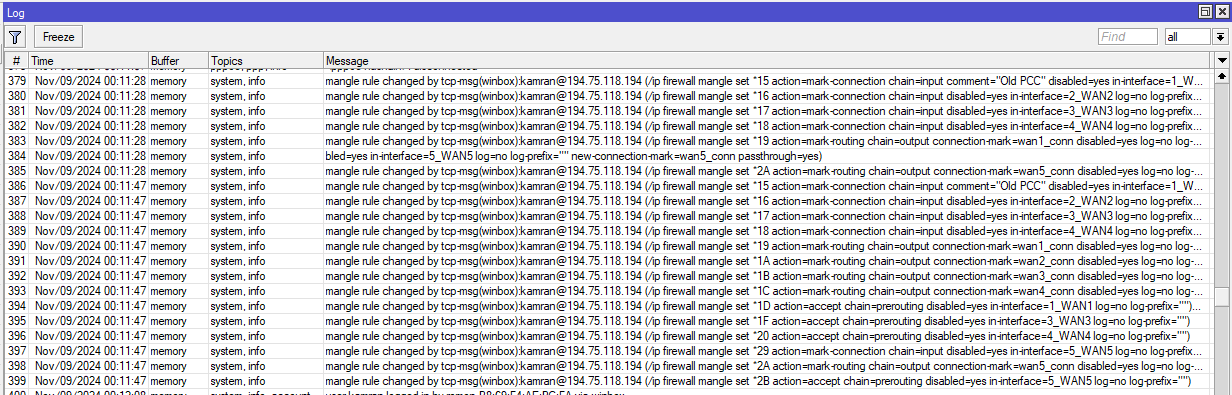
but data only passes from 1 WAN other WANs do not passing data. I received this error message in the Logs:
mangle.PNG