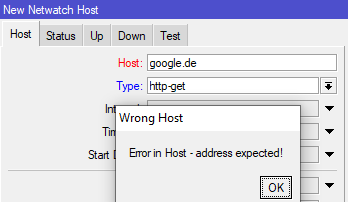
7.10.2 Netwatch does not accept fqdn as host

Hi Team,
i could found out, that netwatch allow only ip addresses.

/tool/netwatch> add host=google.de http-codes=“” interval=10s type=http-get test-script=“” up-script=“”
invalid or unexpected argument base

For http-check it would better to set fqdn.
maybe you could fix in easy way.

Thanks
Marcus
24-08-_2023_13-12-48.png

google.de is not a host it is an awfull lot of them, a domain.
Use a fqdn like foo.bar.google.de

thanks peter,
google.de was only a exmaple for the behavior.

/tool/netwatch> add host=www.google.de http-codes=“” interval=10s type=http-get test-script=“” up-script=“”
invalid or unexpected argument base

Shuoldn’t www.google.de enclosed with “” ? “www.google.de”?

It’s not the domain or quotes. AFAIK, netwatch doesn’t support DNS lookup.

So you you added you need to do a :resolve first:

/tool netwatch add host=[:resolve www.google.de] comment=www.google.de

Thanks for the workaround.
without DNS lookup, the Netwatch seems to be unusable in my case.
I will then implement it as a script.

maybe mikrotik can take this as feature-request. :slight_smile:

Thanks

You can also have a script update a netwatch’s host= periodically from a scheduled script that does the :resolve. Why I showed using a comment, since that be used to find one to resolve.

It should allow DNS. But a bit tricky since the next question be how often it looks it up. e.g. does it follow a TTL or resolve DNS per run… Using the “indirect” way of using a schedule to update a netwatch entry’s host allows you to control how often the DNS gets resolved.