7.23.1 [stable] is released!

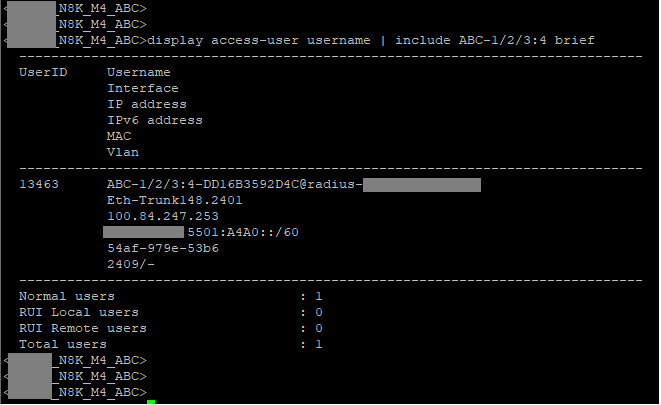
1- Example of a real-world CircuitID registered in our RADIUS database:
image

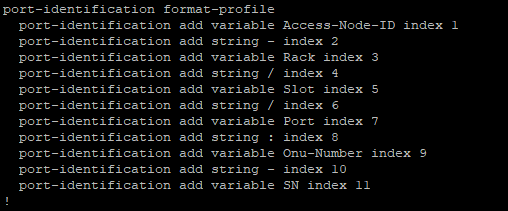
2- Example of the real-world "variable template" at the Access-Switch/OLT:

3- Example of the BRAS / L3 "Concentrator" / "Glorified DHCP-Server With RADIUS Accounting"

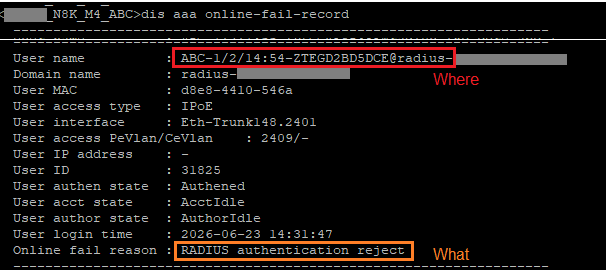
4- When things go wrong, this is the readable and quickly followable alarms

Now try to make any of that work, where needing to manually translate HEX<>ASCII in every step of the chain

Is it really such a small and unexperienced operation that it is not possible to write a small program that does the required conversions automatically when performing the required actions? (like adding a config to MikroTik and RADIUS)?

I do that all the time, because even when readable, data stored in RADIUS often has to be converted, e.g. when MAC addresses are stored it can be in aabbccddeeff format or aa:bb:cc:dd:ee:ff or aa-bb-cc-dd-ee-ff.

Just make a simple program to "add a user" and perform all the changes!

Not really, the ERP/Backend is a commercial solution.

Other comparable commercial solutions follow the exact same standard
(as do the Nokia/Huawei/ZTE Carrier gear)

7.23beta2 lit a beacon of hope, when they introduced the ability to use "option-templates".
This would qualify Mikrotik switches for use as "MDU" access-switches, and maybe the routers as BRAS in small, "GPEN"-style ISP's

This was quickly reverted in beta4, treating everything as HEX. Basically making Mikrotik incompatible with the rest of the market... and therefore what already works in the ERP's / Backend
And last but not least, making the debug/diagnose process unnecessarilly opaque

The "makes debug opaque" angle is not restricted to the ISP realm.
This also undermines the whole "swiss army knife for SmallBusinessNetworks" vertical where Mikrotik is often the standalone debug tool available.

Just to be clear...
If I have to choose, I'm at the RFC team.
Optimal is "RFC + Broadband-Forum TRs" team.

If possible, "RFC + Broadband-Forum TRs + convenient approach" (in that order) team.

I could be mistaken...
But I think there’s a misunderstanding here.

The Circuit-ID/Router-ID is extremely important information in DHCPv4 Option 82, DHCPv6 Option 37, and also in PPPoE-Plus.

As supplementary information inserted into the payloads or headers of these protocols, it is always in Hexadecimal format. That’s just how the protocol works...

However, there are other places where Circuit-ID/Router-ID are used.
The most common is in RADIUS Requests (P.S.: This applies to both Auth and Acc).
In this context, the information is appended with supplementary AV-Pairs and sent to the RADIUS server, as defined in the Broadband Forum's TR-101 standard.

And I believe that is precisely the pain point GuiPoletto is highlighting.

Previously, RouterOS converted the Circuit-ID to ASCII to expose these variables to the user.
And those same ASCII variables were inserted—as ASCII—by RouterOS when constructing the RADIUS requests.

Now, the decision was made that RouterOS would no longer handle this in ASCII, opting to use Hexadecimal exclusively instead. (Note: I bet this is about avoiding conflicts with the data coming directly from the switch chip's hardware offload.)
But they "forgot" that to send this to the RADIUS server, it needs to be converted to ASCII.

Well... If that is indeed the case... If I’m not mistaken...
Here is my suggestion:

  • Keep the Circuit-ID/Remote-ID data in hex...
  • Receive it in hex from the upstream active device... append the information and forward it in hex...

But create two new read-only variables—Circuit-ID-Ascii and Remote-ID-Ascii—that simply translate the hex to ASCII... And use these variables for display in the CLI, Winbox, and scripts... as well as for constructing the RADIUS packets.

I would like to take this opportunity to mention a practice I commonly employ on equipment where the RADIUS setup complies with the Broadband Forum's TR-1010 standard.
A non-exhaustive list of BNG/B-RAS vendors that support this includes Cisco, Juniper, Huawei, and Redback (Ericsson).

This involves rewriting the username within the RADIUS session, replacing the username from the RADIUS request with the content found in the Circuit-ID (whether for IPoE/DHCP or PPPoE+).
This is typically achieved using regex and transform sets.

I would say a commercial solution that does not support customer-defined conversions of data is pretty lame. Data generated by the application and sent to devices should at least pass through customer-defined format strings, better when it can be customer-defined code in some scripting language.

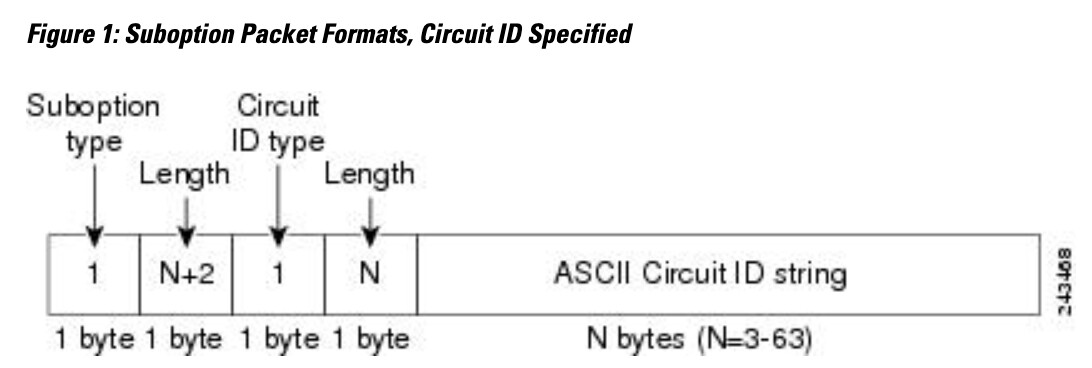
0x01 0x08 0x01 0x06 in the screenshot indicates the cisco circuit id format "1" with a string of lenght 6. Which actually uses an ASCII string after the binary header. "Gi0/5 " in case of the screenshot

Are we talking about DHCP sub options with Mikrotik Device ?
I have done this with my RB750GL long time ago, with my old IPTV.

Yes, we are talking about DHCP Sub-Options...
But no in the scope you are mentioning.

In the message of this topic you replied I mentioned using the information that comes on Option82, parse/cut/append the string, and put it on the username of the session on a radius authentication requisition.
This is not supported by RouterOS.
At least not yet.

Every piece of information exchanged between the DHCP-Client and DHCP-Server is done via HEX-Encoded "options", indeed

But this is "internal behaviour" and should, ideally, never leak into userspace.

RouterOS already deals with this for a number of DHCP Options

All of those are either:

  • available as ASCII from the config and userspace variables, and hex-encoded when composing the DHCP-Offer

  • received hex-encoded over the "dhcp protocol", decoded , and exposed in userspace / piped into the receiving daemon (IP-Stack->interface, DNS, NTP, CAPWAP(131), ACS(43))...

Some of those are simple IP addresses, others, are hex-encoded-ascii-strings.
CAPWAP for instance expects IP data, even if it receives String data...

the two most obvious (and pertinent) examples i see are:

Option12 / Hostname (sent by the DHCP-Client as hex-encoded-ascii, decoded and exposed to RouterOS Userspace exclusivelly as a string)

Vendor Class ID (sent by the DHCP-Client as hex-encoded-ascii, decoded , exposed to RouterOS as a string, AND ALSO used for advanced "matching" in dhcp-scripts, always treated as a string.

See: DHCP - RouterOS - MikroTik Documentation

As far as i'm concerned, all userspace interactions only make sense in ASCII/String format.

And in the very special case of Option82 , in that RouterOS can be Server, Client, and "Agent"/Snooper

Server should be able to read, and expose to userspace, and locally match ASCII

Client could be able to "self identify" adding option82 in the DHCP-Request, (same as option12, but this case is kinda useless)

And in Agent/Snooper mode, things get complicated, and i can only see them wanting to keep this "hex only representation everywhere" for performance reasons...

But functionally-wise, the flow has to be something like :

ASIC intercepts DHCPREQUEST coming from client
ASIC sends this intercepted packet to CPU/RouterOS
Snooper Daemon is aware of packet's origin, so , injects identification data pulled from userspace/config
CPU sends this packet (now with origin attribution) back into the wire , towards DHCP-server

Here, there needs to be bidirectional translation.... the Snooper will receive HEX data, but will need to convert this into ASCII (for userspace and insertion into the "snooping table") if this feature is to have any real world usefulness

and again, the snooper has to have access to the userspace variables / identification template, in ascii-readable form, hex-encode and compose the option for injection.

that last point @fischerdouglas raised is orthogonal to all this:
to be able to interoperate with option82-based radius accounting, Mikrotik has , again , to implement the composition of the radius AV-Pair.
This is based on/ derived from, but almost never exactly, whatever the DHCP-Server received in the Option82 header...

So the DHCP-Server Daemon this time (not the snooper daemon that interacts with the ASIC) has to have it's own "composition template" infrastructure

In my head, this all has to happen in userspace, based off of string/ascii-type data, derived from the configuration database, physical port, hostname, etc...

Specifically the AV-Pairs, since those are directed at the RADIUS server, never need (nor should) be HEX encoded when exiting "RouterOS Userspace"-into-> Packet/Protocol layer

Yes, and it's the "opaque" part that the RFC talks about. Only the 0x01 0x08 part (the sub-option type and the 8-byte length) has a specified format in the RFC. The part that follows is vendor specific and is only specified as a string of bytes, and in the Cisco example is a mix of binary and ASCII. That's why the whole part can contain any bytes, not only ASCII printable characters. 0x01 0x06 is part of this opaque string, and is clearly binary.

Here is a dump from RouterOS (an older version, but it's not important), RouterOS only puts ASCII printable characters in the Circuit ID and Remote ID when it adds option 82 (even in the latest RouterOS version):

As you can see, the string of bytes starts with 0x65 0x74 which is et, and 0x30 0x30, which is the start of the Hyper-V VM's MAC address (00).

RouterOS 7.23 only changes the way it displays and provides as fields (active-agent-circuit-id and active-agent-remote-id) or lease script variables (lease-agent-circuit-id, lease-agent-remote-id) the content of the two fields of the Option 82, so that it can represent the raw content of the fields' values coming from other manufacturers (like Cisco above). In memory and on the wire (in the packets), the content has not changed.

If you have scripts that retrieve the values and send them somewhere else, you can insert a conversion with [:convert from=hex value=...]

This is clearly not the case. No one modifies the content of the fields in the packets by hex-encoding them. The original bytes stay the same as added by the first relay agent that added the option 82. The later relay agents only completely remove/replace the option (if they don't trust the port) or not, and do not change the bytes' content.

The data is not in hex, it is some byte content that once added will not be changed (only removed if needed), nothing more is appended to already existing option 82.

The value of the fields in the packets are not hexadecimal numbers, but any byte content, ASCII or non-printable. The hexadecimal we see is only the output format so that we can see the real value of each of the bytes, including non printable bytes!

I totally agree with you on this!

but not this. How does this support the field content starting with 0x01 0x04 set by the Cisco device in the example above?

You can use the thousands of helper tools/pages and convert the substring you want to search into hex and input that content in the search field?

Winbox should be the tool for this, in my view.

You shouldn’t have to use some external tool just to make the raw byte value readable, any more than you’d need one to see, say, an IP address in plain text.

How this should be displayed and handled is up for debate, though. IMO there should at least be an option to view it as ASCII where possible, and as hex for the raw byte value.

In Carriers scenario, specially in COAX technologies, is very frequent that multiple Active devices thar operates on that level of abstraction APPEND their info to the already existent Circuit-ID info on Option-82.
So, its not just "drop and replace" or "accept and foward".

And, on the string the device itself generates to send... 7.23.1 model that allow using multiple variables is good enough, in my opinion.

And that behavior goes against the RFC recommendations. You can read this section 2.1.1 RFC 3046 - DHCP Relay Agent Information Option

2.1.1 Reforwarded DHCP requests

A DHCP relay agent may receive a client DHCP packet forwarded from a BOOTP/DHCP relay agent closer to the client. Such a packet will have giaddr as non-zero, and may or may not already have a DHCP Relay Agent option in it.

Relay agents configured to add a Relay Agent option which receive a client DHCP packet with a nonzero giaddr SHALL discard the packet if the giaddr spoofs a giaddr address implemented by the local agent itself.

Otherwise, the relay agent SHALL forward any received DHCP packet with a valid non-zero giaddr WITHOUT adding any relay agent options. Per RFC 2131, it shall also NOT modify the giaddr value.

I never argued in a different direction.
The point is circuit-id does not have to be ASCII, but is is allowed to contain ASCII characters and often does. Like many other vendors do, a possibility to show printable ASCII characters as chars instead of hex would on be convenient. On CLI, Winbox and Webfig.

I have an other vendor box here showing the example above like this on CLI:
circuit-id: 01064769302f3520 "..Gi0/5 "
The 2nd part shows printable characters and replaces non-printable chars with a dot.

BUG in firmware or Upgrade script issue for older AC devices with wifi-qcom-ac package?

My 4 CAP devices (cAP AC and wAP AC, all with IPQ4019 chip and wifi-qcom-ac package) dropped their wifi networks on update to 7.23.1. Wifi interfaces where there but would not go active showing as disabled in interface status. And thus there where no provisioning from CAPsMan as there where no available radios. Could not activate interfaces either, they immediately went back to disabled.

Have had diverse problems with these devices upgrading in versions 7.22.x and 7.23. Not enough memory and/or disabled wifi interfaces.

**FIX: One thing fixes this without wiping the configuration (also previously in 7.22.x) > I roll back to "long-term" (currently 7.21.4) and then upgrade back up to latest "stable".

Remaining bug: for the wAP AC i get "ERROR: router does not support secure connection, please enable Legacy Mode if you want to connect anyway" trying to connect with Winbox directly but using RoMON works. Using "Legacy Mode" has no effect. Web interface works.
**
Initially i suspected it was the firmware that was flawed, as auto-update of firmware happened on next reboot and for some versions of 7.22 it was not the upgrade but the subsequent reboot that killed the cap. Going back to 7.21.4 would have fixed that until next reboot. But i don't have enough observations. FW 7.23.1 devices seems to survive reboots now.

On the positive side > from 7.23 the performance of my AC wifi network has improved significantly. I have done no changes to CAPsMan config and now get stable 450-520 mb/s with fast roaming enabled opposed to previously 250-300 mb/s.

I also have one cap ac under capsman control. None of the described issue happened to me. Any upgrade since I can remember, including 7.23.1, went flawlessly. But I usually upgrade as soon as a new stable/testing version is available. So I can't speak for what happens on larger gaps when e.g. upgrading from 7.20.x to 7.23.x.
I can reach up to ~600mbit/s (varying) using iperf3 over cap ac. But it has been this fast for me.....ever since using wifi-qcom-ac in 7.13.x

This has been my experience until recently, problems started with 7.22.x. I mostly upgrade to latest "stable" when they arrive, but has occasionally reverted back to "long term" when something was discovered broken in "stable", but that's mostly for the router and not the CAPs.

Do you also upgrade firmware automatically?
Are you running them in "CAP mode"? Mine don't because i can not figure out how to make them set up VLAN properly for multiple WLANs in CAP mode. Probably something there, don't know. This is not my daily work so I'm no expert :slightly_smiling_face:

But the Caps are very minimal setup with a vlan enabled bridge, 3 VLANs and providing 3 WLANs, been working for years.

Yes, caps mode. dynamic enabled interfaces. Don't like to fiddle with the cumbersome vlan on bridge by using static wifi interfaces, so I live without vlans. I once tried to follow the docs (very hard to follow their samples) but Mikrotik essentially does not describe anything in way you can follow step by step. It is like "here is the sample config, paste, use it". It does not get into any detail what you need to pay attention to. I finally found out the hard way - but I restored a backup. I did not want to have that mess.

Do you also upgrade firmware automatically?

Yes. For a period I did manually but I think it is best practice to keep versions aligned.