What I expect from MikroTik when they fix security issues is that:
they are in the change notes as security fixes, not "improved stability" or "improved processing"
there is a list of exposure and impact of the security issues. i.e. when there is an issue in webfig or snmp or api that service is named. so we can judge if that service (by firewalling) is exposed to untrusted networks
what would be the impact of the fixed vulnerability (DoS, information leak, firewall bypass, root access in the device, etc)
It is clear that usually the fixes are in management interfaces and the impact is limited, but when it is in something like PPP or IPsec ISAKMP or other services that may be exposed to internet, we really need that information. Also when it is inconvenient or embarrassing to MikroTik.
Don't think that not disclosing such information hides you from exploits. It doesn't.
RB5009UG+S+, CRS310-8G+2S+, and several CRS304-4XG were updated without any noticeable issues. However, a side effect became evident only after a long time: one VLAN on a CRS304 switch lost internet connectivity.
I was unable to identify during which specific RouterOS update this behavior changed, which makes this type of silent failure particularly difficult to diagnose.
The root cause was related to the MAC learning setting on a bridge port. Changing "learn=no" to "learn=yes" restored connectivity.
When I plug a Mikrotik base-T 10G SFP+ in slot 3, the link will be negotiated - but the leds of SFP+ port 11 will activate and signal activity and status (so port +8)
About 90% of our RB5009's will not update from within Winbox. We get errors such as ERROR: IPV4 or Calculating download size -- which it seems to get stuck on. However if I upload the .npk and reboot it upgrades. We have other devices such as CRS326, CRS310, CCR2116 that updated with no issues.
Hardly conclusive, but my RB5009's have always updated without issue. Myself, I'd check the environment first (and if you have a spare with the issue, test it with different external connectivity, and/or starting with a cleared config.) I would think that this part of ROS would be the same for all devices.
Oh, and you stated WinBox . . . 3 or 4? And have you tried via WebFig?
In another topic this was resolved to an MTU issue. It seems that the PPP set TCP MSS feature again stopped working, probably in the previous version then. When you have an internet link with less than 1500 byte MTU it stalls.
Try adding some mangle rules to the firewall to see if that fixes it:
These RB5009s have never had an issue updating in the past, they are located in different parts of the US and all of them have the same config. And it doesn't seem to matter what handoff we have to internet - fiber, cable modem, T-Mobile 5G -- same issue.
We run Winbox 4 exclusively. We don't generally run WebFig as they all remote and we don't allow access to WebFig.
Also devices behind these routers such as CAP AX (ARM64) update without an issue. WAP AX (ARM) fails. Since CAP AX upgrades work I would assume that since it goes through the RB5009 to get to the internet and Mikrotik's upgrade servers that the config on the RF5009 such as firewall, Mangle rules, etc are fine. And none of these devices have ever given us an issues while upgrading.
I'll be darned!! I rebooted the router and now it doesn't have a problem updating. Thanks for suggesting that as I had not even thought about rebooting it.
Is this a false positive, I see no sign of a link down anywhere, not seen any sign of that behaviour for at least 18 months.
AI says...
In-Service Monitoring (ISM) GlitchWhen a 5 GHz radio operates on DFS channels, it performs "In-Service Monitoring." If a local client device with a noisy or poorly calibrated Wi-Fi chip transmits a sudden burst of energy right next to the AP, the MikroTik's wireless driver can mistake that burst for a military or weather radar pulse. is this true
The Dude Response
Yes, in principle that can happen on DFS channels.
On 5 GHz DFS channels, the AP must continuously perform radar detection / in-service monitoring.
A strong, abnormal burst of RF energy near the AP can sometimes be misdetected by the driver as radar-like activity.
If that happens, the AP may vacate the channel and stop transmitting there.
However, this is not the normal behavior for ordinary client traffic. A properly operating client should not normally trigger DFS radar detection.
Practical notes
This is a DFS limitation, not a general Wi‑Fi issue.
If you want to reduce the chance of DFS channel interruptions, use a non-DFS 5 GHz channel where allowed by local regulations.
Also keep in mind that channel availability and allowed EIRP depend on your regulatory domain.
Old wireless driver detected dfs several times a day, since I switched to wifi-qcom-ac it stopped. I could even trigger a DFS event by toggling wifi on my Huawei tablet (rip, its battery went up in flames last year).....
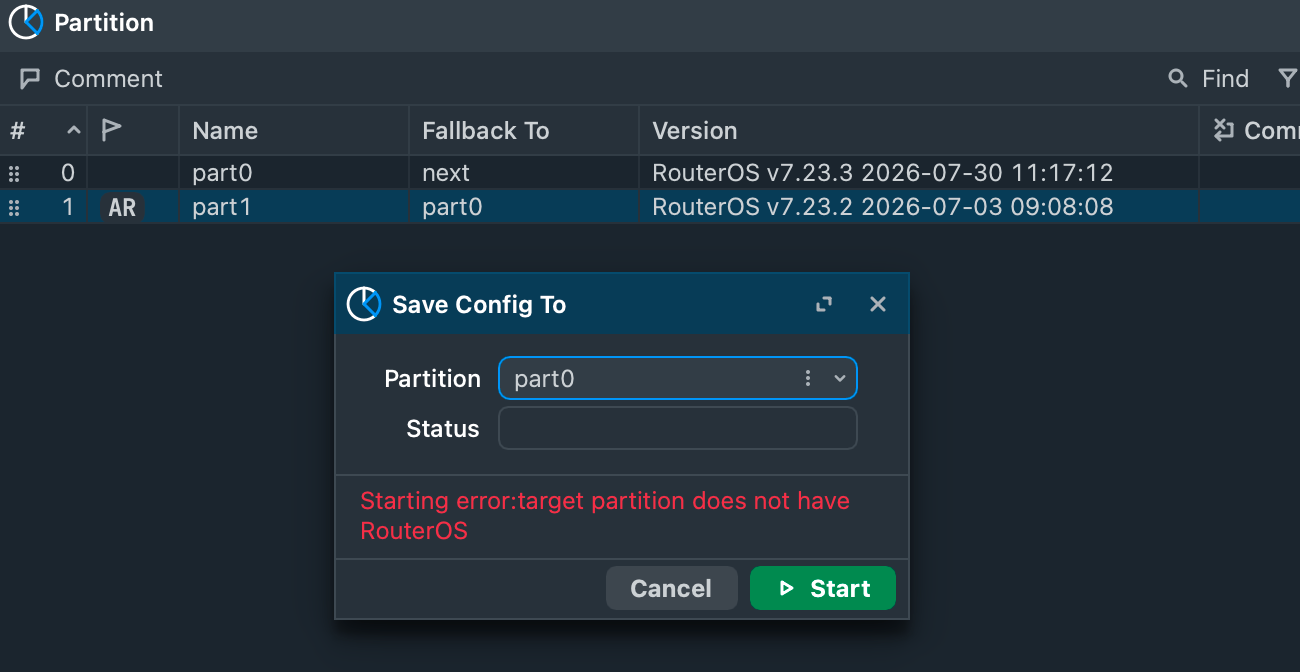
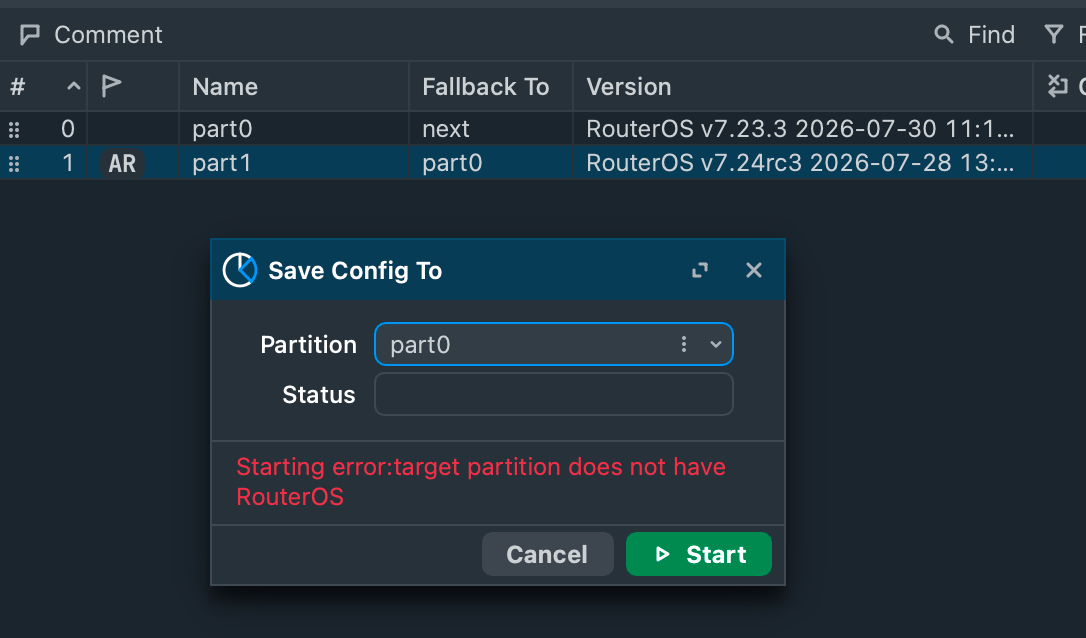
It looks like configuration can not be saved to 7.23.3 partition from other active partition. It has been reproduced on multiple devices and tested with multiple versions as active and inactive/target partitions - so it looks like problem lies in 7.23.3. Support ticket is already submitted.
Is it still possible to copy an entire partition to/from a 7.23.3 partition? I hope they do not break that, it is a standard procedure here to copy to 2nd partition regularly and at least before upgrade.