Remember to make backup/export files before an upgrade and save them on another storage device;
Make sure the device will not lose power during upgrade process;
Device has enough free storage space for all RouterOS packages to be downloaded.
What's new in 7.23.3 (2026-Jul-30 14:17):
certificate - added "ISRG Root X2", "Root YE" and "Root YR" to SMIPS built-in root certificate authorities store;
certificate - added "Root YE" and "Root YR" to built-in root certificate authorities store;
defconf - added virtual "iot-wifi" to MLO supporting devices;
dhcpv4-server - fixed "expires-after" field for disabled static lease (introduced in v7.23);
fastpath - properly fall back to SlowPath when FastPath is not possible due to fragmentation;
ipsec - fixed identity lookup to skip past disabled and certificate-matched identities when scanning for an exact ID match;
ipsec,ike2 - improved logging when remote ID is specified;
ipsec,ike2 - use peer certificates also when identity has one set for peer matching;
ipv6,ra - show warning about paused automatic RA on upgraded routers;
ospf - fixed "duplicate config" issue when using ptp-unnumbered interface type;
ptp - fixed a race condition when reading transmit timestamps, which could cause unstable clock offset under background traffic;
ptp - fixed PTPv1 traffic forwarding when a PTPv2 profile is enabled on bridge ports;
snmp - improved SNMPv3 request processing logic;
system - added microSD card support for hAP be3 Media;
system - improved handling of data re-sending on authorization requests (introduced in v7.22);
system - improved stability;
system - updated certificate for Windows executable signing;
tftp - limit maximum simultaneous session count to 100;
To upgrade, click Check For Updates under System/Packages menu and select the stable Channel in RouterOS configuration interface, or head to our download page: http://www.mikrotik.com/download
Everything went smoothly
I encountered an issue after the update (please post about the device, configuration, and unexpected symptoms)
I encountered an issue, but solved it (please post the solution)
0voters
If you experience version related issues, then please send supout file from your router to support@mikrotik.com. The file must be generated while a router is not working as suspected or after some problem has appeared on the device
Please keep this forum topic strictly related to this particular RouterOS release.
CCR2004 and a few RB5009, and hapAX3, WAP-Ax all fail and get stuck calculating download size. These are all in dev. Some of them give me ERROR: IPv4: and also IPV6: connection timed out
The download speed of packages is incredibly unstable.. 600k/sec one instant then 54k the next. Downloading packages via firefox they quite often fail and retry. Same with routeros update in winbox takes ages..
Updated haP-ax2 first, no issues, then RB5009, no issues. Then let CapsMan push the upgrade to my 3 Cap-AX, again, with no problems. (First time I used CapsMan to upgrade as well. Is it possible to do FW via CapsMan, or just ROS?)
Speed did seem a bit "stuttery", but not too much slower than typical, and no download failures.
Remote IPSec (still on 7.22.1) connected fine - overall, no issues seen.
Updates a CRS520-4XS-16XQ from 7.23.2 to 7.23.3. Update itself was smooth, but after restart establishing OSPF sessions seems to be a bit slow initially.
The neighbor tab in the OSPF windows also does not show any neighbor, even after sessions have been established. There are visible via CLI nonetheless.
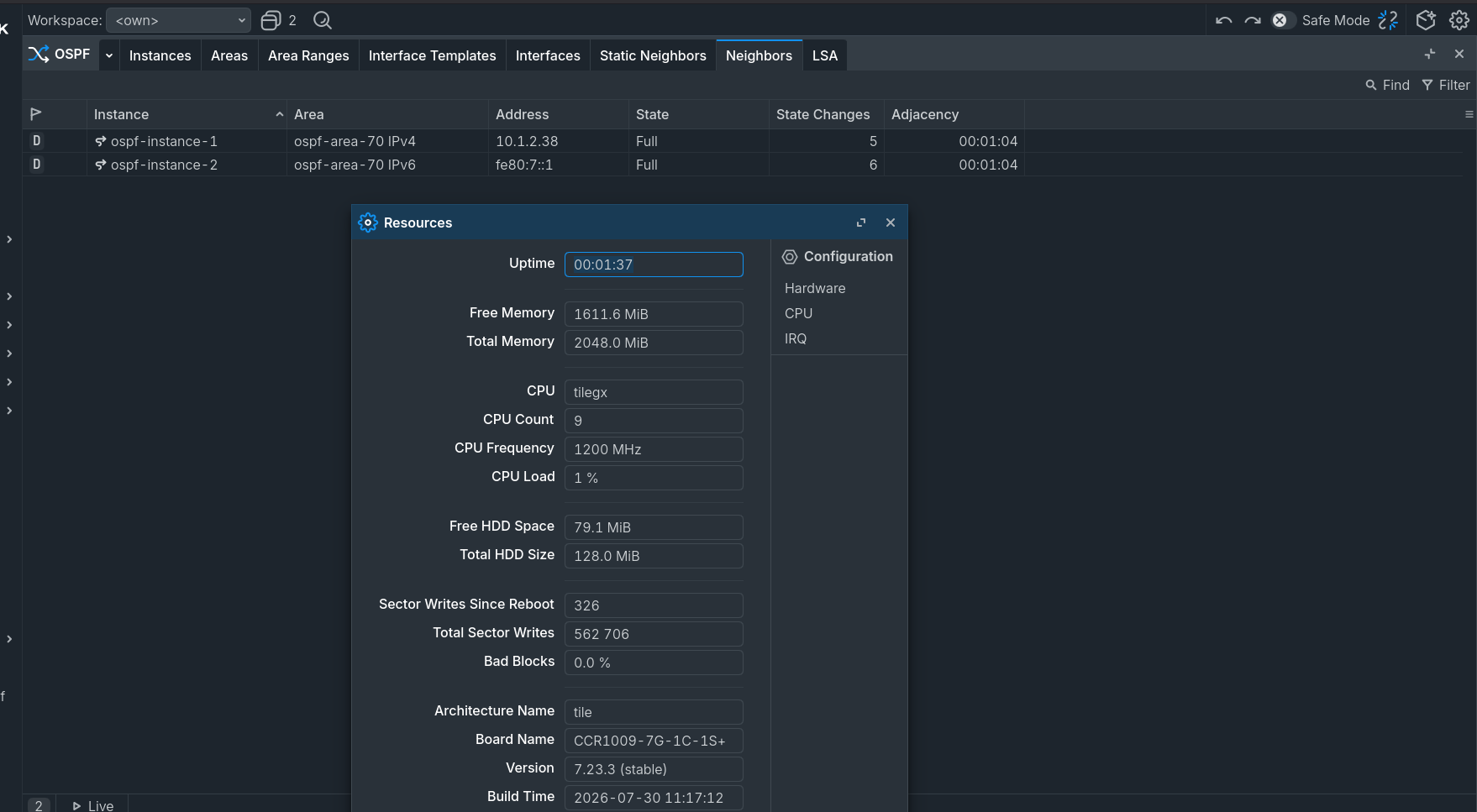
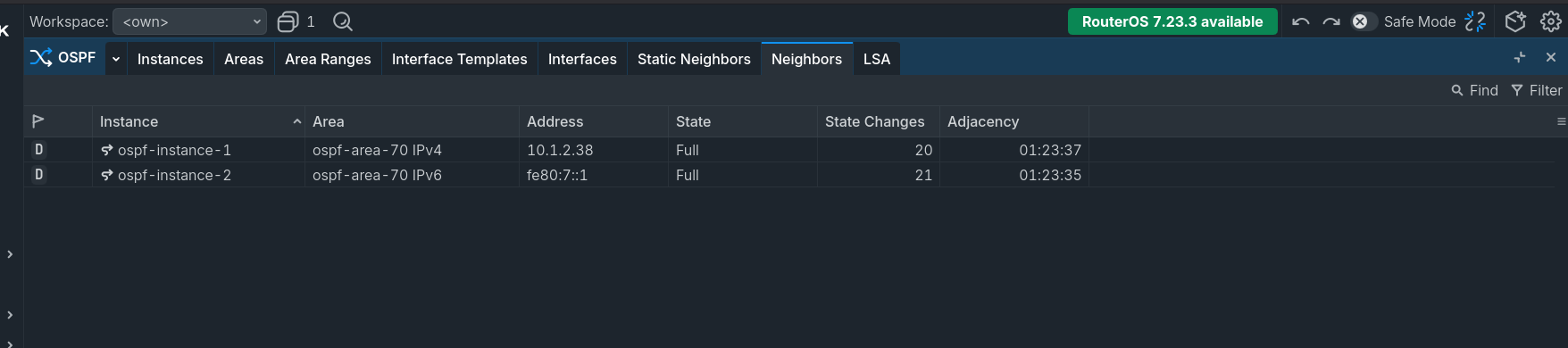
Hi, we updated a CCR1009 router a few minutes ago. Here are before and after pictures. No problems or delays with OSPF. Everything is working correctly.
Lot's of changes to binaries not on the list, 15 in fact, mostly fixing previously unbounded input, auth bypass fixes, they added a stack canary to the cloud binary, likely to fix some kind of overflow, etc... overall good changes though.
I would just go ahead and say, there's a lot of stuff to list, so instead of listing all of the "system stability" improvements they just say "system - improved stability;".
I would just sign-it-off as a time saver on their part.
It's mainly security fixes, it's not a time-saver, it's them obscuring that fact. I'm not asking them to list everything they've fixed. But saying "snmp - improved SNMPv3 request processing logic;" when in fact you fixed an authentication bypass, that's where it gets a bit frustrating. But at least they are pumping these fixes out, so there's that.
It is obvious that Mikrotik might not be able to provide security release notes in a way that multi-hundred billion company is able to provide - but it might be the goal to to try and set the direction of the behavior to.
Here is the example how this might look better than what we are seeing (or rather not seeing) from Mikrotik - all notes are released on the day when the actual release itself comes out with CVE numbers, short descriptions and names of contributors related to them.
You may have misunderstood how "look" was used in this context. It was not about appearance or aesthetics. "Look like Dropbox" meant that trying to keep things secret may cause problems later.
It is often claimed (in this forum) that a CVE should not be assigned because it would reveal too much information and put older versions at risk.
However, as long as there is no exploit and no technical detail is published, the short public CVE description is generally harmless. At the same time, it is extremely important for administrators because it helps them decide whether they need to take action.
For example:
Accounts
Available for: macOS Tahoe
Impact: An app may be able to gain root privileges
Description: A parsing issue in the handling of directory paths was addressed with improved path validation.
CVE-2026-43749: Adam Franke, Ashish Kunwar, Trung Nguyen (@everping) of CyStack
Does this contain an exploit? No. Does it reveal any sensitive technical details? No. It is simply a short summary of the issue.
MikroTik sometimes hides security fixes behind changelog entries such as "improved stability". Only several months later, a security notice is added retrospectively on mikrotik.com/supportsec.
I have tried several times to discuss this practice in the release topics, but there does not seem to be much willingness from MikroTik to reconsider it. Keeping security issues quiet appears to be a policy coming from top management.