It is reported (for both 7.23.7 and 7.24.4) and confirmed "to be fixed in future versions".
Have noticed wifi issues on Hap AX2 since upgrading from 7.24.2 to 7.24.4 - still troubleshooting but seems to only be some devices, not all. They will connect to Wifi, ARP ping works OK, IP based ping does not. I wonder if it is something to do with the Wifi Regulatory change made in 7.24.3. Has anyone else seen any Wifi issues?
Dude on a CHR (either 7.24.2 or 7.24.4) can't get a "RouterOS" connection to any of my hardware devices (only Mipsbe ones tested so far) running 7.24.4 - it just says "Connecting" and then eventually times out and the process repeats ad infinitum.
Restoring the target devices to 7.24.2 makes things work again. Something badly wrong with 7.24.4 then.
So, to summarise:
CHR 7.24.2 => Mipsbe 7.24.2 OK
CHR 7.24.2 => Mipsbe 7.24.4 Broken
CHR 7.24.4 => Mipsbe 7.24.2 OK
CHR 7.24.4 => Mipsbe 7.24.4 Broken
CHR 7.24.4 => CHR 7.24.4 OK
CHR 7.24.4 => Smips 7.24.4 Broken
CHR 7.24.4 => Arm64 7.24.4 OK
Same problem here. Dude is completely useless on these version if you use agent as remote device as I use.
Yes - if target device is mipsbe or smips, then Dude is not able to connect if that target device is on 7.24.4.
arm and arm64 devices are not affected.
I only have this problem after updating to the 7.25 beta; if possible, open a support ticket, although mine has gone several days without a response.
Hey Guys, so I encountered an interesting bug just now on latest v7.24.4 / winbox 4.4
I created a bridge interface, then tried adding a port to that bridge.
The new bridge interface wasn't in the dropdown box.
I was able to add via command line.
Very strange.
Cheers
Dan
Hi, have you noticed that? 7.24.4 [stable] is released! - #18 by randomwalk
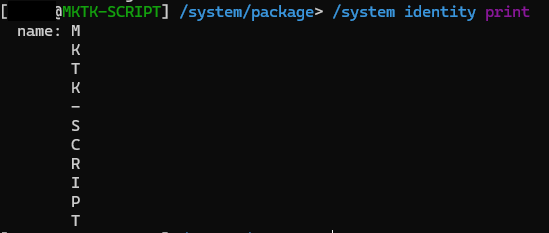
It is fo sure a bug on print command inside /system/identity.
As a workaround you can use:
:put [/system/identity/get name]
If you need a variable inside an script:
:local hostnameOfMyRouter [/system/identity/get name]
I find that command completely useless without specifying the context,
because the name is already written in the prompt.
Why would I even ask for it?
And from a scripting perspective,
using "print" to retrieve information is the wrong approach when there are other methods that don't require it.
Regarding my Wifi Issue I mentioned here...
Seems to be an issue with some devices if 2.4ghz channel width is locked to 20mhz on a HAP AX2. Some devices won't connect, or will connect/disconnect repeatedly, or connect but unreliably. These worked fine at 7.24.2 but not at 7.24.4. My fix was to simply remove the 20mhz channel width lock and return to default setting, the devices now work OK.
I have also noticed unexpected reboots on CCR2004's approximately once per day after upgrade from 7.24.2 to 7.24.4 - have not got enough data / troubleshooting yet to provide any further useful info, but suspect this is a bug with 7.24.3 or 7.24.4. I would be interested to see if others have noticed unexpected reboots on CCR2004 or other models since moving to 7.24.4. Thanks Jonathan.
Unfortunately, ansible module community.routeros has hidden verification mechanism which executes the `/system identity print` command upon connecting to the host via ssh and i cannot change this.
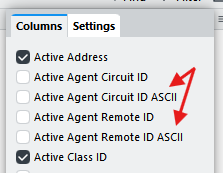
The upgrade went smoothly, but I now noticed that the "Agent Circuit Id" and "Agent Remote Id" in winbox is now represented in hexadecimal for every ascii character.
Example: "6574686572373a31" instead of showing "ether7:1" as it was in previous versions.
Note that this change might not me specific to this exact version, but just noticed after the upgrade.
Is this new behavior as expected?
It has been like that since 7.23:
In 7.25 there will be additional properties that convert the values to ASCII:
Ok! That explains!
Glad Mikrotik added a new column to convert that information to ASCII. For fast diagnostics and daily use is much easier to read.
Thank you @CGGXANNX
So let's prepare for the next upgrade orgy  Let's wait Mikrotik reacting on this one:
https://www.vulncheck.com/advisories/mikrotik-routeros-improper-input-validation-dos-via-bgp-labelled-vpn-nlri
This time, I must update... nothing...
for me BGP still on 6.49.22...
After the update, I encountered an issue where a bridge had been created, and all of my interfaces had been added to it. Has anyone else experienced this issue?