To upgrade, click Check For Updates under System/Packages menu and select the stable Channel in RouterOS configuration interface, or head to our download page: http://www.mikrotik.com/download
Everything went smoothly
I encountered an issue after the update (please post about the device, configuration, and unexpected symptoms)
I encountered an issue, but solved it (please post the solution)
0voters
If you experience version related issues, then please send supout file from your router to support@mikrotik.com. The file must be generated while a router is not working as suspected or after some problem has appeared on the device
Please keep this forum topic strictly related to this particular RouterOS release.
I had updated my cAP ax LTE and RB5009 previously to 7.24.3. I am reading, these devices are not adversely affected by 7.24.3 in any way. Also. updating to 7.24.4 would not make any difference for these devices.
With this my plan is not to update to 7.24.4. Going forward, I also might generally wish to wait a bit longer before updating after new versions are released. Obviously, I will consider the approach case by case depending on the security risk in not updating.
As I’ve written before,
it should only go into production after one or two months of real testing...
Not after a week, or on the very same day just because it seems to work...
Evidently to other subjects such as @MatiasMK88 that likes installing newly untested released updates
that bring production work to a halt
or cause remote sites, 300 km away and accessible only via LTE, to disappear.
It serves those subjects right, seeing as they offer a shi~~y service to their clients,
that way, clients turn to more competent providers who can better meet their need for stability.
If our clients were in a comfortable position—with no active vulnerabilities—I’d actually agree with you.
But right now, I believe 100% of our clients have some active vulnerability on their MikroTiks.
Most have been mitigated, with the vulnerable services hidden or disabled.
But the vulnerability is still there.
And we’re seeing a flood of logs from bots scanning for these vulnerabilities.
Hi, generally, we don't even install many of these updates at the ISP. Firstly, because we follow certain best practices, for example, regarding security. Secondly, if an update has a changelog that benefits our organization, we first test it in our lab with several real machines and then, if feasible, we implement the updates.
Luckily, our furthest point is about 40 minutes away; I understand the point you're making.
Some people use good practices precisely to avoid these kinds of problems.
As with everything, it obviously depends on what is being updated...
If the only thing being updated is something that the end customer or the external network cannot access, but only you can, then run tests first to ensure nothing gets blocked, and proceed from there...
And that is the reason I waited until version 7.23.5 (as I stated years ago) to migrate everything (slowly) from 6.49.21 to 7.23.7 (yes, today it’s .7)
Nothing in my network is exposed to the Internet or the customer LAN, except for a few honeypots.
Someone has to physically go on-site to manage it...
EDIT:
By the way, the honeypots have gone haywire since September 2nd...
The ones running older versions of RouterOS get compromised just two minutes after startup...
I'm leaving the 2-3 September versions here (I'm not including today's ones),
and they haven't been compromised yet, so honestly, I'm not sure exactly what yesterday/today updates are aiming to address...
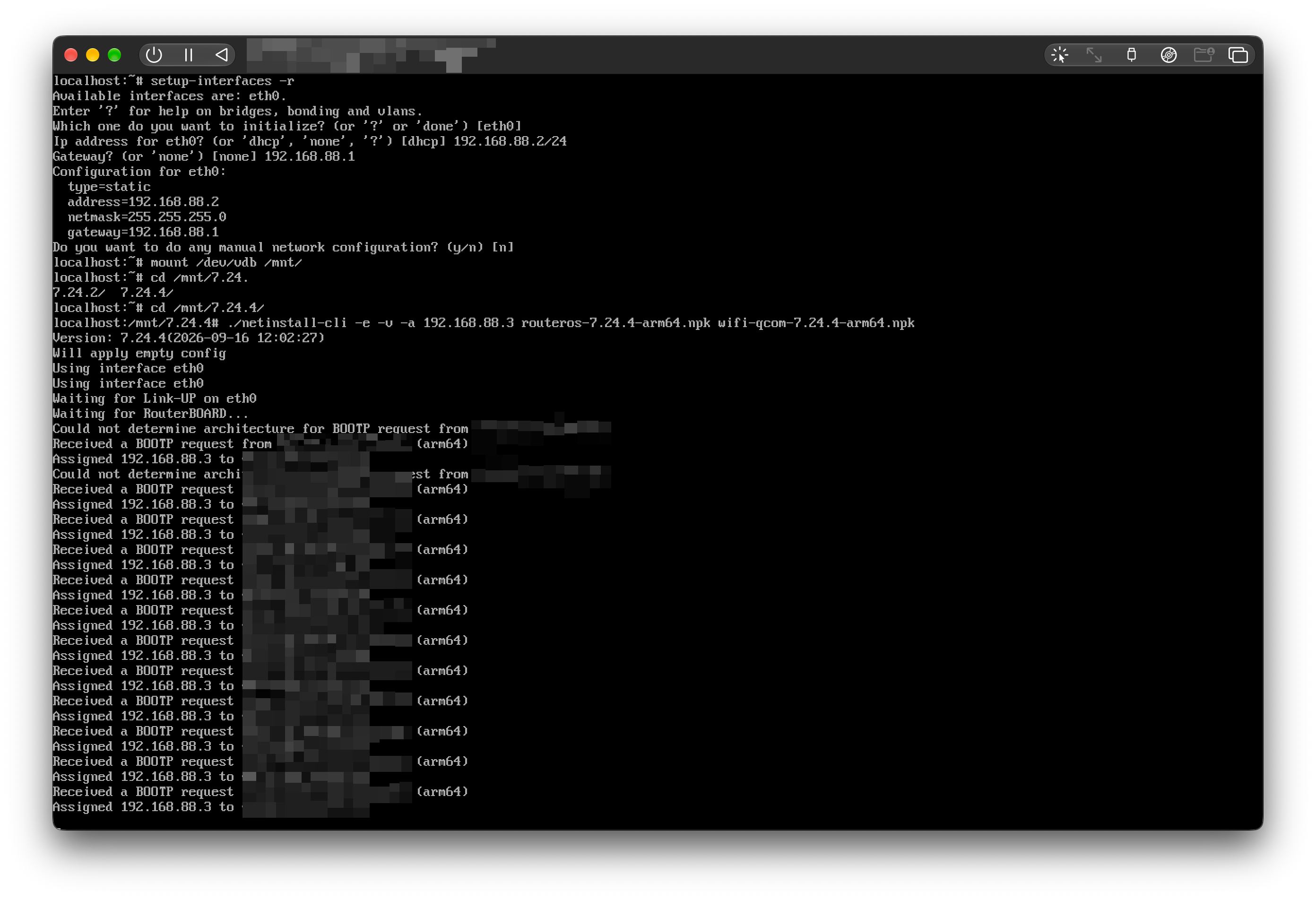
Environment / Configuration:
OS: Linux (localhost)
Interface: eth0 (192.168.88.2/24, Gateway 192.168.88.1)
Packages: routeros-7.24.4-arm64.npk, wifi-qcom-7.24.4-arm64.npk
Target IP: 192.168.88.3
Description:
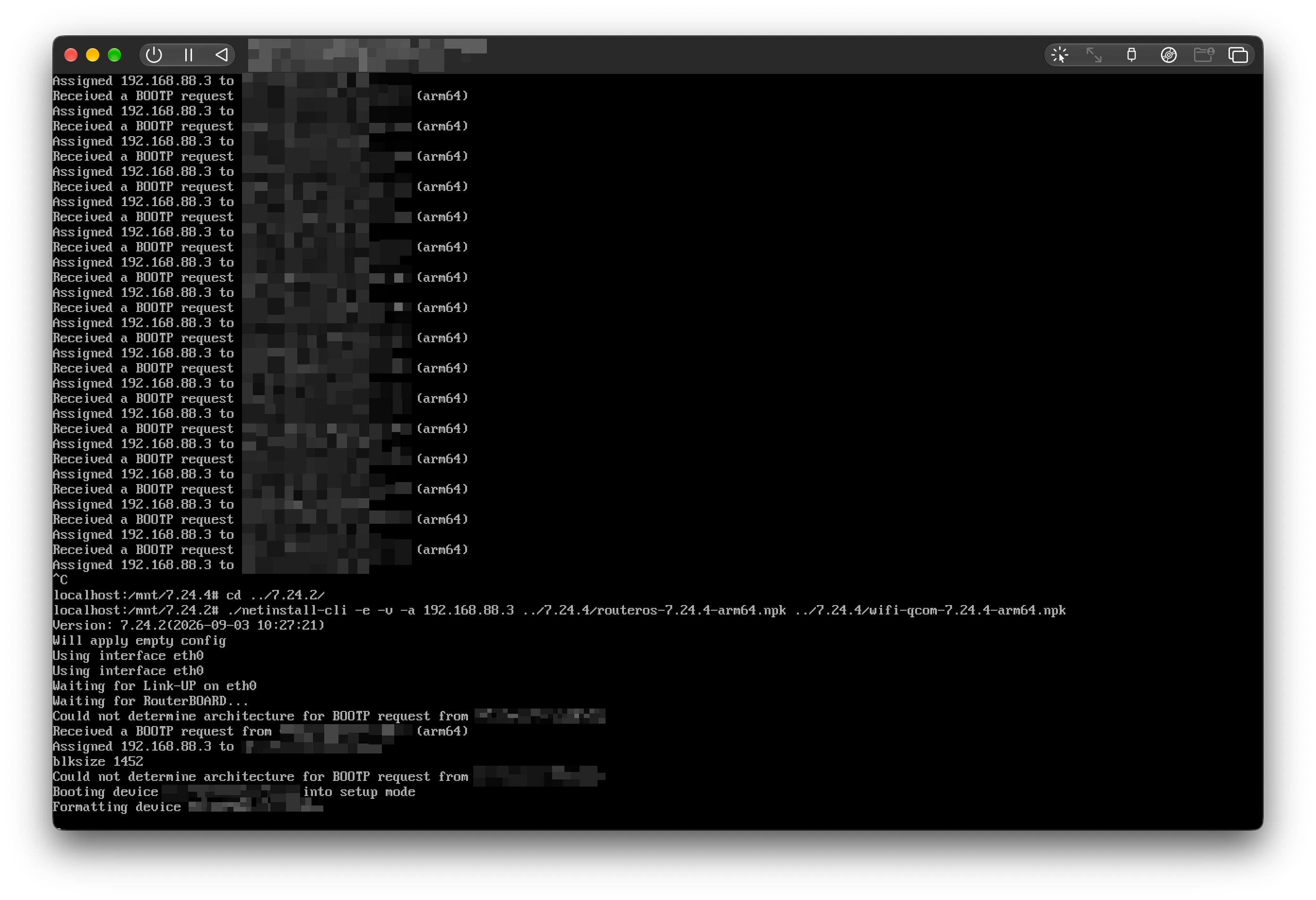
There is a regression in netinstall-cli version 7.24.4. The utility continuously loops on receiving BOOTP requests and re-assigning the IP address without proceeding to the installation phase. Reverting to version 7.24.2 using the exact same arguments and package files resolves the issue — the tool negotiates the block size (blksize 1452), boots the device into setup mode, and starts formatting.
Conclusion:
netinstall-cli v7.24.4 breaks the BOOTP/TFTP handshaking process for arm64 architecture, preventing the client device from negotiating blksize and entering setup mode.
Hmm, interesting find. I think I experienced this as well, but put it down to just something I wasnt getting right, and moved on.
In my case I was running a windows system and used the netinstall x64 v7.23.5 UI version and had a similar issue.
Device: RB3011uias-RM running latest LTS (at that time 7.23.5)
Symptom: It showed on the LCD that it was in the ether boot stage, but it never displayed in the netinstall UI. Same setup, no changes, but used a Hap^ac2 (on an older version RouterOS though) and it showed in the netinstall UI and I was able to netinstall it, no problem.
I know it can be a bit hit or miss on windows with multiple interfaces (but I do disable the other interfaces during a netinstall to help solve that, which works well most times) but I thought it was just one of those moments and didnt take more notice of it until now.
Exactly. It’s deeply frustrating when updates break low-level critical subsystems like TFTP/BOOTP without a single line in the changelog.
Having personally submitted multiple bug reports for critical components like IKEv2 and certificates in the past, seeing these fundamental layers break is the final straw. It really puts recent security incidents into perspective.